# Extract TOTP/HOTP two-factor authentication secrets
[](https://github.com/scito/extract_otp_secrets/actions/workflows/ci.yml)

[](https://github.com/scito/extract_otp_secrets/actions/workflows/ci_docker.yml)

[](https://github.com/scito/extract_otp_secrets/blob/master/Pipfile.lock)

[](https://github.com/scito/extract_otp_secrets/blob/master/LICENSE)
[](https://github.com/scito/extract_otp_secrets/tags)
[](https://stand-with-ukraine.pp.ua)
---
TODO add src/
TODO mention renaming extract_otp_secrets
Extract one time passwords (OTP) / two-factor authentication (2FA, TFA) secrets from export QR codes from 2FA authentication apps such as "Google Authenticator".
The QR codes can be captured from the system camera, imported from images or from text files containing the QR code data.
The secret and otp values can be printed and exported to json or csv, as well as printed or saved to PNG images.
## Installation
git clone https://github.com/scito/extract_otp_secrets.git
cd extract_otp_secrets
## Usage
### Capture QR codes from camera (since v2.0.0)
1. Open "Google Authenticator" app on the mobile phone
2. Export the QR codes from "Google Authenticator" app
3. Point the QR codes to the camera of your computer
4. Call this script with the file as input:
python extract_otp_secrets.py
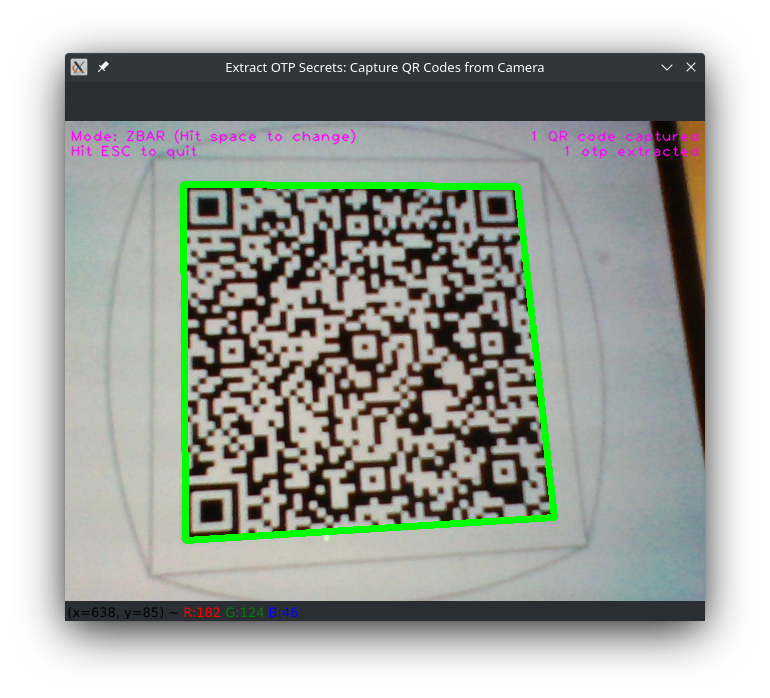
### With builtin QR decoder from image files (since v2.0.0)
1. Open "Google Authenticator" app on the mobile phone
2. Export the QR codes from "Google Authenticator" app
4. Save the captured QR codes as image files, e.g. example_export.png
5. Transfer the images files to the computer where his script is installed.
6. Call this script with the file as input:
python extract_otp_secrets.py example_export.png
### With external QR decoder app from text files
1. Open "Google Authenticator" app on the mobile phone
2. Export the QR codes from "Google Authenticator" app
3. Read QR codes with a QR code reader (e.g. from another phone)
4. Save the captured QR codes in the QR code reader to a text file, e.g. example_export.txt. Save each QR code on a new line. (The captured QR codes look like `otpauth-migration://offline?data=...`)
5. Transfer the file to the computer where his script is installed.
6. Call this script with the file as input:
python extract_otp_secrets.py example_export.txt
## Program help: arguments and options
usage: extract_otp_secrets.py [-h] [--camera NUMBER] [--qr {ZBAR,QREADER,QREADER_DEEP,CV2,CV2_WECHAT}] [--json FILE] [--csv FILE] [--keepass FILE] [--printqr] [--saveqr DIR] [--no-color] [--verbose | --quiet] [infile ...]

Extracts one time password (OTP) / two-factor authentication (2FA) secrets from export QR codes, e.g. from Google Authenticator app.
If no infiles are provided, the QR codes a GUI window starts and QR codes can interactively be captured from the system camera.

positional arguments:
  infile                        a) file or - for stdin with 'otpauth-migration://...' URLs separated by newlines, lines starting with # are ignored;
                                b) image file containing a QR code or = for stdin for an image containing a QR code

options:
  -h, --help                    show this help message and exit
  --camera NUMBER, -C NUMBER    camera number of system (default camera: 0)
  --qr {ZBAR,QREADER,QREADER_DEEP,CV2,CV2_WECHAT}, -Q {ZBAR,QREADER,QREADER_DEEP,CV2,CV2_WECHAT}
                                QR reader (default: ZBAR)
  --json FILE, -j FILE          export json file or - for stdout
  --csv FILE, -c FILE           export csv file or - for stdout
  --keepass FILE, -k FILE       export totp/hotp csv file(s) for KeePass, - for stdout
  --printqr, -p                 print QR code(s) as text to the terminal (requires qrcode module)
  --saveqr DIR, -s DIR          save QR code(s) as images to the given folder (requires qrcode module)
  --no-color, -n                do not use ANSI colors in console output
  --verbose, -v                 verbose output
  --quiet, -q                   no stdout output, except output set by -

examples:
python extract_otp_secrets.py
python extract_otp_secrets.py example_*.txt
python extract_otp_secrets.py - < example_export.txt
python extract_otp_secrets.py --csv - example_*.png | tail -n+2
python extract_otp_secrets.py = < example_export.png
## Dependencies
pip install -r requirements.txt
Known to work with
* Python 3.10.8, protobuf 4.21.9, qrcode 7.3.1, and pillow 9.2
* Python 3.11.1, protobuf 4.21.12, qrcode 7.3.1, and pillow 9.2
For protobuf versions 3.14.0 or similar or Python 3.6, use the extract_otp_secrets version 1.4.0.
### Shared libs installation for reading QR code images
For reading QR code images the zbar library must be installed for `ZBAR` QR reader.
If you do not extract directly from images or using catpuring from camera, you do not need to install the zbar shared library.
For a detailed installation documentation of [pyzbar](https://github.com/NaturalHistoryMuseum/pyzbar#installation).
#### Linux (Debian, Ubuntu, ...)
sudo apt-get install libzbar0
#### Linux (OpenSUSE)
sudo zypper install libzbar0
#### Linux (Fedora)
sudo dnf install libzbar0
#### Mac OS X
brew install zbar
#### Windows
The zbar DLLs are included with the Windows Python wheels. However, you might need to install [Visual C++ Redistributable Packages for Visual Studio 2013](https://www.microsoft.com/en-US/download/details.aspx?id=40784). Install vcredist_x64.exe if using 64-bit Python, vcredist_x86.exe if using 32-bit Python.
## Examples
### Printing otp secrets form text file
python extract_otp_secrets.py example_export.txt
### Printing otp secrets from image file
python extract_otp_secrets.py example_export.png
### Printing otp secrets multiple files
python extract_otp_secrets.py example_*.txt
python extract_otp_secrets.py example_*.png
python extract_otp_secrets.py example_export.*
python extract_otp_secrets.py example_*.txt example_*.png
### Printing otp secrets from stdin (text)
python extract_otp_secrets.py - < example_export.txt
### Printing otp secrets from stdin (image)
python extract_otp_secrets.py = < example_export.png
### Printing otp secrets csv to stdout
python extract_otp_secrets.py --csv - example_export.txt
### Printing otp secrets csv to stdout without header line
python extract_otp_secrets.py --csv - example_*.png | tail -n+2
### Reading from stdin and printing to stdout
cat example_*.txt | python extract_otp_secrets.py --csv - - | tail -n+2
## Features
* Free and open source
* Supports Google Authenticator exports (and compatible apps like Aegis Authenticator)
* Captures the the QR codes directly from the camera using different QR code readers (based on OpenCV)
* ZBAR: fast and reliable, good for images and video capture (default/recommended) [pyzbar](https://github.com/NaturalHistoryMuseum/pyzbar)
* QREADER: fast [QReader](https://github.com/Eric-Canas/QReader)
* QREADER_DEEP: slow, not good for camera [QReader](https://github.com/Eric-Canas/QReader)
* CV2: fast [QRCodeDetector](https://docs.opencv.org/4.x/de/dc3/classcv_1_1QRCodeDetector.html)
* CV2_WECHAT: fast [WeChatQRCode](https://docs.opencv.org/4.x/dd/d63/group__wechat__qrcode.html)
* Supports TOTP and HOTP
* Generates QR codes
* Exports to various formats:
* CSV
* JSON
* Dedicated CSV for KeePass
* QR code images
* Supports reading from stdin and writing to stdout, thus pipes can be used
* Reads QR codes images: (See [OpenCV docu](https://docs.opencv.org/4.x/d4/da8/group__imgcodecs.html#ga288b8b3da0892bd651fce07b3bbd3a56))
* Portable Network Graphics - *.png
* WebP - *.webp
* JPEG files - *.jpeg, *.jpg, *.jpe
* TIFF files - *.tiff, *.tif
* Windows bitmaps - *.bmp, *.dib
* JPEG 2000 files - *.jp2
* Portable image format - *.pbm, *.pgm, *.ppm *.pxm, *.pnm
* Errors and warnings are written to stderr and these are printed in red color on all platforms
* Many ways to run the script:
* Native Python
* pipenv
* pip
* venv
* Docker
* VSCode devcontainer
* devbox
* Compatible with major platforms:
* Linux
* macOS
* Windows
* Uses UTF-8 on all platforms
* Supports Python >= 3.7
* Written in modern Python using type hints and following best practices
* All these features are backed by tests ran nightly
* All functionality in one Python script: extract_otp_secrets.py (except protobuf generated code in protobuf_generated_python)
## KeePass
[KeePass 2.51](https://keepass.info/news/n220506_2.51.html) (released in May 2022) and newer [support the generation of OTPs (TOTP and HOTP)](https://keepass.info/help/base/placeholders.html#otp).
KeePass can generate the second factor password (2FA) if the OTP secret is stored in `TimeOtp-Secret-Base32` string field for TOTP or `HmacOtp-Secret-Base32` string field for HOTP. You view or edit them in entry dialog on the 'Advanced' tab page.
KeePass provides menu commands in the main window for generating one-time passwords ('Copy HMAC-Based OTP', 'Show HMAC-Based OTP', 'Copy Time-Based OTP', 'Show Time-Based OTP'). Furthermore, one-time passwords can be generated during auto-type using the {HMACOTP} and {TIMEOTP} placeholders.
In order to simplify the usage of the second factor password generation in KeePass a specific KeePass CSV export is available with option `-keepass` or `-k`. This KeePass CSV file can be imported by the ["Generic CSV Importer" of KeePass](https://keepass.info/help/kb/imp_csv.html).
If TOTP and HOTP entries have to be exported, then two files with an intermediate suffix .totp or .hotp will be added to the KeePass export filename.
Example:
- Only TOTP entries to export and parameter --keepass example_keepass_output.csv
→ example_keepass_output.csv with TOTP entries will be exported
- Only HOTP entries to export and parameter --keepass example_keepass_output.csv
→ example_keepass_output.csv with HOTP entries will be exported
- If both TOTP and HOTP entries to export and parameter --keepass example_keepass_output.csv
→ example_keepass_output.totp.csv with TOTP entries will be exported
→ example_keepass_output.hotp.csv with HOTP entries will be exported
Import CSV with TOTP entries in KeePass as
- Title
- User Name
- String (TimeOtp-Secret-Base32)
- Group (/)
Import CSV with HOTP entries in KeePass as
- Title
- User Name
- String (HmacOtp-Secret-Base32)
- String (HmacOtp-Counter)
- Group (/)
KeePass can be used as a backup for one time passwords (second factor) from the mobile phone.
## Technical background
The export QR code of "Google Authenticator" contains the URL `otpauth-migration://offline?data=...`.
The data parameter is a base64 encoded proto3 message (Google Protocol Buffers).
Command for regeneration of Python code from proto3 message definition file (only necessary in case of changes of the proto3 message definition or new protobuf versions):
protoc --python_out=protobuf_generated_python google_auth.proto --mypy_out=protobuf_generated_python
The generated protobuf Python code was generated by protoc 21.12 (https://github.com/protocolbuffers/protobuf/releases/tag/v21.12).
https://github.com/nipunn1313/mypy-protobuf
## References
* Proto3 documentation: https://developers.google.com/protocol-buffers/docs/pythontutorial
* Template code: https://github.com/beemdevelopment/Aegis/pull/406
## Glossary
* OTP = One-time password
* TOTP = Time-based one-time password
* HOTP = HMAC-based one-time password (using a counter)
* 2FA = Second factor authentication
* TFA = Two factor authentication
* QR code = Quick response code
## Alternative installation methods
### pip
```
pip install -U git+https://github.com/scito/extract_otp_secrets
python -m extract_otp_secrets
```
#### For development
```
pip install -U git+https://github.com/scito/extract_otp_secrets.git@support_img_read
python -m extract_otp_secrets
```
```
https://stackoverflow.com/questions/13685920/install-specific-git-commit-with-pip
-e for egg
pip install -U -e git+
# pip install -U -e git+https://github.com/scito/extract_otp_secrets@$(git ls-remote git@github.com:scito/extract_otp_secrets@support_img_read.git | head -1 | awk '{print $1;}')#egg=extract_otp_secrets
pip3.11 install -e git+https://github.com/scito/extract_otp_secrets.git@$(git ls-remote git@github.com:scito/extract_otp_secrets.git | grep support_img_read | head -1 | awk '{print $1;}')#egg=extract_otp_secrets
python -m extract_otp_secrets
```
#### Example
```
wget https://raw.githubusercontent.com/scito/extract_otp_secrets/master/example_export.txt
python -m extract_otp_secrets example_export.txt
```
### local pip
```
pip install -U -e .
```
### pipenv
You can you use [Pipenv](https://github.com/pypa/pipenv) for running extract_otp_secrets.
```
pipenv --rm
pipenv install
pipenv shell
python extract_otp_secrets.py example_export.txt
```
### Visual Studio Code Remote - Containers / VSCode devcontainer
You can you use [VSCode devcontainer](https://code.visualstudio.com/docs/remote/containers-tutorial) for running extract_otp_secrets.
Requirement: Docker
1. Start VSCode
2. Open extract_otp_secrets.code-workspace
3. Open VSCode command palette (Ctrl-Shift-P)
4. Type command "Remote-Containers: Reopen in Container"
5. Open integrated bash terminal in VSCode
6. Execute: python extract_otp_secrets.py example_export.txt
### venv
Alternatively, you can use a python virtual env for the dependencies:
python -m venv venv
. venv/bin/activate
pip install -U -r requirements-dev.txt
pip install -U -r requirements.txt
The requirements\*.txt files contain all the dependencies (also the optional ones).
To leave the python virtual env just call `deactivate`.
### devbox
Install [devbox](https://github.com/jetpack-io/devbox), which is a wrapper for nix. Then enter the environment with Python and the packages installed with:
```
devbox shell
```
### Docker
Install [Docker](https://docs.docker.com/get-docker/).
Build and run the app within the container:
```bash
docker build . -t extract_otp_secrets --pull
docker run --rm -v "$(pwd)":/files:ro extract_otp_secrets example_export.txt
docker run --rm -v "$(pwd)":/files:ro extract_otp_secrets example_export.png
```
TODO link to docker/github repos
docker run --rm -v "$(pwd)":/files:ro -i extract_otp_secrets = < example_export.png
docker run --rm -v "$(pwd)":/files:ro -i --device="/dev/video0:/dev/video0" --env="DISPLAY" -v /tmp/.X11-unix:/tmp/.X11-unix:ro extract_otp_secrets
docker run --pull always --rm -v "$(pwd)":/files:ro -i --device="/dev/video0:/dev/video0" --env="DISPLAY" -v /tmp/.X11-unix:/tmp/.X11-unix:ro scit0/extract_otp_secrets
docker run --entrypoint /bin/bash -it --rm -v "$(pwd)":/files:ro extract_otp_secrets
docker run --pull always --rm -v "$(pwd)":/files:ro -i scit0/extract_otp_secrets
docker login -uscit0
docker build . -t extract_otp_secrets_only_txt -f Dockerfile_only_txt --pull
docker build . -t extract_otp_secrets_only_txt -f Dockerfile_only_txt --pull --build-arg RUN_TESTS=false
docker run --entrypoint /extract/run_pytest.sh --rm -v "$(pwd)":/files:ro scit0/extract_otp_secrets_only_txt extract_otp_secrets_test.py -k "not qreader" --relaxed
docker run --rm -v "$(pwd)":/files:ro extract_otp_secrets_only_txt example_export.txt
docker run --rm -v "$(pwd)":/files:ro -i extract_otp_secrets_only_txt - < example_export.txt
docker build . -t extract_otp_secrets_only_txt -f Dockerfile_only_txt --pull && docker run --entrypoint /extract/run_pytest.sh --rm -v "$(pwd)":/files:ro extract_otp_secrets_only_txt extract_otp_secrets_test.py -k "not qreader" -vvv --relaxed -s
docker pull scit0/extract_otp_secrets
docker pull scit0/extract_otp_secrets_only_txt
docker pull ghcr.io/scito/extract_otp_secrets
docker pull ghcr.io/scito/extract_otp_secrets_only_txt
### Docker examples
docker run --pull always --rm -v \"$(pwd)\":/files:ro scit0/extract_otp_secrets example_export.png
docker run --pull always --rm -i -v \"$(pwd)\":/files:ro scit0/extract_otp_secrets_only_txt - < example_export.txt
cat example_export.txt | docker run --pull always --rm -i -v \"$(pwd)\":/files:ro scit0/extract_otp_secrets_only_txt - -c - > example_out.csv
docker run --pull always --rm -v "$(pwd)":/files:ro -i --device="/dev/video0:/dev/video0" --env="DISPLAY" -v /tmp/.X11-unix:/tmp/.X11-unix:ro scit0/extract_otp_secrets
## Tests
### PyTest
There are basic [pytest](https://pytest.org)s, see `extract_otp_secrets_test.py`.
Run tests:
```
pytest
```
or
```
python -m pytest
```
#### Hints
Your tests can run against an installed version after executing pip install .
Your tests can run against the local copy with an editable install after executing pip install --editable .
If you don’t use an editable install and are relying on the fact that Python by default puts the current directory in sys.path to import your package, you can execute python -m pytest to execute the tests against the local copy directly, without using pip.
https://docs.pytest.org/en/7.1.x/explanation/pythonpath.html#pytest-vs-python-m-pytest
### unittest
There are basic [unittest](https://docs.python.org/3.10/library/unittest.html)s, see `extract_otp_secrets_txt_unit_test.py`.
Run tests:
```
python -m unittest
```
Note the `pytest`s are preferred and more complete. For each unittest there is also a test in `pytest`.
### VSCode Setup
Setup for running the tests in VSCode.
1. Open VSCode command palette (Ctrl-Shift-P)
2. Type command "Python: Configure Tests"
3. Choose unittest or pytest. (pytest is recommended, both are supported)
4. Set ". Root" directory
## Development
### Build
```
pip install -U -e .
python src/extract_otp_secrets.py
pip wheel .
# --isolated
# --prefer-binary
python3.11 -m build --wheel
# =
pip wheel --no-deps .
```
### Upgrade pip Packages
```
pip install -U -r requirements.txt
```
## Issues
https://github.com/opencv/opencv/issues/23072
## Problems and Troubleshooting
### Windows error message
If you see an ugly ImportError on Windows you will most likely need the [Visual C++ Redistributable Packages for Visual Studio 2013](https://www.microsoft.com/en-US/download/details.aspx?id=40784). Install vcredist_x64.exe if using 64-bit Python, vcredist_x86.exe if using 32-bit Python.
This library shared library is required by [pyzbar](https://pypi.org/project/pyzbar/).
```
Traceback (most recent call last):
File "C:\Users\Admin\AppData\Local\Packages\PythonSoftwareFoundation.Python.3.11_qbz5n2kfra8p0\LocalCache\local-packages\Python311\site-packages\pyzbar\zbar_library.py", line 58, in load
dependencies, libzbar = load_objects(Path(''))
^^^^^^^^^^^^^^^^^^^^^^
File "C:\Users\Admin\AppData\Local\Packages\PythonSoftwareFoundation.Python.3.11_qbz5n2kfra8p0\LocalCache\local-packages\Python311\site-packages\pyzbar\zbar_library.py", line 50, in load_objects
deps = [
^
File "C:\Users\Admin\AppData\Local\Packages\PythonSoftwareFoundation.Python.3.11_qbz5n2kfra8p0\LocalCache\local-packages\Python311\site-packages\pyzbar\zbar_library.py", line 51, in
cdll.LoadLibrary(str(directory.joinpath(dep)))
File "C:\Program Files\WindowsApps\PythonSoftwareFoundation.Python.3.11_3.11.496.0_x64__qbz5n2kfra8p0\Lib\ctypes\__init__.py", line 454, in LoadLibrary
return self._dlltype(name)
^^^^^^^^^^^^^^^^^^^
File "C:\Program Files\WindowsApps\PythonSoftwareFoundation.Python.3.11_3.11.496.0_x64__qbz5n2kfra8p0\Lib\ctypes\__init__.py", line 376, in __init__
self._handle = _dlopen(self._name, mode)
^^^^^^^^^^^^^^^^^^^^^^^^^
FileNotFoundError: Could not find module 'libiconv.dll' (or one of its dependencies). Try using the full path with constructor syntax.
```
## Related projects
* [ZBar](https://github.com/mchehab/zbar) is an open source software suite for reading bar codes from various sources, including webcams.
* [Aegis Authenticator](https://github.com/beemdevelopment/Aegis) is a free, secure and open source 2FA app for Android.
* [Android OTP Extractor](https://github.com/puddly/android-otp-extractor) can extract your tokens from popular Android OTP apps and export them in a standard format or just display them as QR codes for easy importing. [Requires a _rooted_ Android phone.]
* [Python QReader](https://github.com/Eric-Canas/QReader)
* [pyzbar](https://github.com/NaturalHistoryMuseum/pyzbar)
* [OpenCV](https://docs.opencv.org/4.x/) (CV2) Open Source Computer Vision library with [opencv-python](https://github.com/opencv/opencv-python)
***
# #StandWithUkraine 🇺🇦
I have Ukrainian relatives and friends.
#RussiaInvadedUkraine on 24 of February 2022, at 05:00 the armed forces of the Russian Federation attacked Ukraine. Please, stand with Ukraine, stay tuned for updates on Ukraine's official sources and channels in English and support Ukraine in its fight for freedom and democracy in Europe.