mirror of
https://github.com/RetroGameSets/RGSX.git
synced 2026-03-19 16:26:00 +01:00
Compare commits
9 Commits
| Author | SHA1 | Date | |
|---|---|---|---|

|
db287e33d7 | ||
|
|
217392dcd1 | ||
|
|
fd9037139c | ||
|
|
c3bbb15c40 | ||
|
|
0c5e307112 | ||
|
|
f9d95b9a2d | ||

|
2033eb2f76 | ||

|
f1c4955670 | ||

|
5569238e55 |
4
.gitignore
vendored
4
.gitignore
vendored
@@ -17,7 +17,9 @@ ports/RGSX.bat
|
||||
audit_i18n.py
|
||||
prune_i18n.py
|
||||
Info.txt
|
||||
pygame/
|
||||
|
||||
# Docker test data
|
||||
data/
|
||||
|
||||
docker-compose.test.yml
|
||||
config/
|
||||
|
||||
370
README.md
370
README.md
@@ -1,241 +1,225 @@
|
||||
# 🎮 Retro Game Sets Xtra (RGSX)
|
||||
|
||||
## SUPPORT / HELP: https://discord.gg/Vph9jwg3VV
|
||||
## LISEZ-MOI / INSTRUCTIONS EN FRANCAIS : https://github.com/RetroGameSets/RGSX/blob/main/README_FR.md
|
||||
**[Discord Support](https://discord.gg/Vph9jwg3VV)** • **[Installation](#-installation)** • **[French Documentation](https://github.com/RetroGameSets/RGSX/blob/main/README_FR.md)**
|
||||
|
||||
RGSX is a Python application using Pygame for its graphical interface, created by and for the RetroGameSets community. It is completely free.
|
||||
|
||||
The application currently supports multiple download sources such as myrient and 1fichier (with optional unlocking / fallback via AllDebrid and Real-Debrid). Sources can be updated frequently.
|
||||
|
||||
## INSTALLATION : https://github.com/RetroGameSets/RGSX#-installation
|
||||
|
||||
## ✨ Features
|
||||
|
||||
- **Game downloads**: Supports ZIP files and handles unsupported raw archives automatically based on allowed extensions defined in EmulationStation's `es_systems.cfg` (and custom `es_systems_*.cfg` on Batocera). RGSX reads the per‑system allowed extensions and extracts archives automatically if the target system does not support zipped files.
|
||||
- Most downloads require no account or authentication.
|
||||
- Systems tagged with `(1fichier)` in their name require a valid API key (1Fichier, AllDebrid or Real-Debrid) for premium links.
|
||||
|
||||
---
|
||||
> ## IMPORTANT (1Fichier / AllDebrid / Real-Debrid)
|
||||
> To download from 1Fichier links you may use one of: your 1Fichier API key, an AllDebrid API key (automatic fallback), or a Real-Debrid API key (fallback if others missing / limited).
|
||||
>
|
||||
> Where to paste your API key (file must contain ONLY the key):
|
||||
> - `/saves/ports/rgsx/1FichierAPI.txt` (1Fichier API key)
|
||||
> - `/saves/ports/rgsx/AllDebridAPI.txt` (AllDebrid API key – optional fallback)
|
||||
> - `/saves/ports/rgsx/RealDebridAPI.txt` (Real-Debrid API key – optional fallback)
|
||||
>
|
||||
> Do NOT create these files manually. Launch RGSX once: it will auto‑create the empty files if they are missing. Then open the relevant file and paste your key.
|
||||
---
|
||||
|
||||
**🧰 Command Line (CLI) Usage**
|
||||
|
||||
RGSX also provides a headless command‑line interface to list platforms/games and download ROMs:
|
||||
|
||||
- French CLI guide: https://github.com/RetroGameSets/RGSX/blob/main/README_CLI.md
|
||||
- English CLI guide: https://github.com/RetroGameSets/RGSX/blob/main/README_CLI_EN.md
|
||||
|
||||
- **Download history**: View all current and past downloads.
|
||||
- **Multi‑selection downloads**: Mark several games using the key mapped to Clear History (default X) to prepare a batch, then Confirm to launch sequential downloads.
|
||||
- **Control customization**: Remap keyboard / controller buttons; many popular pads are auto‑configured on first launch.
|
||||
- **Platform grid layouts**: Switch between 3x3, 3x4, 4x3, 4x4.
|
||||
- **Hide unsupported systems**: Automatically hides systems whose ROM folder is missing (toggle in Display menu).
|
||||
- **Change font & size**: Accessibility & readability adjustments directly in the menu.
|
||||
- **Search / filter mode**: Quickly filter games by name; includes on‑screen virtual keyboard for controllers.
|
||||
- **Multi‑language interface**: Switch language any time in the menu.
|
||||
- **Adaptive interface**: Scales cleanly from 800x600 up to 1080p (higher resolutions untested but should work).
|
||||
- **Auto update & restart**: The application restarts itself after applying an update.
|
||||
- **System & extension discovery**: On first run, RGSX parses `es_systems.cfg` (Batocera / RetroBat) and generates `/saves/ports/rgsx/rom_extensions.json` plus the supported systems list.
|
||||
|
||||
---
|
||||
|
||||
## 🖥️ Requirements
|
||||
|
||||
### Operating System
|
||||
- Batocera / Knulli or RetroBat
|
||||
|
||||
### Hardware
|
||||
- PC, Raspberry Pi, handheld console...
|
||||
- Controller (recommended) or keyboard
|
||||
- Active internet connection
|
||||
|
||||
### Disk Space
|
||||
- ~100 MB for the application (additional space for downloaded games)
|
||||
A free, user-friendly ROM downloader for Batocera, Knulli, and RetroBat with multi-source support.
|
||||
|
||||
---
|
||||
|
||||
## 🚀 Installation
|
||||
|
||||
### Automatic Method (Batocera / Knulli)
|
||||
### Quick Install (Batocera / Knulli)
|
||||
|
||||
On the target system:
|
||||
- On Batocera PC: open an xTERM (F1 > Applications > xTERM), or
|
||||
- From another machine: connect via SSH (root / linux) using PuTTY, PowerShell, etc.
|
||||
**SSH or Terminal access required:**
|
||||
```bash
|
||||
curl -L bit.ly/rgsx-install | sh
|
||||
```
|
||||
|
||||
Run:
|
||||
`curl -L bit.ly/rgsx-install | sh`
|
||||
After installation:
|
||||
1. Update game lists: `Menu > Game Settings > Update game list`
|
||||
2. Find RGSX under **PORTS** or **Homebrew and ports**
|
||||
|
||||
Wait for the script to finish (log file and on‑screen output). Then update the game list via:
|
||||
`Menu > Game Settings > Update game list`
|
||||
### Manual Install (All Systems)
|
||||
1. **Download**: [RGSX_full_latest.zip](https://github.com/RetroGameSets/RGSX/releases/latest/download/RGSX_full_latest.zip)
|
||||
2. **Extract**:
|
||||
- **Batocera/Knulli**: Extract `ports` folder to `/roms/`
|
||||
- **RetroBat**: Extract both `ports` and `windows` folders to `/roms/`
|
||||
3. **Refresh**: `Menu > Game Settings > Update game list`
|
||||
|
||||
You will find RGSX under the "PORTS" or "Homebrew and ports" system. Physical paths created: `/roms/ports/RGSX` (and `/roms/windows/RGSX` on RetroBat environments as needed).
|
||||
### Manual Update (if automatic update failed)
|
||||
Download latest release : [RGSX_update_latest.zip](https://github.com/RetroGameSets/RGSX/releases/latest/download/RGSX_full_latest.zip)
|
||||
|
||||
### Manual Method (RetroBat / Batocera)
|
||||
|
||||
1. Download ZIP: https://github.com/RetroGameSets/RGSX/archive/refs/heads/main.zip
|
||||
2. Extract into your ROMS folder:
|
||||
- Batocera: only extract the `ports` folder contents
|
||||
- RetroBat: extract both `ports` and `windows`
|
||||
3. Ensure you now have: `/roms/ports/RGSX` and (RetroBat) `/roms/windows/RGSX`
|
||||
4. Update the game list: `Menu > Game Settings > Update game list`
|
||||
**Installed paths:**
|
||||
- `/roms/ports/RGSX` (all systems)
|
||||
- `/roms/windows/RGSX` (RetroBat only)
|
||||
|
||||
---
|
||||
|
||||
## 🏁 First Launch
|
||||
## 🎮 Usage
|
||||
|
||||
- RGSX appears in the "WINDOWS" system on RetroBat, and in "PORTS" / "Homebrew and ports" on Batocera/Knulli.
|
||||
- On first launch, if your controller matches a predefined profile in `/roms/ports/RGSX/assets/controls`, mapping is auto‑imported.
|
||||
- The app then downloads required data (system images, game lists, etc.).
|
||||
- If controls act strangely or are corrupt, delete `/saves/ports/rgsx/controls.json` and restart (it will be regenerated).
|
||||
### First Launch
|
||||
|
||||
INFO (RetroBat only): On the first run, Python (~50 MB) is downloaded into `/system/tools/python`. The screen may appear frozen on the loading splash for several seconds—this is normal. Installation output is logged in `/roms/ports/RGSX-INSTALL.log` (share this if you need support).
|
||||
- Auto-downloads system images and game lists
|
||||
- Auto-configures controls if your controller is recognized
|
||||
- **Controls broken?** Delete `/saves/ports/rgsx/controls.json` and restart
|
||||
|
||||
**Keyboard Mode**: When no controller is detected, controls display as `[Key]` instead of icons.
|
||||
|
||||
### Pause Menu Structure
|
||||
|
||||
**Controls**
|
||||
- View Controls Help
|
||||
- Remap Controls
|
||||
|
||||
**Display**
|
||||
- Layout (3×3, 3×4, 4×3, 4×4)
|
||||
- Font Size (general UI)
|
||||
- Footer Font Size (controls/version text)
|
||||
- Font Family (pixel fonts)
|
||||
- Hide Unknown Extension Warning
|
||||
|
||||
**Games**
|
||||
- Download History
|
||||
- Source Mode (RGSX / Custom)
|
||||
- Update Game Cache
|
||||
- Show Unsupported Platforms
|
||||
- Hide Premium Systems
|
||||
- Filter Platforms
|
||||
|
||||
**Settings**
|
||||
- Background Music Toggle
|
||||
- Symlink Options (Batocera)
|
||||
- Web Service (Batocera)
|
||||
- API Keys Management
|
||||
- Language Selection
|
||||
|
||||
---
|
||||
|
||||
## 🕹️ Usage
|
||||
## ✨ Features
|
||||
|
||||
### Menu Navigation
|
||||
- 🎯 **Smart System Detection** – Auto-discovers supported systems from `es_systems.cfg`
|
||||
- 📦 **Intelligent Archive Handling** – Auto-extracts archives when systems don't support ZIP files
|
||||
- 🔑 **Premium Unlocking** – 1Fichier API + AllDebrid/Real-Debrid fallback for unlimited downloads
|
||||
- 🎨 **Fully Customizable** – Layout (3×3 to 4×4), fonts, font sizes (UI + footer), languages (EN/FR/DE/ES/IT/PT)
|
||||
- 🎮 **Controller-First Design** – Auto-mapping for popular controllers + custom remapping support
|
||||
- 🔍 **Advanced Filtering** – Search by name, hide/show unsupported systems, filter platforms
|
||||
- 📊 **Download Management** – Queue system, history tracking, progress notifications
|
||||
- 🌐 **Custom Sources** – Use your own game repository URLs
|
||||
- ♿ **Accessibility** – Separate font scaling for UI and footer, keyboard-only mode support
|
||||
|
||||
- Use D‑Pad / Arrow keys to move between platforms, games, and options.
|
||||
- Press the Start key (default: `P` or controller Start) for the pause menu with all configuration options.
|
||||
- From the pause menu you can regenerate cached system/game/image lists to pull latest updates.
|
||||
|
||||
### Display Menu
|
||||
|
||||
- Layout: switch platform grid (3x3, 3x4, 4x3, 4x4)
|
||||
- Font size: adjust text scale (accessibility)
|
||||
- Show unsupported systems: toggle systems whose ROM directory is missing
|
||||
- Filter systems: persistently include/exclude systems by name
|
||||
> ### 🔑 API Keys Setup
|
||||
> For unlimited 1Fichier downloads, add your API key(s) to `/saves/ports/rgsx/`:
|
||||
> - `1FichierAPI.txt` – 1Fichier API key (recommended)
|
||||
> - `AllDebridAPI.txt` – AllDebrid fallback (optional)
|
||||
> - `RealDebridAPI.txt` – Real-Debrid fallback (optional)
|
||||
>
|
||||
> **Each file must contain ONLY the key, no extra text.**
|
||||
|
||||
### Downloading Games
|
||||
|
||||
1. Select a platform then a game
|
||||
2. Press the Confirm key (default: Enter / A) to start downloading
|
||||
3. (Optional) Press the Clear History key (default: X) on multiple games to toggle multi‑selection ([X] marker), then Confirm to launch a sequential batch
|
||||
4. Track progress in the HISTORY menu
|
||||
1. Browse platforms → Select game
|
||||
2. **Direct Download**: Press `Confirm`
|
||||
3. **Queue Download**: Press `X` (West button)
|
||||
4. Track progress in **History** menu or via popup notifications
|
||||
|
||||
### Control Customization
|
||||
### Custom Game Sources
|
||||
|
||||
- Open pause menu → Reconfigure controls
|
||||
- Hold each desired key/button for ~3 seconds when prompted
|
||||
- Button labels adapt to your pad (A/B/X/Y, LB/RB/LT/RT, etc.)
|
||||
- Delete `/saves/ports/rgsx/controls.json` if mapping breaks; restart to regenerate
|
||||
Switch to custom sources via **Pause Menu > Games > Source Mode**.
|
||||
|
||||
### History
|
||||
|
||||
- Access from pause menu or press the History key (default: H)
|
||||
- Select an entry to re‑download (e.g. after an error or cancellation)
|
||||
- CLEAR button empties the list only (does not delete installed games)
|
||||
- BACK cancels an active download
|
||||
|
||||
### Logs
|
||||
|
||||
Logs are stored at: `/roms/ports/RGSX/logs/RGSX.log` (provide this for troubleshooting).
|
||||
|
||||
---
|
||||
|
||||
## 🔄 Changelog
|
||||
See Discord or GitHub commits for the latest changes.
|
||||
|
||||
---
|
||||
|
||||
## 🌐 Custom Game Sources
|
||||
Switch the game source in the pause menu (Game Source: RGSX / Custom).
|
||||
|
||||
Custom mode expects an HTTP/HTTPS ZIP URL pointing to a sources archive mirroring the default structure. Configure in:
|
||||
`{rgsx_settings path}` → key: `sources.custom_url`
|
||||
|
||||
Behavior:
|
||||
- If custom mode is selected and URL is empty/invalid → empty list + popup (no fallback)
|
||||
- Fix the URL then choose "Update games list" (restart if prompted)
|
||||
|
||||
Example `rgsx_settings.json` snippet:
|
||||
Configure in `/saves/ports/rgsx/rgsx_settings.json`:
|
||||
```json
|
||||
"sources": {
|
||||
"mode": "custom",
|
||||
"custom_url": "https://example.com/my-sources.zip"
|
||||
{
|
||||
"sources": {
|
||||
"mode": "custom",
|
||||
"custom_url": "https://example.com/my-sources.zip"
|
||||
}
|
||||
}
|
||||
```
|
||||
Switch back to RGSX mode any time via the pause menu.
|
||||
**Note**: If custom mode activated but Invalid/empty URL = using /saves/ports/rgsx/games.zip . You need to update games cache on RGSX menu after fixing URL.
|
||||
|
||||
---
|
||||
|
||||
## 📁 Project Structure
|
||||
```
|
||||
/roms/windows/RGSX
|
||||
│
|
||||
├── RGSX Retrobat.bat # Windows/RetroBat launcher (not needed on Batocera/Knulli)
|
||||
## 🌐 Web Interface (Batocera/Knulli Only)
|
||||
|
||||
/roms/ports/
|
||||
├── RGSX-INSTALL.log # Install log (first scripted install)
|
||||
└── RGSX/
|
||||
├── __main__.py # Main entry point
|
||||
├── controls.py # Input handling & menu navigation events
|
||||
├── controls_mapper.py # Interactive control remapping & auto button naming
|
||||
├── display.py # Pygame rendering layer
|
||||
├── config.py # Global paths / parameters
|
||||
├── rgsx_settings.py # Unified settings manager
|
||||
├── network.py # Download logic (multi-provider, fallback)
|
||||
├── history.py # Download history store & UI logic
|
||||
├── language.py # Localization manager
|
||||
├── accessibility.py # Accessibility options (fonts, layout)
|
||||
├── utils.py # Helper utilities (text wrapping, truncation, etc.)
|
||||
├── update_gamelist.py # Game list updater (Batocera/Knulli)
|
||||
├── update_gamelist_windows.py # RetroBat gamelist auto-update on launch
|
||||
├── assets/ # Fonts, binaries, music, predefined control maps
|
||||
├── languages/ # Translation files
|
||||
└── logs/
|
||||
└── RGSX.log # Runtime log
|
||||
RGSX includes a web interface that launched automatically when using RGSX for remote browsing and downloading games from any device on your network.
|
||||
|
||||
### Accessing the Web Interface
|
||||
|
||||
1. **Find your Batocera IP address**:
|
||||
- Check Batocera menu: `Network Settings`
|
||||
- Or from terminal: `ip addr show`
|
||||
|
||||
2. **Open in browser**: `http://[BATOCERA_IP]:5000` or `http://BATOCERA:5000`
|
||||
- Example: `http://192.168.1.100:5000`
|
||||
|
||||
3. **Available from any device**: Phone, tablet, PC on the same network
|
||||
|
||||
### Web Interface Features
|
||||
|
||||
- 📱 **Mobile-Friendly** – Responsive design works on all screen sizes
|
||||
- 🔍 **Browse All Systems** – View all platforms and games
|
||||
- ⬇️ **Remote Downloads** – Queue downloads directly to your Batocera
|
||||
- 📊 **Real-Time Status** – See active downloads and history
|
||||
- 🎮 **Same Game Lists** – Uses identical sources as the main app
|
||||
|
||||
|
||||
### Enable/Disable Web Service at Boot, without the need to launch RGSX
|
||||
|
||||
**From RGSX Menu**
|
||||
1. Open **Pause Menu** (Start/ALTGr)
|
||||
2. Navigate to **Settings > Web Service**
|
||||
3. Toggle **Enable at Boot**
|
||||
4. Restart your device
|
||||
|
||||
|
||||
**Port Configuration**: The web service runs on port `5000` by default. Ensure this port is not blocked by firewall rules.
|
||||
|
||||
---
|
||||
|
||||
## 📁 File Structure
|
||||
|
||||
/saves/ports/RGSX/
|
||||
├── systems_list.json # Discovered systems / folders / images
|
||||
├── games/ # Platform game link repositories
|
||||
├── images/ # Downloaded platform images
|
||||
├── rgsx_settings.json # Unified config (settings, language, music, symlinks, sources)
|
||||
├── controls.json # Generated control mapping
|
||||
├── history.json # Download history database
|
||||
├── rom_extensions.json # Allowed ROM extensions cache from es_systems.cfg
|
||||
├── 1FichierAPI.txt # 1Fichier API key (empty until you paste key)
|
||||
├── AllDebridAPI.txt # AllDebrid API key (optional fallback)
|
||||
└── RealDebridAPI.txt # Real-Debrid API key (optional fallback)
|
||||
```
|
||||
/roms/ports/RGSX/
|
||||
├── __main__.py # Entry point
|
||||
├── controls.py # Input handling
|
||||
├── display.py # Rendering engine
|
||||
├── network.py # Download manager
|
||||
├── rgsx_settings.py # Settings manager
|
||||
├── assets/controls/ # Controller profiles
|
||||
├── languages/ # Translations (EN/FR/DE/ES/IT/PT)
|
||||
└── logs/RGSX.log # Runtime logs
|
||||
|
||||
/roms/windows/RGSX/
|
||||
└── RGSX Retrobat.bat # RetroBat launcher
|
||||
|
||||
/saves/ports/rgsx/
|
||||
├── rgsx_settings.json # User preferences
|
||||
├── controls.json # Control mapping
|
||||
├── history.json # Download history
|
||||
├── rom_extensions.json # Supported extensions cache
|
||||
├── systems_list.json # Detected systems
|
||||
├── games/ # Game databases (per platform)
|
||||
├── images/ # Platform images
|
||||
├── 1FichierAPI.txt # 1Fichier API key
|
||||
├── AllDebridAPI.txt # AllDebrid API key
|
||||
└── RealDebridAPI.txt # Real-Debrid API key
|
||||
```
|
||||
|
||||
---
|
||||
|
||||
## 🛠️ Troubleshooting
|
||||
|
||||
| Issue | Solution |
|
||||
|-------|----------|
|
||||
| Controls not working | Delete `/saves/ports/rgsx/controls.json` + restart |
|
||||
| Games not showing | Pause Menu > Games > Update Game Cache |
|
||||
| Download stuck | Check API keys in `/saves/ports/rgsx/` |
|
||||
| App crashes | Check `/roms/ports/RGSX/logs/RGSX.log` |
|
||||
| Layout change not applied | Restart RGSX after changing layout |
|
||||
|
||||
**Need help?** Share logs from `/roms/ports/RGSX/logs/` on [Discord](https://discord.gg/Vph9jwg3VV).
|
||||
|
||||
---
|
||||
|
||||
## 🤝 Contributing
|
||||
|
||||
### Report a Bug
|
||||
1. Review `/roms/ports/RGSX/logs/RGSX.log`.
|
||||
2. Open a GitHub issue with a clear description + relevant log excerpt OR share it on Discord.
|
||||
|
||||
### Propose a Feature
|
||||
- Open an issue (or discuss on Discord first) describing the feature and its integration.
|
||||
|
||||
### Contribute Code
|
||||
1. Fork the repository & create a feature branch:
|
||||
```bash
|
||||
git checkout -b feature/your-feature-name
|
||||
```
|
||||
2. Test on Batocera / RetroBat.
|
||||
3. Open a Pull Request with a detailed summary.
|
||||
|
||||
---
|
||||
|
||||
## ⚠️ Known Issues
|
||||
- (None currently listed)
|
||||
- **Bug Reports**: Open GitHub issue with logs or post on Discord
|
||||
- **Feature Requests**: Discuss on Discord first, then open issue
|
||||
- **Code Contributions**:
|
||||
```bash
|
||||
git checkout -b feature/your-feature
|
||||
# Test on Batocera/RetroBat
|
||||
# Submit Pull Request
|
||||
```
|
||||
|
||||
---
|
||||
|
||||
## 📝 License
|
||||
This project is free software. You are free to use, modify, and distribute it under the terms of the included license.
|
||||
|
||||
Developed with ❤️ for retro gaming enthusiasts.
|
||||
Free and open-source software. Use, modify, and distribute freely.
|
||||
|
||||
## Thanks to all contributors, and followers of this app
|
||||
|
||||
[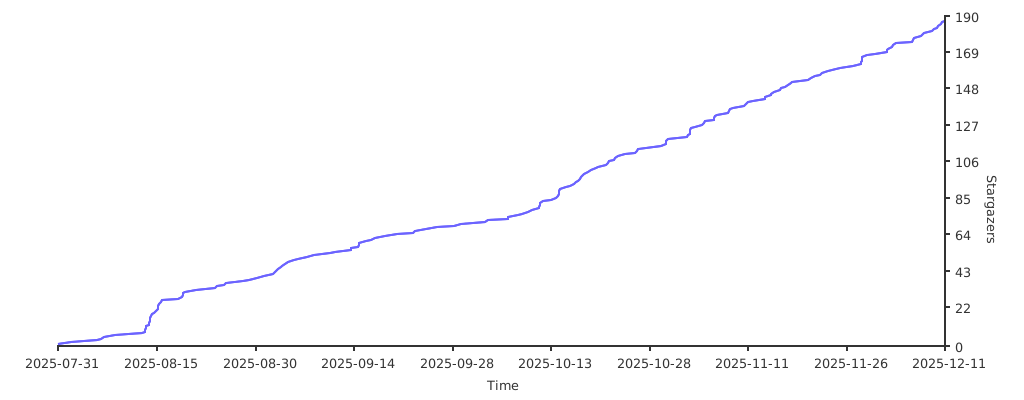](https://starchart.cc/RetroGameSets/RGSX)
|
||||
|
||||
**Developed with ❤️ for the retro gaming community.**
|
||||
251
README_CLI.md
251
README_CLI.md
@@ -1,251 +0,0 @@
|
||||
# RGSX CLI — Guide d’utilisation
|
||||
|
||||
Ce guide couvre toutes les commandes disponibles du CLI et fournit des exemples prêts à copier (Windows PowerShell).
|
||||
|
||||
## Nouveau: mode interactif
|
||||
Vous pouvez maintenant lancer une session interactive et enchaîner les commandes sans retaper `python rgsx_cli.py` à chaque fois :
|
||||
|
||||
```powershell
|
||||
python rgsx_cli.py
|
||||
```
|
||||
Vous verrez :
|
||||
```
|
||||
RGSX CLI interactive mode. Type 'help' for commands, 'exit' to quit.
|
||||
rgsx>
|
||||
```
|
||||
Dans cette session tapez directement les sous-commandes :
|
||||
```
|
||||
rgsx> platforms
|
||||
rgsx> games --platform snes --search mario
|
||||
rgsx> download --platform snes --game "Super Mario World (USA).zip"
|
||||
rgsx> history --tail 10
|
||||
rgsx> exit
|
||||
```
|
||||
Extras :
|
||||
- `help` ou `?` affiche l’aide globale.
|
||||
- `exit` ou `quit` quitte la session.
|
||||
- `--verbose` une fois active les logs détaillés pour toute la session.
|
||||
|
||||
## Tableau formaté (platforms)
|
||||
La commande `platforms` affiche maintenant un tableau ASCII à largeur fixe (sauf avec `--json`) :
|
||||
```
|
||||
+--------------------------------+-----------------+
|
||||
| Nom de plateforme | Dossier |
|
||||
+--------------------------------+-----------------+
|
||||
| Nintendo Entertainment System | nes |
|
||||
| Super Nintendo Entertainment.. | snes |
|
||||
| Sega Mega Drive | megadrive |
|
||||
+--------------------------------+-----------------+
|
||||
```
|
||||
Colonnes : 30 caractères pour le nom, 15 pour le dossier (troncature par `...`).
|
||||
|
||||
## Aliases & synonymes d’options (mis à jour)
|
||||
Aliases des sous-commandes :
|
||||
- `platforms` → `p`
|
||||
- `games` → `g`
|
||||
- `download` → `dl`
|
||||
- `clear-history` → `clear`
|
||||
|
||||
Options équivalentes (toutes les formes listées sont acceptées) :
|
||||
- Plateforme : `--platform`, `--p`, `-p`
|
||||
- Jeu : `--game`, `--g`, `-g`
|
||||
- Recherche : `--search`, `--s`, `-s`
|
||||
- Forcer (download) : `--force`, `-f`
|
||||
- Mode interactif (download) : `--interactive`, `-i`
|
||||
|
||||
Exemples avec alias :
|
||||
```powershell
|
||||
python rgsx_cli.py dl -p snes -g "Super Mario World (USA).zip"
|
||||
python rgsx_cli.py g --p snes --s mario
|
||||
python rgsx_cli.py p --json
|
||||
python rgsx_cli.py clear
|
||||
```
|
||||
|
||||
## Sélection ambiguë lors d’un download (nouveau tableau)
|
||||
Quand vous tentez un téléchargement avec un titre non exact et que le mode interactif est actif (TTY ou `--interactive`), les correspondances s’affichent en tableau :
|
||||
```
|
||||
No exact result found for this game: mario super yoshi
|
||||
Select a match to download:
|
||||
+------+--------------------------------------------------------------+------------+
|
||||
| # | Title | Size |
|
||||
+------+--------------------------------------------------------------+------------+
|
||||
| 1 | Super Mario - Yoshi Island (Japan).zip | 3.2M |
|
||||
| 2 | Super Mario - Yoshi Island (Japan) (Rev 1).zip | 3.2M |
|
||||
| 3 | Super Mario - Yoshi Island (Japan) (Rev 2).zip | 3.2M |
|
||||
| 4 | Super Mario World 2 - Yoshi's Island (USA).zip | 3.3M |
|
||||
| 5 | Super Mario - Yoshi Island (Japan) (Beta) (1995-07-10).zip | 3.1M |
|
||||
+------+--------------------------------------------------------------+------------+
|
||||
Enter number (or press Enter to cancel):
|
||||
```
|
||||
Si vous annulez ou que le mode interactif n’est pas actif, un tableau similaire est affiché (sans le prompt) suivi d’un conseil.
|
||||
|
||||
## Recherche améliorée (multi‑tokens) pour `games`
|
||||
L’option `--search` / `--s` / `-s` utilise maintenant la même logique de classement que les suggestions du download :
|
||||
1. Correspondance sous-chaîne (position la plus tôt) — priorité 0
|
||||
2. Séquence de tokens dans l’ordre (non contiguë) — priorité 1 (écart le plus faible)
|
||||
3. Tous les tokens présents dans n’importe quel ordre — priorité 2 (ensemble de tokens plus petit privilégié)
|
||||
|
||||
Les doublons sont dédupliqués en gardant le meilleur score. Ainsi une requête :
|
||||
```powershell
|
||||
python rgsx_cli.py games --p snes --s "super mario yoshi"
|
||||
```
|
||||
affiche toutes les variantes pertinentes de "Super Mario World 2 - Yoshi's Island" même si l’ordre des mots diffère.
|
||||
|
||||
Exemple de sortie :
|
||||
```
|
||||
+--------------------------------------------------------------+------------+
|
||||
| Game Title | Size |
|
||||
+--------------------------------------------------------------+------------+
|
||||
| Super Mario World 2 - Yoshi's Island (USA).zip | 3.3M |
|
||||
| Super Mario World 2 - Yoshi's Island (Europe) (En,Fr,De).zip | 3.3M |
|
||||
| Super Mario - Yoshi Island (Japan).zip | 3.2M |
|
||||
| Super Mario - Yoshi Island (Japan) (Rev 1).zip | 3.2M |
|
||||
| Super Mario - Yoshi Island (Japan) (Rev 2).zip | 3.2M |
|
||||
+--------------------------------------------------------------+------------+
|
||||
```
|
||||
Si aucun résultat n’est trouvé, seul l’en-tête est affiché puis un message.
|
||||
|
||||
## Prérequis
|
||||
- Python installé et accessible (le projet utilise un mode headless; aucune fenêtre ne s’ouvrira).
|
||||
- Exécuter depuis le dossier contenant `rgsx_cli.py`.
|
||||
|
||||
## Syntaxe générale (mode classique)
|
||||
Les options globales peuvent être placées avant ou après la sous-commande.
|
||||
|
||||
- Forme 1:
|
||||
```powershell
|
||||
python rgsx_cli.py [--verbose] [--force-update|-force-update] <commande> [options]
|
||||
```
|
||||
- Forme 2:
|
||||
```powershell
|
||||
python rgsx_cli.py <commande> [options] [--verbose] [--force-update|-force-update]
|
||||
```
|
||||
|
||||
- `--verbose` active les logs détaillés (DEBUG) sur stderr.
|
||||
- `--force-update` (ou `-force-update`) purge les données locales et force le re-téléchargement du pack de données (systems_list, games/*.json, images).
|
||||
|
||||
Quand les données sources sont manquantes, le CLI télécharge et extrait automatiquement le pack (avec progression).
|
||||
|
||||
## Commandes
|
||||
|
||||
### 1) platforms (`platforms` / `p`) — lister les plateformes
|
||||
- Options:
|
||||
- `--json`: sortie JSON (objets `{ name, folder }`).
|
||||
|
||||
Exemples:
|
||||
```powershell
|
||||
python rgsx_cli.py platforms
|
||||
python rgsx_cli.py p --json
|
||||
python rgsx_cli.py --verbose p
|
||||
python rgsx_cli.py p --verbose
|
||||
```
|
||||
|
||||
Sortie texte: une ligne par plateforme, au format `Nom<TAB>Dossier`.
|
||||
|
||||
### 2) games (`games` / `g`) — lister les jeux d’une plateforme
|
||||
- Options:
|
||||
- `--platform | --p | -p <nom_ou_dossier>` (ex: `n64` ou "Nintendo 64").
|
||||
- `--search | --s | -s <texte>`: filtre par sous-chaîne.
|
||||
|
||||
Exemples:
|
||||
```powershell
|
||||
python rgsx_cli.py games --platform n64
|
||||
python rgsx_cli.py g --p "Nintendo 64" --s zelda
|
||||
python rgsx_cli.py g -p n64 --verbose
|
||||
```
|
||||
|
||||
Remarques:
|
||||
- La plateforme est résolue par nom affiché (platform_name) ou dossier, insensible à la casse.
|
||||
|
||||
### 3) download (`download` / `dl`) — télécharger un jeu
|
||||
- Options:
|
||||
- `--platform | --p | -p <nom_ou_dossier>`
|
||||
- `--game | --g | -g "<titre exact ou partiel>"`
|
||||
- `--force | -f`: ignorer l’avertissement d’extension non supportée.
|
||||
- `--interactive | -i`: choisir un titre parmi des correspondances quand aucun exact n’est trouvé.
|
||||
|
||||
Exemples:
|
||||
```powershell
|
||||
# Titre exact
|
||||
python rgsx_cli.py dl --p n64 --g "Legend of Zelda, The - Ocarina of Time (USA) (Beta).zip"
|
||||
|
||||
# Titre partiel (sélection numérotée si aucun exact)
|
||||
python rgsx_cli.py dl -p n64 -g "Ocarina of Time (Beta)"
|
||||
|
||||
# Forcer malgré extension
|
||||
python rgsx_cli.py dl -p snes -g "pack_roms.rar" -f
|
||||
|
||||
# Verbose après sous-commande
|
||||
python rgsx_cli.py dl -p n64 -g "Legend of Zelda, The - Ocarina of Time (USA) (Beta).zip" --verbose
|
||||
```
|
||||
|
||||
Pendant le téléchargement: progression %, taille (MB), vitesse (MB/s). Résultat final aussi dans l’historique.
|
||||
|
||||
Notes:
|
||||
- Les ROMs sont enregistrées dans le dossier plateforme correspondant (ex: `R:\roms\n64`).
|
||||
- Si le fichier est une archive (zip/rar) et que la plateforme ne supporte pas l’extension, un avertissement apparaît (utiliser `--force`).
|
||||
|
||||
### 4) history — afficher l’historique
|
||||
- Options:
|
||||
- `--tail <N>`: n dernières entrées (défaut: 50)
|
||||
- `--json`: sortie JSON
|
||||
|
||||
Exemples:
|
||||
```powershell
|
||||
python rgsx_cli.py history
|
||||
python rgsx_cli.py history --tail 20
|
||||
python rgsx_cli.py history --json
|
||||
```
|
||||
|
||||
### 5) clear-history (`clear-history` / `clear`) — vider l’historique
|
||||
Exemple:
|
||||
```powershell
|
||||
python rgsx_cli.py clear
|
||||
```
|
||||
|
||||
### Option globale: --force-update — purge + re-téléchargement des données
|
||||
- Supprime `systems_list.json`, `games/`, `images/` puis retélécharge/extrait le pack.
|
||||
|
||||
Exemples:
|
||||
```powershell
|
||||
python rgsx_cli.py --force-update
|
||||
python rgsx_cli.py p --force-update
|
||||
```
|
||||
|
||||
## Comportements et conseils
|
||||
- Résolution plateforme: par nom affiché ou dossier, insensible à la casse.
|
||||
- `--verbose`: utile surtout pour téléchargements/extractions.
|
||||
- Données manquantes: téléchargement + extraction automatiques.
|
||||
- Codes de sortie (indicatif):
|
||||
- `0`: succès
|
||||
- `1`: échec téléchargement/erreur générique
|
||||
- `2`: plateforme introuvable
|
||||
- `3`: jeu introuvable
|
||||
- `4`: extension non supportée (sans `--force`)
|
||||
|
||||
## Exemples rapides (copier-coller)
|
||||
```powershell
|
||||
# Démarrer le shell interactif
|
||||
python rgsx_cli.py
|
||||
|
||||
# Lister plateformes (alias)
|
||||
python rgsx_cli.py p
|
||||
|
||||
# Lister plateformes (JSON)
|
||||
python rgsx_cli.py p --json
|
||||
|
||||
# Lister jeux N64 avec filtre (synonymes)
|
||||
python rgsx_cli.py g --p n64 --s zelda
|
||||
|
||||
# Télécharger un jeu N64 (titre exact) avec alias
|
||||
python rgsx_cli.py dl --p n64 --g "Legend of Zelda, The - Ocarina of Time (USA) (Beta).zip"
|
||||
|
||||
# Télécharger (titre partiel) + sélection
|
||||
python rgsx_cli.py dl -p n64 -g "Ocarina of Time"
|
||||
|
||||
# Historique (20 dernières entrées)
|
||||
python rgsx_cli.py history --tail 20
|
||||
|
||||
# Purger et recharger le pack
|
||||
python rgsx_cli.py --force-update
|
||||
```
|
||||
254
README_CLI_EN.md
254
README_CLI_EN.md
@@ -1,254 +0,0 @@
|
||||
# RGSX CLI — Usage Guide
|
||||
|
||||
This guide covers all available CLI commands with copy-ready Windows PowerShell examples.
|
||||
|
||||
## Prerequisites
|
||||
- Python installed and on PATH (the app runs in headless mode; no window will open).
|
||||
- Run commands from the folder that contains `rgsx_cli.py`.
|
||||
|
||||
## Quick interactive mode (new)
|
||||
You can now start an interactive shell once and issue multiple commands without retyping `python rgsx_cli.py` each time:
|
||||
|
||||
```powershell
|
||||
python rgsx_cli.py
|
||||
```
|
||||
You will see a prompt like:
|
||||
```
|
||||
RGSX CLI interactive mode. Type 'help' for commands, 'exit' to quit.
|
||||
rgsx>
|
||||
```
|
||||
Inside this shell type subcommands exactly as you would after `python rgsx_cli.py`:
|
||||
```
|
||||
rgsx> platforms
|
||||
rgsx> games --platform snes --search mario
|
||||
rgsx> download --platform snes --game "Super Mario World (USA).zip"
|
||||
rgsx> history --tail 10
|
||||
rgsx> exit
|
||||
```
|
||||
Extras:
|
||||
- `help` or `?` prints the global help.
|
||||
- `exit` or `quit` leaves the shell.
|
||||
- `--verbose` once sets persistent verbose logging for the rest of the session.
|
||||
|
||||
## Formatted table output (platforms)
|
||||
The `platforms` command now renders a fixed-width ASCII table (unless `--json` is used):
|
||||
```
|
||||
+--------------------------------+-----------------+
|
||||
| Platform Name | Folder |
|
||||
+--------------------------------+-----------------+
|
||||
| Nintendo Entertainment System | nes |
|
||||
| Super Nintendo Entertainment.. | snes |
|
||||
| Sega Mega Drive | megadrive |
|
||||
+--------------------------------+-----------------+
|
||||
```
|
||||
Columns: 30 chars for name, 15 for folder (values longer are truncated with `...`).
|
||||
|
||||
## Aliases & option synonyms (updated)
|
||||
Subcommand aliases:
|
||||
- `platforms` → `p`
|
||||
- `games` → `g`
|
||||
- `download` → `dl`
|
||||
- `clear-history` → `clear`
|
||||
|
||||
Option aliases (all shown forms are accepted; they are equivalent):
|
||||
- Platform: `--platform`, `--p`, `-p`
|
||||
- Game: `--game`, `--g`, `-g`
|
||||
- Search: `--search`, `--s`, `-s`
|
||||
- Force (download): `--force`, `-f`
|
||||
- Interactive (download): `--interactive`, `-i`
|
||||
|
||||
Examples with aliases:
|
||||
```powershell
|
||||
python rgsx_cli.py dl -p snes -g "Super Mario World (USA).zip"
|
||||
python rgsx_cli.py g --p snes --s mario
|
||||
python rgsx_cli.py p --json
|
||||
python rgsx_cli.py clear
|
||||
```
|
||||
|
||||
## Ambiguous download selection (new table)
|
||||
When you attempt a download with a non-exact title and interactive mode is active (TTY or `--interactive`), matches are displayed in a table:
|
||||
```
|
||||
No exact result found for this game: mario super yoshi
|
||||
Select a match to download:
|
||||
+------+--------------------------------------------------------------+------------+
|
||||
| # | Title | Size |
|
||||
+------+--------------------------------------------------------------+------------+
|
||||
| 1 | Super Mario - Yoshi Island (Japan).zip | 3.2M |
|
||||
| 2 | Super Mario - Yoshi Island (Japan) (Rev 1).zip | 3.2M |
|
||||
| 3 | Super Mario - Yoshi Island (Japan) (Rev 2).zip | 3.2M |
|
||||
| 4 | Super Mario World 2 - Yoshi's Island (USA).zip | 3.3M |
|
||||
| 5 | Super Mario - Yoshi Island (Japan) (Beta) (1995-07-10).zip | 3.1M |
|
||||
+------+--------------------------------------------------------------+------------+
|
||||
Enter number (or press Enter to cancel):
|
||||
```
|
||||
If you cancel or are not in interactive mode, a similar table is still shown (without the prompt) followed by a tip.
|
||||
|
||||
## Improved fuzzy search for games (multi-token)
|
||||
The `--search` / `--s` / `-s` option now uses the same multi-strategy ranking as the download suggestion logic:
|
||||
1. Substring match (position-based) — highest priority
|
||||
2. Ordered non-contiguous token sequence (smallest gap wins)
|
||||
3. All tokens present in any order (smaller token set size wins)
|
||||
|
||||
Duplicate titles are deduplicated by keeping the best scoring strategy. This means queries like:
|
||||
```powershell
|
||||
python rgsx_cli.py games --p snes --s "super mario yoshi"
|
||||
```
|
||||
will surface all relevant "Super Mario World 2 - Yoshi's Island" variants even if the word order differs.
|
||||
|
||||
Example output:
|
||||
```
|
||||
+--------------------------------------------------------------+------------+
|
||||
| Game Title | Size |
|
||||
+--------------------------------------------------------------+------------+
|
||||
| Super Mario World 2 - Yoshi's Island (USA).zip | 3.3M |
|
||||
| Super Mario World 2 - Yoshi's Island (Europe) (En,Fr,De).zip | 3.3M |
|
||||
| Super Mario - Yoshi Island (Japan).zip | 3.2M |
|
||||
| Super Mario - Yoshi Island (Japan) (Rev 1).zip | 3.2M |
|
||||
| Super Mario - Yoshi Island (Japan) (Rev 2).zip | 3.2M |
|
||||
+--------------------------------------------------------------+------------+
|
||||
```
|
||||
If no results are found the table displays only headers followed by a message.
|
||||
|
||||
## General syntax (non-interactive)
|
||||
Global options can be placed before or after the subcommand.
|
||||
|
||||
- Form 1:
|
||||
```powershell
|
||||
python rgsx_cli.py [--verbose] [--force-update|-force-update] <command> [options]
|
||||
```
|
||||
- Form 2:
|
||||
```powershell
|
||||
python rgsx_cli.py <command> [options] [--verbose] [--force-update|-force-update]
|
||||
```
|
||||
|
||||
- `--verbose` enables detailed logs (DEBUG) on stderr.
|
||||
- `--force-update` (or `-force-update`) purges local data and re-downloads the data pack (systems_list, games/*.json, images).
|
||||
|
||||
When source data is missing, the CLI will automatically download and extract the data pack (with progress).
|
||||
|
||||
## Commands
|
||||
|
||||
### 1) platforms (`platforms` / `p`) — list platforms
|
||||
- Options:
|
||||
- `--json`: JSON output (objects `{ name, folder }`).
|
||||
|
||||
Examples:
|
||||
```powershell
|
||||
python rgsx_cli.py platforms
|
||||
python rgsx_cli.py p --json
|
||||
python rgsx_cli.py --verbose p
|
||||
python rgsx_cli.py p --verbose
|
||||
```
|
||||
|
||||
Text output: one line per platform, formatted as `Name<TAB>Folder`.
|
||||
|
||||
### 2) games (`games` / `g`) — list games for a platform
|
||||
- Options:
|
||||
- `--platform | --p | -p <name_or_folder>` (e.g., `n64` or "Nintendo 64").
|
||||
- `--search | --s | -s <text>`: filter by substring in game title.
|
||||
|
||||
Examples:
|
||||
```powershell
|
||||
python rgsx_cli.py games --platform n64
|
||||
python rgsx_cli.py g --p "Nintendo 64" --s zelda
|
||||
python rgsx_cli.py g -p n64 --verbose
|
||||
```
|
||||
|
||||
Notes:
|
||||
- The platform is resolved by display name (platform_name) or folder, case-insensitively.
|
||||
|
||||
### 3) download (`download` / `dl`) — download a game
|
||||
- Options:
|
||||
- `--platform | --p | -p <name_or_folder>`
|
||||
- `--game | --g | -g "<exact or partial title>"`
|
||||
- `--force | -f`: ignore unsupported-extension warning for the platform.
|
||||
- `--interactive | -i`: prompt to choose from matches when no exact title is found.
|
||||
|
||||
Examples:
|
||||
```powershell
|
||||
# Exact title
|
||||
python rgsx_cli.py dl --p n64 --g "Legend of Zelda, The - Ocarina of Time (USA) (Beta).zip"
|
||||
|
||||
# Partial match (interactive numbered selection if no exact match)
|
||||
python rgsx_cli.py dl -p n64 -g "Ocarina of Time (Beta)"
|
||||
|
||||
# Forced despite extension
|
||||
python rgsx_cli.py dl -p snes -g "pack_roms.rar" -f
|
||||
|
||||
# Verbose after subcommand
|
||||
python rgsx_cli.py dl -p n64 -g "Legend of Zelda, The - Ocarina of Time (USA) (Beta).zip" --verbose
|
||||
```
|
||||
|
||||
During download, progress %, size (MB) and speed (MB/s) are shown. The final result is also written to history.
|
||||
|
||||
Notes:
|
||||
- ROMs are saved into the corresponding platform directory (e.g., `R:\roms\n64`).
|
||||
- If the file is an archive (zip/rar) and the platform doesn’t support that extension, a warning is shown (you can use `--force`).
|
||||
|
||||
### 4) history — show history
|
||||
- Options:
|
||||
- `--tail <N>`: last N entries (default: 50)
|
||||
- `--json`: JSON output
|
||||
|
||||
Examples:
|
||||
```powershell
|
||||
python rgsx_cli.py history
|
||||
python rgsx_cli.py history --tail 20
|
||||
python rgsx_cli.py history --json
|
||||
```
|
||||
|
||||
### 5) clear-history (`clear-history` / `clear`) — clear history
|
||||
Example:
|
||||
```powershell
|
||||
python rgsx_cli.py clear
|
||||
```
|
||||
|
||||
### Global option: --force-update — purge + re-download data
|
||||
- Removes `systems_list.json`, the `games/` and `images/` folders, then downloads/extracts the data pack again.
|
||||
|
||||
Examples:
|
||||
```powershell
|
||||
# Without subcommand: purge + re-download then exit
|
||||
python rgsx_cli.py --force-update
|
||||
|
||||
# Placed after a subcommand (also accepted)
|
||||
python rgsx_cli.py p --force-update
|
||||
```
|
||||
|
||||
## Behavior and tips
|
||||
- Platform resolution: by display name or folder, case-insensitive. For `games` and `download`, if no exact match is found a search-like suggestion list is shown.
|
||||
- `--verbose` logs: most useful during downloads/extraction; printed at DEBUG level.
|
||||
- Missing data download: automatic, with consistent progress (download then extraction).
|
||||
- Exit codes (indicative):
|
||||
- `0`: success
|
||||
- `1`: download failure/generic error
|
||||
- `2`: platform not found
|
||||
- `3`: game not found
|
||||
- `4`: unsupported extension (without `--force`)
|
||||
|
||||
## Quick examples (copy/paste)
|
||||
```powershell
|
||||
# Start interactive shell
|
||||
python rgsx_cli.py
|
||||
|
||||
# List platforms (text)
|
||||
python rgsx_cli.py p
|
||||
|
||||
# List platforms (JSON)
|
||||
python rgsx_cli.py p --json
|
||||
|
||||
# List N64 games with filter (using alias synonyms)
|
||||
python rgsx_cli.py g --p n64 --s zelda
|
||||
|
||||
# Download an N64 game (exact title) using aliases
|
||||
python rgsx_cli.py dl --p n64 --g "Legend of Zelda, The - Ocarina of Time (USA) (Beta).zip"
|
||||
|
||||
# Download with approximate title (suggestions + interactive pick)
|
||||
python rgsx_cli.py dl -p n64 -g "Ocarina of Time"
|
||||
|
||||
# View last 20 history entries
|
||||
python rgsx_cli.py history --tail 20
|
||||
|
||||
# Purge and refresh data pack
|
||||
python rgsx_cli.py --force-update
|
||||
```
|
||||
@@ -5,28 +5,29 @@ RUN apt-get update && apt-get install -y --no-install-recommends \
|
||||
p7zip-full \
|
||||
unrar-free \
|
||||
curl \
|
||||
rsync \
|
||||
gosu \
|
||||
&& rm -rf /var/lib/apt/lists/*
|
||||
|
||||
# Create required directories
|
||||
RUN mkdir -p /userdata/saves/ports/rgsx \
|
||||
&& mkdir -p /userdata/roms/ports \
|
||||
&& mkdir -p /app
|
||||
# Create app directory
|
||||
RUN mkdir -p /app
|
||||
|
||||
# Copy RGSX application files to /app (will be copied to volume at runtime)
|
||||
# Copy RGSX application files to /app
|
||||
COPY ports/RGSX/ /app/RGSX/
|
||||
|
||||
# Copy entrypoint script
|
||||
COPY docker-entrypoint.sh /usr/local/bin/
|
||||
COPY docker/docker-entrypoint.sh /usr/local/bin/
|
||||
RUN chmod +x /usr/local/bin/docker-entrypoint.sh
|
||||
|
||||
# Install Python dependencies
|
||||
# pygame is imported in some modules even in headless mode, so we include it
|
||||
RUN pip install --no-cache-dir requests pygame
|
||||
|
||||
# Set environment to headless mode
|
||||
ENV RGSX_HEADLESS=1
|
||||
# Set environment variables for Docker mode
|
||||
# These tell RGSX to use /config for settings and /data for ROMs
|
||||
ENV RGSX_HEADLESS=1 \
|
||||
RGSX_APP_DIR=/app \
|
||||
RGSX_CONFIG_DIR=/config \
|
||||
RGSX_DATA_DIR=/data
|
||||
|
||||
# Expose web interface port
|
||||
EXPOSE 5000
|
||||
@@ -35,6 +36,9 @@ EXPOSE 5000
|
||||
HEALTHCHECK --interval=30s --timeout=10s --start-period=40s --retries=3 \
|
||||
CMD curl -f http://localhost:5000/ || exit 1
|
||||
|
||||
# Entrypoint copies app to volume, then runs command
|
||||
# Set working directory
|
||||
WORKDIR /app/RGSX
|
||||
|
||||
# Entrypoint handles user permissions and directory setup
|
||||
ENTRYPOINT ["docker-entrypoint.sh"]
|
||||
CMD ["python", "rgsx_web.py", "--host", "0.0.0.0", "--port", "5000"]
|
||||
|
||||
@@ -5,19 +5,16 @@ Run RGSX as a web-only service without the Pygame UI. Perfect for homelab/server
|
||||
## Quick Start
|
||||
|
||||
```bash
|
||||
# Build the image
|
||||
docker build -t rgsx .
|
||||
# Using docker-compose (recommended)
|
||||
docker-compose up -d
|
||||
|
||||
# Run with docker
|
||||
# Or build and run manually
|
||||
docker build -f docker/Dockerfile -t rgsx .
|
||||
docker run -d \
|
||||
--name rgsx \
|
||||
-p 5000:5000 \
|
||||
-e PUID=99 \
|
||||
-e PGID=100 \
|
||||
-e RGSX_HEADLESS=1 \
|
||||
-v ./data/saves:/userdata/saves/ports/rgsx \
|
||||
-v ./data/roms:/userdata/roms/ports \
|
||||
-v ./data/logs:/userdata/roms/ports/RGSX/logs \
|
||||
-v ./config:/config \
|
||||
-v ./data:/data \
|
||||
rgsx
|
||||
|
||||
# Access the web interface
|
||||
@@ -28,65 +25,63 @@ open http://localhost:5000
|
||||
|
||||
- Runs RGSX web server in headless mode (no Pygame UI)
|
||||
- Web interface accessible from any browser
|
||||
- ROMs and settings persist in `./data/` volumes
|
||||
- Container restarts automatically
|
||||
- Config persists in `/config` volume (settings, metadata, history)
|
||||
- ROMs download to `/data/roms/{platform}/` and extract there
|
||||
- Environment variables pre-configured (no manual setup needed)
|
||||
|
||||
## Environment Variables
|
||||
|
||||
**Pre-configured in the container (no need to set these):**
|
||||
- `RGSX_HEADLESS=1` - Runs in headless mode
|
||||
- `RGSX_CONFIG_DIR=/config` - Config location
|
||||
- `RGSX_DATA_DIR=/data` - Data location
|
||||
|
||||
**Optional (only if needed):**
|
||||
- `PUID` - User ID for file ownership (default: root)
|
||||
- `PGID` - Group ID for file ownership (default: root)
|
||||
|
||||
## Configuration
|
||||
|
||||
### Docker Compose
|
||||
|
||||
See `docker-compose.example.yml` for a complete example configuration.
|
||||
|
||||
### User Permissions (Important!)
|
||||
|
||||
**For SMB mounts (Unraid, Windows shares):**
|
||||
|
||||
Don't set PUID/PGID. The container runs as root, and the SMB server maps files to your authenticated user.
|
||||
|
||||
```bash
|
||||
docker run \
|
||||
-e RGSX_HEADLESS=1 \
|
||||
...
|
||||
```
|
||||
- Don't set PUID/PGID
|
||||
- The container runs as root, and the SMB server maps files to your authenticated user
|
||||
|
||||
**For NFS/local storage:**
|
||||
- Set PUID and PGID to match your host user (files will be owned by that user)
|
||||
- Find your user ID: `id -u` and `id -g`
|
||||
|
||||
Set PUID and PGID to match your host user. Files will be owned by that user.
|
||||
### Volumes
|
||||
|
||||
```bash
|
||||
docker run \
|
||||
-e PUID=1000 \
|
||||
-e PGID=1000 \
|
||||
-e RGSX_HEADLESS=1 \
|
||||
...
|
||||
```
|
||||
Two volumes are used:
|
||||
|
||||
**Find your user ID:**
|
||||
```bash
|
||||
id -u # Your UID
|
||||
id -g # Your GID
|
||||
```
|
||||
**`/config`** - Configuration and metadata
|
||||
- `rgsx_settings.json` - Settings
|
||||
- `games/` - Platform game database files (JSON)
|
||||
- `images/` - Game cover art
|
||||
- `history.json` - Download history
|
||||
- `logs/` - Application logs
|
||||
- `*.txt` - API keys
|
||||
|
||||
### Change Port
|
||||
|
||||
```bash
|
||||
docker run -p 8080:5000 ... # Access on port 8080
|
||||
```
|
||||
|
||||
### Custom ROM Location
|
||||
|
||||
Map to your existing ROM collection:
|
||||
```bash
|
||||
docker run -v /your/existing/roms:/userdata/roms/ports ...
|
||||
```
|
||||
**`/data`** - ROM storage
|
||||
- `roms/` - ROMs by platform (snes/, nes/, psx/, etc.) - downloads extract here
|
||||
|
||||
### API Keys
|
||||
|
||||
Add your download service API keys to `./data/saves/`:
|
||||
Add your download service API keys to `./config/`:
|
||||
|
||||
```bash
|
||||
# Add your API key (just the key, no extra text)
|
||||
echo "YOUR_KEY_HERE" > ./data/saves/1FichierAPI.txt
|
||||
echo "YOUR_KEY_HERE" > ./config/1FichierAPI.txt
|
||||
|
||||
# Optional: AllDebrid/RealDebrid fallbacks
|
||||
echo "YOUR_KEY" > ./data/saves/AllDebridAPI.txt
|
||||
echo "YOUR_KEY" > ./data/saves/RealDebridAPI.txt
|
||||
# Optional: AllDebrid/RealDebrid
|
||||
echo "YOUR_KEY" > ./config/AllDebridAPI.txt
|
||||
echo "YOUR_KEY" > ./config/RealDebridAPI.txt
|
||||
|
||||
# Restart to apply
|
||||
docker restart rgsx
|
||||
@@ -112,14 +107,29 @@ docker stop rgsx && docker rm rgsx
|
||||
|
||||
## Directory Structure
|
||||
|
||||
**On Host:**
|
||||
```
|
||||
RGSX/
|
||||
├── data/ # Created on first run
|
||||
│ ├── saves/ # Settings, history, API keys
|
||||
│ ├── roms/ # Downloaded ROMs
|
||||
│ └── logs/ # Application logs
|
||||
├── Dockerfile
|
||||
└── docker-compose.yml
|
||||
./
|
||||
├── config/ # Config volume (created on first run)
|
||||
│ ├── rgsx_settings.json
|
||||
│ ├── games/ # Platform game database (JSON)
|
||||
│ ├── images/ # Platform images
|
||||
│ ├── logs/ # Application logs
|
||||
│ └── *.txt # API keys (1FichierAPI.txt, etc.)
|
||||
└── data/
|
||||
└── roms/ # ROMs by platform
|
||||
├── snes/
|
||||
├── n64/
|
||||
└── ...
|
||||
```
|
||||
|
||||
**In Container:**
|
||||
```
|
||||
/app/RGSX/ # Application code
|
||||
/config/ # Mapped to ./config on host
|
||||
└── games/, images/, logs/, etc.
|
||||
/data/ # Mapped to ./data on host
|
||||
└── roms/ # ROM downloads go here
|
||||
```
|
||||
|
||||
## How It Works
|
||||
@@ -137,22 +147,15 @@ The container creates files with the UID/GID specified by PUID/PGID environment
|
||||
docker run -e PUID=1000 -e PGID=1000 ...
|
||||
```
|
||||
|
||||
**Changed PUID/PGID and container won't start:**
|
||||
**Changed PUID/PGID and permission errors:**
|
||||
|
||||
When you change PUID/PGID, old files with different ownership will cause rsync to fail. You MUST fix ownership on the storage server:
|
||||
Fix ownership of your volumes:
|
||||
|
||||
```bash
|
||||
# On your NAS/Unraid (via SSH), either:
|
||||
|
||||
# Option 1: Delete old files (easiest)
|
||||
rm -rf /mnt/user/roms/rgsx/roms/ports/RGSX/*
|
||||
|
||||
# Option 2: Change ownership to new PUID/PGID
|
||||
chown -R 1000:1000 /mnt/user/roms/rgsx/roms/ports/RGSX/
|
||||
# Fix ownership to match new PUID/PGID
|
||||
sudo chown -R 1000:1000 ./config ./data
|
||||
```
|
||||
|
||||
Then restart the container.
|
||||
|
||||
**Port already in use:**
|
||||
```bash
|
||||
docker run -p 8080:5000 ... # Use port 8080 instead
|
||||
|
||||
29
docker/docker-compose.example.yml
Normal file
29
docker/docker-compose.example.yml
Normal file
@@ -0,0 +1,29 @@
|
||||
version: '3.8'
|
||||
|
||||
services:
|
||||
rgsx:
|
||||
# Option 1: Build from source
|
||||
build:
|
||||
context: ..
|
||||
dockerfile: docker/Dockerfile
|
||||
|
||||
# Option 2: Use pre-built image (push to your own registry)
|
||||
# image: your-registry/rgsx:latest
|
||||
|
||||
container_name: rgsx
|
||||
restart: unless-stopped
|
||||
ports:
|
||||
- "5000:5000"
|
||||
volumes:
|
||||
- ./config:/config
|
||||
- ./data:/data
|
||||
# Optional: Set PUID/PGID for NFS/local storage (not needed for SMB mounts)
|
||||
# environment:
|
||||
# - PUID=1000
|
||||
# - PGID=1000
|
||||
healthcheck:
|
||||
test: ["CMD", "curl", "-f", "http://localhost:5000/"]
|
||||
interval: 30s
|
||||
timeout: 10s
|
||||
retries: 3
|
||||
start_period: 40s
|
||||
@@ -1,10 +1,12 @@
|
||||
#!/bin/bash
|
||||
set -e
|
||||
|
||||
echo "=== RGSX Docker Container Startup ==="
|
||||
|
||||
# If PUID/PGID are set, create user and run as that user
|
||||
# If not set, run as root (works for SMB mounts)
|
||||
if [ -n "$PUID" ] && [ -n "$PGID" ]; then
|
||||
echo "=== Creating user with PUID=$PUID, PGID=$PGID ==="
|
||||
echo "Creating user with PUID=$PUID, PGID=$PGID..."
|
||||
|
||||
# Create group if it doesn't exist
|
||||
if ! getent group $PGID >/dev/null 2>&1; then
|
||||
@@ -16,43 +18,28 @@ if [ -n "$PUID" ] && [ -n "$PGID" ]; then
|
||||
useradd -u $PUID -g $PGID -m -s /bin/bash rgsx
|
||||
fi
|
||||
|
||||
# Fix ownership of app files
|
||||
chown -R $PUID:$PGID /app /userdata 2>/dev/null || true
|
||||
|
||||
echo "=== Running as user $(id -un $PUID) (UID=$PUID, GID=$PGID) ==="
|
||||
echo "Running as user $(id -un $PUID) (UID=$PUID, GID=$PGID)"
|
||||
RUN_USER="gosu rgsx"
|
||||
else
|
||||
echo "=== Running as root (no PUID/PGID set) - for SMB mounts ==="
|
||||
echo "Running as root (no PUID/PGID set) - suitable for SMB mounts"
|
||||
RUN_USER=""
|
||||
fi
|
||||
|
||||
# Always sync RGSX app code to the mounted volume (for updates)
|
||||
echo "Syncing RGSX app code to /userdata/roms/ports/RGSX..."
|
||||
$RUN_USER mkdir -p /userdata/roms/ports/RGSX
|
||||
# Create necessary directories
|
||||
# /config needs logs directory, app will create others (like images/, games/) as needed
|
||||
# /data needs roms directory
|
||||
echo "Setting up directories..."
|
||||
$RUN_USER mkdir -p /config/logs
|
||||
$RUN_USER mkdir -p /data/roms
|
||||
|
||||
# Try rsync
|
||||
if ! $RUN_USER rsync -av --delete /app/RGSX/ /userdata/roms/ports/RGSX/ 2>&1; then
|
||||
echo ""
|
||||
echo "=========================================="
|
||||
echo "WARNING: rsync partially failed!"
|
||||
echo "=========================================="
|
||||
echo "Some files may not have synced. Container will continue for debugging."
|
||||
echo ""
|
||||
if [ -n "$PUID" ] && [ -n "$PGID" ]; then
|
||||
echo "If using SMB, try removing PUID/PGID to run as root"
|
||||
fi
|
||||
echo ""
|
||||
# Fix ownership of volumes if PUID/PGID are set
|
||||
if [ -n "$PUID" ] && [ -n "$PGID" ]; then
|
||||
echo "Setting ownership on volumes..."
|
||||
chown -R $PUID:$PGID /config /data 2>/dev/null || true
|
||||
fi
|
||||
|
||||
echo "RGSX app code sync attempted."
|
||||
|
||||
# Create Batocera folder structure only if folders don't exist
|
||||
$RUN_USER mkdir -p /userdata/saves/ports/rgsx/images
|
||||
$RUN_USER mkdir -p /userdata/saves/ports/rgsx/games
|
||||
$RUN_USER mkdir -p /userdata/roms/ports/RGSX/logs
|
||||
|
||||
# Create default settings with show_unsupported_platforms enabled if config doesn't exist
|
||||
SETTINGS_FILE="/userdata/saves/ports/rgsx/rgsx_settings.json"
|
||||
SETTINGS_FILE="/config/rgsx_settings.json"
|
||||
if [ ! -f "$SETTINGS_FILE" ]; then
|
||||
echo "Creating default settings with all platforms visible..."
|
||||
$RUN_USER bash -c "cat > '$SETTINGS_FILE' << 'EOF'
|
||||
@@ -60,11 +47,15 @@ if [ ! -f "$SETTINGS_FILE" ]; then
|
||||
\"show_unsupported_platforms\": true
|
||||
}
|
||||
EOF"
|
||||
echo "Default settings created!"
|
||||
echo "Default settings created at $SETTINGS_FILE"
|
||||
fi
|
||||
|
||||
# Run the command
|
||||
cd /userdata/roms/ports/RGSX
|
||||
echo "=== Starting RGSX Web Server ==="
|
||||
echo "Config directory: /config"
|
||||
echo "ROMs directory: /data/roms"
|
||||
echo "======================================"
|
||||
|
||||
# Run the command from the working directory (/app/RGSX set in Dockerfile)
|
||||
if [ -z "$RUN_USER" ]; then
|
||||
exec "$@"
|
||||
else
|
||||
|
||||
@@ -127,6 +127,12 @@ for i, scale in enumerate(config.font_scale_options):
|
||||
config.current_font_scale_index = i
|
||||
break
|
||||
|
||||
# Charger le footer_font_scale
|
||||
for i, scale in enumerate(config.footer_font_scale_options):
|
||||
if scale == config.accessibility_settings.get("footer_font_scale", 1.0):
|
||||
config.current_footer_font_scale_index = i
|
||||
break
|
||||
|
||||
# Chargement et initialisation de la langue
|
||||
from language import initialize_language
|
||||
initialize_language()
|
||||
@@ -160,6 +166,7 @@ pygame.display.set_caption("RGSX")
|
||||
|
||||
# Initialisation des polices via config
|
||||
config.init_font()
|
||||
config.init_footer_font()
|
||||
|
||||
# Mise à jour de la résolution dans config
|
||||
config.screen_width, config.screen_height = pygame.display.get_surface().get_size()
|
||||
@@ -231,11 +238,12 @@ except Exception as e:
|
||||
|
||||
# Initialisation du mixer Pygame (déférée/évitable si musique désactivée)
|
||||
if getattr(config, 'music_enabled', True):
|
||||
pygame.mixer.pre_init(44100, -16, 2, 4096)
|
||||
try:
|
||||
pygame.mixer.pre_init(44100, -16, 2, 4096)
|
||||
pygame.mixer.init()
|
||||
except Exception as e:
|
||||
logger.warning(f"Échec init mixer: {e}")
|
||||
except (NotImplementedError, AttributeError, Exception) as e:
|
||||
logger.warning(f"Mixer non disponible ou échec init: {e}")
|
||||
config.music_enabled = False # Désactiver la musique si mixer non disponible
|
||||
|
||||
# Dossier musique Batocera
|
||||
music_folder = os.path.join(config.APP_FOLDER, "assets", "music")
|
||||
@@ -1361,7 +1369,11 @@ async def main():
|
||||
clock.tick(60)
|
||||
await asyncio.sleep(0.01)
|
||||
|
||||
pygame.mixer.music.stop()
|
||||
try:
|
||||
if pygame.mixer.get_init() is not None:
|
||||
pygame.mixer.music.stop()
|
||||
except (AttributeError, NotImplementedError):
|
||||
pass
|
||||
# Cancel any ongoing downloads to prevent lingering background threads
|
||||
try:
|
||||
cancel_all_downloads()
|
||||
|
||||
@@ -11,10 +11,10 @@ def load_accessibility_settings():
|
||||
|
||||
try:
|
||||
settings = load_rgsx_settings()
|
||||
return settings.get("accessibility", {"font_scale": 1.0})
|
||||
return settings.get("accessibility", {"font_scale": 1.0, "footer_font_scale": 1.0})
|
||||
except Exception as e:
|
||||
logger.error(f"Erreur lors du chargement des paramètres d'accessibilité: {str(e)}")
|
||||
return {"font_scale": 1.0}
|
||||
return {"font_scale": 1.0, "footer_font_scale": 1.0}
|
||||
|
||||
def save_accessibility_settings(accessibility_settings):
|
||||
"""Sauvegarde les paramètres d'accessibilité dans rgsx_settings.json."""
|
||||
@@ -28,7 +28,7 @@ def save_accessibility_settings(accessibility_settings):
|
||||
logger.error(f"Erreur lors de la sauvegarde des paramètres d'accessibilité: {str(e)}")
|
||||
|
||||
def draw_accessibility_menu(screen):
|
||||
"""Affiche le menu d'accessibilité avec curseur pour la taille de police."""
|
||||
"""Affiche le menu d'accessibilité avec curseurs pour la taille de police générale et du footer."""
|
||||
from display import OVERLAY, THEME_COLORS, draw_stylized_button
|
||||
|
||||
screen.blit(OVERLAY, (0, 0))
|
||||
@@ -44,47 +44,87 @@ def draw_accessibility_menu(screen):
|
||||
pygame.draw.rect(screen, THEME_COLORS["border"], title_bg_rect, 2, border_radius=10)
|
||||
screen.blit(title_surface, title_rect)
|
||||
|
||||
# Curseur de taille de police
|
||||
# Déterminer quel curseur est sélectionné (0 = général, 1 = footer)
|
||||
selected_cursor = getattr(config, 'accessibility_selected_cursor', 0)
|
||||
|
||||
# Curseur 1: Taille de police générale
|
||||
current_scale = config.font_scale_options[config.current_font_scale_index]
|
||||
font_text = _("accessibility_font_size").format(f"{current_scale:.1f}")
|
||||
|
||||
# Position du curseur
|
||||
cursor_y = config.screen_height // 2
|
||||
cursor_y1 = config.screen_height // 2 - 50
|
||||
cursor_width = 400
|
||||
cursor_height = 60
|
||||
cursor_x = (config.screen_width - cursor_width) // 2
|
||||
|
||||
# Fond du curseur
|
||||
pygame.draw.rect(screen, THEME_COLORS["button_idle"], (cursor_x, cursor_y, cursor_width, cursor_height), border_radius=10)
|
||||
pygame.draw.rect(screen, THEME_COLORS["border"], (cursor_x, cursor_y, cursor_width, cursor_height), 2, border_radius=10)
|
||||
# Fond du curseur 1
|
||||
cursor1_color = THEME_COLORS["fond_lignes"] if selected_cursor == 0 else THEME_COLORS["button_idle"]
|
||||
pygame.draw.rect(screen, cursor1_color, (cursor_x, cursor_y1, cursor_width, cursor_height), border_radius=10)
|
||||
border_width = 3 if selected_cursor == 0 else 2
|
||||
pygame.draw.rect(screen, THEME_COLORS["border"], (cursor_x, cursor_y1, cursor_width, cursor_height), border_width, border_radius=10)
|
||||
|
||||
# Flèches gauche/droite
|
||||
# Flèches gauche/droite pour curseur 1
|
||||
arrow_size = 30
|
||||
left_arrow_x = cursor_x + 20
|
||||
right_arrow_x = cursor_x + cursor_width - arrow_size - 20
|
||||
arrow_y = cursor_y + (cursor_height - arrow_size) // 2
|
||||
arrow_y1 = cursor_y1 + (cursor_height - arrow_size) // 2
|
||||
|
||||
# Flèche gauche
|
||||
left_color = THEME_COLORS["fond_lignes"] if config.current_font_scale_index > 0 else THEME_COLORS["border"]
|
||||
left_color = THEME_COLORS["text"] if config.current_font_scale_index > 0 else THEME_COLORS["border"]
|
||||
pygame.draw.polygon(screen, left_color, [
|
||||
(left_arrow_x + arrow_size, arrow_y),
|
||||
(left_arrow_x, arrow_y + arrow_size // 2),
|
||||
(left_arrow_x + arrow_size, arrow_y + arrow_size)
|
||||
(left_arrow_x + arrow_size, arrow_y1),
|
||||
(left_arrow_x, arrow_y1 + arrow_size // 2),
|
||||
(left_arrow_x + arrow_size, arrow_y1 + arrow_size)
|
||||
])
|
||||
|
||||
# Flèche droite
|
||||
right_color = THEME_COLORS["fond_lignes"] if config.current_font_scale_index < len(config.font_scale_options) - 1 else THEME_COLORS["border"]
|
||||
right_color = THEME_COLORS["text"] if config.current_font_scale_index < len(config.font_scale_options) - 1 else THEME_COLORS["border"]
|
||||
pygame.draw.polygon(screen, right_color, [
|
||||
(right_arrow_x, arrow_y),
|
||||
(right_arrow_x + arrow_size, arrow_y + arrow_size // 2),
|
||||
(right_arrow_x, arrow_y + arrow_size)
|
||||
(right_arrow_x, arrow_y1),
|
||||
(right_arrow_x + arrow_size, arrow_y1 + arrow_size // 2),
|
||||
(right_arrow_x, arrow_y1 + arrow_size)
|
||||
])
|
||||
|
||||
# Texte au centre
|
||||
text_surface = config.font.render(font_text, True, THEME_COLORS["text"])
|
||||
text_rect = text_surface.get_rect(center=(cursor_x + cursor_width // 2, cursor_y + cursor_height // 2))
|
||||
text_rect = text_surface.get_rect(center=(cursor_x + cursor_width // 2, cursor_y1 + cursor_height // 2))
|
||||
screen.blit(text_surface, text_rect)
|
||||
|
||||
# Curseur 2: Taille de police du footer
|
||||
current_footer_scale = config.footer_font_scale_options[config.current_footer_font_scale_index]
|
||||
footer_font_text = _("accessibility_footer_font_size").format(f"{current_footer_scale:.1f}")
|
||||
|
||||
cursor_y2 = cursor_y1 + cursor_height + 20
|
||||
|
||||
# Fond du curseur 2
|
||||
cursor2_color = THEME_COLORS["fond_lignes"] if selected_cursor == 1 else THEME_COLORS["button_idle"]
|
||||
pygame.draw.rect(screen, cursor2_color, (cursor_x, cursor_y2, cursor_width, cursor_height), border_radius=10)
|
||||
border_width = 3 if selected_cursor == 1 else 2
|
||||
pygame.draw.rect(screen, THEME_COLORS["border"], (cursor_x, cursor_y2, cursor_width, cursor_height), border_width, border_radius=10)
|
||||
|
||||
# Flèches gauche/droite pour curseur 2
|
||||
arrow_y2 = cursor_y2 + (cursor_height - arrow_size) // 2
|
||||
|
||||
# Flèche gauche
|
||||
left_color2 = THEME_COLORS["text"] if config.current_footer_font_scale_index > 0 else THEME_COLORS["border"]
|
||||
pygame.draw.polygon(screen, left_color2, [
|
||||
(left_arrow_x + arrow_size, arrow_y2),
|
||||
(left_arrow_x, arrow_y2 + arrow_size // 2),
|
||||
(left_arrow_x + arrow_size, arrow_y2 + arrow_size)
|
||||
])
|
||||
|
||||
# Flèche droite
|
||||
right_color2 = THEME_COLORS["text"] if config.current_footer_font_scale_index < len(config.footer_font_scale_options) - 1 else THEME_COLORS["border"]
|
||||
pygame.draw.polygon(screen, right_color2, [
|
||||
(right_arrow_x, arrow_y2),
|
||||
(right_arrow_x + arrow_size, arrow_y2 + arrow_size // 2),
|
||||
(right_arrow_x, arrow_y2 + arrow_size)
|
||||
])
|
||||
|
||||
# Texte au centre
|
||||
text_surface2 = config.font.render(footer_font_text, True, THEME_COLORS["text"])
|
||||
text_rect2 = text_surface2.get_rect(center=(cursor_x + cursor_width // 2, cursor_y2 + cursor_height // 2))
|
||||
screen.blit(text_surface2, text_rect2)
|
||||
|
||||
# Instructions
|
||||
instruction_text = _("language_select_instruction")
|
||||
instruction_surface = config.small_font.render(instruction_text, True, THEME_COLORS["text"])
|
||||
@@ -93,16 +133,44 @@ def draw_accessibility_menu(screen):
|
||||
|
||||
def handle_accessibility_events(event):
|
||||
"""Gère les événements du menu d'accessibilité avec support clavier et manette."""
|
||||
# Initialiser le curseur sélectionné si non défini
|
||||
if not hasattr(config, 'accessibility_selected_cursor'):
|
||||
config.accessibility_selected_cursor = 0
|
||||
|
||||
# Gestion des touches du clavier
|
||||
if event.type == pygame.KEYDOWN:
|
||||
if event.key == pygame.K_LEFT and config.current_font_scale_index > 0:
|
||||
config.current_font_scale_index -= 1
|
||||
update_font_scale()
|
||||
# Navigation haut/bas entre les curseurs
|
||||
if event.key == pygame.K_UP:
|
||||
config.accessibility_selected_cursor = max(0, config.accessibility_selected_cursor - 1)
|
||||
config.needs_redraw = True
|
||||
return True
|
||||
elif event.key == pygame.K_RIGHT and config.current_font_scale_index < len(config.font_scale_options) - 1:
|
||||
config.current_font_scale_index += 1
|
||||
update_font_scale()
|
||||
elif event.key == pygame.K_DOWN:
|
||||
config.accessibility_selected_cursor = min(1, config.accessibility_selected_cursor + 1)
|
||||
config.needs_redraw = True
|
||||
return True
|
||||
# Navigation gauche/droite pour modifier les valeurs
|
||||
elif event.key == pygame.K_LEFT:
|
||||
if config.accessibility_selected_cursor == 0:
|
||||
if config.current_font_scale_index > 0:
|
||||
config.current_font_scale_index -= 1
|
||||
update_font_scale()
|
||||
return True
|
||||
else:
|
||||
if config.current_footer_font_scale_index > 0:
|
||||
config.current_footer_font_scale_index -= 1
|
||||
update_footer_font_scale()
|
||||
return True
|
||||
elif event.key == pygame.K_RIGHT:
|
||||
if config.accessibility_selected_cursor == 0:
|
||||
if config.current_font_scale_index < len(config.font_scale_options) - 1:
|
||||
config.current_font_scale_index += 1
|
||||
update_font_scale()
|
||||
return True
|
||||
else:
|
||||
if config.current_footer_font_scale_index < len(config.footer_font_scale_options) - 1:
|
||||
config.current_footer_font_scale_index += 1
|
||||
update_footer_font_scale()
|
||||
return True
|
||||
elif event.key == pygame.K_RETURN or event.key == pygame.K_ESCAPE:
|
||||
config.menu_state = "pause_menu"
|
||||
return True
|
||||
@@ -118,36 +186,89 @@ def handle_accessibility_events(event):
|
||||
|
||||
# Gestion du D-pad
|
||||
elif event.type == pygame.JOYHATMOTION:
|
||||
if event.value == (-1, 0): # Gauche
|
||||
if config.current_font_scale_index > 0:
|
||||
config.current_font_scale_index -= 1
|
||||
update_font_scale()
|
||||
return True
|
||||
if event.value == (0, 1): # Haut
|
||||
config.accessibility_selected_cursor = max(0, config.accessibility_selected_cursor - 1)
|
||||
config.needs_redraw = True
|
||||
return True
|
||||
elif event.value == (0, -1): # Bas
|
||||
config.accessibility_selected_cursor = min(1, config.accessibility_selected_cursor + 1)
|
||||
config.needs_redraw = True
|
||||
return True
|
||||
elif event.value == (-1, 0): # Gauche
|
||||
if config.accessibility_selected_cursor == 0:
|
||||
if config.current_font_scale_index > 0:
|
||||
config.current_font_scale_index -= 1
|
||||
update_font_scale()
|
||||
return True
|
||||
else:
|
||||
if config.current_footer_font_scale_index > 0:
|
||||
config.current_footer_font_scale_index -= 1
|
||||
update_footer_font_scale()
|
||||
return True
|
||||
elif event.value == (1, 0): # Droite
|
||||
if config.current_font_scale_index < len(config.font_scale_options) - 1:
|
||||
config.current_font_scale_index += 1
|
||||
update_font_scale()
|
||||
return True
|
||||
if config.accessibility_selected_cursor == 0:
|
||||
if config.current_font_scale_index < len(config.font_scale_options) - 1:
|
||||
config.current_font_scale_index += 1
|
||||
update_font_scale()
|
||||
return True
|
||||
else:
|
||||
if config.current_footer_font_scale_index < len(config.footer_font_scale_options) - 1:
|
||||
config.current_footer_font_scale_index += 1
|
||||
update_footer_font_scale()
|
||||
return True
|
||||
|
||||
# Gestion du joystick analogique (axe horizontal)
|
||||
# Gestion du joystick analogique
|
||||
elif event.type == pygame.JOYAXISMOTION:
|
||||
if event.axis == 0 and abs(event.value) > 0.5: # Joystick gauche horizontal
|
||||
if event.value < -0.5 and config.current_font_scale_index > 0: # Gauche
|
||||
config.current_font_scale_index -= 1
|
||||
update_font_scale()
|
||||
if event.axis == 1 and abs(event.value) > 0.5: # Joystick vertical
|
||||
if event.value < -0.5: # Haut
|
||||
config.accessibility_selected_cursor = max(0, config.accessibility_selected_cursor - 1)
|
||||
config.needs_redraw = True
|
||||
return True
|
||||
elif event.value > 0.5 and config.current_font_scale_index < len(config.font_scale_options) - 1: # Droite
|
||||
config.current_font_scale_index += 1
|
||||
update_font_scale()
|
||||
elif event.value > 0.5: # Bas
|
||||
config.accessibility_selected_cursor = min(1, config.accessibility_selected_cursor + 1)
|
||||
config.needs_redraw = True
|
||||
return True
|
||||
elif event.axis == 0 and abs(event.value) > 0.5: # Joystick horizontal
|
||||
if event.value < -0.5: # Gauche
|
||||
if config.accessibility_selected_cursor == 0:
|
||||
if config.current_font_scale_index > 0:
|
||||
config.current_font_scale_index -= 1
|
||||
update_font_scale()
|
||||
return True
|
||||
else:
|
||||
if config.current_footer_font_scale_index > 0:
|
||||
config.current_footer_font_scale_index -= 1
|
||||
update_footer_font_scale()
|
||||
return True
|
||||
elif event.value > 0.5: # Droite
|
||||
if config.accessibility_selected_cursor == 0:
|
||||
if config.current_font_scale_index < len(config.font_scale_options) - 1:
|
||||
config.current_font_scale_index += 1
|
||||
update_font_scale()
|
||||
return True
|
||||
else:
|
||||
if config.current_footer_font_scale_index < len(config.footer_font_scale_options) - 1:
|
||||
config.current_footer_font_scale_index += 1
|
||||
update_footer_font_scale()
|
||||
return True
|
||||
|
||||
return False
|
||||
def update_font_scale():
|
||||
"""Met à jour l'échelle de police et sauvegarde."""
|
||||
"""Met à jour l'échelle de police générale et sauvegarde."""
|
||||
new_scale = config.font_scale_options[config.current_font_scale_index]
|
||||
config.accessibility_settings["font_scale"] = new_scale
|
||||
save_accessibility_settings(config.accessibility_settings)
|
||||
|
||||
# Réinitialiser les polices
|
||||
config.init_font()
|
||||
config.needs_redraw = True
|
||||
|
||||
def update_footer_font_scale():
|
||||
"""Met à jour l'échelle de police du footer et sauvegarde."""
|
||||
new_scale = config.footer_font_scale_options[config.current_footer_font_scale_index]
|
||||
config.accessibility_settings["footer_font_scale"] = new_scale
|
||||
save_accessibility_settings(config.accessibility_settings)
|
||||
|
||||
# Réinitialiser les polices du footer
|
||||
config.init_footer_font()
|
||||
config.needs_redraw = True
|
||||
133
ports/RGSX/assets/progs/custom_dns
Normal file
133
ports/RGSX/assets/progs/custom_dns
Normal file
@@ -0,0 +1,133 @@
|
||||
#!/bin/bash
|
||||
# BATOCERA SERVICE
|
||||
# name: Custom DNS Service for RGSX
|
||||
# description: Force custom DNS servers (Cloudflare 1.1.1.1)
|
||||
# author: RetroGameSets
|
||||
# depends:
|
||||
# version: 1.0
|
||||
|
||||
RESOLV_CONF="/tmp/resolv.conf"
|
||||
PIDFILE="/var/run/custom_dns.pid"
|
||||
LOGFILE="/userdata/roms/ports/RGSX/logs/custom_dns_service.log"
|
||||
SERVICE_NAME="custom_dns"
|
||||
|
||||
# Fonction utilitaire : vérifie si le service est activé dans batocera-settings
|
||||
is_enabled() {
|
||||
local enabled_services
|
||||
enabled_services="$(/usr/bin/batocera-settings-get system.services 2>/dev/null)"
|
||||
for s in $enabled_services; do
|
||||
if [ "$s" = "$SERVICE_NAME" ]; then
|
||||
echo "enabled"
|
||||
return
|
||||
fi
|
||||
done
|
||||
echo "disabled"
|
||||
}
|
||||
|
||||
# Fonction pour appliquer les DNS personnalisés
|
||||
apply_custom_dns() {
|
||||
echo "[${SERVICE_NAME}] Applying custom DNS servers..."
|
||||
mkdir -p "$(dirname "$LOGFILE")"
|
||||
{
|
||||
echo "$(date '+%Y-%m-%d %H:%M:%S') - Applying custom DNS"
|
||||
# Retirer la protection si elle existe
|
||||
chattr -i "$RESOLV_CONF" 2>/dev/null || true
|
||||
# Écrire la nouvelle configuration DNS
|
||||
echo "# Generated by RGSX Custom DNS Service" > "$RESOLV_CONF"
|
||||
echo "nameserver 1.1.1.1" >> "$RESOLV_CONF"
|
||||
echo "nameserver 1.0.0.1" >> "$RESOLV_CONF"
|
||||
# Protéger le fichier contre les modifications
|
||||
chattr +i "$RESOLV_CONF" 2>/dev/null || true
|
||||
echo "$(date '+%Y-%m-%d %H:%M:%S') - Custom DNS applied successfully"
|
||||
} >> "$LOGFILE" 2>&1
|
||||
echo "[${SERVICE_NAME}] Custom DNS applied (1.1.1.1, 1.0.0.1)"
|
||||
}
|
||||
|
||||
# Fonction pour restaurer les DNS par défaut
|
||||
restore_default_dns() {
|
||||
echo "[${SERVICE_NAME}] Restoring default DNS..."
|
||||
mkdir -p "$(dirname "$LOGFILE")"
|
||||
{
|
||||
echo "$(date '+%Y-%m-%d %H:%M:%S') - Restoring default DNS"
|
||||
# Retirer la protection
|
||||
chattr -i "$RESOLV_CONF" 2>/dev/null || true
|
||||
echo "$(date '+%Y-%m-%d %H:%M:%S') - DNS protection removed"
|
||||
} >> "$LOGFILE" 2>&1
|
||||
echo "[${SERVICE_NAME}] Default DNS restored"
|
||||
}
|
||||
|
||||
case "$1" in
|
||||
start)
|
||||
if [ -f "$PIDFILE" ]; then
|
||||
echo "[${SERVICE_NAME}] Already running (PID $(cat "$PIDFILE"))"
|
||||
exit 0
|
||||
fi
|
||||
apply_custom_dns
|
||||
echo $$ > "$PIDFILE"
|
||||
echo "[${SERVICE_NAME}] Started (PID $(cat "$PIDFILE"))"
|
||||
;;
|
||||
|
||||
stop)
|
||||
if [ -f "$PIDFILE" ]; then
|
||||
echo "[${SERVICE_NAME}] Stopping..."
|
||||
restore_default_dns
|
||||
rm -f "$PIDFILE"
|
||||
echo "[${SERVICE_NAME}] Stopped"
|
||||
else
|
||||
echo "[${SERVICE_NAME}] Not running"
|
||||
fi
|
||||
;;
|
||||
|
||||
restart)
|
||||
echo "[${SERVICE_NAME}] Restarting..."
|
||||
"$0" stop
|
||||
sleep 1
|
||||
"$0" start
|
||||
;;
|
||||
|
||||
status)
|
||||
ENABLE_STATE=$(is_enabled)
|
||||
if [ -f "$PIDFILE" ]; then
|
||||
if chattr -i "$RESOLV_CONF" 2>/dev/null; then
|
||||
chattr +i "$RESOLV_CONF" 2>/dev/null
|
||||
echo "[${SERVICE_NAME}] Running (DNS protected) - ${ENABLE_STATE} on boot"
|
||||
exit 0
|
||||
else
|
||||
echo "[${SERVICE_NAME}] Running (DNS not protected) - ${ENABLE_STATE} on boot"
|
||||
exit 0
|
||||
fi
|
||||
else
|
||||
echo "[${SERVICE_NAME}] Not running - ${ENABLE_STATE} on boot"
|
||||
exit 1
|
||||
fi
|
||||
;;
|
||||
|
||||
enable)
|
||||
current=$(/usr/bin/batocera-settings-get system.services 2>/dev/null)
|
||||
if echo "$current" | grep -qw "$SERVICE_NAME"; then
|
||||
echo "[${SERVICE_NAME}] Already enabled on boot"
|
||||
else
|
||||
new_value="$current $SERVICE_NAME"
|
||||
/usr/bin/batocera-settings-set system.services "$new_value"
|
||||
echo "[${SERVICE_NAME}] Enabled on boot"
|
||||
fi
|
||||
;;
|
||||
|
||||
disable)
|
||||
current=$(/usr/bin/batocera-settings-get system.services 2>/dev/null)
|
||||
if echo "$current" | grep -qw "$SERVICE_NAME"; then
|
||||
new_value=$(echo "$current" | sed "s/\b$SERVICE_NAME\b//g" | xargs)
|
||||
/usr/bin/batocera-settings-set system.services "$new_value"
|
||||
echo "[${SERVICE_NAME}] Disabled on boot"
|
||||
else
|
||||
echo "[${SERVICE_NAME}] Already disabled"
|
||||
fi
|
||||
;;
|
||||
|
||||
*)
|
||||
echo "Usage: $0 {start|stop|restart|status|enable|disable}"
|
||||
exit 1
|
||||
;;
|
||||
esac
|
||||
|
||||
exit 0
|
||||
@@ -13,7 +13,7 @@ except Exception:
|
||||
pygame = None # type: ignore
|
||||
|
||||
# Version actuelle de l'application
|
||||
app_version = "2.3.1.7"
|
||||
app_version = "2.3.2.2"
|
||||
|
||||
|
||||
def get_application_root():
|
||||
@@ -28,29 +28,100 @@ def get_application_root():
|
||||
# Si __file__ n'est pas défini (par exemple, exécution dans un REPL)
|
||||
return os.path.abspath(os.getcwd())
|
||||
|
||||
|
||||
|
||||
### CONSTANTES DES CHEMINS DE BASE
|
||||
|
||||
# Chemins de base
|
||||
APP_FOLDER = os.path.join(get_application_root(), "RGSX")
|
||||
USERDATA_FOLDER = os.path.dirname(os.path.dirname(os.path.dirname(APP_FOLDER))) # remonte de /userdata/roms/ports/rgsx à /userdata ou \Retrobat
|
||||
SAVE_FOLDER = os.path.join(USERDATA_FOLDER, "saves", "ports", "rgsx")
|
||||
|
||||
# ROMS_FOLDER - Charger depuis rgsx_settings.json si défini, sinon valeur par défaut
|
||||
_default_roms_folder = os.path.join(USERDATA_FOLDER, "roms")
|
||||
# Check for Docker mode environment variables
|
||||
_docker_app_dir = os.environ.get("RGSX_APP_DIR", "").strip()
|
||||
_docker_config_dir = os.environ.get("RGSX_CONFIG_DIR", "").strip()
|
||||
_docker_data_dir = os.environ.get("RGSX_DATA_DIR", "").strip()
|
||||
|
||||
# Determine if we're running in Docker mode
|
||||
_is_docker_mode = bool(_docker_config_dir or _docker_data_dir)
|
||||
|
||||
if _is_docker_mode:
|
||||
# ===== DOCKER MODE =====
|
||||
|
||||
# App code location (can be overridden, defaults to file location)
|
||||
if _docker_app_dir:
|
||||
APP_FOLDER = os.path.join(_docker_app_dir, "RGSX")
|
||||
else:
|
||||
APP_FOLDER = os.path.join(get_application_root(), "RGSX")
|
||||
|
||||
# Config directory: where rgsx_settings.json and metadata live
|
||||
if _docker_config_dir:
|
||||
CONFIG_FOLDER = _docker_config_dir
|
||||
SAVE_FOLDER = _docker_config_dir
|
||||
else:
|
||||
# Fallback: derive from traditional structure
|
||||
USERDATA_FOLDER = os.path.dirname(os.path.dirname(os.path.dirname(APP_FOLDER)))
|
||||
CONFIG_FOLDER = os.path.join(USERDATA_FOLDER, "saves", "ports", "rgsx")
|
||||
SAVE_FOLDER = CONFIG_FOLDER
|
||||
|
||||
# Data directory: where ROMs live
|
||||
# If not set, fallback to CONFIG_FOLDER (single volume mode)
|
||||
if _docker_data_dir:
|
||||
DATA_FOLDER = _docker_data_dir
|
||||
elif _docker_config_dir:
|
||||
DATA_FOLDER = _docker_config_dir
|
||||
else:
|
||||
USERDATA_FOLDER = os.path.dirname(os.path.dirname(os.path.dirname(APP_FOLDER)))
|
||||
DATA_FOLDER = USERDATA_FOLDER
|
||||
|
||||
# For backwards compatibility with code that references USERDATA_FOLDER
|
||||
USERDATA_FOLDER = DATA_FOLDER
|
||||
|
||||
else:
|
||||
# ===== TRADITIONAL MODE =====
|
||||
# Derive all paths from app location using original logic
|
||||
|
||||
APP_FOLDER = os.path.join(get_application_root(), "RGSX")
|
||||
|
||||
# Go up 3 directories from APP_FOLDER to find USERDATA
|
||||
# Example: /userdata/roms/ports/RGSX -> /userdata
|
||||
USERDATA_FOLDER = os.path.dirname(os.path.dirname(os.path.dirname(APP_FOLDER)))
|
||||
|
||||
# Config and data are both under USERDATA in traditional mode
|
||||
CONFIG_FOLDER = os.path.join(USERDATA_FOLDER, "saves", "ports", "rgsx")
|
||||
SAVE_FOLDER = CONFIG_FOLDER
|
||||
DATA_FOLDER = USERDATA_FOLDER
|
||||
|
||||
# ROMS_FOLDER - Can be customized via rgsx_settings.json
|
||||
|
||||
# Default ROM location
|
||||
_default_roms_folder = os.path.join(DATA_FOLDER if _is_docker_mode else USERDATA_FOLDER, "roms")
|
||||
|
||||
try:
|
||||
# Import tardif pour éviter les dépendances circulaires
|
||||
# Try to load custom roms_folder from settings
|
||||
_settings_path = os.path.join(SAVE_FOLDER, "rgsx_settings.json")
|
||||
if os.path.exists(_settings_path):
|
||||
import json
|
||||
with open(_settings_path, 'r', encoding='utf-8') as _f:
|
||||
_settings = json.load(_f)
|
||||
_custom_roms = _settings.get("roms_folder", "").strip()
|
||||
if _custom_roms and os.path.isdir(_custom_roms):
|
||||
ROMS_FOLDER = _custom_roms
|
||||
|
||||
if _custom_roms:
|
||||
# Check if it's an absolute path
|
||||
if os.path.isabs(_custom_roms):
|
||||
# Absolute path: use as-is if directory exists
|
||||
if os.path.isdir(_custom_roms):
|
||||
ROMS_FOLDER = _custom_roms
|
||||
else:
|
||||
ROMS_FOLDER = _default_roms_folder
|
||||
else:
|
||||
# Relative path: resolve relative to DATA_FOLDER (docker) or USERDATA_FOLDER (traditional)
|
||||
_base = DATA_FOLDER if _is_docker_mode else USERDATA_FOLDER
|
||||
_resolved = os.path.join(_base, _custom_roms)
|
||||
if os.path.isdir(_resolved):
|
||||
ROMS_FOLDER = _resolved
|
||||
else:
|
||||
ROMS_FOLDER = _default_roms_folder
|
||||
else:
|
||||
# Empty: use default
|
||||
ROMS_FOLDER = _default_roms_folder
|
||||
else:
|
||||
# Settings file doesn't exist yet: use default
|
||||
ROMS_FOLDER = _default_roms_folder
|
||||
except Exception as _e:
|
||||
ROMS_FOLDER = _default_roms_folder
|
||||
@@ -64,7 +135,15 @@ logger = logging.getLogger(__name__)
|
||||
download_queue = [] # Liste de dicts: {url, platform, game_name, ...}
|
||||
# Indique si un téléchargement est en cours
|
||||
download_active = False
|
||||
log_dir = os.path.join(APP_FOLDER, "logs")
|
||||
|
||||
# Log directory
|
||||
# Docker mode: /config/logs (persisted in config volume)
|
||||
# Traditional mode: /app/RGSX/logs (current behavior)
|
||||
if _is_docker_mode:
|
||||
log_dir = os.path.join(CONFIG_FOLDER, "logs")
|
||||
else:
|
||||
log_dir = os.path.join(APP_FOLDER, "logs")
|
||||
|
||||
log_file = os.path.join(log_dir, "RGSX.log")
|
||||
log_file_web = os.path.join(log_dir, 'rgsx_web.log')
|
||||
|
||||
@@ -75,9 +154,17 @@ MUSIC_FOLDER = os.path.join(APP_FOLDER, "assets", "music")
|
||||
GAMELISTXML = os.path.join(ROMS_FOLDER, "ports","gamelist.xml")
|
||||
GAMELISTXML_WINDOWS = os.path.join(ROMS_FOLDER, "windows","gamelist.xml")
|
||||
|
||||
# Dans le Dossier de sauvegarde : /saves/ports/rgsx
|
||||
# Dans le Dossier de sauvegarde : /saves/ports/rgsx (traditional) or /config (Docker)
|
||||
IMAGES_FOLDER = os.path.join(SAVE_FOLDER, "images")
|
||||
GAMES_FOLDER = os.path.join(SAVE_FOLDER, "games")
|
||||
|
||||
# GAME_LISTS_FOLDER: Platform game database JSON files (extracted from games.zip)
|
||||
# Always in SAVE_FOLDER/games for both Docker and Traditional modes
|
||||
# These are small JSON files containing available games per platform
|
||||
GAME_LISTS_FOLDER = os.path.join(SAVE_FOLDER, "games")
|
||||
|
||||
# Legacy alias for backwards compatibility (some code still uses GAMES_FOLDER)
|
||||
GAMES_FOLDER = GAME_LISTS_FOLDER
|
||||
|
||||
SOURCES_FILE = os.path.join(SAVE_FOLDER, "systems_list.json")
|
||||
JSON_EXTENSIONS = os.path.join(SAVE_FOLDER, "rom_extensions.json")
|
||||
PRECONF_CONTROLS_PATH = os.path.join(APP_FOLDER, "assets", "controls")
|
||||
@@ -225,6 +312,7 @@ progress_font = None # Police pour l'affichage de la progression
|
||||
title_font = None # Police pour les titres
|
||||
search_font = None # Police pour la recherche
|
||||
small_font = None # Police pour les petits textes
|
||||
tiny_font = None # Police pour le footer (contrôles/version)
|
||||
FONT_FAMILIES = [
|
||||
"pixel", # police rétro Pixel-UniCode.ttf
|
||||
"dejavu" # police plus standard lisible petites tailles
|
||||
@@ -271,9 +359,11 @@ visible_games = 15 # Nombre de jeux visibles en même temps par défaut
|
||||
|
||||
# Options d'affichage
|
||||
accessibility_mode = False # Mode accessibilité pour les polices agrandies
|
||||
accessibility_settings = {"font_scale": 1.0} # Paramètres d'accessibilité (échelle de police)
|
||||
accessibility_settings = {"font_scale": 1.0, "footer_font_scale": 1.0} # Paramètres d'accessibilité (échelle de police)
|
||||
font_scale_options = [0.7, 0.8, 0.9, 1.0, 1.1, 1.2, 1.3, 1.4, 1.5, 1.6, 1.7, 1.8, 1.9, 2.0] # Options disponibles pour l'échelle de police
|
||||
current_font_scale_index = 3 # Index pour 1.0
|
||||
footer_font_scale_options = [0.7, 0.8, 0.9, 1.0, 1.1, 1.2, 1.3, 1.4, 1.5, 1.6, 1.7, 1.8, 1.9, 2.0, 2.1, 2.2, 2.3, 2.4, 2.5] # Options pour l'échelle de police du footer
|
||||
current_footer_font_scale_index = 3 # Index pour 1.0
|
||||
popup_start_time = 0 # Timestamp de début d'affichage du popup
|
||||
last_progress_update = 0 # Timestamp de la dernière mise à jour de progression
|
||||
transition_state = "idle" # État de la transition d'écran
|
||||
@@ -412,6 +502,31 @@ def init_font():
|
||||
font = title_font = search_font = progress_font = small_font = None
|
||||
|
||||
|
||||
def init_footer_font():
|
||||
"""Initialise uniquement la police du footer (tiny_font) en fonction de l'échelle séparée."""
|
||||
global tiny_font
|
||||
footer_font_scale = accessibility_settings.get("footer_font_scale", 1.0)
|
||||
|
||||
# Déterminer la famille sélectionnée
|
||||
family_id = FONT_FAMILIES[current_font_family_index] if 0 <= current_font_family_index < len(FONT_FAMILIES) else "pixel"
|
||||
|
||||
footer_base_size = 20 # Taille de base pour le footer
|
||||
|
||||
try:
|
||||
if family_id == "pixel":
|
||||
path = os.path.join(APP_FOLDER, "assets", "fonts", "Pixel-UniCode.ttf")
|
||||
tiny_font = pygame.font.Font(path, int(footer_base_size * footer_font_scale))
|
||||
elif family_id == "dejavu":
|
||||
try:
|
||||
tiny_font = pygame.font.SysFont("dejavusans", int(footer_base_size * footer_font_scale))
|
||||
except Exception:
|
||||
tiny_font = pygame.font.SysFont("dejavu sans", int(footer_base_size * footer_font_scale))
|
||||
logger.debug(f"Police footer initialisée (famille={family_id}, scale={footer_font_scale})")
|
||||
except Exception as e:
|
||||
logger.error(f"Erreur chargement police footer: {e}")
|
||||
tiny_font = None
|
||||
|
||||
|
||||
def validate_resolution():
|
||||
"""Valide la résolution de l'écran par rapport aux capacités de l'écran."""
|
||||
if pygame is None:
|
||||
|
||||
@@ -15,7 +15,9 @@ from utils import (
|
||||
load_games, check_extension_before_download, is_extension_supported,
|
||||
load_extensions_json, play_random_music, sanitize_filename,
|
||||
save_music_config, load_api_keys, _get_dest_folder_name,
|
||||
extract_zip, extract_rar, find_file_with_or_without_extension, toggle_web_service_at_boot, check_web_service_status,
|
||||
extract_zip, extract_rar, find_file_with_or_without_extension,
|
||||
toggle_web_service_at_boot, check_web_service_status,
|
||||
toggle_custom_dns_at_boot, check_custom_dns_status,
|
||||
restart_application, generate_support_zip, load_sources,
|
||||
ensure_download_provider_keys, missing_all_provider_keys, build_provider_paths_string
|
||||
)
|
||||
@@ -189,21 +191,49 @@ def is_input_matched(event, action_name):
|
||||
mapping = config.controls_config[action_name]
|
||||
input_type = mapping["type"]
|
||||
|
||||
# Vérifier d'abord le mapping configuré
|
||||
matched = False
|
||||
if input_type == "key" and event.type == pygame.KEYDOWN:
|
||||
return event.key == mapping.get("key")
|
||||
matched = event.key == mapping.get("key")
|
||||
elif input_type == "button" and event.type == pygame.JOYBUTTONDOWN:
|
||||
return event.button == mapping.get("button")
|
||||
matched = event.button == mapping.get("button")
|
||||
elif input_type == "axis" and event.type == pygame.JOYAXISMOTION:
|
||||
axis = mapping.get("axis")
|
||||
direction = mapping.get("direction")
|
||||
return event.axis == axis and abs(event.value) > 0.5 and (1 if event.value > 0 else -1) == direction
|
||||
matched = event.axis == axis and abs(event.value) > 0.5 and (1 if event.value > 0 else -1) == direction
|
||||
elif input_type == "hat" and event.type == pygame.JOYHATMOTION:
|
||||
hat_value = mapping.get("value")
|
||||
if isinstance(hat_value, list):
|
||||
hat_value = tuple(hat_value)
|
||||
return event.value == hat_value
|
||||
matched = event.value == hat_value
|
||||
elif input_type == "mouse" and event.type == pygame.MOUSEBUTTONDOWN:
|
||||
return event.button == mapping.get("button")
|
||||
matched = event.button == mapping.get("button")
|
||||
|
||||
# Si déjà matché, retourner True
|
||||
if matched:
|
||||
return True
|
||||
|
||||
# Fallback clavier pour dépannage (fonctionne toujours même avec manette configurée)
|
||||
if event.type == pygame.KEYDOWN:
|
||||
keyboard_fallback = {
|
||||
"up": pygame.K_UP,
|
||||
"down": pygame.K_DOWN,
|
||||
"left": pygame.K_LEFT,
|
||||
"right": pygame.K_RIGHT,
|
||||
"confirm": pygame.K_RETURN,
|
||||
"cancel": pygame.K_ESCAPE,
|
||||
"start": pygame.K_RALT,
|
||||
"filter": pygame.K_f,
|
||||
"history": pygame.K_h,
|
||||
"clear_history": pygame.K_DELETE,
|
||||
"delete": pygame.K_d,
|
||||
"space": pygame.K_SPACE,
|
||||
"page_up": pygame.K_PAGEUP,
|
||||
"page_down": pygame.K_PAGEDOWN,
|
||||
}
|
||||
if action_name in keyboard_fallback:
|
||||
return event.key == keyboard_fallback[action_name]
|
||||
|
||||
return False
|
||||
|
||||
def _launch_next_queued_download():
|
||||
@@ -593,31 +623,31 @@ def handle_controls(event, sources, joystick, screen):
|
||||
config.needs_redraw = True
|
||||
elif is_input_matched(event, "page_up"):
|
||||
config.current_game = max(0, config.current_game - config.visible_games)
|
||||
config.repeat_action = None
|
||||
config.repeat_key = None
|
||||
config.repeat_start_time = 0
|
||||
config.repeat_last_action = current_time
|
||||
update_key_state("page_up", True, event.type, event.key if event.type == pygame.KEYDOWN else
|
||||
event.button if event.type == pygame.JOYBUTTONDOWN else
|
||||
(event.axis, event.value) if event.type == pygame.JOYAXISMOTION else
|
||||
event.value)
|
||||
config.needs_redraw = True
|
||||
elif is_input_matched(event, "left"):
|
||||
config.current_game = max(0, config.current_game - config.visible_games)
|
||||
config.repeat_action = None
|
||||
config.repeat_key = None
|
||||
config.repeat_start_time = 0
|
||||
config.repeat_last_action = current_time
|
||||
update_key_state("left", True, event.type, event.key if event.type == pygame.KEYDOWN else
|
||||
event.button if event.type == pygame.JOYBUTTONDOWN else
|
||||
(event.axis, event.value) if event.type == pygame.JOYAXISMOTION else
|
||||
event.value)
|
||||
config.needs_redraw = True
|
||||
elif is_input_matched(event, "page_down"):
|
||||
config.current_game = min(len(games) - 1, config.current_game + config.visible_games)
|
||||
config.repeat_action = None
|
||||
config.repeat_key = None
|
||||
config.repeat_start_time = 0
|
||||
config.repeat_last_action = current_time
|
||||
update_key_state("page_down", True, event.type, event.key if event.type == pygame.KEYDOWN else
|
||||
event.button if event.type == pygame.JOYBUTTONDOWN else
|
||||
(event.axis, event.value) if event.type == pygame.JOYAXISMOTION else
|
||||
event.value)
|
||||
config.needs_redraw = True
|
||||
elif is_input_matched(event, "right"):
|
||||
config.current_game = min(len(games) - 1, config.current_game + config.visible_games)
|
||||
config.repeat_action = None
|
||||
config.repeat_key = None
|
||||
config.repeat_start_time = 0
|
||||
config.repeat_last_action = current_time
|
||||
update_key_state("right", True, event.type, event.key if event.type == pygame.KEYDOWN else
|
||||
event.button if event.type == pygame.JOYBUTTONDOWN else
|
||||
(event.axis, event.value) if event.type == pygame.JOYAXISMOTION else
|
||||
event.value)
|
||||
config.needs_redraw = True
|
||||
elif is_input_matched(event, "filter"):
|
||||
config.search_mode = True
|
||||
@@ -1415,7 +1445,7 @@ def handle_controls(event, sources, joystick, screen):
|
||||
# Sous-menu Display
|
||||
elif config.menu_state == "pause_display_menu":
|
||||
sel = getattr(config, 'pause_display_selection', 0)
|
||||
total = 8 # layout, font size, font family, unsupported, unknown, hide premium, filter, back
|
||||
total = 6 # layout, font size, footer font size, font family, unknown, back
|
||||
if is_input_matched(event, "up"):
|
||||
config.pause_display_selection = (sel - 1) % total
|
||||
config.needs_redraw = True
|
||||
@@ -1439,14 +1469,12 @@ def handle_controls(event, sources, joystick, screen):
|
||||
logger.error(f"Erreur set_display_grid: {e}")
|
||||
config.GRID_COLS = new_cols
|
||||
config.GRID_ROWS = new_rows
|
||||
# Redémarrage automatique
|
||||
# Afficher popup au lieu de redémarrer
|
||||
try:
|
||||
config.menu_state = "restart_popup"
|
||||
config.popup_message = _("popup_restarting") if _ else "Restarting..."
|
||||
config.popup_timer = 2000
|
||||
restart_application(2000)
|
||||
restart_msg = _("popup_layout_changed_restart").format(new_cols, new_rows) if _ else f"Layout changed to {new_cols}x{new_rows}. Please restart the app to apply changes."
|
||||
show_toast(restart_msg, duration=3000)
|
||||
except Exception as e:
|
||||
logger.error(f"Erreur restart après layout: {e}")
|
||||
logger.error(f"Erreur toast après layout: {e}")
|
||||
config.needs_redraw = True
|
||||
# 1 font size
|
||||
elif sel == 1 and (is_input_matched(event, "left") or is_input_matched(event, "right")):
|
||||
@@ -1466,8 +1494,28 @@ def handle_controls(event, sources, joystick, screen):
|
||||
except Exception as e:
|
||||
logger.error(f"Erreur init polices: {e}")
|
||||
config.needs_redraw = True
|
||||
# 2 font family cycle
|
||||
elif sel == 2 and (is_input_matched(event, "left") or is_input_matched(event, "right") or is_input_matched(event, "confirm")):
|
||||
# 2 footer font size
|
||||
elif sel == 2 and (is_input_matched(event, "left") or is_input_matched(event, "right")):
|
||||
opts = getattr(config, 'footer_font_scale_options', [0.7, 0.8, 0.9, 1.0, 1.1, 1.2, 1.3, 1.4, 1.5, 1.6, 1.7, 1.8, 1.9, 2.0])
|
||||
idx = getattr(config, 'current_footer_font_scale_index', 3)
|
||||
idx = max(0, idx-1) if is_input_matched(event, "left") else min(len(opts)-1, idx+1)
|
||||
if idx != getattr(config, 'current_footer_font_scale_index', 3):
|
||||
config.current_footer_font_scale_index = idx
|
||||
scale = opts[idx]
|
||||
config.accessibility_settings["footer_font_scale"] = scale
|
||||
try:
|
||||
save_accessibility_settings(config.accessibility_settings)
|
||||
except Exception as e:
|
||||
logger.error(f"Erreur sauvegarde footer font scale: {e}")
|
||||
try:
|
||||
init_footer_font_func = getattr(config, 'init_footer_font', None)
|
||||
if callable(init_footer_font_func):
|
||||
init_footer_font_func()
|
||||
except Exception as e:
|
||||
logger.error(f"Erreur init footer font: {e}")
|
||||
config.needs_redraw = True
|
||||
# 3 font family cycle
|
||||
elif sel == 3 and (is_input_matched(event, "left") or is_input_matched(event, "right") or is_input_matched(event, "confirm")):
|
||||
try:
|
||||
families = getattr(config, 'FONT_FAMILIES', ["pixel"]) or ["pixel"]
|
||||
current = get_font_family()
|
||||
@@ -1500,17 +1548,6 @@ def handle_controls(event, sources, joystick, screen):
|
||||
config.needs_redraw = True
|
||||
except Exception as e:
|
||||
logger.error(f"Erreur changement font family: {e}")
|
||||
# 3 unsupported toggle
|
||||
elif sel == 3 and (is_input_matched(event, "left") or is_input_matched(event, "right") or is_input_matched(event, "confirm")):
|
||||
try:
|
||||
current = get_show_unsupported_platforms()
|
||||
new_val = set_show_unsupported_platforms(not current)
|
||||
load_sources()
|
||||
config.popup_message = _("menu_show_unsupported_enabled") if new_val else _("menu_show_unsupported_disabled")
|
||||
config.popup_timer = 3000
|
||||
config.needs_redraw = True
|
||||
except Exception as e:
|
||||
logger.error(f"Erreur toggle unsupported: {e}")
|
||||
# 4 allow unknown extensions
|
||||
elif sel == 4 and (is_input_matched(event, "left") or is_input_matched(event, "right") or is_input_matched(event, "confirm")):
|
||||
try:
|
||||
@@ -1521,25 +1558,8 @@ def handle_controls(event, sources, joystick, screen):
|
||||
config.needs_redraw = True
|
||||
except Exception as e:
|
||||
logger.error(f"Erreur toggle allow_unknown_extensions: {e}")
|
||||
# 5 hide premium systems
|
||||
elif sel == 5 and (is_input_matched(event, "confirm") or is_input_matched(event, "left") or is_input_matched(event, "right")):
|
||||
try:
|
||||
cur = get_hide_premium_systems()
|
||||
new_val = set_hide_premium_systems(not cur)
|
||||
config.popup_message = ("Premium hidden" if new_val else "Premium visible") if _ is None else (_("popup_hide_premium_on") if new_val else _("popup_hide_premium_off"))
|
||||
config.popup_timer = 2500
|
||||
config.needs_redraw = True
|
||||
except Exception as e:
|
||||
logger.error(f"Erreur toggle hide_premium_systems: {e}")
|
||||
# 6 filter platforms
|
||||
elif sel == 6 and (is_input_matched(event, "confirm") or is_input_matched(event, "right")):
|
||||
config.filter_return_to = "pause_display_menu"
|
||||
config.menu_state = "filter_platforms"
|
||||
config.selected_filter_index = 0
|
||||
config.filter_platforms_scroll_offset = 0
|
||||
config.needs_redraw = True
|
||||
# 7 back
|
||||
elif sel == 7 and (is_input_matched(event, "confirm")):
|
||||
# 5 back
|
||||
elif sel == 5 and (is_input_matched(event, "confirm")):
|
||||
config.menu_state = "pause_menu"
|
||||
config.last_state_change_time = pygame.time.get_ticks()
|
||||
config.needs_redraw = True
|
||||
@@ -1551,7 +1571,7 @@ def handle_controls(event, sources, joystick, screen):
|
||||
# Sous-menu Games
|
||||
elif config.menu_state == "pause_games_menu":
|
||||
sel = getattr(config, 'pause_games_selection', 0)
|
||||
total = 4 # history, source, redownload, back
|
||||
total = 7 # history, source, redownload, unsupported, hide premium, filter, back
|
||||
if is_input_matched(event, "up"):
|
||||
config.pause_games_selection = (sel - 1) % total
|
||||
config.needs_redraw = True
|
||||
@@ -1587,7 +1607,35 @@ def handle_controls(event, sources, joystick, screen):
|
||||
config.menu_state = "reload_games_data"
|
||||
config.redownload_confirm_selection = 0
|
||||
config.needs_redraw = True
|
||||
elif sel == 3 and is_input_matched(event, "confirm"): # back
|
||||
# 3 unsupported toggle
|
||||
elif sel == 3 and (is_input_matched(event, "left") or is_input_matched(event, "right") or is_input_matched(event, "confirm")):
|
||||
try:
|
||||
current = get_show_unsupported_platforms()
|
||||
new_val = set_show_unsupported_platforms(not current)
|
||||
load_sources()
|
||||
config.popup_message = _("menu_show_unsupported_enabled") if new_val else _("menu_show_unsupported_disabled")
|
||||
config.popup_timer = 3000
|
||||
config.needs_redraw = True
|
||||
except Exception as e:
|
||||
logger.error(f"Erreur toggle unsupported: {e}")
|
||||
# 4 hide premium systems
|
||||
elif sel == 4 and (is_input_matched(event, "confirm") or is_input_matched(event, "left") or is_input_matched(event, "right")):
|
||||
try:
|
||||
cur = get_hide_premium_systems()
|
||||
new_val = set_hide_premium_systems(not cur)
|
||||
config.popup_message = ("Premium hidden" if new_val else "Premium visible") if _ is None else (_("popup_hide_premium_on") if new_val else _("popup_hide_premium_off"))
|
||||
config.popup_timer = 2500
|
||||
config.needs_redraw = True
|
||||
except Exception as e:
|
||||
logger.error(f"Erreur toggle hide_premium_systems: {e}")
|
||||
# 5 filter platforms
|
||||
elif sel == 5 and (is_input_matched(event, "confirm") or is_input_matched(event, "right")):
|
||||
config.filter_return_to = "pause_games_menu"
|
||||
config.menu_state = "filter_platforms"
|
||||
config.selected_filter_index = 0
|
||||
config.filter_platforms_scroll_offset = 0
|
||||
config.needs_redraw = True
|
||||
elif sel == 6 and is_input_matched(event, "confirm"): # back
|
||||
config.menu_state = "pause_menu"
|
||||
config.last_state_change_time = pygame.time.get_ticks()
|
||||
config.needs_redraw = True
|
||||
@@ -1602,9 +1650,11 @@ def handle_controls(event, sources, joystick, screen):
|
||||
# Calculer le nombre total d'options selon le système
|
||||
total = 4 # music, symlink, api keys, back
|
||||
web_service_index = -1
|
||||
custom_dns_index = -1
|
||||
if config.OPERATING_SYSTEM == "Linux":
|
||||
total = 5 # music, symlink, web_service, api keys, back
|
||||
total = 6 # music, symlink, web_service, custom_dns, api keys, back
|
||||
web_service_index = 2
|
||||
custom_dns_index = 3
|
||||
|
||||
if is_input_matched(event, "up"):
|
||||
config.pause_settings_selection = (sel - 1) % total
|
||||
@@ -1624,7 +1674,11 @@ def handle_controls(event, sources, joystick, screen):
|
||||
if music_files and music_folder:
|
||||
config.current_music = play_random_music(music_files, music_folder, getattr(config, "current_music", None))
|
||||
else:
|
||||
pygame.mixer.music.stop()
|
||||
try:
|
||||
if pygame.mixer.get_init() is not None:
|
||||
pygame.mixer.music.stop()
|
||||
except (AttributeError, NotImplementedError):
|
||||
pass
|
||||
config.needs_redraw = True
|
||||
logger.info(f"Musique {'activée' if config.music_enabled else 'désactivée'} via settings")
|
||||
# Option 1: Symlink toggle
|
||||
@@ -1637,7 +1691,6 @@ def handle_controls(event, sources, joystick, screen):
|
||||
logger.info(f"Symlink option {'activée' if not current_status else 'désactivée'} via settings")
|
||||
# Option 2: Web Service toggle (seulement si Linux)
|
||||
elif sel == web_service_index and web_service_index >= 0 and (is_input_matched(event, "confirm") or is_input_matched(event, "left") or is_input_matched(event, "right")):
|
||||
|
||||
current_status = check_web_service_status()
|
||||
# Afficher un message de chargement
|
||||
config.popup_message = _("settings_web_service_enabling") if not current_status else _("settings_web_service_disabling")
|
||||
@@ -1654,8 +1707,26 @@ def handle_controls(event, sources, joystick, screen):
|
||||
else:
|
||||
logger.error(f"Erreur toggle service web: {message}")
|
||||
threading.Thread(target=toggle_service, daemon=True).start()
|
||||
# Option 3: Custom DNS toggle (seulement si Linux)
|
||||
elif sel == custom_dns_index and custom_dns_index >= 0 and (is_input_matched(event, "confirm") or is_input_matched(event, "left") or is_input_matched(event, "right")):
|
||||
current_status = check_custom_dns_status()
|
||||
# Afficher un message de chargement
|
||||
config.popup_message = _("settings_custom_dns_enabling") if not current_status else _("settings_custom_dns_disabling")
|
||||
config.popup_timer = 1000
|
||||
config.needs_redraw = True
|
||||
# Exécuter en thread pour ne pas bloquer l'UI
|
||||
def toggle_dns():
|
||||
success, message = toggle_custom_dns_at_boot(not current_status)
|
||||
config.popup_message = message
|
||||
config.popup_timer = 5000 if success else 7000
|
||||
config.needs_redraw = True
|
||||
if success:
|
||||
logger.info(f"Service custom DNS {'activé' if not current_status else 'désactivé'} au démarrage")
|
||||
else:
|
||||
logger.error(f"Erreur toggle service custom DNS: {message}")
|
||||
threading.Thread(target=toggle_dns, daemon=True).start()
|
||||
# Option API Keys (index varie selon Linux ou pas)
|
||||
elif sel == (web_service_index + 1 if web_service_index >= 0 else 2) and is_input_matched(event, "confirm"):
|
||||
elif sel == (custom_dns_index + 1 if custom_dns_index >= 0 else 2) and is_input_matched(event, "confirm"):
|
||||
config.menu_state = "pause_api_keys_status"
|
||||
config.needs_redraw = True
|
||||
# Option Back (dernière option)
|
||||
@@ -1982,7 +2053,7 @@ def handle_controls(event, sources, joystick, screen):
|
||||
# Gestion des relâchements de touches
|
||||
if event.type == pygame.KEYUP:
|
||||
# Vérifier quelle touche a été relâchée
|
||||
for action_name in ["up", "down", "left", "right", "confirm", "cancel"]:
|
||||
for action_name in ["up", "down", "left", "right", "page_up", "page_down", "confirm", "cancel"]:
|
||||
if config.controls_config.get(action_name, {}).get("type") == "key" and \
|
||||
config.controls_config.get(action_name, {}).get("key") == event.key:
|
||||
update_key_state(action_name, False)
|
||||
@@ -2076,7 +2147,7 @@ def handle_controls(event, sources, joystick, screen):
|
||||
|
||||
elif event.type == pygame.JOYBUTTONUP:
|
||||
# Vérifier quel bouton a été relâché
|
||||
for action_name in ["up", "down", "left", "right", "confirm", "cancel"]:
|
||||
for action_name in ["up", "down", "left", "right", "page_up", "page_down", "confirm", "cancel"]:
|
||||
if config.controls_config.get(action_name, {}).get("type") == "button" and \
|
||||
config.controls_config.get(action_name, {}).get("button") == event.button:
|
||||
update_key_state(action_name, False)
|
||||
@@ -2170,14 +2241,14 @@ def handle_controls(event, sources, joystick, screen):
|
||||
|
||||
elif event.type == pygame.JOYAXISMOTION and abs(event.value) < 0.5:
|
||||
# Vérifier quel axe a été relâché
|
||||
for action_name in ["up", "down", "left", "right"]:
|
||||
for action_name in ["up", "down", "left", "right", "page_up", "page_down"]:
|
||||
if config.controls_config.get(action_name, {}).get("type") == "axis" and \
|
||||
config.controls_config.get(action_name, {}).get("axis") == event.axis:
|
||||
update_key_state(action_name, False)
|
||||
|
||||
elif event.type == pygame.JOYHATMOTION and event.value == (0, 0):
|
||||
# Vérifier quel hat a été relâché
|
||||
for action_name in ["up", "down", "left", "right"]:
|
||||
for action_name in ["up", "down", "left", "right", "page_up", "page_down"]:
|
||||
if config.controls_config.get(action_name, {}).get("type") == "hat":
|
||||
update_key_state(action_name, False)
|
||||
|
||||
|
||||
@@ -90,7 +90,34 @@ def get_help_icon_surface(action_name: str, size: int):
|
||||
def _render_icons_line(actions, text, target_col_width, font, text_color, icon_size=28, icon_gap=8, icon_text_gap=12):
|
||||
"""Compose une ligne avec une rangée d'icônes (actions) et un texte à droite.
|
||||
Renvoie un pygame.Surface prêt à être blité, limité à target_col_width.
|
||||
Si aucun joystick n'est détecté, affiche les touches clavier entre [ ] au lieu des icônes.
|
||||
"""
|
||||
# Si aucun joystick détecté, afficher les touches clavier entre crochets au lieu des icônes
|
||||
if not getattr(config, 'joystick', True):
|
||||
# Mode clavier : afficher [Touche] : Description
|
||||
action_labels = []
|
||||
for a in actions:
|
||||
label = get_control_display(a, a.upper())
|
||||
action_labels.append(f"[{label}]")
|
||||
|
||||
# Combiner les labels avec le texte
|
||||
full_text = " ".join(action_labels) + " : " + text
|
||||
|
||||
try:
|
||||
lines = wrap_text(full_text, font, target_col_width)
|
||||
except Exception:
|
||||
lines = [full_text]
|
||||
line_surfs = [font.render(l, True, text_color) for l in lines]
|
||||
width = max((s.get_width() for s in line_surfs), default=1)
|
||||
height = sum(s.get_height() for s in line_surfs) + max(0, (len(line_surfs) - 1)) * 4
|
||||
surf = pygame.Surface((width, height), pygame.SRCALPHA)
|
||||
y = 0
|
||||
for s in line_surfs:
|
||||
surf.blit(s, (0, y))
|
||||
y += s.get_height() + 4
|
||||
return surf
|
||||
|
||||
# Mode joystick : afficher les icônes normalement
|
||||
# Charger icônes (ignorer celles manquantes)
|
||||
icon_surfs = []
|
||||
for a in actions:
|
||||
@@ -174,6 +201,8 @@ THEME_COLORS = {
|
||||
"text_selected": (0, 255, 0), # utilise le même vert que fond_lignes
|
||||
# Erreur
|
||||
"error_text": (255, 0, 0), # rouge
|
||||
# Succès
|
||||
"success_text": (0, 255, 0), # vert
|
||||
# Avertissement
|
||||
"warning_text": (255, 100, 0), # orange
|
||||
# Titres
|
||||
@@ -643,7 +672,10 @@ def draw_platform_grid(screen):
|
||||
if total_pages > 1:
|
||||
page_indicator_text = _("platform_page").format(config.current_page + 1, total_pages)
|
||||
page_indicator = config.small_font.render(page_indicator_text, True, THEME_COLORS["text"])
|
||||
page_rect = page_indicator.get_rect(center=(config.screen_width // 2, config.screen_height - margin_bottom // 2))
|
||||
# Positionner au-dessus du footer (réserver ~80px pour le footer)
|
||||
footer_reserved_height = 80
|
||||
page_y = config.screen_height - footer_reserved_height - page_indicator.get_height() - 10
|
||||
page_rect = page_indicator.get_rect(center=(config.screen_width // 2, page_y))
|
||||
screen.blit(page_indicator, page_rect)
|
||||
|
||||
# Calculer une seule fois la pulsation pour les éléments sélectionnés
|
||||
@@ -1139,13 +1171,16 @@ def draw_history_list(screen):
|
||||
status_text = str(status or "")
|
||||
|
||||
# Determine color dedicated to status (independent from selection for better readability)
|
||||
if status == "Erreur":
|
||||
if status == "Erreur" or status == "Error":
|
||||
status_color = THEME_COLORS.get("error_text", (255, 0, 0))
|
||||
elif status == "Canceled":
|
||||
status_color = THEME_COLORS.get("warning_text", (255, 100, 0))
|
||||
elif status == "Download_OK":
|
||||
elif status == "Download_OK" or status == "Completed":
|
||||
# Use green OK color
|
||||
status_color = THEME_COLORS.get("fond_lignes", (0, 255, 0))
|
||||
status_color = THEME_COLORS.get("success_text", (0, 255, 0))
|
||||
elif status in ("Downloading", "Téléchargement", "downloading", "Extracting", "Converting", "Queued", "Connecting"):
|
||||
# En cours - couleur bleue/cyan pour différencier des autres
|
||||
status_color = THEME_COLORS.get("text_selected", (100, 180, 255))
|
||||
else:
|
||||
status_color = THEME_COLORS.get("text", (255, 255, 255))
|
||||
|
||||
@@ -1494,6 +1529,9 @@ def draw_controls(screen, menu_state, current_music_name=None, music_popup_start
|
||||
control_parts = []
|
||||
|
||||
start_button = get_control_display('start', 'START')
|
||||
# Si aucun joystick, afficher la touche entre crochets
|
||||
if not getattr(config, 'joystick', True):
|
||||
start_button = f"[{start_button}]"
|
||||
start_text = i18n("controls_action_start")
|
||||
control_parts.append(f"RGSX v{config.app_version} - {start_button} : {start_text}")
|
||||
|
||||
@@ -1540,6 +1578,15 @@ def draw_controls(screen, menu_state, current_music_name=None, music_popup_start
|
||||
max_width = config.screen_width - 40
|
||||
icon_surfs = []
|
||||
|
||||
# Calculer la taille des icônes en fonction du footer_font_scale
|
||||
footer_scale = config.accessibility_settings.get("footer_font_scale", 1.0)
|
||||
base_icon_size = 20
|
||||
scaled_icon_size = int(base_icon_size * footer_scale)
|
||||
base_icon_gap = 6
|
||||
scaled_icon_gap = int(base_icon_gap * footer_scale)
|
||||
base_icon_text_gap = 10
|
||||
scaled_icon_text_gap = int(base_icon_text_gap * footer_scale)
|
||||
|
||||
for line_data in icon_lines:
|
||||
if isinstance(line_data, tuple) and len(line_data) >= 2:
|
||||
if line_data[0] == "icons_combined":
|
||||
@@ -1550,7 +1597,7 @@ def draw_controls(screen, menu_state, current_music_name=None, music_popup_start
|
||||
for action_tuple in all_controls:
|
||||
_, actions, label = action_tuple
|
||||
try:
|
||||
surf = _render_icons_line(actions, label, max_width - x_pos - 10, config.font, THEME_COLORS["text"], icon_size=20, icon_gap=6, icon_text_gap=10)
|
||||
surf = _render_icons_line(actions, label, max_width - x_pos - 10, config.tiny_font, THEME_COLORS["text"], icon_size=scaled_icon_size, icon_gap=scaled_icon_gap, icon_text_gap=scaled_icon_text_gap)
|
||||
if x_pos + surf.get_width() > max_width - 10:
|
||||
break # Pas assez de place
|
||||
combined_surf.blit(surf, (x_pos, (50 - surf.get_height()) // 2))
|
||||
@@ -1565,14 +1612,14 @@ def draw_controls(screen, menu_state, current_music_name=None, music_popup_start
|
||||
elif line_data[0] == "icons" and len(line_data) == 3:
|
||||
_, actions, label = line_data
|
||||
try:
|
||||
surf = _render_icons_line(actions, label, max_width, config.font, THEME_COLORS["text"], icon_size=20, icon_gap=6, icon_text_gap=10)
|
||||
surf = _render_icons_line(actions, label, max_width, config.tiny_font, THEME_COLORS["text"], icon_size=scaled_icon_size, icon_gap=scaled_icon_gap, icon_text_gap=scaled_icon_text_gap)
|
||||
icon_surfs.append(surf)
|
||||
except Exception:
|
||||
text_surface = config.font.render(f"{label}", True, THEME_COLORS["text"])
|
||||
text_surface = config.tiny_font.render(f"{label}", True, THEME_COLORS["text"])
|
||||
icon_surfs.append(text_surface)
|
||||
else:
|
||||
# Texte simple (pour la ligne platform)
|
||||
text_surface = config.font.render(line_data, True, THEME_COLORS["text"])
|
||||
text_surface = config.tiny_font.render(line_data, True, THEME_COLORS["text"])
|
||||
icon_surfs.append(text_surface)
|
||||
|
||||
# Calculer hauteur totale
|
||||
@@ -1936,9 +1983,7 @@ def draw_pause_controls_menu(screen, selected_index):
|
||||
|
||||
def draw_pause_display_menu(screen, selected_index):
|
||||
from rgsx_settings import (
|
||||
get_show_unsupported_platforms,
|
||||
get_allow_unknown_extensions,
|
||||
get_hide_premium_systems,
|
||||
get_font_family
|
||||
)
|
||||
# Layout label
|
||||
@@ -1954,6 +1999,11 @@ def draw_pause_display_menu(screen, selected_index):
|
||||
cur_idx = getattr(config, 'current_font_scale_index', 1)
|
||||
font_value = f"{opts[cur_idx]}x"
|
||||
font_txt = f"{_('submenu_display_font_size') if _ else 'Font Size'}: < {font_value} >"
|
||||
# Footer font size
|
||||
footer_opts = getattr(config, 'footer_font_scale_options', [0.7, 0.8, 0.9, 1.0, 1.1, 1.2, 1.3, 1.4, 1.5, 1.6, 1.7, 1.8, 1.9, 2.0])
|
||||
footer_cur_idx = getattr(config, 'current_footer_font_scale_index', 3)
|
||||
footer_font_value = f"{footer_opts[footer_cur_idx]}x"
|
||||
footer_font_txt = f"{_('accessibility_footer_font_size').split(':')[0] if _ else 'Footer Font Size'}: < {footer_font_value} >"
|
||||
# Font family
|
||||
current_family = get_font_family()
|
||||
# Nom user-friendly
|
||||
@@ -1964,37 +2014,21 @@ def draw_pause_display_menu(screen, selected_index):
|
||||
fam_label = family_map.get(current_family, current_family)
|
||||
font_family_txt = f"{_('submenu_display_font_family') if _ else 'Font'}: < {fam_label} >"
|
||||
|
||||
unsupported = get_show_unsupported_platforms()
|
||||
status_unsupported = _('status_on') if unsupported else _('status_off')
|
||||
# Construire label sans statut pour insérer les chevrons proprement
|
||||
raw_unsupported_label = _('submenu_display_show_unsupported') if _ else 'Show unsupported systems: {status}'
|
||||
# Retirer éventuel placeholder et ponctuation finale
|
||||
if '{status}' in raw_unsupported_label:
|
||||
raw_unsupported_label = raw_unsupported_label.split('{status}')[0].rstrip(' :')
|
||||
unsupported_txt = f"{raw_unsupported_label}: < {status_unsupported} >"
|
||||
allow_unknown = get_allow_unknown_extensions()
|
||||
status_unknown = _('status_on') if allow_unknown else _('status_off')
|
||||
raw_unknown_label = _('submenu_display_allow_unknown_ext') if _ else 'Hide unknown ext warn: {status}'
|
||||
if '{status}' in raw_unknown_label:
|
||||
raw_unknown_label = raw_unknown_label.split('{status}')[0].rstrip(' :')
|
||||
unknown_txt = f"{raw_unknown_label}: < {status_unknown} >"
|
||||
# Hide premium systems
|
||||
hide_premium = get_hide_premium_systems()
|
||||
status_hide_premium = _('status_on') if hide_premium else _('status_off')
|
||||
hide_premium_label = _('menu_hide_premium_systems') if _ else 'Hide Premium systems'
|
||||
hide_premium_txt = f"{hide_premium_label}: < {status_hide_premium} >"
|
||||
filter_txt = _("submenu_display_filter_platforms") if _ else "Filter Platforms"
|
||||
back_txt = _("menu_back") if _ else "Back"
|
||||
options = [layout_txt, font_txt, font_family_txt, unsupported_txt, unknown_txt, hide_premium_txt, filter_txt, back_txt]
|
||||
options = [layout_txt, font_txt, footer_font_txt, font_family_txt, unknown_txt, back_txt]
|
||||
_draw_submenu_generic(screen, _("menu_display"), options, selected_index)
|
||||
instruction_keys = [
|
||||
"instruction_display_layout",
|
||||
"instruction_display_font_size",
|
||||
"instruction_display_footer_font_size",
|
||||
"instruction_display_font_family",
|
||||
"instruction_display_show_unsupported",
|
||||
"instruction_display_unknown_ext",
|
||||
"instruction_display_hide_premium",
|
||||
"instruction_display_filter_platforms",
|
||||
"instruction_generic_back",
|
||||
]
|
||||
key = instruction_keys[selected_index] if 0 <= selected_index < len(instruction_keys) else None
|
||||
@@ -2011,19 +2045,40 @@ def draw_pause_display_menu(screen, selected_index):
|
||||
draw_menu_instruction(screen, _(key), last_button_bottom)
|
||||
|
||||
def draw_pause_games_menu(screen, selected_index):
|
||||
from rgsx_settings import get_sources_mode
|
||||
from rgsx_settings import get_sources_mode, get_show_unsupported_platforms, get_hide_premium_systems
|
||||
mode = get_sources_mode()
|
||||
source_label = _("games_source_rgsx") if mode == "rgsx" else _("games_source_custom")
|
||||
source_txt = f"{_('menu_games_source_prefix')}: < {source_label} >"
|
||||
update_txt = _("menu_redownload_cache")
|
||||
history_txt = _("menu_history") if _ else "History"
|
||||
|
||||
# Show unsupported systems
|
||||
unsupported = get_show_unsupported_platforms()
|
||||
status_unsupported = _('status_on') if unsupported else _('status_off')
|
||||
raw_unsupported_label = _('submenu_display_show_unsupported') if _ else 'Show unsupported systems: {status}'
|
||||
if '{status}' in raw_unsupported_label:
|
||||
raw_unsupported_label = raw_unsupported_label.split('{status}')[0].rstrip(' :')
|
||||
unsupported_txt = f"{raw_unsupported_label}: < {status_unsupported} >"
|
||||
|
||||
# Hide premium systems
|
||||
hide_premium = get_hide_premium_systems()
|
||||
status_hide_premium = _('status_on') if hide_premium else _('status_off')
|
||||
hide_premium_label = _('menu_hide_premium_systems') if _ else 'Hide Premium systems'
|
||||
hide_premium_txt = f"{hide_premium_label}: < {status_hide_premium} >"
|
||||
|
||||
# Filter platforms
|
||||
filter_txt = _("submenu_display_filter_platforms") if _ else "Filter Platforms"
|
||||
|
||||
back_txt = _("menu_back") if _ else "Back"
|
||||
options = [history_txt, source_txt, update_txt, back_txt]
|
||||
options = [history_txt, source_txt, update_txt, unsupported_txt, hide_premium_txt, filter_txt, back_txt]
|
||||
_draw_submenu_generic(screen, _("menu_games") if _ else "Games", options, selected_index)
|
||||
instruction_keys = [
|
||||
"instruction_games_history",
|
||||
"instruction_games_source_mode",
|
||||
"instruction_games_update_cache",
|
||||
"instruction_display_show_unsupported",
|
||||
"instruction_display_hide_premium",
|
||||
"instruction_display_filter_platforms",
|
||||
"instruction_generic_back",
|
||||
]
|
||||
key = instruction_keys[selected_index] if 0 <= selected_index < len(instruction_keys) else None
|
||||
@@ -2036,11 +2091,35 @@ def draw_pause_games_menu(screen, selected_index):
|
||||
title_rect_height = title_surface.get_height()
|
||||
start_y = menu_y + margin_top_bottom//2 + title_rect_height + 10 + 10
|
||||
last_button_bottom = start_y + (len(options)-1) * (button_height + 10) + button_height
|
||||
draw_menu_instruction(screen, _(key), last_button_bottom)
|
||||
text = _(key)
|
||||
if key == "instruction_display_hide_premium":
|
||||
# Inject dynamic list of premium providers from config.PREMIUM_HOST_MARKERS
|
||||
try:
|
||||
from config import PREMIUM_HOST_MARKERS
|
||||
# Clean, preserve order, remove duplicates (case-insensitive)
|
||||
seen = set()
|
||||
providers_clean = []
|
||||
for p in PREMIUM_HOST_MARKERS:
|
||||
p_lower = p.lower()
|
||||
if p_lower not in seen:
|
||||
seen.add(p_lower)
|
||||
providers_clean.append(p)
|
||||
providers_str = ", ".join(providers_clean)
|
||||
if not providers_str:
|
||||
providers_str = "1fichier, etc."
|
||||
if "{providers}" in text:
|
||||
text = text.format(providers=providers_str)
|
||||
else:
|
||||
# fallback si placeholder absent
|
||||
text = f"{text} ({providers_str})"
|
||||
|
||||
except Exception:
|
||||
pass
|
||||
draw_menu_instruction(screen, text, last_button_bottom)
|
||||
|
||||
def draw_pause_settings_menu(screen, selected_index):
|
||||
from rgsx_settings import get_symlink_option
|
||||
from utils import check_web_service_status
|
||||
from utils import check_web_service_status, check_custom_dns_status
|
||||
# Music
|
||||
if config.music_enabled:
|
||||
music_name = config.current_music_name or ""
|
||||
@@ -2061,10 +2140,16 @@ def draw_pause_settings_menu(screen, selected_index):
|
||||
|
||||
# Web Service at boot (only on Linux/Batocera)
|
||||
web_service_txt = ""
|
||||
custom_dns_txt = ""
|
||||
if config.OPERATING_SYSTEM == "Linux":
|
||||
web_service_enabled = check_web_service_status()
|
||||
web_service_status = _("settings_web_service_enabled") if web_service_enabled else _("settings_web_service_disabled")
|
||||
web_service_txt = f"{_('settings_web_service')} : < {web_service_status} >"
|
||||
|
||||
# Custom DNS at boot
|
||||
custom_dns_enabled = check_custom_dns_status()
|
||||
custom_dns_status = _("settings_custom_dns_enabled") if custom_dns_enabled else _("settings_custom_dns_disabled")
|
||||
custom_dns_txt = f"{_('settings_custom_dns')} : < {custom_dns_status} >"
|
||||
|
||||
api_keys_txt = _("menu_api_keys_status") if _ else "API Keys"
|
||||
back_txt = _("menu_back") if _ else "Back"
|
||||
@@ -2073,6 +2158,8 @@ def draw_pause_settings_menu(screen, selected_index):
|
||||
options = [music_option, symlink_option]
|
||||
if web_service_txt: # Ajouter seulement si Linux/Batocera
|
||||
options.append(web_service_txt)
|
||||
if custom_dns_txt: # Ajouter seulement si Linux/Batocera
|
||||
options.append(custom_dns_txt)
|
||||
options.extend([api_keys_txt, back_txt])
|
||||
|
||||
_draw_submenu_generic(screen, _("menu_settings_category") if _ else "Settings", options, selected_index)
|
||||
@@ -2082,6 +2169,8 @@ def draw_pause_settings_menu(screen, selected_index):
|
||||
]
|
||||
if web_service_txt:
|
||||
instruction_keys.append("instruction_settings_web_service")
|
||||
if custom_dns_txt:
|
||||
instruction_keys.append("instruction_settings_custom_dns")
|
||||
instruction_keys.extend([
|
||||
"instruction_settings_api_keys",
|
||||
"instruction_generic_back",
|
||||
@@ -2321,22 +2410,22 @@ def draw_controls_help(screen, previous_state):
|
||||
# Contenu des catégories (avec icônes si disponibles)
|
||||
control_categories = {
|
||||
_("controls_category_navigation"): [
|
||||
("icons", ["up", "down", "left", "right"], f"{get_control_display('up', '↑')} {get_control_display('down', '↓')} {get_control_display('left', '←')} {get_control_display('right', '→')} : {_('controls_navigation')}"),
|
||||
("icons", ["page_up", "page_down"], f"{get_control_display('page_up', 'LB')} {get_control_display('page_down', 'RB')} : {_('controls_pages')}"),
|
||||
("icons", ["up", "down", "left", "right"], _('controls_navigation')),
|
||||
("icons", ["page_up", "page_down"], _('controls_pages')),
|
||||
],
|
||||
_("controls_category_main_actions"): [
|
||||
("icons", ["confirm"], f"{get_control_display('confirm', 'A')} : {_('controls_confirm_select')}"),
|
||||
("icons", ["cancel"], f"{get_control_display('cancel', 'B')} : {_('controls_cancel_back')}"),
|
||||
("icons", ["start"], f"{get_control_display('start', 'Start')} : {_('controls_action_start')}"),
|
||||
("icons", ["confirm"], _('controls_confirm_select')),
|
||||
("icons", ["cancel"], _('controls_cancel_back')),
|
||||
("icons", ["start"], _('controls_action_start')),
|
||||
],
|
||||
_("controls_category_downloads"): [
|
||||
("icons", ["history"], f"{get_control_display('history', 'Y')} : {_('controls_action_history')}"),
|
||||
("icons", ["clear_history"], f"{get_control_display('clear_history', 'X')} : {_('controls_action_clear_history')}"),
|
||||
("icons", ["history"], _('controls_action_history')),
|
||||
("icons", ["clear_history"], _('controls_action_clear_history')),
|
||||
],
|
||||
_("controls_category_search"): [
|
||||
("icons", ["filter"], f"{get_control_display('filter', 'Select')} : {_('controls_filter_search')}"),
|
||||
("icons", ["delete"], f"{get_control_display('delete', 'Suppr')} : {_('controls_action_delete')}"),
|
||||
("icons", ["space"], f"{get_control_display('space', 'Espace')} : {_('controls_action_space')}"),
|
||||
("icons", ["filter"], _('controls_filter_search')),
|
||||
("icons", ["delete"], _('controls_action_delete')),
|
||||
("icons", ["space"], _('controls_action_space')),
|
||||
],
|
||||
}
|
||||
|
||||
@@ -2505,16 +2594,18 @@ def draw_confirm_dialog(screen):
|
||||
active_downloads = 0
|
||||
try:
|
||||
active_downloads = len(getattr(config, 'download_tasks', {}) or {})
|
||||
queued_downloads = len(getattr(config, 'download_queue', []) or [])
|
||||
total_downloads = active_downloads + queued_downloads
|
||||
except Exception:
|
||||
active_downloads = 0
|
||||
if active_downloads > 0:
|
||||
total_downloads = 0
|
||||
if total_downloads > 0:
|
||||
# Try translated key if it exists; otherwise fallback to generic message
|
||||
try:
|
||||
warn_tpl = _("confirm_exit_with_downloads") # optional key
|
||||
# If untranslated key returns the same string, still format
|
||||
message = warn_tpl.format(active_downloads)
|
||||
message = warn_tpl.format(total_downloads)
|
||||
except Exception:
|
||||
message = f"Attention: {active_downloads} téléchargement(s) en cours. Quitter quand même ?"
|
||||
message = f"Attention: {total_downloads} téléchargement(s) en cours. Quitter quand même ?"
|
||||
else:
|
||||
message = _("confirm_exit")
|
||||
wrapped_message = wrap_text(message, config.font, config.screen_width - 80)
|
||||
|
||||
@@ -190,6 +190,7 @@
|
||||
"instruction_generic_back": "Zum vorherigen Menü zurückkehren",
|
||||
"instruction_display_layout": "Rasterabmessungen (Spalten × Zeilen) durchschalten",
|
||||
"instruction_display_font_size": "Schriftgröße für bessere Lesbarkeit anpassen",
|
||||
"instruction_display_footer_font_size": "Fußzeilen-Textgröße anpassen (Version & Steuerelemente)",
|
||||
"instruction_display_font_family": "Zwischen verfügbaren Schriftarten wechseln",
|
||||
"instruction_display_show_unsupported": "Nicht in es_systems.cfg definierte Systeme anzeigen/ausblenden",
|
||||
"instruction_display_unknown_ext": "Warnung für in es_systems.cfg fehlende Dateiendungen an-/abschalten",
|
||||
@@ -202,6 +203,7 @@
|
||||
"instruction_settings_symlink": "Verwendung von Symlinks für Installationen umschalten",
|
||||
"instruction_settings_api_keys": "Gefundene Premium-API-Schlüssel ansehen",
|
||||
"instruction_settings_web_service": "Web-Dienst Autostart beim Booten aktivieren/deaktivieren",
|
||||
"instruction_settings_custom_dns": "Custom DNS (Cloudflare 1.1.1.1) beim Booten aktivieren/deaktivieren",
|
||||
"settings_web_service": "Web-Dienst beim Booten",
|
||||
"settings_web_service_enabled": "Aktiviert",
|
||||
"settings_web_service_disabled": "Deaktiviert",
|
||||
@@ -210,6 +212,13 @@
|
||||
"settings_web_service_success_enabled": "Web-Dienst beim Booten aktiviert",
|
||||
"settings_web_service_success_disabled": "Web-Dienst beim Booten deaktiviert",
|
||||
"settings_web_service_error": "Fehler: {0}",
|
||||
"settings_custom_dns": "Custom DNS beim Booten",
|
||||
"settings_custom_dns_enabled": "Aktiviert",
|
||||
"settings_custom_dns_disabled": "Deaktiviert",
|
||||
"settings_custom_dns_enabling": "Custom DNS wird aktiviert...",
|
||||
"settings_custom_dns_disabling": "Custom DNS wird deaktiviert...",
|
||||
"settings_custom_dns_success_enabled": "Custom DNS beim Booten aktiviert (1.1.1.1)",
|
||||
"settings_custom_dns_success_disabled": "Custom DNS beim Booten deaktiviert",
|
||||
"controls_desc_confirm": "Bestätigen (z.B. A/Kreuz)",
|
||||
"controls_desc_cancel": "Abbrechen/Zurück (z.B. B/Kreis)",
|
||||
"controls_desc_up": "UP ↑",
|
||||
@@ -361,5 +370,7 @@
|
||||
"filter_all": "Alles auswählen",
|
||||
"filter_none": "Alles abwählen",
|
||||
"filter_apply": "Filter anwenden",
|
||||
"filter_back": "Zurück"
|
||||
"filter_back": "Zurück",
|
||||
"accessibility_footer_font_size": "Fußzeilen-Schriftgröße: {0}",
|
||||
"popup_layout_changed_restart": "Layout geändert auf {0}x{1}. Bitte starten Sie die App neu."
|
||||
}
|
||||
@@ -192,6 +192,7 @@
|
||||
"instruction_generic_back": "Return to the previous menu",
|
||||
"instruction_display_layout": "Cycle grid dimensions (columns × rows)",
|
||||
"instruction_display_font_size": "Adjust text scale for readability",
|
||||
"instruction_display_footer_font_size": "Adjust footer text scale (version & controls display)",
|
||||
"instruction_display_font_family": "Switch between available font families",
|
||||
"instruction_display_show_unsupported": "Show/hide systems not defined in es_systems.cfg",
|
||||
"instruction_display_unknown_ext": "Enable/disable warning for file extensions absent from es_systems.cfg",
|
||||
@@ -204,6 +205,7 @@
|
||||
"instruction_settings_symlink": "Toggle using filesystem symlinks for installs",
|
||||
"instruction_settings_api_keys": "See detected premium provider API keys",
|
||||
"instruction_settings_web_service": "Enable/disable web service auto-start at boot",
|
||||
"instruction_settings_custom_dns": "Enable/disable custom DNS (Cloudflare 1.1.1.1) at boot",
|
||||
"settings_web_service": "Web Service at Boot",
|
||||
"settings_web_service_enabled": "Enabled",
|
||||
"settings_web_service_disabled": "Disabled",
|
||||
@@ -212,6 +214,13 @@
|
||||
"settings_web_service_success_enabled": "Web service enabled at boot",
|
||||
"settings_web_service_success_disabled": "Web service disabled at boot",
|
||||
"settings_web_service_error": "Error: {0}",
|
||||
"settings_custom_dns": "Custom DNS at Boot",
|
||||
"settings_custom_dns_enabled": "Enabled",
|
||||
"settings_custom_dns_disabled": "Disabled",
|
||||
"settings_custom_dns_enabling": "Enabling custom DNS...",
|
||||
"settings_custom_dns_disabling": "Disabling custom DNS...",
|
||||
"settings_custom_dns_success_enabled": "Custom DNS enabled at boot (1.1.1.1)",
|
||||
"settings_custom_dns_success_disabled": "Custom DNS disabled at boot",
|
||||
"controls_desc_confirm": "Confirm (e.g. A/Cross)",
|
||||
"controls_desc_cancel": "Cancel/Back (e.g. B/Circle)",
|
||||
"controls_desc_up": "UP ↑",
|
||||
@@ -361,5 +370,7 @@
|
||||
"filter_all": "Check All",
|
||||
"filter_none": "Uncheck All",
|
||||
"filter_apply": "Apply Filter",
|
||||
"filter_back": "Back"
|
||||
"filter_back": "Back",
|
||||
"accessibility_footer_font_size": "Footer font size: {0}",
|
||||
"popup_layout_changed_restart": "Layout changed to {0}x{1}. Please restart the app to apply."
|
||||
}
|
||||
@@ -192,6 +192,7 @@
|
||||
"instruction_generic_back": "Volver al menú anterior",
|
||||
"instruction_display_layout": "Alternar dimensiones de la cuadrícula (columnas × filas)",
|
||||
"instruction_display_font_size": "Ajustar tamaño del texto para mejor legibilidad",
|
||||
"instruction_display_footer_font_size": "Ajustar el tamaño del texto del pie de página (versión y controles)",
|
||||
"instruction_display_font_family": "Cambiar entre familias de fuentes disponibles",
|
||||
"instruction_display_show_unsupported": "Mostrar/ocultar sistemas no definidos en es_systems.cfg",
|
||||
"instruction_display_unknown_ext": "Activar/desactivar aviso para extensiones no presentes en es_systems.cfg",
|
||||
@@ -204,6 +205,7 @@
|
||||
"instruction_settings_symlink": "Alternar uso de symlinks en instalaciones",
|
||||
"instruction_settings_api_keys": "Ver claves API premium detectadas",
|
||||
"instruction_settings_web_service": "Activar/desactivar inicio automático del servicio web",
|
||||
"instruction_settings_custom_dns": "Activar/desactivar DNS personalizado (Cloudflare 1.1.1.1) al inicio",
|
||||
"settings_web_service": "Servicio Web al Inicio",
|
||||
"settings_web_service_enabled": "Activado",
|
||||
"settings_web_service_disabled": "Desactivado",
|
||||
@@ -212,6 +214,13 @@
|
||||
"settings_web_service_success_enabled": "Servicio web activado al inicio",
|
||||
"settings_web_service_success_disabled": "Servicio web desactivado al inicio",
|
||||
"settings_web_service_error": "Error: {0}",
|
||||
"settings_custom_dns": "DNS Personalizado al Inicio",
|
||||
"settings_custom_dns_enabled": "Activado",
|
||||
"settings_custom_dns_disabled": "Desactivado",
|
||||
"settings_custom_dns_enabling": "Activando DNS personalizado...",
|
||||
"settings_custom_dns_disabling": "Desactivando DNS personalizado...",
|
||||
"settings_custom_dns_success_enabled": "DNS personalizado activado al inicio (1.1.1.1)",
|
||||
"settings_custom_dns_success_disabled": "DNS personalizado desactivado al inicio",
|
||||
"controls_desc_confirm": "Confirmar (ej. A/Cruz)",
|
||||
"controls_desc_cancel": "Cancelar/Volver (ej. B/Círculo)",
|
||||
"controls_desc_up": "UP ↑",
|
||||
@@ -361,5 +370,7 @@
|
||||
"filter_all": "Marcar todo",
|
||||
"filter_none": "Desmarcar todo",
|
||||
"filter_apply": "Aplicar filtro",
|
||||
"filter_back": "Volver"
|
||||
"filter_back": "Volver",
|
||||
"accessibility_footer_font_size": "Tamaño fuente pie de página: {0}",
|
||||
"popup_layout_changed_restart": "Diseño cambiado a {0}x{1}. Reinicie la app para aplicar."
|
||||
}
|
||||
@@ -192,6 +192,7 @@
|
||||
"instruction_generic_back": "Revenir au menu précédent",
|
||||
"instruction_display_layout": "Changer les dimensions de la grille",
|
||||
"instruction_display_font_size": "Ajuster la taille du texte pour la lisibilité",
|
||||
"instruction_display_footer_font_size": "Ajuster la taille du texte du pied de page (version et contrôles)",
|
||||
"instruction_display_font_family": "Basculer entre les polices disponibles",
|
||||
"instruction_display_show_unsupported": "Afficher/masquer systèmes absents de es_systems.cfg",
|
||||
"instruction_display_unknown_ext": "Avertir ou non pour extensions absentes de es_systems.cfg",
|
||||
@@ -204,6 +205,7 @@
|
||||
"instruction_settings_symlink": "Basculer l'utilisation de symlinks pour l'installation",
|
||||
"instruction_settings_api_keys": "Voir les clés API détectées des services premium",
|
||||
"instruction_settings_web_service": "Activer/désactiver le démarrage automatique du service web",
|
||||
"instruction_settings_custom_dns": "Activer/désactiver les DNS personnalisés (Cloudflare 1.1.1.1) au démarrage",
|
||||
"settings_web_service": "Service Web au démarrage",
|
||||
"settings_web_service_enabled": "Activé",
|
||||
"settings_web_service_disabled": "Désactivé",
|
||||
@@ -212,6 +214,13 @@
|
||||
"settings_web_service_success_enabled": "Service web activé au démarrage",
|
||||
"settings_web_service_success_disabled": "Service web désactivé au démarrage",
|
||||
"settings_web_service_error": "Erreur : {0}",
|
||||
"settings_custom_dns": "DNS Personnalisé au démarrage",
|
||||
"settings_custom_dns_enabled": "Activé",
|
||||
"settings_custom_dns_disabled": "Désactivé",
|
||||
"settings_custom_dns_enabling": "Activation du DNS personnalisé...",
|
||||
"settings_custom_dns_disabling": "Désactivation du DNS personnalisé...",
|
||||
"settings_custom_dns_success_enabled": "DNS personnalisé activé au démarrage (1.1.1.1)",
|
||||
"settings_custom_dns_success_disabled": "DNS personnalisé désactivé au démarrage",
|
||||
"controls_desc_confirm": "Valider (ex: A/Croix)",
|
||||
"controls_desc_cancel": "Annuler/Retour (ex: B/Rond)",
|
||||
"controls_desc_up": "UP ↑",
|
||||
@@ -361,5 +370,7 @@
|
||||
"filter_all": "Tout cocher",
|
||||
"filter_none": "Tout décocher",
|
||||
"filter_apply": "Appliquer filtre",
|
||||
"filter_back": "Retour"
|
||||
"filter_back": "Retour",
|
||||
"accessibility_footer_font_size": "Taille police pied de page : {0}",
|
||||
"popup_layout_changed_restart": "Disposition changée en {0}x{1}. Veuillez redémarrer l'app pour appliquer."
|
||||
}
|
||||
@@ -189,6 +189,7 @@
|
||||
"instruction_generic_back": "Tornare al menu precedente",
|
||||
"instruction_display_layout": "Scorrere dimensioni griglia (colonne × righe)",
|
||||
"instruction_display_font_size": "Regolare dimensione testo per leggibilità",
|
||||
"instruction_display_footer_font_size": "Regola dimensione testo piè di pagina (versione e controlli)",
|
||||
"instruction_display_font_family": "Cambiare famiglia di font disponibile",
|
||||
"instruction_display_show_unsupported": "Mostrare/nascondere sistemi non definiti in es_systems.cfg",
|
||||
"instruction_display_unknown_ext": "Attivare/disattivare avviso per estensioni assenti in es_systems.cfg",
|
||||
@@ -201,6 +202,7 @@
|
||||
"instruction_settings_symlink": "Abilitare/disabilitare uso symlink per installazioni",
|
||||
"instruction_settings_api_keys": "Mostrare chiavi API premium rilevate",
|
||||
"instruction_settings_web_service": "Attivare/disattivare avvio automatico servizio web all'avvio",
|
||||
"instruction_settings_custom_dns": "Attivare/disattivare DNS personalizzato (Cloudflare 1.1.1.1) all'avvio",
|
||||
"settings_web_service": "Servizio Web all'Avvio",
|
||||
"settings_web_service_enabled": "Abilitato",
|
||||
"settings_web_service_disabled": "Disabilitato",
|
||||
@@ -209,6 +211,13 @@
|
||||
"settings_web_service_success_enabled": "Servizio web abilitato all'avvio",
|
||||
"settings_web_service_success_disabled": "Servizio web disabilitato all'avvio",
|
||||
"settings_web_service_error": "Errore: {0}",
|
||||
"settings_custom_dns": "DNS Personalizzato all'Avvio",
|
||||
"settings_custom_dns_enabled": "Abilitato",
|
||||
"settings_custom_dns_disabled": "Disabilitato",
|
||||
"settings_custom_dns_enabling": "Abilitazione DNS personalizzato...",
|
||||
"settings_custom_dns_disabling": "Disabilitazione DNS personalizzato...",
|
||||
"settings_custom_dns_success_enabled": "DNS personalizzato abilitato all'avvio (1.1.1.1)",
|
||||
"settings_custom_dns_success_disabled": "DNS personalizzato disabilitato all'avvio",
|
||||
"controls_desc_confirm": "Confermare (es. A/Croce)",
|
||||
"controls_desc_cancel": "Annullare/Indietro (es. B/Cerchio)",
|
||||
"controls_desc_up": "UP ↑",
|
||||
@@ -361,5 +370,7 @@
|
||||
"filter_all": "Seleziona tutto",
|
||||
"filter_none": "Deseleziona tutto",
|
||||
"filter_apply": "Applica filtro",
|
||||
"filter_back": "Indietro"
|
||||
"filter_back": "Indietro",
|
||||
"accessibility_footer_font_size": "Dimensione carattere piè di pagina: {0}",
|
||||
"popup_layout_changed_restart": "Layout cambiato in {0}x{1}. Riavviare l'app per applicare."
|
||||
}
|
||||
@@ -191,6 +191,7 @@
|
||||
"instruction_generic_back": "Voltar ao menu anterior",
|
||||
"instruction_display_layout": "Alternar dimensões da grade (colunas × linhas)",
|
||||
"instruction_display_font_size": "Ajustar tamanho do texto para legibilidade",
|
||||
"instruction_display_footer_font_size": "Ajustar tamanho do texto do rodapé (versão e controles)",
|
||||
"instruction_display_font_family": "Alternar entre famílias de fontes disponíveis",
|
||||
"instruction_display_show_unsupported": "Mostrar/ocultar sistemas não definidos em es_systems.cfg",
|
||||
"instruction_display_unknown_ext": "Ativar/desativar aviso para extensões ausentes em es_systems.cfg",
|
||||
@@ -203,6 +204,7 @@
|
||||
"instruction_settings_symlink": "Ativar/desativar uso de symlinks para instalações",
|
||||
"instruction_settings_api_keys": "Ver chaves API premium detectadas",
|
||||
"instruction_settings_web_service": "Ativar/desativar início automático do serviço web na inicialização",
|
||||
"instruction_settings_custom_dns": "Ativar/desativar DNS personalizado (Cloudflare 1.1.1.1) na inicialização",
|
||||
"settings_web_service": "Serviço Web na Inicialização",
|
||||
"settings_web_service_enabled": "Ativado",
|
||||
"settings_web_service_disabled": "Desativado",
|
||||
@@ -211,6 +213,13 @@
|
||||
"settings_web_service_success_enabled": "Serviço web ativado na inicialização",
|
||||
"settings_web_service_success_disabled": "Serviço web desativado na inicialização",
|
||||
"settings_web_service_error": "Erro: {0}",
|
||||
"settings_custom_dns": "DNS Personalizado na Inicialização",
|
||||
"settings_custom_dns_enabled": "Ativado",
|
||||
"settings_custom_dns_disabled": "Desativado",
|
||||
"settings_custom_dns_enabling": "Ativando DNS personalizado...",
|
||||
"settings_custom_dns_disabling": "Desativando DNS personalizado...",
|
||||
"settings_custom_dns_success_enabled": "DNS personalizado ativado na inicialização (1.1.1.1)",
|
||||
"settings_custom_dns_success_disabled": "DNS personalizado desativado na inicialização",
|
||||
"controls_desc_confirm": "Confirmar (ex. A/Cruz)",
|
||||
"controls_desc_cancel": "Cancelar/Voltar (ex. B/Círculo)",
|
||||
"controls_desc_up": "UP ↑",
|
||||
@@ -361,5 +370,7 @@
|
||||
"filter_all": "Marcar tudo",
|
||||
"filter_none": "Desmarcar tudo",
|
||||
"filter_apply": "Aplicar filtro",
|
||||
"filter_back": "Voltar"
|
||||
"filter_back": "Voltar",
|
||||
"accessibility_footer_font_size": "Tamanho fonte rodapé: {0}",
|
||||
"popup_layout_changed_restart": "Layout alterado para {0}x{1}. Reinicie o app para aplicar."
|
||||
}
|
||||
@@ -625,7 +625,8 @@ def request_cancel(task_id: str) -> bool:
|
||||
return False
|
||||
|
||||
def cancel_all_downloads():
|
||||
"""Cancel all active downloads and attempt to stop threads quickly."""
|
||||
"""Cancel all active downloads and queued downloads, and attempt to stop threads quickly."""
|
||||
# Annuler tous les téléchargements actifs via cancel_events
|
||||
for tid, ev in list(cancel_events.items()):
|
||||
try:
|
||||
ev.set()
|
||||
@@ -638,6 +639,22 @@ def cancel_all_downloads():
|
||||
th.join(timeout=0.2)
|
||||
except Exception:
|
||||
pass
|
||||
|
||||
# Vider la file d'attente des téléchargements
|
||||
config.download_queue.clear()
|
||||
config.download_active = False
|
||||
|
||||
# Mettre à jour l'historique pour annuler les téléchargements en statut "Queued"
|
||||
try:
|
||||
history = load_history()
|
||||
for entry in history:
|
||||
if entry.get("status") == "Queued":
|
||||
entry["status"] = "Canceled"
|
||||
entry["message"] = _("download_canceled")
|
||||
logger.info(f"Téléchargement en attente annulé : {entry.get('game_name', '?')}")
|
||||
save_history(history)
|
||||
except Exception as e:
|
||||
logger.error(f"Erreur lors de l'annulation des téléchargements en attente : {e}")
|
||||
|
||||
|
||||
|
||||
@@ -1055,14 +1072,14 @@ async def download_rom(url, platform, game_name, is_zip_non_supported=False, tas
|
||||
last_update_time = time.time()
|
||||
last_downloaded = 0
|
||||
update_interval = 0.1 # Mettre à jour toutes les 0,1 secondes
|
||||
download_cancelled = False
|
||||
download_canceled = False
|
||||
with open(dest_path, 'wb') as f:
|
||||
for chunk in response.iter_content(chunk_size=chunk_size):
|
||||
if cancel_ev is not None and cancel_ev.is_set():
|
||||
logger.debug(f"Annulation détectée, arrêt du téléchargement pour task_id={task_id}")
|
||||
result[0] = False
|
||||
result[1] = _("download_canceled") if _ else "Download canceled"
|
||||
download_cancelled = True
|
||||
download_canceled = True
|
||||
try:
|
||||
f.close()
|
||||
except Exception:
|
||||
@@ -1097,7 +1114,7 @@ async def download_rom(url, platform, game_name, is_zip_non_supported=False, tas
|
||||
logger.debug(f"Mise à jour finale de progression: {downloaded}/{total_size} octets")
|
||||
|
||||
# Si annulé, ne pas continuer avec extraction
|
||||
if download_cancelled:
|
||||
if download_canceled:
|
||||
return
|
||||
|
||||
os.chmod(dest_path, 0o644)
|
||||
@@ -2077,7 +2094,7 @@ async def download_from_1fichier(url, platform, game_name, is_zip_non_supported=
|
||||
last_update_time = time.time()
|
||||
last_downloaded = 0
|
||||
update_interval = 0.1 # Mettre à jour toutes les 0,1 secondes
|
||||
download_cancelled = False
|
||||
download_canceled = False
|
||||
logger.debug(f"Ouverture fichier: {dest_path}")
|
||||
with open(dest_path, 'wb') as f:
|
||||
for chunk in response.iter_content(chunk_size=chunk_size):
|
||||
@@ -2085,7 +2102,7 @@ async def download_from_1fichier(url, platform, game_name, is_zip_non_supported=
|
||||
logger.debug(f"Annulation détectée, arrêt du téléchargement 1fichier pour task_id={task_id}")
|
||||
result[0] = False
|
||||
result[1] = _("download_canceled") if _ else "Download canceled"
|
||||
download_cancelled = True
|
||||
download_canceled = True
|
||||
try:
|
||||
f.close()
|
||||
except Exception:
|
||||
@@ -2121,7 +2138,7 @@ async def download_from_1fichier(url, platform, game_name, is_zip_non_supported=
|
||||
progress_queues[task_id].put((task_id, downloaded, total_size, speed))
|
||||
|
||||
# Si annulé, ne pas continuer avec extraction
|
||||
if download_cancelled:
|
||||
if download_canceled:
|
||||
return
|
||||
|
||||
# Déterminer si extraction est nécessaire
|
||||
|
||||
@@ -53,7 +53,8 @@ def load_rgsx_settings():
|
||||
"language": "en",
|
||||
"music_enabled": True,
|
||||
"accessibility": {
|
||||
"font_scale": 1.0
|
||||
"font_scale": 1.0,
|
||||
"footer_font_scale": 1.5
|
||||
},
|
||||
"display": {
|
||||
"grid": "3x4",
|
||||
|
||||
@@ -20,7 +20,7 @@ import mimetypes
|
||||
from datetime import datetime, timezone
|
||||
from email.utils import formatdate, parsedate_to_datetime
|
||||
import config
|
||||
from history import load_history
|
||||
from history import load_history, save_history
|
||||
from utils import load_sources, load_games, extract_data
|
||||
from network import download_rom, download_from_1fichier
|
||||
from pathlib import Path
|
||||
@@ -1363,6 +1363,16 @@ class RGSXHandler(BaseHTTPRequestHandler):
|
||||
try:
|
||||
cleared_count = len(config.download_queue)
|
||||
config.download_queue.clear()
|
||||
|
||||
# Mettre à jour l'historique pour annuler les téléchargements en statut "Queued"
|
||||
history = load_history()
|
||||
for entry in history:
|
||||
if entry.get("status") == "Queued":
|
||||
entry["status"] = "Canceled"
|
||||
entry["message"] = get_translation('download_canceled')
|
||||
logger.info(f"Téléchargement en attente annulé : {entry.get('game_name', '?')}")
|
||||
save_history(history)
|
||||
|
||||
logger.info(f"📋 Queue vidée ({cleared_count} éléments supprimés)")
|
||||
self._send_json({
|
||||
'success': True,
|
||||
@@ -1394,6 +1404,16 @@ class RGSXHandler(BaseHTTPRequestHandler):
|
||||
removed_item = config.download_queue.pop(idx)
|
||||
logger.info(f"📋 {removed_item['game_name']} supprimé de la queue")
|
||||
found = True
|
||||
|
||||
# Mettre à jour l'historique pour cet élément
|
||||
history = load_history()
|
||||
for entry in history:
|
||||
if entry.get('task_id') == task_id and entry.get('status') == 'Queued':
|
||||
entry['status'] = 'Canceled'
|
||||
entry['message'] = get_translation('download_canceled')
|
||||
logger.info(f"Téléchargement en attente annulé dans l'historique : {entry.get('game_name', '?')}")
|
||||
break
|
||||
save_history(history)
|
||||
break
|
||||
|
||||
if found:
|
||||
|
||||
@@ -212,7 +212,7 @@ def get_game_metadata(game_name, platform_name):
|
||||
# Vérifier si des résultats ont été trouvés
|
||||
if "data" not in data or "games" not in data["data"] or not data["data"]["games"]:
|
||||
logger.warning(f"Aucun résultat trouvé pour '{clean_name}'")
|
||||
return {"error": "Aucun résultat trouvé"}
|
||||
return {"error": f"No result found for '{clean_name}'"}
|
||||
|
||||
# Prendre le premier résultat (meilleure correspondance)
|
||||
games = data["data"]["games"]
|
||||
|
||||
@@ -34,6 +34,14 @@ logger = logging.getLogger(__name__)
|
||||
logging.getLogger("urllib3").setLevel(logging.WARNING)
|
||||
logging.getLogger("requests").setLevel(logging.WARNING)
|
||||
|
||||
# Helper pour vérifier si pygame.mixer est disponible
|
||||
def is_mixer_available():
|
||||
"""Vérifie si pygame.mixer est disponible et initialisé."""
|
||||
try:
|
||||
return pygame is not None and hasattr(pygame, 'mixer') and pygame.mixer.get_init() is not None
|
||||
except (AttributeError, NotImplementedError):
|
||||
return False
|
||||
|
||||
# Liste globale pour stocker les systèmes avec une erreur 404
|
||||
unavailable_systems = []
|
||||
|
||||
@@ -65,7 +73,8 @@ def restart_application(delay_ms: int = 2000):
|
||||
if int(delay_ms) <= 0:
|
||||
try:
|
||||
try:
|
||||
pygame.mixer.music.stop()
|
||||
if is_mixer_available():
|
||||
pygame.mixer.music.stop()
|
||||
except Exception:
|
||||
pass
|
||||
try:
|
||||
@@ -300,6 +309,176 @@ def toggle_web_service_at_boot(enable: bool):
|
||||
return (False, error_msg)
|
||||
|
||||
|
||||
def toggle_custom_dns_at_boot(enable: bool):
|
||||
"""Active ou désactive le service custom DNS au démarrage de Batocera.
|
||||
|
||||
Args:
|
||||
enable: True pour activer, False pour désactiver
|
||||
|
||||
Returns:
|
||||
tuple: (success: bool, message: str)
|
||||
"""
|
||||
try:
|
||||
# Vérifier si on est sur un système compatible (Linux avec batocera-services)
|
||||
if config.OPERATING_SYSTEM != "Linux":
|
||||
return (False, "Custom DNS service is only available on Batocera/Linux systems")
|
||||
|
||||
services_dir = "/userdata/system/services"
|
||||
service_file = os.path.join(services_dir, "custom_dns")
|
||||
source_file = os.path.join(config.APP_FOLDER, "assets", "progs", "custom_dns")
|
||||
|
||||
if enable:
|
||||
# Mode ENABLE
|
||||
logger.debug("Activation du service custom DNS au démarrage...")
|
||||
|
||||
# 1. Créer le dossier services s'il n'existe pas
|
||||
try:
|
||||
os.makedirs(services_dir, exist_ok=True)
|
||||
logger.debug(f"Dossier services vérifié/créé: {services_dir}")
|
||||
except Exception as e:
|
||||
error_msg = f"Failed to create services directory: {str(e)}"
|
||||
logger.error(error_msg)
|
||||
return (False, error_msg)
|
||||
|
||||
# 2. Copier le fichier custom_dns
|
||||
try:
|
||||
if not os.path.exists(source_file):
|
||||
error_msg = f"Source service file not found: {source_file}"
|
||||
logger.error(error_msg)
|
||||
return (False, error_msg)
|
||||
|
||||
shutil.copy2(source_file, service_file)
|
||||
os.chmod(service_file, 0o755) # Rendre exécutable
|
||||
logger.debug(f"Fichier service copié et rendu exécutable: {service_file}")
|
||||
except Exception as e:
|
||||
error_msg = f"Failed to copy service file: {str(e)}"
|
||||
logger.error(error_msg)
|
||||
return (False, error_msg)
|
||||
|
||||
# 3. Activer le service avec batocera-services
|
||||
try:
|
||||
result = subprocess.run(
|
||||
['batocera-services', 'enable', 'custom_dns'],
|
||||
capture_output=True,
|
||||
text=True,
|
||||
timeout=10
|
||||
)
|
||||
if result.returncode != 0:
|
||||
error_msg = f"batocera-services enable failed: {result.stderr}"
|
||||
logger.error(error_msg)
|
||||
return (False, error_msg)
|
||||
logger.debug(f"Service activé: {result.stdout}")
|
||||
except FileNotFoundError:
|
||||
error_msg = "batocera-services command not found"
|
||||
logger.error(error_msg)
|
||||
return (False, error_msg)
|
||||
except Exception as e:
|
||||
error_msg = f"Failed to enable service: {str(e)}"
|
||||
logger.error(error_msg)
|
||||
return (False, error_msg)
|
||||
|
||||
# 4. Démarrer le service immédiatement
|
||||
try:
|
||||
result = subprocess.run(
|
||||
['batocera-services', 'start', 'custom_dns'],
|
||||
capture_output=True,
|
||||
text=True,
|
||||
timeout=10
|
||||
)
|
||||
if result.returncode != 0:
|
||||
# Le service peut ne pas démarrer si déjà en cours, ce n'est pas grave
|
||||
logger.warning(f"batocera-services start warning: {result.stderr}")
|
||||
else:
|
||||
logger.debug(f"Service démarré: {result.stdout}")
|
||||
except Exception as e:
|
||||
logger.warning(f"Failed to start service (non-critical): {str(e)}")
|
||||
|
||||
success_msg = _("settings_custom_dns_success_enabled") if _ else "Custom DNS enabled at boot"
|
||||
logger.info(success_msg)
|
||||
|
||||
# Sauvegarder l'état dans rgsx_settings.json
|
||||
settings = load_rgsx_settings()
|
||||
settings["custom_dns_at_boot"] = True
|
||||
save_rgsx_settings(settings)
|
||||
|
||||
return (True, success_msg)
|
||||
|
||||
else:
|
||||
# Mode DISABLE
|
||||
logger.debug("Désactivation du service custom DNS au démarrage...")
|
||||
|
||||
# 1. Désactiver le service avec batocera-services
|
||||
try:
|
||||
result = subprocess.run(
|
||||
['batocera-services', 'disable', 'custom_dns'],
|
||||
capture_output=True,
|
||||
text=True,
|
||||
timeout=10
|
||||
)
|
||||
if result.returncode != 0:
|
||||
error_msg = f"batocera-services disable failed: {result.stderr}"
|
||||
logger.error(error_msg)
|
||||
return (False, error_msg)
|
||||
logger.debug(f"Service désactivé: {result.stdout}")
|
||||
except FileNotFoundError:
|
||||
error_msg = "batocera-services command not found"
|
||||
logger.error(error_msg)
|
||||
return (False, error_msg)
|
||||
except Exception as e:
|
||||
error_msg = f"Failed to disable service: {str(e)}"
|
||||
logger.error(error_msg)
|
||||
return (False, error_msg)
|
||||
|
||||
# 2. Arrêter le service immédiatement
|
||||
try:
|
||||
result = subprocess.run(
|
||||
['batocera-services', 'stop', 'custom_dns'],
|
||||
capture_output=True,
|
||||
text=True,
|
||||
timeout=10
|
||||
)
|
||||
if result.returncode != 0:
|
||||
logger.warning(f"batocera-services stop warning: {result.stderr}")
|
||||
else:
|
||||
logger.debug(f"Service arrêté: {result.stdout}")
|
||||
except Exception as e:
|
||||
logger.warning(f"Failed to stop service (non-critical): {str(e)}")
|
||||
|
||||
success_msg = _("settings_custom_dns_success_disabled") if _ else "✓ Custom DNS disabled at boot"
|
||||
logger.info(success_msg)
|
||||
|
||||
# Sauvegarder l'état dans rgsx_settings.json
|
||||
settings = load_rgsx_settings()
|
||||
settings["custom_dns_at_boot"] = False
|
||||
save_rgsx_settings(settings)
|
||||
|
||||
return (True, success_msg)
|
||||
|
||||
except Exception as e:
|
||||
error_msg = f"Unexpected error: {str(e)}"
|
||||
logger.exception(error_msg)
|
||||
return (False, error_msg)
|
||||
|
||||
|
||||
def check_custom_dns_status():
|
||||
"""Vérifie si le service custom DNS est activé au démarrage.
|
||||
|
||||
Returns:
|
||||
bool: True si activé, False sinon
|
||||
"""
|
||||
try:
|
||||
if config.OPERATING_SYSTEM != "Linux":
|
||||
return False
|
||||
|
||||
# Lire l'état depuis rgsx_settings.json
|
||||
settings = load_rgsx_settings()
|
||||
return settings.get("custom_dns_at_boot", False)
|
||||
|
||||
except Exception as e:
|
||||
logger.debug(f"Failed to check custom DNS status: {e}")
|
||||
return False
|
||||
|
||||
|
||||
|
||||
_extensions_cache = None # type: ignore
|
||||
_extensions_json_regenerated = False
|
||||
@@ -1983,8 +2162,9 @@ def handle_xbox(dest_dir, iso_files, url=None):
|
||||
|
||||
|
||||
def play_random_music(music_files, music_folder, current_music=None):
|
||||
if not getattr(config, "music_enabled", True):
|
||||
pygame.mixer.music.stop()
|
||||
if not getattr(config, "music_enabled", True) or not is_mixer_available():
|
||||
if is_mixer_available():
|
||||
pygame.mixer.music.stop()
|
||||
return current_music
|
||||
if music_files:
|
||||
# Éviter de rejouer la même musique consécutivement
|
||||
@@ -1997,11 +2177,12 @@ def play_random_music(music_files, music_folder, current_music=None):
|
||||
|
||||
def load_and_play_music():
|
||||
try:
|
||||
pygame.mixer.music.load(music_path)
|
||||
pygame.mixer.music.set_volume(0.5)
|
||||
pygame.mixer.music.play(loops=0) # Jouer une seule fois
|
||||
pygame.mixer.music.set_endevent(pygame.USEREVENT + 1) # Événement de fin
|
||||
set_music_popup(music_file) # Afficher le nom de la musique dans la popup
|
||||
if is_mixer_available():
|
||||
pygame.mixer.music.load(music_path)
|
||||
pygame.mixer.music.set_volume(0.5)
|
||||
pygame.mixer.music.play(loops=0) # Jouer une seule fois
|
||||
pygame.mixer.music.set_endevent(pygame.USEREVENT + 1) # Événement de fin
|
||||
set_music_popup(music_file) # Afficher le nom de la musique dans la popup
|
||||
except Exception as e:
|
||||
logger.error(f"Erreur lors du chargement de la musique {music_path}: {str(e)}")
|
||||
|
||||
|
||||
@@ -1,3 +1,3 @@
|
||||
{
|
||||
"version": "2.3.1.7"
|
||||
"version": "2.3.2.2"
|
||||
}
|
||||
Reference in New Issue
Block a user