mirror of
https://github.com/RetroGameSets/RGSX.git
synced 2026-03-23 02:05:43 +01:00
Compare commits
3 Commits
| Author | SHA1 | Date | |
|---|---|---|---|

|
ace6ec876f | ||

|
9f759c1928 | ||
|
|
db287e33d7 |
23
README.md
23
README.md
@@ -4,6 +4,16 @@
|
||||
|
||||
A free, user-friendly ROM downloader for Batocera, Knulli, and RetroBat with multi-source support.
|
||||
|
||||
<p align="center">
|
||||
<img width="69%" alt="platform menu" src="https://github.com/user-attachments/assets/4464b57b-06a8-45e9-a411-cc12b421545a" />
|
||||
<img width="30%" alt="controls help" src="https://github.com/user-attachments/assets/38cac7e6-14f2-4e83-91da-0679669822ee" />
|
||||
</p>
|
||||
<p align="center">
|
||||
<img width="49%" alt="web interface" src="https://github.com/user-attachments/assets/71f8bd39-5901-45a9-82b2-91426b3c31a7" />
|
||||
<img width="49%" alt="api menu" src="https://github.com/user-attachments/assets/5bae018d-b7d9-4a95-9f1b-77db751ff24f" />
|
||||
</p>
|
||||
|
||||
|
||||
---
|
||||
|
||||
## 🚀 Installation
|
||||
@@ -145,22 +155,13 @@ RGSX includes a web interface that launched automatically when using RGSX for re
|
||||
|
||||
### Enable/Disable Web Service at Boot, without the need to launch RGSX
|
||||
|
||||
**Method 1: From RGSX Menu**
|
||||
**From RGSX Menu**
|
||||
1. Open **Pause Menu** (Start/ALTGr)
|
||||
2. Navigate to **Settings > Web Service**
|
||||
3. Toggle **Enable at Boot**
|
||||
4. Restart your device
|
||||
|
||||
**Method 2: Manual Configuration**
|
||||
|
||||
Edit `/saves/ports/rgsx/rgsx_settings.json`:
|
||||
```json
|
||||
{
|
||||
"web_service": {
|
||||
"enabled_at_boot": true
|
||||
}
|
||||
}
|
||||
```
|
||||
**Port Configuration**: The web service runs on port `5000` by default. Ensure this port is not blocked by firewall rules.
|
||||
|
||||
---
|
||||
@@ -231,4 +232,4 @@ Free and open-source software. Use, modify, and distribute freely.
|
||||
|
||||
[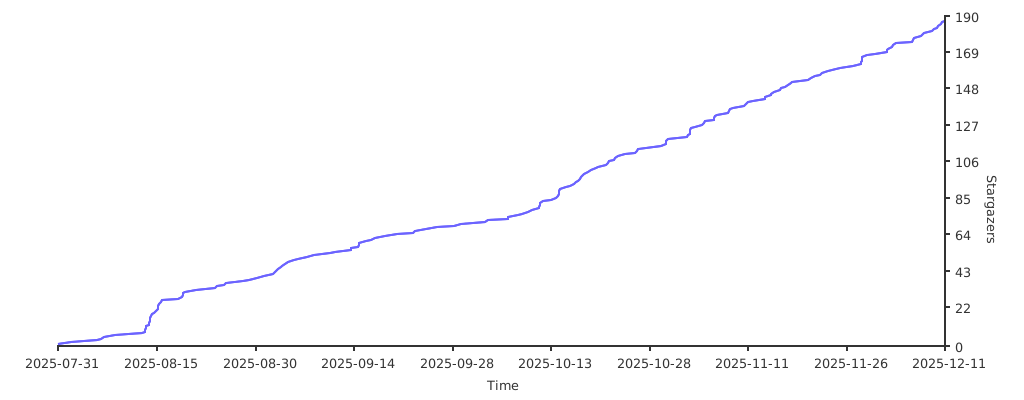](https://starchart.cc/RetroGameSets/RGSX)
|
||||
|
||||
**Developed with ❤️ for the retro gaming community.**
|
||||
**Developed with ❤️ for the retro gaming community.**
|
||||
|
||||
@@ -13,7 +13,7 @@ except Exception:
|
||||
pygame = None # type: ignore
|
||||
|
||||
# Version actuelle de l'application
|
||||
app_version = "2.3.2.1"
|
||||
app_version = "2.3.2.3"
|
||||
|
||||
|
||||
def get_application_root():
|
||||
|
||||
@@ -191,21 +191,49 @@ def is_input_matched(event, action_name):
|
||||
mapping = config.controls_config[action_name]
|
||||
input_type = mapping["type"]
|
||||
|
||||
# Vérifier d'abord le mapping configuré
|
||||
matched = False
|
||||
if input_type == "key" and event.type == pygame.KEYDOWN:
|
||||
return event.key == mapping.get("key")
|
||||
matched = event.key == mapping.get("key")
|
||||
elif input_type == "button" and event.type == pygame.JOYBUTTONDOWN:
|
||||
return event.button == mapping.get("button")
|
||||
matched = event.button == mapping.get("button")
|
||||
elif input_type == "axis" and event.type == pygame.JOYAXISMOTION:
|
||||
axis = mapping.get("axis")
|
||||
direction = mapping.get("direction")
|
||||
return event.axis == axis and abs(event.value) > 0.5 and (1 if event.value > 0 else -1) == direction
|
||||
matched = event.axis == axis and abs(event.value) > 0.5 and (1 if event.value > 0 else -1) == direction
|
||||
elif input_type == "hat" and event.type == pygame.JOYHATMOTION:
|
||||
hat_value = mapping.get("value")
|
||||
if isinstance(hat_value, list):
|
||||
hat_value = tuple(hat_value)
|
||||
return event.value == hat_value
|
||||
matched = event.value == hat_value
|
||||
elif input_type == "mouse" and event.type == pygame.MOUSEBUTTONDOWN:
|
||||
return event.button == mapping.get("button")
|
||||
matched = event.button == mapping.get("button")
|
||||
|
||||
# Si déjà matché, retourner True
|
||||
if matched:
|
||||
return True
|
||||
|
||||
# Fallback clavier pour dépannage (fonctionne toujours même avec manette configurée)
|
||||
if event.type == pygame.KEYDOWN:
|
||||
keyboard_fallback = {
|
||||
"up": pygame.K_UP,
|
||||
"down": pygame.K_DOWN,
|
||||
"left": pygame.K_LEFT,
|
||||
"right": pygame.K_RIGHT,
|
||||
"confirm": pygame.K_RETURN,
|
||||
"cancel": pygame.K_ESCAPE,
|
||||
"start": pygame.K_RALT,
|
||||
"filter": pygame.K_f,
|
||||
"history": pygame.K_h,
|
||||
"clear_history": pygame.K_DELETE,
|
||||
"delete": pygame.K_d,
|
||||
"space": pygame.K_SPACE,
|
||||
"page_up": pygame.K_PAGEUP,
|
||||
"page_down": pygame.K_PAGEDOWN,
|
||||
}
|
||||
if action_name in keyboard_fallback:
|
||||
return event.key == keyboard_fallback[action_name]
|
||||
|
||||
return False
|
||||
|
||||
def _launch_next_queued_download():
|
||||
@@ -2024,10 +2052,32 @@ def handle_controls(event, sources, joystick, screen):
|
||||
|
||||
# Gestion des relâchements de touches
|
||||
if event.type == pygame.KEYUP:
|
||||
# Mapping des touches fallback (pour le dépannage clavier)
|
||||
keyboard_fallback = {
|
||||
"up": pygame.K_UP,
|
||||
"down": pygame.K_DOWN,
|
||||
"left": pygame.K_LEFT,
|
||||
"right": pygame.K_RIGHT,
|
||||
"confirm": pygame.K_RETURN,
|
||||
"cancel": pygame.K_ESCAPE,
|
||||
"start": pygame.K_RALT, # AltGr
|
||||
"filter": pygame.K_f,
|
||||
"history": pygame.K_h,
|
||||
"clear_history": pygame.K_DELETE,
|
||||
"delete": pygame.K_d,
|
||||
"space": pygame.K_SPACE,
|
||||
"page_up": pygame.K_PAGEUP,
|
||||
"page_down": pygame.K_PAGEDOWN,
|
||||
}
|
||||
|
||||
# Vérifier quelle touche a été relâchée
|
||||
for action_name in ["up", "down", "left", "right", "page_up", "page_down", "confirm", "cancel"]:
|
||||
if config.controls_config.get(action_name, {}).get("type") == "key" and \
|
||||
config.controls_config.get(action_name, {}).get("key") == event.key:
|
||||
# Vérifier le mapping configuré OU le fallback clavier
|
||||
is_mapped_key = (config.controls_config.get(action_name, {}).get("type") == "key" and \
|
||||
config.controls_config.get(action_name, {}).get("key") == event.key)
|
||||
is_fallback_key = (action_name in keyboard_fallback and keyboard_fallback[action_name] == event.key)
|
||||
|
||||
if is_mapped_key or is_fallback_key:
|
||||
update_key_state(action_name, False)
|
||||
|
||||
# Gestion spéciale pour confirm dans le menu game
|
||||
|
||||
@@ -1,3 +1,3 @@
|
||||
{
|
||||
"version": "2.3.2.1"
|
||||
"version": "2.3.2.3"
|
||||
}
|
||||
Reference in New Issue
Block a user