forked from Mirrors/RGSX
Compare commits
83 Commits
| Author | SHA1 | Date | |
|---|---|---|---|

|
d9c1ca6794 | ||
|
|
6613b43264 | ||

|
d60dc31291 | ||
|
|
ace6ec876f | ||
|
|
9f759c1928 | ||
|
|
db287e33d7 | ||
|
|
217392dcd1 | ||
|
|
fd9037139c | ||
|
|
c3bbb15c40 | ||
|
|
0c5e307112 | ||
|
|
f9d95b9a2d | ||
|
|
2033eb2f76 | ||
|
|
61b615f4c7 | ||

|
f1c4955670 | ||
|
|
03d64d4401 | ||

|
5569238e55 | ||
|
|
798ef13dd3 | ||
|
|
40d0826a6b | ||
|
|
82dbf4e49d | ||
|
|
26f8499c83 | ||
|
|
0f671ccdf2 | ||
|
|
0c55d6d6d6 | ||
|
|
cdc81f795d | ||
|
|
961e46a77d | ||
|
|
7a061ef0bc | ||
|
|
57b75dc199 | ||
|
|
af42c31476 | ||
|
|
eeea4763f5 | ||
|
|
201d56fff4 | ||
|
|
3caa780e5a | ||
|
|
716fa23e4e | ||
|
|
d0eaf387b2 | ||
|
|
28a0013bee | ||
|
|
acb3eb33c3 | ||
|
|
486c9d0244 | ||
|
|
aed7da8b51 | ||
|
|
93fc4a023d | ||
|
|
b4398b1d82 | ||
|
|
751800026c | ||
|
|
8427ba60eb | ||
|
|
7fbf936af6 | ||
|
|
5fa606b3de | ||
|
|
179d10facd | ||
|
|
06c06d0223 | ||
|
|
18e5f6d637 | ||
|
|
d2a52c5a2e | ||
|
|
9df7a35e85 | ||
|
|
26f1f58d7a | ||
|
|
a9cdba3aa6 | ||
|
|
1a118247d9 | ||
|
|
5497727e2e | ||
|
|
56a6d6f17b | ||
|
|
3e769e4b18 | ||
|
|
3023a45402 | ||
|
|
f1b2fad0d4 | ||
|
|
80844bda79 | ||
|
|
b19d4ff60a | ||
|
|
f6f8436022 | ||
|
|
edb331d053 | ||
|
|
059c38d8d6 | ||
|
|
acac05ea26 | ||
|
|
6e59e954ec | ||
|
|
dac8114a0b | ||
|
|
b46455aff2 | ||
|
|
893573b560 | ||
|
|
8618220f66 | ||
|
|
2fc881e6ab | ||
|
|
a81139b50d | ||
|
|
dd447e0bea | ||
|
|
b8b6277ba0 | ||
|
|
34eafcd981 | ||
|
|
31c8f6a63e | ||
|
|
2caf0f80c7 | ||
|
|
b73c1e7a80 | ||
|
|
b0087c9d58 | ||
|
|
8e60a44ccc | ||
|
|
75cbe5c259 | ||
|
|
669aae02b0 | ||
|
|
acd0ce337e | ||
|
|
0183916667 | ||
|
|
997de8bf36 | ||
|
|
22a36df654 | ||
|
|
ac4c34089e |
133
.github/workflows/release.yml
vendored
Normal file
133
.github/workflows/release.yml
vendored
Normal file
@@ -0,0 +1,133 @@
|
||||
# Pour déclencher ce workflow : git tag v1.X.X && git push origin v1.X.X
|
||||
# OU en une seule ligne : git tag v1.X.X && git push origin --tags
|
||||
name: Release on tag
|
||||
|
||||
on:
|
||||
push:
|
||||
tags:
|
||||
- 'v*'
|
||||
|
||||
permissions:
|
||||
contents: write
|
||||
|
||||
jobs:
|
||||
create_release:
|
||||
runs-on: ubuntu-latest
|
||||
steps:
|
||||
- name: Checkout
|
||||
uses: actions/checkout@v4
|
||||
|
||||
- name: Build RGSX Release Package
|
||||
shell: bash
|
||||
run: |
|
||||
set -euo pipefail
|
||||
VERSION="${GITHUB_REF_NAME}"
|
||||
mkdir -p dist
|
||||
|
||||
echo "Building RGSX package from ports/RGSX/ directory…"
|
||||
cd ports/RGSX
|
||||
|
||||
zip -r "../../dist/RGSX_update_latest.zip" . \
|
||||
-x "logs/*" \
|
||||
"logs/**" \
|
||||
"images/*" \
|
||||
"images/**" \
|
||||
"games/*" \
|
||||
"games/**" \
|
||||
"scripts/*" \
|
||||
"scripts/**" \
|
||||
"__pycache__/*" \
|
||||
"__pycache__/**" \
|
||||
"*.pyc" \
|
||||
"sources.json" \
|
||||
"*.log"
|
||||
|
||||
cd ../..
|
||||
cp -f "dist/RGSX_update_latest.zip" "dist/RGSX_latest.zip"
|
||||
|
||||
echo "✓ RGSX package created successfully"
|
||||
|
||||
echo ""
|
||||
echo "Building RGSX Full package (includes ports/ and windows/ directories)…"
|
||||
zip -r "dist/RGSX_full_latest.zip" ports windows \
|
||||
-x "ports/RGSX/logs/*" \
|
||||
"ports/RGSX/logs/**" \
|
||||
"ports/RGSX/images/*" \
|
||||
"ports/RGSX/images/**" \
|
||||
"ports/RGSX/games/*" \
|
||||
"ports/RGSX/games/**" \
|
||||
"ports/RGSX/scripts/*" \
|
||||
"ports/RGSX/scripts/**" \
|
||||
"ports/RGSX/__pycache__/*" \
|
||||
"ports/RGSX/__pycache__/**" \
|
||||
"ports/RGSX/*.pyc" \
|
||||
"ports/RGSX/sources.json" \
|
||||
"ports/RGSX/*.log" \
|
||||
"windows/logs/*" \
|
||||
"windows/*.xml" \
|
||||
"ports/*.xml" \
|
||||
"*.xml" \
|
||||
"*.pyc" \
|
||||
"*.xml" \
|
||||
"*.log"
|
||||
|
||||
|
||||
echo "✓ All packages created successfully"
|
||||
ls -lh dist/
|
||||
|
||||
- name: Create GitHub Release
|
||||
uses: softprops/action-gh-release@v2
|
||||
with:
|
||||
tag_name: ${{ github.ref_name }}
|
||||
name: RGSX ${{ github.ref_name }}
|
||||
generate_release_notes: true
|
||||
draft: false
|
||||
prerelease: false
|
||||
body: |
|
||||
# 📦 RGSX Release ${{ github.ref_name }}
|
||||
|
||||
## 📥 Automatic Installation (Only for batocera Knulli)
|
||||
|
||||
### ON PC :
|
||||
1. Open File Manager (F1) then "Applications" and launch xterm
|
||||
2. Use the command line `curl -L bit.ly/rgsx-install | sh`
|
||||
3. Launch RGSX from "Ports" menu
|
||||
|
||||
### ON RASPBERRY/ARM SBC / HANDHELD :
|
||||
1. Connect your device with SSH on a computer/smartphone connected to same network (ssh root@IPADDRESS , pass:linux)
|
||||
2. Use the command line `curl -L bit.ly/rgsx-install | sh`
|
||||
3. Launch RGSX from "Ports" menu
|
||||
|
||||
## 📥 Manual Installation
|
||||
|
||||
### Batocera/Knulli
|
||||
1. Download latest release : https://github.com/RetroGameSets/RGSX/releases/latest/download/RGSX_full_latest.zip
|
||||
2. Extract only PORTS folder in `/userdata/roms/`
|
||||
3. Launch RGSX from the Ports menu
|
||||
|
||||
### Retrobat/Full Installation on Windows
|
||||
1. Download latest release : https://github.com/RetroGameSets/RGSX/releases/latest/download/RGSX_full_latest.zip
|
||||
2. Extract all folders in your Retrobat\roms folder
|
||||
3. Launch RGSX from system "Windows"
|
||||
|
||||
|
||||
## 📥 Manual Update (you shouldn't need to do this as RGSX updates automatically on each start)
|
||||
|
||||
#### Batocera/Knulli
|
||||
1. Download latest update : https://github.com/RetroGameSets/RGSX/releases/latest/download/RGSX_update_latest.zip
|
||||
2. Extract only PORTS folder in `/userdata/roms/`
|
||||
3. Launch RGSX from the Ports menu
|
||||
|
||||
#### Retrobat
|
||||
1. Download latest update : https://github.com/RetroGameSets/RGSX/releases/latest/download/RGSX_update_latest.zip
|
||||
2. Extract all folders in your Retrobat\roms folder
|
||||
3. Launch RGSX from system "Windows"
|
||||
|
||||
|
||||
### 📖 Documentation
|
||||
[README.md](https://github.com/${{ github.repository }}/blob/main/README.md)
|
||||
files: |
|
||||
dist/RGSX_update_latest.zip
|
||||
dist/RGSX_full_latest.zip
|
||||
env:
|
||||
GITHUB_TOKEN: ${{ secrets.GITHUB_TOKEN }}
|
||||
13
.gitignore
vendored
13
.gitignore
vendored
@@ -6,11 +6,20 @@ ports/RGSX/__pycache__/
|
||||
ports/RGSX/sources.json
|
||||
ports/gamelist.xml
|
||||
windows/gamelist.xml
|
||||
windows/logs/
|
||||
ports/gamelist.xml
|
||||
prboom/
|
||||
*.log
|
||||
*.rar
|
||||
*.zip
|
||||
.vscode/
|
||||
ports/RGSX.bat
|
||||
.venv/
|
||||
*.py
|
||||
audit_i18n.py
|
||||
prune_i18n.py
|
||||
Info.txt
|
||||
pygame/
|
||||
|
||||
# Docker test data
|
||||
data/
|
||||
docker-compose.test.yml
|
||||
config/
|
||||
|
||||
@@ -1,71 +0,0 @@
|
||||
# Migration vers rgsx_settings.json
|
||||
|
||||
## Résumé des changements
|
||||
|
||||
Ce commit unifie les fichiers de configuration suivants en un seul fichier `rgsx_settings.json` :
|
||||
|
||||
- `accessibility.json` → `rgsx_settings.json` (clé: `accessibility`)
|
||||
- `language.json` → `rgsx_settings.json` (clé: `language`)
|
||||
- `music_config.json` → `rgsx_settings.json` (clé: `music_enabled`)
|
||||
- `symlink_settings.json` → `rgsx_settings.json` (clé: `symlink`)
|
||||
|
||||
## Structure du nouveau fichier rgsx_settings.json
|
||||
|
||||
```json
|
||||
{
|
||||
"language": "fr",
|
||||
"music_enabled": true,
|
||||
"accessibility": {
|
||||
"font_scale": 1.0
|
||||
},
|
||||
"symlink": {
|
||||
"enabled": false,
|
||||
"target_directory": ""
|
||||
}
|
||||
}
|
||||
```
|
||||
|
||||
## Nouveau module rgsx_settings.py
|
||||
|
||||
Un nouveau module `rgsx_settings.py` a été créé pour centraliser la gestion des paramètres :
|
||||
|
||||
### Fonctions principales :
|
||||
- `load_rgsx_settings()` : Charge tous les paramètres depuis rgsx_settings.json
|
||||
- `save_rgsx_settings(settings)` : Sauvegarde tous les paramètres
|
||||
- `migrate_old_settings()` : Migre automatiquement les anciens fichiers
|
||||
|
||||
## Fichiers modifiés
|
||||
|
||||
### Nouveau fichier : rgsx_settings.py
|
||||
- Module dédié à la gestion des paramètres RGSX
|
||||
- Contient toute la logique de chargement, sauvegarde et migration
|
||||
- Documentation complète des fonctions
|
||||
|
||||
### config.py
|
||||
- Ajout de `RGSX_SETTINGS_PATH`
|
||||
- Import des fonctions depuis `rgsx_settings.py`
|
||||
- Conservation temporaire des anciens chemins pour la migration
|
||||
- Suppression des fonctions de gestion des paramètres (déplacées vers rgsx_settings.py)
|
||||
|
||||
### accessibility.py
|
||||
- Import des fonctions depuis `rgsx_settings.py`
|
||||
- Utilisation directe des fonctions importées au lieu de `config.`
|
||||
|
||||
### utils.py
|
||||
- Import des fonctions depuis `rgsx_settings.py`
|
||||
- Fonctions `load_music_config()` et `save_music_config()` mises à jour
|
||||
|
||||
### symlink_settings.py
|
||||
- Import des fonctions depuis `rgsx_settings.py`
|
||||
- Fonctions `load_symlink_settings()` et `save_symlink_settings()` mises à jour
|
||||
- Compatibilité maintenue avec l'ancien format (`use_symlink_path`)
|
||||
|
||||
## Migration automatique
|
||||
|
||||
Le système détecte automatiquement les anciens fichiers et les migre vers le nouveau format :
|
||||
|
||||
1. Au premier lancement, `load_rgsx_settings()` vérifie si `rgsx_settings.json` existe
|
||||
2. Si absent, il tente de migrer les données depuis les anciens fichiers
|
||||
3. Les valeurs par défaut sont utilisées si aucun ancien fichier n'est trouvé
|
||||
4. Le nouveau fichier unifié est créé automatiquement
|
||||
5. Les anciens fichiers sont automatiquement supprimés après migration réussie
|
||||
377
README.md
377
README.md
@@ -1,241 +1,236 @@
|
||||
# 🎮 Retro Game Sets Xtra (RGSX)
|
||||
|
||||
## SUPPORT / HELP: https://discord.gg/Vph9jwg3VV
|
||||
## LISEZ-MOI / INSTRUCTIONS EN FRANCAIS : https://github.com/RetroGameSets/RGSX/blob/main/README_FR.md
|
||||
**[Discord Support](https://discord.gg/Vph9jwg3VV)** • **[Installation](#-installation)** • **[French Documentation](https://github.com/RetroGameSets/RGSX/blob/main/README_FR.md)**
|
||||
|
||||
RGSX is a Python application using Pygame for its graphical interface, created by and for the RetroGameSets community. It is completely free.
|
||||
A free, user-friendly ROM downloader for Batocera, Knulli, and RetroBat with multi-source support.
|
||||
|
||||
The application currently supports multiple download sources such as myrient and 1fichier (with optional unlocking / fallback via AllDebrid and Real-Debrid). Sources can be updated frequently.
|
||||
<p align="center">
|
||||
<img width="69%" alt="platform menu" src="https://github.com/user-attachments/assets/4464b57b-06a8-45e9-a411-cc12b421545a" />
|
||||
<img width="30%" alt="controls help" src="https://github.com/user-attachments/assets/38cac7e6-14f2-4e83-91da-0679669822ee" />
|
||||
</p>
|
||||
<p align="center">
|
||||
<img width="49%" alt="web interface" src="https://github.com/user-attachments/assets/71f8bd39-5901-45a9-82b2-91426b3c31a7" />
|
||||
<img width="49%" alt="api menu" src="https://github.com/user-attachments/assets/5bae018d-b7d9-4a95-9f1b-77db751ff24f" />
|
||||
</p>
|
||||
|
||||
## INSTALLATION : https://github.com/RetroGameSets/RGSX#-installation
|
||||
|
||||
## ✨ Features
|
||||
|
||||
- **Game downloads**: Supports ZIP files and handles unsupported raw archives automatically based on allowed extensions defined in EmulationStation's `es_systems.cfg` (and custom `es_systems_*.cfg` on Batocera). RGSX reads the per‑system allowed extensions and extracts archives automatically if the target system does not support zipped files.
|
||||
- Most downloads require no account or authentication.
|
||||
- Systems tagged with `(1fichier)` in their name require a valid API key (1Fichier, AllDebrid or Real-Debrid) for premium links.
|
||||
|
||||
---
|
||||
> ## IMPORTANT (1Fichier / AllDebrid / Real-Debrid)
|
||||
> To download from 1Fichier links you may use one of: your 1Fichier API key, an AllDebrid API key (automatic fallback), or a Real-Debrid API key (fallback if others missing / limited).
|
||||
>
|
||||
> Where to paste your API key (file must contain ONLY the key):
|
||||
> - `/saves/ports/rgsx/1FichierAPI.txt` (1Fichier API key)
|
||||
> - `/saves/ports/rgsx/AllDebridAPI.txt` (AllDebrid API key – optional fallback)
|
||||
> - `/saves/ports/rgsx/RealDebridAPI.txt` (Real-Debrid API key – optional fallback)
|
||||
>
|
||||
> Do NOT create these files manually. Launch RGSX once: it will auto‑create the empty files if they are missing. Then open the relevant file and paste your key.
|
||||
---
|
||||
|
||||
**🧰 Command Line (CLI) Usage**
|
||||
|
||||
RGSX also provides a headless command‑line interface to list platforms/games and download ROMs:
|
||||
|
||||
- French CLI guide: https://github.com/RetroGameSets/RGSX/blob/main/README_CLI.md
|
||||
- English CLI guide: https://github.com/RetroGameSets/RGSX/blob/main/README_CLI_EN.md
|
||||
|
||||
- **Download history**: View all current and past downloads.
|
||||
- **Multi‑selection downloads**: Mark several games using the key mapped to Clear History (default X) to prepare a batch, then Confirm to launch sequential downloads.
|
||||
- **Control customization**: Remap keyboard / controller buttons; many popular pads are auto‑configured on first launch.
|
||||
- **Platform grid layouts**: Switch between 3x3, 3x4, 4x3, 4x4.
|
||||
- **Hide unsupported systems**: Automatically hides systems whose ROM folder is missing (toggle in Display menu).
|
||||
- **Change font & size**: Accessibility & readability adjustments directly in the menu.
|
||||
- **Search / filter mode**: Quickly filter games by name; includes on‑screen virtual keyboard for controllers.
|
||||
- **Multi‑language interface**: Switch language any time in the menu.
|
||||
- **Adaptive interface**: Scales cleanly from 800x600 up to 1080p (higher resolutions untested but should work).
|
||||
- **Auto update & restart**: The application restarts itself after applying an update.
|
||||
- **System & extension discovery**: On first run, RGSX parses `es_systems.cfg` (Batocera / RetroBat) and generates `/saves/ports/rgsx/rom_extensions.json` plus the supported systems list.
|
||||
|
||||
---
|
||||
|
||||
## 🖥️ Requirements
|
||||
|
||||
### Operating System
|
||||
- Batocera / Knulli or RetroBat
|
||||
|
||||
### Hardware
|
||||
- PC, Raspberry Pi, handheld console...
|
||||
- Controller (recommended) or keyboard
|
||||
- Active internet connection
|
||||
|
||||
### Disk Space
|
||||
- ~100 MB for the application (additional space for downloaded games)
|
||||
|
||||
---
|
||||
|
||||
## 🚀 Installation
|
||||
|
||||
### Automatic Method (Batocera / Knulli)
|
||||
### Quick Install (Batocera / Knulli)
|
||||
|
||||
On the target system:
|
||||
- On Batocera PC: open an xTERM (F1 > Applications > xTERM), or
|
||||
- From another machine: connect via SSH (root / linux) using PuTTY, PowerShell, etc.
|
||||
**SSH or Terminal access required:**
|
||||
```bash
|
||||
curl -L bit.ly/rgsx-install | sh
|
||||
```
|
||||
|
||||
Run:
|
||||
`curl -L bit.ly/rgsx-install | sh`
|
||||
After installation:
|
||||
1. Update game lists: `Menu > Game Settings > Update game list`
|
||||
2. Find RGSX under **PORTS** or **Homebrew and ports**
|
||||
|
||||
Wait for the script to finish (log file and on‑screen output). Then update the game list via:
|
||||
`Menu > Game Settings > Update game list`
|
||||
### Manual Install (All Systems)
|
||||
1. **Download**: [RGSX_full_latest.zip](https://github.com/RetroGameSets/RGSX/releases/latest/download/RGSX_full_latest.zip)
|
||||
2. **Extract**:
|
||||
- **Batocera/Knulli**: Extract `ports` folder to `/roms/`
|
||||
- **RetroBat**: Extract both `ports` and `windows` folders to `/roms/`
|
||||
3. **Refresh**: `Menu > Game Settings > Update game list`
|
||||
|
||||
You will find RGSX under the "PORTS" or "Homebrew and ports" system. Physical paths created: `/roms/ports/RGSX` (and `/roms/windows/RGSX` on RetroBat environments as needed).
|
||||
### Manual Update (if automatic update failed)
|
||||
Download latest release : [RGSX_update_latest.zip](https://github.com/RetroGameSets/RGSX/releases/latest/download/RGSX_full_latest.zip)
|
||||
|
||||
### Manual Method (RetroBat / Batocera)
|
||||
|
||||
1. Download ZIP: https://github.com/RetroGameSets/RGSX/archive/refs/heads/main.zip
|
||||
2. Extract into your ROMS folder:
|
||||
- Batocera: only extract the `ports` folder contents
|
||||
- RetroBat: extract both `ports` and `windows`
|
||||
3. Ensure you now have: `/roms/ports/RGSX` and (RetroBat) `/roms/windows/RGSX`
|
||||
4. Update the game list: `Menu > Game Settings > Update game list`
|
||||
**Installed paths:**
|
||||
- `/roms/ports/RGSX` (all systems)
|
||||
- `/roms/windows/RGSX` (RetroBat only)
|
||||
|
||||
---
|
||||
|
||||
## 🏁 First Launch
|
||||
## 🎮 Usage
|
||||
|
||||
- RGSX appears in the "WINDOWS" system on RetroBat, and in "PORTS" / "Homebrew and ports" on Batocera/Knulli.
|
||||
- On first launch, if your controller matches a predefined profile in `/roms/ports/RGSX/assets/controls`, mapping is auto‑imported.
|
||||
- The app then downloads required data (system images, game lists, etc.).
|
||||
- If controls act strangely or are corrupt, delete `/saves/ports/rgsx/controls.json` and restart (it will be regenerated).
|
||||
### First Launch
|
||||
|
||||
INFO (RetroBat only): On the first run, Python (~50 MB) is downloaded into `/system/tools/python`. The screen may appear frozen on the loading splash for several seconds—this is normal. Installation output is logged in `/roms/ports/RGSX-INSTALL.log` (share this if you need support).
|
||||
- Auto-downloads system images and game lists
|
||||
- Auto-configures controls if your controller is recognized
|
||||
- **Controls broken?** Delete `/saves/ports/rgsx/controls.json` and restart
|
||||
|
||||
**Keyboard Mode**: When no controller is detected, controls display as `[Key]` instead of icons.
|
||||
|
||||
### Pause Menu Structure
|
||||
|
||||
**Controls**
|
||||
- View Controls Help
|
||||
- Remap Controls
|
||||
|
||||
**Display**
|
||||
- Layout (3×3, 3×4, 4×3, 4×4)
|
||||
- Font Size (general UI)
|
||||
- Footer Font Size (controls/version text)
|
||||
- Font Family (pixel fonts)
|
||||
- Hide Unknown Extension Warning
|
||||
|
||||
**Games**
|
||||
- Download History
|
||||
- Source Mode (RGSX / Custom)
|
||||
- Update Game Cache
|
||||
- Show Unsupported Platforms
|
||||
- Hide Premium Systems
|
||||
- Filter Platforms
|
||||
|
||||
**Settings**
|
||||
- Background Music Toggle
|
||||
- Symlink Options (Batocera)
|
||||
- Web Service (Batocera)
|
||||
- API Keys Management
|
||||
- Language Selection
|
||||
|
||||
---
|
||||
|
||||
## 🕹️ Usage
|
||||
## ✨ Features
|
||||
|
||||
### Menu Navigation
|
||||
- 🎯 **Smart System Detection** – Auto-discovers supported systems from `es_systems.cfg`
|
||||
- 📦 **Intelligent Archive Handling** – Auto-extracts archives when systems don't support ZIP files
|
||||
- 🔑 **Premium Unlocking** – 1Fichier API + AllDebrid/Real-Debrid fallback for unlimited downloads
|
||||
- 🎨 **Fully Customizable** – Layout (3×3 to 4×4), fonts, font sizes (UI + footer), languages (EN/FR/DE/ES/IT/PT)
|
||||
- 🎮 **Controller-First Design** – Auto-mapping for popular controllers + custom remapping support
|
||||
- 🔍 **Advanced Filtering** – Search by name, hide/show unsupported systems, filter platforms
|
||||
- 📊 **Download Management** – Queue system, history tracking, progress notifications
|
||||
- 🌐 **Custom Sources** – Use your own game repository URLs
|
||||
- ♿ **Accessibility** – Separate font scaling for UI and footer, keyboard-only mode support
|
||||
|
||||
- Use D‑Pad / Arrow keys to move between platforms, games, and options.
|
||||
- Press the Start key (default: `P` or controller Start) for the pause menu with all configuration options.
|
||||
- From the pause menu you can regenerate cached system/game/image lists to pull latest updates.
|
||||
|
||||
### Display Menu
|
||||
|
||||
- Layout: switch platform grid (3x3, 3x4, 4x3, 4x4)
|
||||
- Font size: adjust text scale (accessibility)
|
||||
- Show unsupported systems: toggle systems whose ROM directory is missing
|
||||
- Filter systems: persistently include/exclude systems by name
|
||||
> ### 🔑 API Keys Setup
|
||||
> For unlimited 1Fichier downloads, add your API key(s) to `/saves/ports/rgsx/`:
|
||||
> - `1FichierAPI.txt` – 1Fichier API key (recommended)
|
||||
> - `AllDebridAPI.txt` – AllDebrid fallback (optional)
|
||||
> - `RealDebridAPI.txt` – Real-Debrid fallback (optional)
|
||||
>
|
||||
> **Each file must contain ONLY the key, no extra text.**
|
||||
|
||||
### Downloading Games
|
||||
|
||||
1. Select a platform then a game
|
||||
2. Press the Confirm key (default: Enter / A) to start downloading
|
||||
3. (Optional) Press the Clear History key (default: X) on multiple games to toggle multi‑selection ([X] marker), then Confirm to launch a sequential batch
|
||||
4. Track progress in the HISTORY menu
|
||||
1. Browse platforms → Select game
|
||||
2. **Direct Download**: Press `Confirm`
|
||||
3. **Queue Download**: Press `X` (West button)
|
||||
4. Track progress in **History** menu or via popup notifications
|
||||
|
||||
### Control Customization
|
||||
### Custom Game Sources
|
||||
|
||||
- Open pause menu → Reconfigure controls
|
||||
- Hold each desired key/button for ~3 seconds when prompted
|
||||
- Button labels adapt to your pad (A/B/X/Y, LB/RB/LT/RT, etc.)
|
||||
- Delete `/saves/ports/rgsx/controls.json` if mapping breaks; restart to regenerate
|
||||
Switch to custom sources via **Pause Menu > Games > Source Mode**.
|
||||
|
||||
### History
|
||||
|
||||
- Access from pause menu or press the History key (default: H)
|
||||
- Select an entry to re‑download (e.g. after an error or cancellation)
|
||||
- CLEAR button empties the list only (does not delete installed games)
|
||||
- BACK cancels an active download
|
||||
|
||||
### Logs
|
||||
|
||||
Logs are stored at: `/roms/ports/RGSX/logs/RGSX.log` (provide this for troubleshooting).
|
||||
|
||||
---
|
||||
|
||||
## 🔄 Changelog
|
||||
See Discord or GitHub commits for the latest changes.
|
||||
|
||||
---
|
||||
|
||||
## 🌐 Custom Game Sources
|
||||
Switch the game source in the pause menu (Game Source: RGSX / Custom).
|
||||
|
||||
Custom mode expects an HTTP/HTTPS ZIP URL pointing to a sources archive mirroring the default structure. Configure in:
|
||||
`{rgsx_settings path}` → key: `sources.custom_url`
|
||||
|
||||
Behavior:
|
||||
- If custom mode is selected and URL is empty/invalid → empty list + popup (no fallback)
|
||||
- Fix the URL then choose "Update games list" (restart if prompted)
|
||||
|
||||
Example `rgsx_settings.json` snippet:
|
||||
Configure in `/saves/ports/rgsx/rgsx_settings.json`:
|
||||
```json
|
||||
"sources": {
|
||||
"mode": "custom",
|
||||
"custom_url": "https://example.com/my-sources.zip"
|
||||
{
|
||||
"sources": {
|
||||
"mode": "custom",
|
||||
"custom_url": "https://example.com/my-sources.zip"
|
||||
}
|
||||
}
|
||||
```
|
||||
Switch back to RGSX mode any time via the pause menu.
|
||||
**Note**: If custom mode activated but Invalid/empty URL = using /saves/ports/rgsx/games.zip . You need to update games cache on RGSX menu after fixing URL.
|
||||
|
||||
---
|
||||
|
||||
## 📁 Project Structure
|
||||
```
|
||||
/roms/windows/RGSX
|
||||
│
|
||||
├── RGSX Retrobat.bat # Windows/RetroBat launcher (not needed on Batocera/Knulli)
|
||||
## 🌐 Web Interface (Batocera/Knulli Only)
|
||||
|
||||
/roms/ports/
|
||||
├── RGSX-INSTALL.log # Install log (first scripted install)
|
||||
└── RGSX/
|
||||
├── __main__.py # Main entry point
|
||||
├── controls.py # Input handling & menu navigation events
|
||||
├── controls_mapper.py # Interactive control remapping & auto button naming
|
||||
├── display.py # Pygame rendering layer
|
||||
├── config.py # Global paths / parameters
|
||||
├── rgsx_settings.py # Unified settings manager
|
||||
├── network.py # Download logic (multi-provider, fallback)
|
||||
├── history.py # Download history store & UI logic
|
||||
├── language.py # Localization manager
|
||||
├── accessibility.py # Accessibility options (fonts, layout)
|
||||
├── utils.py # Helper utilities (text wrapping, truncation, etc.)
|
||||
├── update_gamelist.py # Game list updater (Batocera/Knulli)
|
||||
├── update_gamelist_windows.py # RetroBat gamelist auto-update on launch
|
||||
├── assets/ # Fonts, binaries, music, predefined control maps
|
||||
├── languages/ # Translation files
|
||||
└── logs/
|
||||
└── RGSX.log # Runtime log
|
||||
RGSX includes a web interface that launched automatically when using RGSX for remote browsing and downloading games from any device on your network.
|
||||
|
||||
### Accessing the Web Interface
|
||||
|
||||
1. **Find your Batocera IP address**:
|
||||
- Check Batocera menu: `Network Settings`
|
||||
- Or from terminal: `ip addr show`
|
||||
|
||||
2. **Open in browser**: `http://[BATOCERA_IP]:5000` or `http://BATOCERA:5000`
|
||||
- Example: `http://192.168.1.100:5000`
|
||||
|
||||
3. **Available from any device**: Phone, tablet, PC on the same network
|
||||
|
||||
### Web Interface Features
|
||||
|
||||
- 📱 **Mobile-Friendly** – Responsive design works on all screen sizes
|
||||
- 🔍 **Browse All Systems** – View all platforms and games
|
||||
- ⬇️ **Remote Downloads** – Queue downloads directly to your Batocera
|
||||
- 📊 **Real-Time Status** – See active downloads and history
|
||||
- 🎮 **Same Game Lists** – Uses identical sources as the main app
|
||||
|
||||
|
||||
### Enable/Disable Web Service at Boot, without the need to launch RGSX
|
||||
|
||||
**From RGSX Menu**
|
||||
1. Open **Pause Menu** (Start/ALTGr)
|
||||
2. Navigate to **Settings > Web Service**
|
||||
3. Toggle **Enable at Boot**
|
||||
4. Restart your device
|
||||
|
||||
|
||||
**Port Configuration**: The web service runs on port `5000` by default. Ensure this port is not blocked by firewall rules.
|
||||
|
||||
---
|
||||
|
||||
## 📁 File Structure
|
||||
|
||||
/saves/ports/RGSX/
|
||||
├── systems_list.json # Discovered systems / folders / images
|
||||
├── games/ # Platform game link repositories
|
||||
├── images/ # Downloaded platform images
|
||||
├── rgsx_settings.json # Unified config (settings, language, music, symlinks, sources)
|
||||
├── controls.json # Generated control mapping
|
||||
├── history.json # Download history database
|
||||
├── rom_extensions.json # Allowed ROM extensions cache from es_systems.cfg
|
||||
├── 1FichierAPI.txt # 1Fichier API key (empty until you paste key)
|
||||
├── AllDebridAPI.txt # AllDebrid API key (optional fallback)
|
||||
└── RealDebridAPI.txt # Real-Debrid API key (optional fallback)
|
||||
```
|
||||
/roms/ports/RGSX/
|
||||
├── __main__.py # Entry point
|
||||
├── controls.py # Input handling
|
||||
├── display.py # Rendering engine
|
||||
├── network.py # Download manager
|
||||
├── rgsx_settings.py # Settings manager
|
||||
├── assets/controls/ # Controller profiles
|
||||
├── languages/ # Translations (EN/FR/DE/ES/IT/PT)
|
||||
└── logs/RGSX.log # Runtime logs
|
||||
|
||||
/roms/windows/RGSX/
|
||||
└── RGSX Retrobat.bat # RetroBat launcher
|
||||
|
||||
/saves/ports/rgsx/
|
||||
├── rgsx_settings.json # User preferences
|
||||
├── controls.json # Control mapping
|
||||
├── history.json # Download history
|
||||
├── rom_extensions.json # Supported extensions cache
|
||||
├── systems_list.json # Detected systems
|
||||
├── games/ # Game databases (per platform)
|
||||
├── images/ # Platform images
|
||||
├── 1FichierAPI.txt # 1Fichier API key
|
||||
├── AllDebridAPI.txt # AllDebrid API key
|
||||
└── RealDebridAPI.txt # Real-Debrid API key
|
||||
```
|
||||
|
||||
---
|
||||
|
||||
## 🛠️ Troubleshooting
|
||||
|
||||
| Issue | Solution |
|
||||
|-------|----------|
|
||||
| Controls not working | Delete `/saves/ports/rgsx/controls.json` + restart |
|
||||
| Games not showing | Pause Menu > Games > Update Game Cache |
|
||||
| Download stuck | Check API keys in `/saves/ports/rgsx/` |
|
||||
| App crashes | Check `/roms/ports/RGSX/logs/RGSX.log` |
|
||||
| Layout change not applied | Restart RGSX after changing layout |
|
||||
|
||||
**Need help?** Share logs from `/roms/ports/RGSX/logs/` on [Discord](https://discord.gg/Vph9jwg3VV).
|
||||
|
||||
---
|
||||
|
||||
## 🤝 Contributing
|
||||
|
||||
### Report a Bug
|
||||
1. Review `/roms/ports/RGSX/logs/RGSX.log`.
|
||||
2. Open a GitHub issue with a clear description + relevant log excerpt OR share it on Discord.
|
||||
|
||||
### Propose a Feature
|
||||
- Open an issue (or discuss on Discord first) describing the feature and its integration.
|
||||
|
||||
### Contribute Code
|
||||
1. Fork the repository & create a feature branch:
|
||||
```bash
|
||||
git checkout -b feature/your-feature-name
|
||||
```
|
||||
2. Test on Batocera / RetroBat.
|
||||
3. Open a Pull Request with a detailed summary.
|
||||
|
||||
---
|
||||
|
||||
## ⚠️ Known Issues
|
||||
- (None currently listed)
|
||||
- **Bug Reports**: Open GitHub issue with logs or post on Discord
|
||||
- **Feature Requests**: Discuss on Discord first, then open issue
|
||||
- **Code Contributions**:
|
||||
```bash
|
||||
git checkout -b feature/your-feature
|
||||
# Test on Batocera/RetroBat
|
||||
# Submit Pull Request
|
||||
```
|
||||
|
||||
---
|
||||
|
||||
## 📝 License
|
||||
This project is free software. You are free to use, modify, and distribute it under the terms of the included license.
|
||||
|
||||
Developed with ❤️ for retro gaming enthusiasts.
|
||||
Free and open-source software. Use, modify, and distribute freely.
|
||||
|
||||
## Thanks to all contributors, and followers of this app
|
||||
|
||||
**If you want to support my project you can buy me a beer : https://bit.ly/donate-to-rgsx**
|
||||
[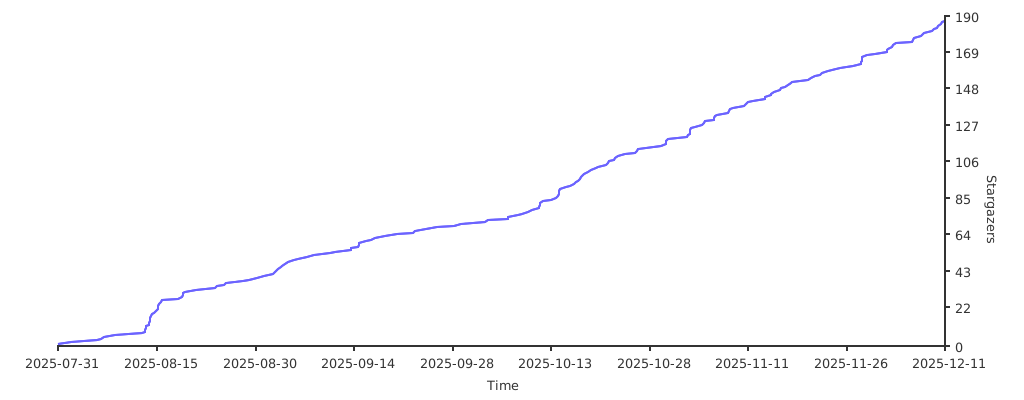](https://starchart.cc/RetroGameSets/RGSX)
|
||||
|
||||
**Developed with ❤️ for the retro gaming community.**
|
||||
|
||||
251
README_CLI.md
251
README_CLI.md
@@ -1,251 +0,0 @@
|
||||
# RGSX CLI — Guide d’utilisation
|
||||
|
||||
Ce guide couvre toutes les commandes disponibles du CLI et fournit des exemples prêts à copier (Windows PowerShell).
|
||||
|
||||
## Nouveau: mode interactif
|
||||
Vous pouvez maintenant lancer une session interactive et enchaîner les commandes sans retaper `python rgsx_cli.py` à chaque fois :
|
||||
|
||||
```powershell
|
||||
python rgsx_cli.py
|
||||
```
|
||||
Vous verrez :
|
||||
```
|
||||
RGSX CLI interactive mode. Type 'help' for commands, 'exit' to quit.
|
||||
rgsx>
|
||||
```
|
||||
Dans cette session tapez directement les sous-commandes :
|
||||
```
|
||||
rgsx> platforms
|
||||
rgsx> games --platform snes --search mario
|
||||
rgsx> download --platform snes --game "Super Mario World (USA).zip"
|
||||
rgsx> history --tail 10
|
||||
rgsx> exit
|
||||
```
|
||||
Extras :
|
||||
- `help` ou `?` affiche l’aide globale.
|
||||
- `exit` ou `quit` quitte la session.
|
||||
- `--verbose` une fois active les logs détaillés pour toute la session.
|
||||
|
||||
## Tableau formaté (platforms)
|
||||
La commande `platforms` affiche maintenant un tableau ASCII à largeur fixe (sauf avec `--json`) :
|
||||
```
|
||||
+--------------------------------+-----------------+
|
||||
| Nom de plateforme | Dossier |
|
||||
+--------------------------------+-----------------+
|
||||
| Nintendo Entertainment System | nes |
|
||||
| Super Nintendo Entertainment.. | snes |
|
||||
| Sega Mega Drive | megadrive |
|
||||
+--------------------------------+-----------------+
|
||||
```
|
||||
Colonnes : 30 caractères pour le nom, 15 pour le dossier (troncature par `...`).
|
||||
|
||||
## Aliases & synonymes d’options (mis à jour)
|
||||
Aliases des sous-commandes :
|
||||
- `platforms` → `p`
|
||||
- `games` → `g`
|
||||
- `download` → `dl`
|
||||
- `clear-history` → `clear`
|
||||
|
||||
Options équivalentes (toutes les formes listées sont acceptées) :
|
||||
- Plateforme : `--platform`, `--p`, `-p`
|
||||
- Jeu : `--game`, `--g`, `-g`
|
||||
- Recherche : `--search`, `--s`, `-s`
|
||||
- Forcer (download) : `--force`, `-f`
|
||||
- Mode interactif (download) : `--interactive`, `-i`
|
||||
|
||||
Exemples avec alias :
|
||||
```powershell
|
||||
python rgsx_cli.py dl -p snes -g "Super Mario World (USA).zip"
|
||||
python rgsx_cli.py g --p snes --s mario
|
||||
python rgsx_cli.py p --json
|
||||
python rgsx_cli.py clear
|
||||
```
|
||||
|
||||
## Sélection ambiguë lors d’un download (nouveau tableau)
|
||||
Quand vous tentez un téléchargement avec un titre non exact et que le mode interactif est actif (TTY ou `--interactive`), les correspondances s’affichent en tableau :
|
||||
```
|
||||
No exact result found for this game: mario super yoshi
|
||||
Select a match to download:
|
||||
+------+--------------------------------------------------------------+------------+
|
||||
| # | Title | Size |
|
||||
+------+--------------------------------------------------------------+------------+
|
||||
| 1 | Super Mario - Yoshi Island (Japan).zip | 3.2M |
|
||||
| 2 | Super Mario - Yoshi Island (Japan) (Rev 1).zip | 3.2M |
|
||||
| 3 | Super Mario - Yoshi Island (Japan) (Rev 2).zip | 3.2M |
|
||||
| 4 | Super Mario World 2 - Yoshi's Island (USA).zip | 3.3M |
|
||||
| 5 | Super Mario - Yoshi Island (Japan) (Beta) (1995-07-10).zip | 3.1M |
|
||||
+------+--------------------------------------------------------------+------------+
|
||||
Enter number (or press Enter to cancel):
|
||||
```
|
||||
Si vous annulez ou que le mode interactif n’est pas actif, un tableau similaire est affiché (sans le prompt) suivi d’un conseil.
|
||||
|
||||
## Recherche améliorée (multi‑tokens) pour `games`
|
||||
L’option `--search` / `--s` / `-s` utilise maintenant la même logique de classement que les suggestions du download :
|
||||
1. Correspondance sous-chaîne (position la plus tôt) — priorité 0
|
||||
2. Séquence de tokens dans l’ordre (non contiguë) — priorité 1 (écart le plus faible)
|
||||
3. Tous les tokens présents dans n’importe quel ordre — priorité 2 (ensemble de tokens plus petit privilégié)
|
||||
|
||||
Les doublons sont dédupliqués en gardant le meilleur score. Ainsi une requête :
|
||||
```powershell
|
||||
python rgsx_cli.py games --p snes --s "super mario yoshi"
|
||||
```
|
||||
affiche toutes les variantes pertinentes de "Super Mario World 2 - Yoshi's Island" même si l’ordre des mots diffère.
|
||||
|
||||
Exemple de sortie :
|
||||
```
|
||||
+--------------------------------------------------------------+------------+
|
||||
| Game Title | Size |
|
||||
+--------------------------------------------------------------+------------+
|
||||
| Super Mario World 2 - Yoshi's Island (USA).zip | 3.3M |
|
||||
| Super Mario World 2 - Yoshi's Island (Europe) (En,Fr,De).zip | 3.3M |
|
||||
| Super Mario - Yoshi Island (Japan).zip | 3.2M |
|
||||
| Super Mario - Yoshi Island (Japan) (Rev 1).zip | 3.2M |
|
||||
| Super Mario - Yoshi Island (Japan) (Rev 2).zip | 3.2M |
|
||||
+--------------------------------------------------------------+------------+
|
||||
```
|
||||
Si aucun résultat n’est trouvé, seul l’en-tête est affiché puis un message.
|
||||
|
||||
## Prérequis
|
||||
- Python installé et accessible (le projet utilise un mode headless; aucune fenêtre ne s’ouvrira).
|
||||
- Exécuter depuis le dossier contenant `rgsx_cli.py`.
|
||||
|
||||
## Syntaxe générale (mode classique)
|
||||
Les options globales peuvent être placées avant ou après la sous-commande.
|
||||
|
||||
- Forme 1:
|
||||
```powershell
|
||||
python rgsx_cli.py [--verbose] [--force-update|-force-update] <commande> [options]
|
||||
```
|
||||
- Forme 2:
|
||||
```powershell
|
||||
python rgsx_cli.py <commande> [options] [--verbose] [--force-update|-force-update]
|
||||
```
|
||||
|
||||
- `--verbose` active les logs détaillés (DEBUG) sur stderr.
|
||||
- `--force-update` (ou `-force-update`) purge les données locales et force le re-téléchargement du pack de données (systems_list, games/*.json, images).
|
||||
|
||||
Quand les données sources sont manquantes, le CLI télécharge et extrait automatiquement le pack (avec progression).
|
||||
|
||||
## Commandes
|
||||
|
||||
### 1) platforms (`platforms` / `p`) — lister les plateformes
|
||||
- Options:
|
||||
- `--json`: sortie JSON (objets `{ name, folder }`).
|
||||
|
||||
Exemples:
|
||||
```powershell
|
||||
python rgsx_cli.py platforms
|
||||
python rgsx_cli.py p --json
|
||||
python rgsx_cli.py --verbose p
|
||||
python rgsx_cli.py p --verbose
|
||||
```
|
||||
|
||||
Sortie texte: une ligne par plateforme, au format `Nom<TAB>Dossier`.
|
||||
|
||||
### 2) games (`games` / `g`) — lister les jeux d’une plateforme
|
||||
- Options:
|
||||
- `--platform | --p | -p <nom_ou_dossier>` (ex: `n64` ou "Nintendo 64").
|
||||
- `--search | --s | -s <texte>`: filtre par sous-chaîne.
|
||||
|
||||
Exemples:
|
||||
```powershell
|
||||
python rgsx_cli.py games --platform n64
|
||||
python rgsx_cli.py g --p "Nintendo 64" --s zelda
|
||||
python rgsx_cli.py g -p n64 --verbose
|
||||
```
|
||||
|
||||
Remarques:
|
||||
- La plateforme est résolue par nom affiché (platform_name) ou dossier, insensible à la casse.
|
||||
|
||||
### 3) download (`download` / `dl`) — télécharger un jeu
|
||||
- Options:
|
||||
- `--platform | --p | -p <nom_ou_dossier>`
|
||||
- `--game | --g | -g "<titre exact ou partiel>"`
|
||||
- `--force | -f`: ignorer l’avertissement d’extension non supportée.
|
||||
- `--interactive | -i`: choisir un titre parmi des correspondances quand aucun exact n’est trouvé.
|
||||
|
||||
Exemples:
|
||||
```powershell
|
||||
# Titre exact
|
||||
python rgsx_cli.py dl --p n64 --g "Legend of Zelda, The - Ocarina of Time (USA) (Beta).zip"
|
||||
|
||||
# Titre partiel (sélection numérotée si aucun exact)
|
||||
python rgsx_cli.py dl -p n64 -g "Ocarina of Time (Beta)"
|
||||
|
||||
# Forcer malgré extension
|
||||
python rgsx_cli.py dl -p snes -g "pack_roms.rar" -f
|
||||
|
||||
# Verbose après sous-commande
|
||||
python rgsx_cli.py dl -p n64 -g "Legend of Zelda, The - Ocarina of Time (USA) (Beta).zip" --verbose
|
||||
```
|
||||
|
||||
Pendant le téléchargement: progression %, taille (MB), vitesse (MB/s). Résultat final aussi dans l’historique.
|
||||
|
||||
Notes:
|
||||
- Les ROMs sont enregistrées dans le dossier plateforme correspondant (ex: `R:\roms\n64`).
|
||||
- Si le fichier est une archive (zip/rar) et que la plateforme ne supporte pas l’extension, un avertissement apparaît (utiliser `--force`).
|
||||
|
||||
### 4) history — afficher l’historique
|
||||
- Options:
|
||||
- `--tail <N>`: n dernières entrées (défaut: 50)
|
||||
- `--json`: sortie JSON
|
||||
|
||||
Exemples:
|
||||
```powershell
|
||||
python rgsx_cli.py history
|
||||
python rgsx_cli.py history --tail 20
|
||||
python rgsx_cli.py history --json
|
||||
```
|
||||
|
||||
### 5) clear-history (`clear-history` / `clear`) — vider l’historique
|
||||
Exemple:
|
||||
```powershell
|
||||
python rgsx_cli.py clear
|
||||
```
|
||||
|
||||
### Option globale: --force-update — purge + re-téléchargement des données
|
||||
- Supprime `systems_list.json`, `games/`, `images/` puis retélécharge/extrait le pack.
|
||||
|
||||
Exemples:
|
||||
```powershell
|
||||
python rgsx_cli.py --force-update
|
||||
python rgsx_cli.py p --force-update
|
||||
```
|
||||
|
||||
## Comportements et conseils
|
||||
- Résolution plateforme: par nom affiché ou dossier, insensible à la casse.
|
||||
- `--verbose`: utile surtout pour téléchargements/extractions.
|
||||
- Données manquantes: téléchargement + extraction automatiques.
|
||||
- Codes de sortie (indicatif):
|
||||
- `0`: succès
|
||||
- `1`: échec téléchargement/erreur générique
|
||||
- `2`: plateforme introuvable
|
||||
- `3`: jeu introuvable
|
||||
- `4`: extension non supportée (sans `--force`)
|
||||
|
||||
## Exemples rapides (copier-coller)
|
||||
```powershell
|
||||
# Démarrer le shell interactif
|
||||
python rgsx_cli.py
|
||||
|
||||
# Lister plateformes (alias)
|
||||
python rgsx_cli.py p
|
||||
|
||||
# Lister plateformes (JSON)
|
||||
python rgsx_cli.py p --json
|
||||
|
||||
# Lister jeux N64 avec filtre (synonymes)
|
||||
python rgsx_cli.py g --p n64 --s zelda
|
||||
|
||||
# Télécharger un jeu N64 (titre exact) avec alias
|
||||
python rgsx_cli.py dl --p n64 --g "Legend of Zelda, The - Ocarina of Time (USA) (Beta).zip"
|
||||
|
||||
# Télécharger (titre partiel) + sélection
|
||||
python rgsx_cli.py dl -p n64 -g "Ocarina of Time"
|
||||
|
||||
# Historique (20 dernières entrées)
|
||||
python rgsx_cli.py history --tail 20
|
||||
|
||||
# Purger et recharger le pack
|
||||
python rgsx_cli.py --force-update
|
||||
```
|
||||
254
README_CLI_EN.md
254
README_CLI_EN.md
@@ -1,254 +0,0 @@
|
||||
# RGSX CLI — Usage Guide
|
||||
|
||||
This guide covers all available CLI commands with copy-ready Windows PowerShell examples.
|
||||
|
||||
## Prerequisites
|
||||
- Python installed and on PATH (the app runs in headless mode; no window will open).
|
||||
- Run commands from the folder that contains `rgsx_cli.py`.
|
||||
|
||||
## Quick interactive mode (new)
|
||||
You can now start an interactive shell once and issue multiple commands without retyping `python rgsx_cli.py` each time:
|
||||
|
||||
```powershell
|
||||
python rgsx_cli.py
|
||||
```
|
||||
You will see a prompt like:
|
||||
```
|
||||
RGSX CLI interactive mode. Type 'help' for commands, 'exit' to quit.
|
||||
rgsx>
|
||||
```
|
||||
Inside this shell type subcommands exactly as you would after `python rgsx_cli.py`:
|
||||
```
|
||||
rgsx> platforms
|
||||
rgsx> games --platform snes --search mario
|
||||
rgsx> download --platform snes --game "Super Mario World (USA).zip"
|
||||
rgsx> history --tail 10
|
||||
rgsx> exit
|
||||
```
|
||||
Extras:
|
||||
- `help` or `?` prints the global help.
|
||||
- `exit` or `quit` leaves the shell.
|
||||
- `--verbose` once sets persistent verbose logging for the rest of the session.
|
||||
|
||||
## Formatted table output (platforms)
|
||||
The `platforms` command now renders a fixed-width ASCII table (unless `--json` is used):
|
||||
```
|
||||
+--------------------------------+-----------------+
|
||||
| Platform Name | Folder |
|
||||
+--------------------------------+-----------------+
|
||||
| Nintendo Entertainment System | nes |
|
||||
| Super Nintendo Entertainment.. | snes |
|
||||
| Sega Mega Drive | megadrive |
|
||||
+--------------------------------+-----------------+
|
||||
```
|
||||
Columns: 30 chars for name, 15 for folder (values longer are truncated with `...`).
|
||||
|
||||
## Aliases & option synonyms (updated)
|
||||
Subcommand aliases:
|
||||
- `platforms` → `p`
|
||||
- `games` → `g`
|
||||
- `download` → `dl`
|
||||
- `clear-history` → `clear`
|
||||
|
||||
Option aliases (all shown forms are accepted; they are equivalent):
|
||||
- Platform: `--platform`, `--p`, `-p`
|
||||
- Game: `--game`, `--g`, `-g`
|
||||
- Search: `--search`, `--s`, `-s`
|
||||
- Force (download): `--force`, `-f`
|
||||
- Interactive (download): `--interactive`, `-i`
|
||||
|
||||
Examples with aliases:
|
||||
```powershell
|
||||
python rgsx_cli.py dl -p snes -g "Super Mario World (USA).zip"
|
||||
python rgsx_cli.py g --p snes --s mario
|
||||
python rgsx_cli.py p --json
|
||||
python rgsx_cli.py clear
|
||||
```
|
||||
|
||||
## Ambiguous download selection (new table)
|
||||
When you attempt a download with a non-exact title and interactive mode is active (TTY or `--interactive`), matches are displayed in a table:
|
||||
```
|
||||
No exact result found for this game: mario super yoshi
|
||||
Select a match to download:
|
||||
+------+--------------------------------------------------------------+------------+
|
||||
| # | Title | Size |
|
||||
+------+--------------------------------------------------------------+------------+
|
||||
| 1 | Super Mario - Yoshi Island (Japan).zip | 3.2M |
|
||||
| 2 | Super Mario - Yoshi Island (Japan) (Rev 1).zip | 3.2M |
|
||||
| 3 | Super Mario - Yoshi Island (Japan) (Rev 2).zip | 3.2M |
|
||||
| 4 | Super Mario World 2 - Yoshi's Island (USA).zip | 3.3M |
|
||||
| 5 | Super Mario - Yoshi Island (Japan) (Beta) (1995-07-10).zip | 3.1M |
|
||||
+------+--------------------------------------------------------------+------------+
|
||||
Enter number (or press Enter to cancel):
|
||||
```
|
||||
If you cancel or are not in interactive mode, a similar table is still shown (without the prompt) followed by a tip.
|
||||
|
||||
## Improved fuzzy search for games (multi-token)
|
||||
The `--search` / `--s` / `-s` option now uses the same multi-strategy ranking as the download suggestion logic:
|
||||
1. Substring match (position-based) — highest priority
|
||||
2. Ordered non-contiguous token sequence (smallest gap wins)
|
||||
3. All tokens present in any order (smaller token set size wins)
|
||||
|
||||
Duplicate titles are deduplicated by keeping the best scoring strategy. This means queries like:
|
||||
```powershell
|
||||
python rgsx_cli.py games --p snes --s "super mario yoshi"
|
||||
```
|
||||
will surface all relevant "Super Mario World 2 - Yoshi's Island" variants even if the word order differs.
|
||||
|
||||
Example output:
|
||||
```
|
||||
+--------------------------------------------------------------+------------+
|
||||
| Game Title | Size |
|
||||
+--------------------------------------------------------------+------------+
|
||||
| Super Mario World 2 - Yoshi's Island (USA).zip | 3.3M |
|
||||
| Super Mario World 2 - Yoshi's Island (Europe) (En,Fr,De).zip | 3.3M |
|
||||
| Super Mario - Yoshi Island (Japan).zip | 3.2M |
|
||||
| Super Mario - Yoshi Island (Japan) (Rev 1).zip | 3.2M |
|
||||
| Super Mario - Yoshi Island (Japan) (Rev 2).zip | 3.2M |
|
||||
+--------------------------------------------------------------+------------+
|
||||
```
|
||||
If no results are found the table displays only headers followed by a message.
|
||||
|
||||
## General syntax (non-interactive)
|
||||
Global options can be placed before or after the subcommand.
|
||||
|
||||
- Form 1:
|
||||
```powershell
|
||||
python rgsx_cli.py [--verbose] [--force-update|-force-update] <command> [options]
|
||||
```
|
||||
- Form 2:
|
||||
```powershell
|
||||
python rgsx_cli.py <command> [options] [--verbose] [--force-update|-force-update]
|
||||
```
|
||||
|
||||
- `--verbose` enables detailed logs (DEBUG) on stderr.
|
||||
- `--force-update` (or `-force-update`) purges local data and re-downloads the data pack (systems_list, games/*.json, images).
|
||||
|
||||
When source data is missing, the CLI will automatically download and extract the data pack (with progress).
|
||||
|
||||
## Commands
|
||||
|
||||
### 1) platforms (`platforms` / `p`) — list platforms
|
||||
- Options:
|
||||
- `--json`: JSON output (objects `{ name, folder }`).
|
||||
|
||||
Examples:
|
||||
```powershell
|
||||
python rgsx_cli.py platforms
|
||||
python rgsx_cli.py p --json
|
||||
python rgsx_cli.py --verbose p
|
||||
python rgsx_cli.py p --verbose
|
||||
```
|
||||
|
||||
Text output: one line per platform, formatted as `Name<TAB>Folder`.
|
||||
|
||||
### 2) games (`games` / `g`) — list games for a platform
|
||||
- Options:
|
||||
- `--platform | --p | -p <name_or_folder>` (e.g., `n64` or "Nintendo 64").
|
||||
- `--search | --s | -s <text>`: filter by substring in game title.
|
||||
|
||||
Examples:
|
||||
```powershell
|
||||
python rgsx_cli.py games --platform n64
|
||||
python rgsx_cli.py g --p "Nintendo 64" --s zelda
|
||||
python rgsx_cli.py g -p n64 --verbose
|
||||
```
|
||||
|
||||
Notes:
|
||||
- The platform is resolved by display name (platform_name) or folder, case-insensitively.
|
||||
|
||||
### 3) download (`download` / `dl`) — download a game
|
||||
- Options:
|
||||
- `--platform | --p | -p <name_or_folder>`
|
||||
- `--game | --g | -g "<exact or partial title>"`
|
||||
- `--force | -f`: ignore unsupported-extension warning for the platform.
|
||||
- `--interactive | -i`: prompt to choose from matches when no exact title is found.
|
||||
|
||||
Examples:
|
||||
```powershell
|
||||
# Exact title
|
||||
python rgsx_cli.py dl --p n64 --g "Legend of Zelda, The - Ocarina of Time (USA) (Beta).zip"
|
||||
|
||||
# Partial match (interactive numbered selection if no exact match)
|
||||
python rgsx_cli.py dl -p n64 -g "Ocarina of Time (Beta)"
|
||||
|
||||
# Forced despite extension
|
||||
python rgsx_cli.py dl -p snes -g "pack_roms.rar" -f
|
||||
|
||||
# Verbose after subcommand
|
||||
python rgsx_cli.py dl -p n64 -g "Legend of Zelda, The - Ocarina of Time (USA) (Beta).zip" --verbose
|
||||
```
|
||||
|
||||
During download, progress %, size (MB) and speed (MB/s) are shown. The final result is also written to history.
|
||||
|
||||
Notes:
|
||||
- ROMs are saved into the corresponding platform directory (e.g., `R:\roms\n64`).
|
||||
- If the file is an archive (zip/rar) and the platform doesn’t support that extension, a warning is shown (you can use `--force`).
|
||||
|
||||
### 4) history — show history
|
||||
- Options:
|
||||
- `--tail <N>`: last N entries (default: 50)
|
||||
- `--json`: JSON output
|
||||
|
||||
Examples:
|
||||
```powershell
|
||||
python rgsx_cli.py history
|
||||
python rgsx_cli.py history --tail 20
|
||||
python rgsx_cli.py history --json
|
||||
```
|
||||
|
||||
### 5) clear-history (`clear-history` / `clear`) — clear history
|
||||
Example:
|
||||
```powershell
|
||||
python rgsx_cli.py clear
|
||||
```
|
||||
|
||||
### Global option: --force-update — purge + re-download data
|
||||
- Removes `systems_list.json`, the `games/` and `images/` folders, then downloads/extracts the data pack again.
|
||||
|
||||
Examples:
|
||||
```powershell
|
||||
# Without subcommand: purge + re-download then exit
|
||||
python rgsx_cli.py --force-update
|
||||
|
||||
# Placed after a subcommand (also accepted)
|
||||
python rgsx_cli.py p --force-update
|
||||
```
|
||||
|
||||
## Behavior and tips
|
||||
- Platform resolution: by display name or folder, case-insensitive. For `games` and `download`, if no exact match is found a search-like suggestion list is shown.
|
||||
- `--verbose` logs: most useful during downloads/extraction; printed at DEBUG level.
|
||||
- Missing data download: automatic, with consistent progress (download then extraction).
|
||||
- Exit codes (indicative):
|
||||
- `0`: success
|
||||
- `1`: download failure/generic error
|
||||
- `2`: platform not found
|
||||
- `3`: game not found
|
||||
- `4`: unsupported extension (without `--force`)
|
||||
|
||||
## Quick examples (copy/paste)
|
||||
```powershell
|
||||
# Start interactive shell
|
||||
python rgsx_cli.py
|
||||
|
||||
# List platforms (text)
|
||||
python rgsx_cli.py p
|
||||
|
||||
# List platforms (JSON)
|
||||
python rgsx_cli.py p --json
|
||||
|
||||
# List N64 games with filter (using alias synonyms)
|
||||
python rgsx_cli.py g --p n64 --s zelda
|
||||
|
||||
# Download an N64 game (exact title) using aliases
|
||||
python rgsx_cli.py dl --p n64 --g "Legend of Zelda, The - Ocarina of Time (USA) (Beta).zip"
|
||||
|
||||
# Download with approximate title (suggestions + interactive pick)
|
||||
python rgsx_cli.py dl -p n64 -g "Ocarina of Time"
|
||||
|
||||
# View last 20 history entries
|
||||
python rgsx_cli.py history --tail 20
|
||||
|
||||
# Purge and refresh data pack
|
||||
python rgsx_cli.py --force-update
|
||||
```
|
||||
406
README_FR.md
406
README_FR.md
@@ -1,268 +1,236 @@
|
||||
# 🎮 Retro Game Sets Xtra (RGSX)
|
||||
|
||||
## SUPPORT / HELP : https://discord.gg/Vph9jwg3VV
|
||||
**[Support / Aide Discord](https://discord.gg/Vph9jwg3VV)** • **[Installation](#-installation)** • **[Documentation anglaise](https://github.com/RetroGameSets/RGSX/blob/main/README.md)**
|
||||
|
||||
RGSX est une application développée en Python basée sur Pygame pour la partie graphique pour la communauté par RetroGameSets. Elle est entièrement gratuite.
|
||||
Un téléchargeur de ROMs gratuit et facile à utiliser pour Batocera, Knulli et RetroBat avec support multi-sources.
|
||||
|
||||
L'application prend en charge plusieurs sources comme myrient, 1fichier (avec support de débridage via AllDebrid en option). Ces sources pourront être mises à jour fréquemment.
|
||||
<p align="center">
|
||||
<img width="69%" alt="menu plateformes" src="https://github.com/user-attachments/assets/4464b57b-06a8-45e9-a411-cc12b421545a" />
|
||||
<img width="30%" alt="aide contrôles" src="https://github.com/user-attachments/assets/38cac7e6-14f2-4e83-91da-0679669822ee" />
|
||||
</p>
|
||||
<p align="center">
|
||||
<img width="49%" alt="interface web" src="https://github.com/user-attachments/assets/71f8bd39-5901-45a9-82b2-91426b3c31a7" />
|
||||
<img width="49%" alt="menu API" src="https://github.com/user-attachments/assets/5bae018d-b7d9-4a95-9f1b-77db751ff24f" />
|
||||
</p>
|
||||
|
||||
## INSTALLATION : https://github.com/RetroGameSets/RGSX/blob/main/README_FR.md#-installation
|
||||
|
||||
## ✨ Fonctionnalités
|
||||
|
||||
- **Téléchargement de jeux** : Prise en charge des fichiers ZIP et gestion des extensions non supportées à partir du fichier `es_systems.cfg` d'EmulationStation (et des `es_systems_*.cfg` personnalisés sur Batocera). RGSX lit les extensions autorisées par système depuis ces configurations et extrait automatiquement les archives si le système ne les supporte pas.
|
||||
- Les téléchargements ne nécessitent aucune authentification ni compte pour la plupart.
|
||||
- Les systèmes notés `(1fichier)` dans le nom ne seront accessibles que si vous renseignez votre clé API (1Fichier,AllDebrid, Real-Debrid)
|
||||
---
|
||||
> ## IMPORTANT (1Fichier / AllDebrid / Real-Debdrid)
|
||||
> Pour télécharger depuis des liens 1Fichier, vous pouvez utiliser soit votre clé API 1Fichier, soit votre clé API AllDebrid (fallback automatique si 1Fichier est absent).
|
||||
>
|
||||
> Où coller votre clé API (le fichier doit contenir uniquement la clé) :
|
||||
> - `/saves/ports/rgsx/1FichierAPI.txt` (clé API 1Fichier)
|
||||
> - `/saves/ports/rgsx/AllDebridAPI.txt` (clé API AllDebrid)
|
||||
> - `/saves/ports/rgsx/RealDebridAPI.txt` (clé API Real-Debrid)
|
||||
>
|
||||
> Ne créez PAS ces fichiers manuellement. Lancez une première fois l'application RGSX : elle créera automatiquement les fichiers vides s’ils sont absents. Ensuite, ouvrez le fichier correspondant et collez votre clé.
|
||||
---
|
||||
|
||||
**🧰 Utilisation en ligne de commande (CLI)**
|
||||
|
||||
RGSX propose aussi une interface en ligne de commande (sans interface graphique) pour lister les plateformes/jeux et télécharger des ROMs :
|
||||
|
||||
- Guide FR: voir `https://github.com/RetroGameSets/RGSX/blob/main/README_CLI.md`
|
||||
|
||||
- **Historique des téléchargements** : Consultez la liste de tous les téléchargements actuels et anciens.
|
||||
|
||||
- **Téléchargements multi-sélection** : Marquez plusieurs jeux dans la liste avec la touche associée à Vider Historique (par défaut X) pour préparer un lot. Appuyez ensuite sur Confirmer pour lancer les téléchargements en séquence.
|
||||
|
||||
- **Personnalisation des contrôles** : Remappez les touches du clavier ou de la manette à votre convenance, par defaut certaines manettes sont automatiquement configurées
|
||||
|
||||
- **Grille des plateformes** : Possibilité de modifier la disposition de la grille des plateformes (3x3, 3x4, 4x3, 4x4)
|
||||
|
||||
- **Afficher/Masquer plateformes non supportées** : masquage automatique des systèmes dont le dossier ROM est absent selon `es_systems.cfg`, avec un interrupteur dans le menu Affichage.
|
||||
|
||||
- **Changement de police et de taille** : Si vous trouvez les écritures trop petites/trop grosses, pas assez lisibles, vous pouvez le changer dans le menu.
|
||||
|
||||
- **Mode recherche / Filtre** : Filtrez les jeux par nom pour une navigation rapide avec clavier virtuel sur manette.
|
||||
|
||||
- **Support multilingue** : Interface disponible en plusieurs langues. Vous pourrez choisir la langue dans le menu.
|
||||
|
||||
- **Interface adaptative** : L'interface s'adapte à toutes résolutions de 800x600 à 4K (non testé au-delà de 1920x1080).
|
||||
|
||||
- **Mise à jour automatique** : l'application se relance automatiquement après une mise à jour.
|
||||
|
||||
- **Systèmes et Extensions des fichiers** : à la première utilisation, RGSX lit `es_systems.cfg` (RetroBat/Batocera) et génère `/saves/ports/rgsx/rom_extensions.json` avec les extensions autorisées par système. Ainsi que la liste des plateformes prises en charge par le système.
|
||||
|
||||
---
|
||||
|
||||
## 🖥️ Prérequis
|
||||
|
||||
### Système d'exploitation
|
||||
- Batocera / Knulli ou Retrobat
|
||||
|
||||
### Matériel
|
||||
- PC, Raspberry, console portable...
|
||||
- Manette (optionnelle, mais recommandée pour une expérience optimale) ou Clavier.
|
||||
- Connexion internet active
|
||||
|
||||
### Espace disque
|
||||
- 100 Mo pour l'application.
|
||||
|
||||
---
|
||||
|
||||
## 🚀 Installation
|
||||
|
||||
### Méthode Automatique : BATOCERA / KNULLI
|
||||
### Installation rapide (Batocera / Knulli)
|
||||
|
||||
- Sur un PC lancer un terminal XTERM depuis le menu F1>Applications
|
||||
- Depuis un autre équipement sur le réseau avec application Putty ou autre logiciel prenant en charge le SSH (connectez vous à l'IP user=root pass=linux)
|
||||
**Accès SSH ou Terminal requis :**
|
||||
```bash
|
||||
curl -L bit.ly/rgsx-install | sh
|
||||
```
|
||||
|
||||
**Entrez la commande :**
|
||||
**`curl -L bit.ly/rgsx-install | sh`**
|
||||
|
||||
Patientez et regardez le retour à l'écran ou sur la commande.
|
||||
Après l'installation :
|
||||
1. Mettez à jour les listes de jeux : `Menu > Paramètres des jeux > Mettre à jour la liste des jeux`
|
||||
2. Trouvez RGSX dans **PORTS** ou **Jeux amateurs et portages**
|
||||
|
||||
Vous trouverez RGSX dans le système "PORTS" ou "Jeux Amateurs et portages" (et physiquement dans `/roms/ports/RGSX` et `/roms/windows/rgsx` pour Retrobat.
|
||||
### Installation manuelle (Tous systèmes)
|
||||
1. **Télécharger** : [RGSX_full_latest.zip](https://github.com/RetroGameSets/RGSX/releases/latest/download/RGSX_full_latest.zip)
|
||||
2. **Extraire** :
|
||||
- **Batocera/Knulli** : extraire le dossier `ports` dans `/roms/`
|
||||
- **RetroBat** : extraire les dossiers `ports` et `windows` dans `/roms/`
|
||||
3. **Rafraîchir** : `Menu > Paramètres des jeux > Mettre à jour la liste des jeux`
|
||||
|
||||
Mettez à jour la liste des jeux via : `Menu > Paramètres de jeux > Mettre à jour la liste des jeux` si l'application n'apparaît pas !
|
||||
### Mise à jour manuelle (si la mise à jour automatique a échoué)
|
||||
Téléchargez la dernière version : [RGSX_update_latest.zip](https://github.com/RetroGameSets/RGSX/releases/latest/download/RGSX_full_latest.zip)
|
||||
|
||||
**Chemins d'installation :**
|
||||
- `/roms/ports/RGSX` (tous systèmes)
|
||||
- `/roms/windows/RGSX` (RetroBat uniquement)
|
||||
|
||||
---
|
||||
|
||||
### Méthode manuelle (Retrobat / Batocera)
|
||||
## 🎮 Utilisation
|
||||
|
||||
- Téléchargez le contenu du dépôt en zip : https://github.com/RetroGameSets/RGSX/archive/refs/heads/main.zip
|
||||
- Extraire le fichier zip dans le dossier ROMS de votre installation (pour Batocera, seulement le dossier PORTS, pour Retrobat : PORTS et WINDOWS)
|
||||
- Vous aurez donc les dossiers `/roms/ports/RGSX` et `/roms/windows/rgsx`
|
||||
- Mettez à jour la liste des jeux via : `Menu > Paramètres de jeux > Mettre à jour la liste des jeux` si l'application n'apparaît pas !
|
||||
### Premier lancement
|
||||
|
||||
- Téléchargement automatique des images systèmes et des listes de jeux
|
||||
- Configuration automatique des contrôles si votre manette est reconnue
|
||||
- **Contrôles cassés ?** Supprimez `/saves/ports/rgsx/controls.json` puis relancez
|
||||
|
||||
**Mode clavier** : lorsqu'aucune manette n'est détectée, les contrôles s'affichent sous forme de `[Touche]` au lieu d'icônes.
|
||||
|
||||
### Structure du menu pause
|
||||
|
||||
**Contrôles**
|
||||
- Voir l'aide des contrôles
|
||||
- Remapper les contrôles
|
||||
|
||||
**Affichage**
|
||||
- Disposition (3×3, 3×4, 4×3, 4×4)
|
||||
- Taille de police (UI générale)
|
||||
- Taille de police du footer (texte des contrôles/version)
|
||||
- Famille de police (polices pixel)
|
||||
- Masquer l'avertissement d'extension inconnue
|
||||
|
||||
**Jeux**
|
||||
- Historique des téléchargements
|
||||
+- Mode des sources (RGSX / Personnalisé)
|
||||
- Mettre à jour le cache des jeux
|
||||
- Afficher les plateformes non supportées
|
||||
- Masquer les systèmes premium
|
||||
- Filtrer les plateformes
|
||||
|
||||
**Paramètres**
|
||||
- Musique de fond (on/off)
|
||||
- Options de symlink (Batocera)
|
||||
- Service web (Batocera)
|
||||
- Gestion des clés API
|
||||
- Sélection de la langue
|
||||
|
||||
---
|
||||
|
||||
## 🏁 Premier démarrage
|
||||
## ✨ Fonctionnalités
|
||||
|
||||
- Vous trouverez RGSX dans le système "WINDOWS" sur Retrobat et dans "PORTS" ou "Jeux Amateurs et portages"
|
||||
- Au premier lancement, l'application importera automatiquement la configuration des contrôles depuis des fichiers pré-configurés dans /roms/ports/RGSX/assets/controls si votre manette est reconnue
|
||||
- L'application téléchargera toutes les données nécessaires automatiquement ensuite (images des systèmes, liste des jeux, etc.)
|
||||
- 🎯 **Détection intelligente des systèmes** – Découverte automatique des systèmes supportés depuis `es_systems.cfg`
|
||||
- 📦 **Gestion intelligente des archives** – Extraction automatique quand un système ne supporte pas les fichiers ZIP
|
||||
- 🔑 **Débloquage premium** – API 1Fichier + fallback AllDebrid/Real-Debrid pour des téléchargements illimités
|
||||
- 🎨 **Entièrement personnalisable** – Disposition (3×3 à 4×4), polices, tailles de police (UI + footer), langues (EN/FR/DE/ES/IT/PT)
|
||||
- 🎮 **Pensé manette d'abord** – Auto-mapping pour les manettes populaires + remapping personnalisé
|
||||
- 🔍 **Filtrage avancé** – Recherche par nom, affichage/masquage des systèmes non supportés, filtre de plateformes
|
||||
- 📊 **Gestion des téléchargements** – File d'attente, historique, notifications de progression
|
||||
- 🌐 **Sources personnalisées** – Utilisez vos propres URLs de dépôt de jeux
|
||||
- ♿ **Accessibilité** – Échelles de police séparées pour l'UI et le footer, support du mode clavier seul
|
||||
|
||||
INFO : pour retrobat au premier lancement, l'application téléchargera Python dans le dossier /system/tools/python qui est nécessaire pour faire fonctionner l'application. Le fichier fait environ 50 Mo et va assez vite à télécharger mais il n'y a aucun retour visuel à l'écran, qui va rester figé sur le chargement de RGSX pendant quelques secondes. Vous trouvez le log d'installation dans `/roms/ports/RGSX-INSTALL.log` à fournir en cas de problème.
|
||||
> ### 🔑 Configuration des clés API
|
||||
> Pour des téléchargements 1Fichier illimités, ajoutez vos clés API dans `/saves/ports/rgsx/` :
|
||||
> - `1FichierAPI.txt` – Clé API 1Fichier (recommandé)
|
||||
> - `AllDebridAPI.txt` – Fallback AllDebrid (optionnel)
|
||||
> - `RealDebridAPI.txt` – Fallback Real-Debrid (optionnel)
|
||||
>
|
||||
> **Chaque fichier ne doit contenir QUE la clé, sans texte supplémentaire.**
|
||||
|
||||
---
|
||||
### Télécharger des jeux
|
||||
|
||||
## 🕹️ Utilisation
|
||||
1. Parcourez les plateformes → sélectionnez un jeu
|
||||
2. **Téléchargement direct** : appuyez sur `Confirmer`
|
||||
3. **Ajout à la file d'attente** : appuyez sur `X` (bouton Ouest)
|
||||
4. Suivez la progression dans le menu **Historique** ou via les popups de notification
|
||||
|
||||
### Navigation dans les menus
|
||||
### Sources de jeux personnalisées
|
||||
|
||||
- Utilisez les touches directionnelles (D-Pad, flèches du clavier) pour naviguer entre les plateformes, jeux et options.
|
||||
- Appuyez sur la touche configurée comme start (par défaut, **P** ou bouton Start sur la manette) pour ouvrir le menu pause. Depuis ce menu, accédez à toute la configuration de l'application.
|
||||
- Vous pouvez aussi, depuis le menu, régénérer le cache de la liste des systèmes/jeux/images pour être sûr d'avoir les dernières mises à jour.
|
||||
Basculez vers les sources personnalisées via **Menu pause > Jeux > Mode des sources**.
|
||||
|
||||
---
|
||||
|
||||
#### Menu Affichage
|
||||
|
||||
- Disposition: basculez la grille des plateformes entre 3x3, 3x4, 4x3, 4x4.
|
||||
- Taille de police: ajustez l’échelle du texte (accessibilité).
|
||||
- Afficher plateformes non supportées: afficher/masquer les systèmes dont le dossier ROM est absent.
|
||||
- Filtrer les systèmes: afficher/masquer rapidement des plateformes par nom (persistant).
|
||||
|
||||
---
|
||||
|
||||
### Téléchargement
|
||||
|
||||
- Sélectionnez une plateforme, puis un jeu.
|
||||
- Appuyez sur la touche configurée confirm (par défaut, **Entrée** ou bouton **A**) pour lancer le téléchargement.
|
||||
- Option : appuyez sur la touche Vider Historique (par défaut **X**) sur plusieurs jeux pour activer/désactiver leur sélection (marqueur [X]). Puis validez pour lancer un lot de téléchargements.
|
||||
- Suivez la progression dans le menu `HISTORIQUE`.
|
||||
|
||||
---
|
||||
|
||||
### Personnalisation des contrôles
|
||||
|
||||
- Dans le menu pause, sélectionnez **Reconfigurer controles**.
|
||||
- Suivez les instructions à l'écran pour mapper chaque action en maintenant la touche ou le bouton pendant 3 secondes.
|
||||
- Les noms des boutons s'affichent automatiquement selon votre manette (A, B, X, Y, LB, RB, LT, RT, etc.).
|
||||
- La configuration est compatible avec toutes les manettes supportées par EmulationStation.
|
||||
- En cas de problème de contrôles ou configuration corrompue, supprimez le fichier : `/saves/ports/rgsx/controls.json` s'il existe puis redémarrez l'application (il sera recréé automatiquement).
|
||||
|
||||
---
|
||||
|
||||
### Historique
|
||||
|
||||
- Accédez à l'historique des téléchargements via le menu pause ou en appuyant sur la touche historique (par défaut, **H**).
|
||||
- Sélectionnez un jeu pour le retélécharger si nécessaire en cas d'erreur ou annulation.
|
||||
- Videz tout l'historique via le bouton **EFFACER** dans le menu historique. Les jeux ne sont pas effacés seulement la liste.
|
||||
- Annulez un téléchargement avec le bouton **RETOUR**
|
||||
|
||||
---
|
||||
|
||||
### Logs
|
||||
|
||||
Les logs sont enregistrés dans `/roms/ports/RGSX/logs/RGSX.log` sur batocera et sur Retrobat pour diagnostiquer les problèmes et seront à partager pour tout support.
|
||||
|
||||
---
|
||||
|
||||
## 🔄 Journal des modifications
|
||||
Toutes les infos sur discord ou sur les commit github.
|
||||
|
||||
---
|
||||
|
||||
## 🌐 Sources de jeux personnalisées
|
||||
Vous pouvez changer la source dans le menu pause (Source des jeux : RGSX / Personnalisée).
|
||||
|
||||
Le mode personnalisé attend une URL ZIP (HTTP/HTTPS) pointant vers une archive des sources avec la même structure que celle par défaut. À configurer dans :
|
||||
`{chemin rgsx_settings}` → clé : `sources.custom_url`
|
||||
|
||||
Comportement :
|
||||
- Si mode personnalisé sélectionné et URL vide/invalide → liste vide + popup (aucun fallback)
|
||||
- Corrigez l’URL puis utilisez "Mettre à jour la liste des jeux" et redémarrez si nécessaire
|
||||
|
||||
Exemple dans rgsx_settings.json :
|
||||
Configurez dans `/saves/ports/rgsx/rgsx_settings.json` :
|
||||
```json
|
||||
"sources": {
|
||||
"mode": "custom",
|
||||
"custom_url": "https://exemple.com/mes-sources.zip"
|
||||
{
|
||||
"sources": {
|
||||
"mode": "custom",
|
||||
"custom_url": "https://example.com/my-sources.zip"
|
||||
}
|
||||
}
|
||||
```
|
||||
Revenez au mode RGSX à tout moment via le menu pause.
|
||||
**Note** : si le mode personnalisé est activé mais que l'URL est invalide/vide = utilisation de `/saves/ports/rgsx/games.zip`. Vous devez mettre à jour le cache des jeux dans le menu RGSX après avoir corrigé l'URL.
|
||||
|
||||
---
|
||||
|
||||
## 📁 Structure du projet
|
||||
## 🌐 Interface web (Batocera/Knulli uniquement)
|
||||
|
||||
RGSX inclut une interface web qui se lance automatiquement avec RGSX pour parcourir et télécharger des jeux à distance depuis n'importe quel appareil de votre réseau.
|
||||
|
||||
### Accéder à l'interface web
|
||||
|
||||
1. **Trouvez l'adresse IP de votre Batocera** :
|
||||
- Dans le menu Batocera : `Paramètres réseau`
|
||||
- Ou depuis un terminal : `ip addr show`
|
||||
|
||||
2. **Ouvrez dans un navigateur** : `http://[IP_BATO]:5000` ou `http://BATOCERA:5000`
|
||||
- Exemple : `http://192.168.1.100:5000`
|
||||
|
||||
3. **Accessible depuis n'importe quel appareil** : téléphone, tablette, PC sur le même réseau
|
||||
|
||||
### Fonctionnalités de l'interface web
|
||||
|
||||
- 📱 **Compatible mobile** – Design responsive qui fonctionne sur tous les écrans
|
||||
- 🔍 **Parcourir tous les systèmes** – Voir toutes les plateformes et les jeux
|
||||
- ⬇️ **Téléchargements à distance** – Ajouter des téléchargements directement sur votre Batocera
|
||||
- 📊 **Statut en temps réel** – Voir les téléchargements actifs et l'historique
|
||||
- 🎮 **Même liste de jeux** – Utilise les mêmes sources que l'application principale
|
||||
|
||||
|
||||
### Activer/Désactiver le service web au démarrage, sans lancer RGSX
|
||||
|
||||
**Depuis le menu RGSX**
|
||||
1. Ouvrez le **menu pause** (Start/ALTGr)
|
||||
2. Allez dans **Paramètres > Service web**
|
||||
3. Basculez sur **Activer au démarrage**
|
||||
4. Redémarrez votre appareil
|
||||
|
||||
|
||||
**Configuration du port** : le service web utilise le port `5000` par défaut. Assurez-vous qu'il n'est pas bloqué par un pare-feu.
|
||||
|
||||
---
|
||||
|
||||
## 📁 Structure des fichiers
|
||||
|
||||
```
|
||||
/roms/windows/RGSX
|
||||
│
|
||||
├── RGSX Retrobat.bat # Raccourci pour lancer l'application RGSX pour retrobat uniquement, non nécessaire pour batocera/knulli
|
||||
/roms/ports/RGSX/
|
||||
├── __main__.py # Point d'entrée
|
||||
├── controls.py # Gestion des entrées
|
||||
├── display.py # Moteur de rendu
|
||||
├── network.py # Gestionnaire de téléchargements
|
||||
├── rgsx_settings.py # Gestionnaire de paramètres
|
||||
├── assets/controls/ # Profils de manettes
|
||||
├── languages/ # Traductions (EN/FR/DE/ES/IT/PT)
|
||||
└── logs/RGSX.log # Logs d'exécution
|
||||
|
||||
/roms/ports/
|
||||
├── RGSX-INSTALL.log # LOG d'installation uniquement
|
||||
└── RGSX/
|
||||
│ └──── __main__.py # Point d'entrée principal de l'application.
|
||||
│ ├──── controls.py # Gestion des événements de navigation dans les menus.
|
||||
│ ├──── controls_mapper.py # Configuration des contrôles
|
||||
│ ├──── display.py # Rendu des interfaces graphiques avec Pygame.
|
||||
│ ├──── config.py # Configuration globale (chemins, paramètres, etc.).
|
||||
│ ├──── rgsx_settings.py # Gestion unifiée des paramètres de l'application.
|
||||
│ ├──── network.py # Gestion des téléchargements de jeux.
|
||||
│ ├──── history.py # Gestion de l'historique des téléchargements.
|
||||
│ ├──── language.py # Gestion du support multilingue.
|
||||
│ ├──── accessibility.py # Gestion des paramètres d'accessibilité.
|
||||
│ ├──── utils.py # Fonctions utilitaires (wrap du texte, troncage etc.).
|
||||
│ ├──── update_gamelist.py # Mise à jour de la liste des jeux (Batocera/Knulli).
|
||||
│ └──── update_gamelist_windows.py # MAJ gamelist retrobat au lancement.
|
||||
└────logs/
|
||||
│ └──── RGSX.log # Fichier de logs.
|
||||
└── assets/ # Ressources de l'application (polices, exécutables, musique).
|
||||
└──── controls/ # Fichiers de configuration des contrôles pré-définis
|
||||
└──── languages/ # Fichiers de traduction
|
||||
/roms/windows/RGSX/
|
||||
└── RGSX Retrobat.bat # Lanceur RetroBat
|
||||
|
||||
|
||||
/saves/ports/RGSX/
|
||||
│
|
||||
├── systems_list.json # Liste des systèmes / dossiers / images.
|
||||
├── games/ # Liens des jeux / plateformes
|
||||
├── images/ # Images des plateformes.
|
||||
├── rgsx_settings.json # Fichier de configuration des paramètres.
|
||||
├── controls.json # Fichier de mappage des contrôles manuel
|
||||
├── history.json # Base de données de l'historique de téléchargements
|
||||
├── rom_extensions.json # Généré depuis es_systems.cfg : extensions autorisées
|
||||
├── 1FichierAPI.txt # Clé API 1fichier
|
||||
└── AllDebridAPI.txt # Clé API AllDebrid
|
||||
/saves/ports/rgsx/
|
||||
├── rgsx_settings.json # Préférences utilisateur
|
||||
├── controls.json # Mappage des contrôles
|
||||
├── history.json # Historique des téléchargements
|
||||
├── rom_extensions.json # Cache des extensions supportées
|
||||
├── systems_list.json # Systèmes détectés
|
||||
├── games/ # Bases de données de jeux (par plateforme)
|
||||
├── images/ # Images des plateformes
|
||||
├── 1FichierAPI.txt # Clé API 1Fichier
|
||||
├── AllDebridAPI.txt # Clé API AllDebrid
|
||||
└── RealDebridAPI.txt # Clé API Real-Debrid
|
||||
```
|
||||
|
||||
---
|
||||
|
||||
## 🛠️ Dépannage
|
||||
|
||||
| Problème | Solution |
|
||||
|----------|----------|
|
||||
| Contrôles qui ne répondent plus | Supprimer `/saves/ports/rgsx/controls.json` + redémarrer |
|
||||
| Jeux non affichés | Menu pause > Jeux > Mettre à jour le cache des jeux |
|
||||
| Téléchargement bloqué | Vérifier les clés API dans `/saves/ports/rgsx/` |
|
||||
| Crash de l'application | Vérifier `/roms/ports/RGSX/logs/RGSX.log` |
|
||||
| Changement de layout non pris en compte | Redémarrer RGSX après modification du layout |
|
||||
|
||||
**Besoin d'aide ?** Partagez les logs depuis `/roms/ports/RGSX/logs/` sur [Discord](https://discord.gg/Vph9jwg3VV).
|
||||
|
||||
---
|
||||
|
||||
## 🤝 Contribution
|
||||
|
||||
### Signaler un bug
|
||||
|
||||
1. Consultez les logs dans `/roms/ports/RGSX/logs/RGSX.log`.
|
||||
2. Envoyez un message sur le discord avec le log complet et une description du problème.
|
||||
- Lien Discord : https://discord.gg/Vph9jwg3VV
|
||||
|
||||
### Proposer une fonctionnalité
|
||||
|
||||
- Discutez de votre idée sur le discord pour obtenir des retours.
|
||||
- Soumettez une issue avec une description claire de la fonctionnalité proposée.
|
||||
- Expliquez comment elle s'intègre dans l'application.
|
||||
|
||||
### Contribuer au code
|
||||
|
||||
1. Forkez le dépôt et créez une branche pour votre fonctionnalité ou correction :
|
||||
```bash
|
||||
git checkout -b feature/nom-de-votre-fonctionnalité
|
||||
```
|
||||
2. Testez vos modifications sur Batocera.
|
||||
3. Soumettez une pull request avec une description détaillée.
|
||||
|
||||
---
|
||||
|
||||
## ⚠️ Problèmes connus
|
||||
|
||||
- (Aucun listé actuellement)
|
||||
- **Rapports de bugs** : ouvrez une issue GitHub avec les logs ou postez sur Discord
|
||||
- **Demandes de fonctionnalités** : discutez d'abord sur Discord, puis ouvrez une issue
|
||||
- **Contributions de code** :
|
||||
```bash
|
||||
git checkout -b feature/your-feature
|
||||
# Testez sur Batocera/RetroBat
|
||||
# Soumettez une Pull Request
|
||||
```
|
||||
|
||||
---
|
||||
|
||||
## 📝 Licence
|
||||
|
||||
Ce projet est libre. Vous êtes libre de l'utiliser, le modifier et le distribuer selon les termes de cette licence.
|
||||
Logiciel libre et open-source. Utilisation, modification et distribution autorisées librement.
|
||||
|
||||
## Merci à tous les contributeurs et aux personnes qui suivent l'application
|
||||
|
||||
[](https://starchart.cc/RetroGameSets/RGSX)
|
||||
|
||||
**Développé avec ❤️ pour la communauté du retrogaming.**
|
||||
|
||||
Développé avec ❤️ pour les amateurs de jeux rétro.
|
||||
|
||||
@@ -1,77 +0,0 @@
|
||||
# Symlink Option Feature
|
||||
|
||||
## Overview
|
||||
|
||||
This feature adds a simple toggle option to append the platform folder name to the download path, creating a symlink-friendly structure for external storage.
|
||||
|
||||
## How It Works
|
||||
|
||||
When the symlink option is **disabled** (default):
|
||||
- Super Nintendo ROMs download to: `../roms/snes/`
|
||||
- PlayStation 2 ROMs download to: `../roms/ps2/`
|
||||
|
||||
When the symlink option is **enabled**:
|
||||
- Super Nintendo ROMs download to: `../roms/snes/snes/`
|
||||
- PlayStation 2 ROMs download to: `../roms/ps2/ps2/`
|
||||
|
||||
This allows users to create symlinks from the platform folder to external storage locations.
|
||||
|
||||
## Usage
|
||||
|
||||
1. Open the pause menu (P key or Start button)
|
||||
2. Navigate to "Symlink Option" (second to last option, before Quit)
|
||||
3. Press Enter to toggle the option on/off
|
||||
4. The menu will show the current status: "Symlink option enabled" or "Symlink option disabled"
|
||||
|
||||
## Implementation Details
|
||||
|
||||
### Files Added
|
||||
- `symlink_settings.py` - Core functionality for managing the symlink option
|
||||
|
||||
### Files Modified
|
||||
- `display.py` - Added symlink option to pause menu with dynamic status display
|
||||
- `controls.py` - Added handling for symlink option toggle
|
||||
- `network.py` - Modified download functions to use symlink paths when enabled
|
||||
- Language files - Added translation strings for all supported languages
|
||||
|
||||
### Configuration
|
||||
|
||||
The symlink setting is stored in `symlink_settings.json` in the save folder:
|
||||
|
||||
```json
|
||||
{
|
||||
"use_symlink_path": false
|
||||
}
|
||||
```
|
||||
|
||||
### API Functions
|
||||
|
||||
- `get_symlink_option()` - Get current symlink option status
|
||||
- `set_symlink_option(enabled)` - Enable/disable the symlink option
|
||||
- `apply_symlink_path(base_path, platform_folder)` - Apply symlink path modification
|
||||
|
||||
## Example Use Case
|
||||
|
||||
1. Enable the symlink option
|
||||
2. **Optional**: Create a symlink: `ln -s /external/storage/snes ../roms/snes/snes`
|
||||
- If you don't create the symlink, the nested directories will be created automatically when you download ROMs
|
||||
3. Download ROMs - the nested directories (like `../roms/snes/snes/`) will be created automatically if they don't exist
|
||||
4. Now Super Nintendo ROMs will download to the external storage via the symlink (if created) or to the local nested directory
|
||||
|
||||
## Features
|
||||
|
||||
- **Simple Toggle**: Easy on/off switch in the pause menu
|
||||
- **Persistent Settings**: Option is remembered between sessions
|
||||
- **Multi-language Support**: Full internationalization
|
||||
- **Backward Compatible**: Disabled by default, doesn't affect existing setups
|
||||
- **Platform Agnostic**: Works with all platforms automatically
|
||||
- **Automatic Directory Creation**: Nested directories are created automatically if they don't exist
|
||||
|
||||
## Technical Notes
|
||||
|
||||
- The option is disabled by default
|
||||
- Settings are stored in JSON format
|
||||
- Path modification is applied at download time
|
||||
- Works with both regular downloads and 1fichier downloads
|
||||
- No impact on existing ROMs or folder structure
|
||||
- Missing directories are automatically created using `os.makedirs(dest_dir, exist_ok=True)`
|
||||
44
docker/Dockerfile
Normal file
44
docker/Dockerfile
Normal file
@@ -0,0 +1,44 @@
|
||||
FROM python:3.11-slim
|
||||
|
||||
# Install system dependencies for ROM extraction
|
||||
RUN apt-get update && apt-get install -y --no-install-recommends \
|
||||
p7zip-full \
|
||||
unrar-free \
|
||||
curl \
|
||||
gosu \
|
||||
&& rm -rf /var/lib/apt/lists/*
|
||||
|
||||
# Create app directory
|
||||
RUN mkdir -p /app
|
||||
|
||||
# Copy RGSX application files to /app
|
||||
COPY ports/RGSX/ /app/RGSX/
|
||||
|
||||
# Copy entrypoint script
|
||||
COPY docker/docker-entrypoint.sh /usr/local/bin/
|
||||
RUN chmod +x /usr/local/bin/docker-entrypoint.sh
|
||||
|
||||
# Install Python dependencies
|
||||
# pygame is imported in some modules even in headless mode, so we include it
|
||||
RUN pip install --no-cache-dir requests pygame
|
||||
|
||||
# Set environment variables for Docker mode
|
||||
# These tell RGSX to use /config for settings and /data for ROMs
|
||||
ENV RGSX_HEADLESS=1 \
|
||||
RGSX_APP_DIR=/app \
|
||||
RGSX_CONFIG_DIR=/config \
|
||||
RGSX_DATA_DIR=/data
|
||||
|
||||
# Expose web interface port
|
||||
EXPOSE 5000
|
||||
|
||||
# Health check
|
||||
HEALTHCHECK --interval=30s --timeout=10s --start-period=40s --retries=3 \
|
||||
CMD curl -f http://localhost:5000/ || exit 1
|
||||
|
||||
# Set working directory
|
||||
WORKDIR /app/RGSX
|
||||
|
||||
# Entrypoint handles user permissions and directory setup
|
||||
ENTRYPOINT ["docker-entrypoint.sh"]
|
||||
CMD ["python", "rgsx_web.py", "--host", "0.0.0.0", "--port", "5000"]
|
||||
182
docker/README-DOCKER.md
Normal file
182
docker/README-DOCKER.md
Normal file
@@ -0,0 +1,182 @@
|
||||
# 🐳 RGSX Docker - Headless Web Server
|
||||
|
||||
Run RGSX as a web-only service without the Pygame UI. Perfect for homelab/server setups.
|
||||
|
||||
## Quick Start
|
||||
|
||||
```bash
|
||||
# Using docker-compose (recommended)
|
||||
docker-compose up -d
|
||||
|
||||
# Or build and run manually
|
||||
docker build -f docker/Dockerfile -t rgsx .
|
||||
docker run -d \
|
||||
--name rgsx \
|
||||
-p 5000:5000 \
|
||||
-v ./config:/config \
|
||||
-v ./data:/data \
|
||||
rgsx
|
||||
|
||||
# Access the web interface
|
||||
open http://localhost:5000
|
||||
```
|
||||
|
||||
## What This Does
|
||||
|
||||
- Runs RGSX web server in headless mode (no Pygame UI)
|
||||
- Web interface accessible from any browser
|
||||
- Config persists in `/config` volume (settings, metadata, history)
|
||||
- ROMs download to `/data/roms/{platform}/` and extract there
|
||||
- Environment variables pre-configured (no manual setup needed)
|
||||
|
||||
## Environment Variables
|
||||
|
||||
**Pre-configured in the container (no need to set these):**
|
||||
- `RGSX_HEADLESS=1` - Runs in headless mode
|
||||
- `RGSX_CONFIG_DIR=/config` - Config location
|
||||
- `RGSX_DATA_DIR=/data` - Data location
|
||||
|
||||
**Optional (only if needed):**
|
||||
- `PUID` - User ID for file ownership (default: root)
|
||||
- `PGID` - Group ID for file ownership (default: root)
|
||||
|
||||
## Configuration
|
||||
|
||||
### Docker Compose
|
||||
|
||||
See `docker-compose.example.yml` for a complete example configuration.
|
||||
|
||||
### User Permissions (Important!)
|
||||
|
||||
**For SMB mounts (Unraid, Windows shares):**
|
||||
- Don't set PUID/PGID
|
||||
- The container runs as root, and the SMB server maps files to your authenticated user
|
||||
|
||||
**For NFS/local storage:**
|
||||
- Set PUID and PGID to match your host user (files will be owned by that user)
|
||||
- Find your user ID: `id -u` and `id -g`
|
||||
|
||||
### Volumes
|
||||
|
||||
Two volumes are used:
|
||||
|
||||
**`/config`** - Configuration and metadata
|
||||
- `rgsx_settings.json` - Settings
|
||||
- `games/` - Platform game database files (JSON)
|
||||
- `images/` - Game cover art
|
||||
- `history.json` - Download history
|
||||
- `logs/` - Application logs
|
||||
- `*.txt` - API keys
|
||||
|
||||
**`/data`** - ROM storage
|
||||
- `roms/` - ROMs by platform (snes/, nes/, psx/, etc.) - downloads extract here
|
||||
|
||||
### API Keys
|
||||
|
||||
Add your download service API keys to `./config/`:
|
||||
|
||||
```bash
|
||||
# Add your API key (just the key, no extra text)
|
||||
echo "YOUR_KEY_HERE" > ./config/1FichierAPI.txt
|
||||
|
||||
# Optional: AllDebrid/RealDebrid
|
||||
echo "YOUR_KEY" > ./config/AllDebridAPI.txt
|
||||
echo "YOUR_KEY" > ./config/RealDebridAPI.txt
|
||||
|
||||
# Restart to apply
|
||||
docker restart rgsx
|
||||
```
|
||||
|
||||
## Commands
|
||||
|
||||
```bash
|
||||
# Start
|
||||
docker start rgsx
|
||||
|
||||
# View logs
|
||||
docker logs -f rgsx
|
||||
|
||||
# Stop
|
||||
docker stop rgsx
|
||||
|
||||
# Update (after git pull)
|
||||
docker build --no-cache -t rgsx .
|
||||
docker stop rgsx && docker rm rgsx
|
||||
# Then re-run the docker run command
|
||||
```
|
||||
|
||||
## Directory Structure
|
||||
|
||||
**On Host:**
|
||||
```
|
||||
./
|
||||
├── config/ # Config volume (created on first run)
|
||||
│ ├── rgsx_settings.json
|
||||
│ ├── games/ # Platform game database (JSON)
|
||||
│ ├── images/ # Platform images
|
||||
│ ├── logs/ # Application logs
|
||||
│ └── *.txt # API keys (1FichierAPI.txt, etc.)
|
||||
└── data/
|
||||
└── roms/ # ROMs by platform
|
||||
├── snes/
|
||||
├── n64/
|
||||
└── ...
|
||||
```
|
||||
|
||||
**In Container:**
|
||||
```
|
||||
/app/RGSX/ # Application code
|
||||
/config/ # Mapped to ./config on host
|
||||
└── games/, images/, logs/, etc.
|
||||
/data/ # Mapped to ./data on host
|
||||
└── roms/ # ROM downloads go here
|
||||
```
|
||||
|
||||
## How It Works
|
||||
|
||||
RGSX already has a headless mode (`RGSX_HEADLESS=1`) and the web server (`rgsx_web.py`) works standalone - this was designed for the Batocera web service. The Docker setup just runs it in a container with proper volume mappings.
|
||||
|
||||
## Troubleshooting
|
||||
|
||||
**Permission denied errors / Can't delete files:**
|
||||
|
||||
The container creates files with the UID/GID specified by PUID/PGID environment variables:
|
||||
|
||||
```bash
|
||||
# Set correct PUID/PGID for your environment
|
||||
docker run -e PUID=1000 -e PGID=1000 ...
|
||||
```
|
||||
|
||||
**Changed PUID/PGID and permission errors:**
|
||||
|
||||
Fix ownership of your volumes:
|
||||
|
||||
```bash
|
||||
# Fix ownership to match new PUID/PGID
|
||||
sudo chown -R 1000:1000 ./config ./data
|
||||
```
|
||||
|
||||
**Port already in use:**
|
||||
```bash
|
||||
docker run -p 8080:5000 ... # Use port 8080 instead
|
||||
```
|
||||
|
||||
**Container won't start:**
|
||||
```bash
|
||||
docker logs rgsx
|
||||
```
|
||||
|
||||
## vs Traditional Install
|
||||
|
||||
| Feature | Docker | Batocera/RetroBat |
|
||||
|---------|--------|-------------------|
|
||||
| Interface | Web only | Pygame UI + Web |
|
||||
| Install | `docker run` | Manual setup |
|
||||
| Updates | `docker build` | git pull |
|
||||
| Access | Any device on network | Device only |
|
||||
| Use Case | Server/homelab | Gaming device |
|
||||
|
||||
## Support
|
||||
|
||||
- RGSX Issues: https://github.com/RetroGameSets/RGSX/issues
|
||||
- Discord: https://discord.gg/Vph9jwg3VV
|
||||
29
docker/docker-compose.example.yml
Normal file
29
docker/docker-compose.example.yml
Normal file
@@ -0,0 +1,29 @@
|
||||
version: '3.8'
|
||||
|
||||
services:
|
||||
rgsx:
|
||||
# Option 1: Build from source
|
||||
build:
|
||||
context: ..
|
||||
dockerfile: docker/Dockerfile
|
||||
|
||||
# Option 2: Use pre-built image (push to your own registry)
|
||||
# image: your-registry/rgsx:latest
|
||||
|
||||
container_name: rgsx
|
||||
restart: unless-stopped
|
||||
ports:
|
||||
- "5000:5000"
|
||||
volumes:
|
||||
- ./config:/config
|
||||
- ./data:/data
|
||||
# Optional: Set PUID/PGID for NFS/local storage (not needed for SMB mounts)
|
||||
# environment:
|
||||
# - PUID=1000
|
||||
# - PGID=1000
|
||||
healthcheck:
|
||||
test: ["CMD", "curl", "-f", "http://localhost:5000/"]
|
||||
interval: 30s
|
||||
timeout: 10s
|
||||
retries: 3
|
||||
start_period: 40s
|
||||
63
docker/docker-entrypoint.sh
Normal file
63
docker/docker-entrypoint.sh
Normal file
@@ -0,0 +1,63 @@
|
||||
#!/bin/bash
|
||||
set -e
|
||||
|
||||
echo "=== RGSX Docker Container Startup ==="
|
||||
|
||||
# If PUID/PGID are set, create user and run as that user
|
||||
# If not set, run as root (works for SMB mounts)
|
||||
if [ -n "$PUID" ] && [ -n "$PGID" ]; then
|
||||
echo "Creating user with PUID=$PUID, PGID=$PGID..."
|
||||
|
||||
# Create group if it doesn't exist
|
||||
if ! getent group $PGID >/dev/null 2>&1; then
|
||||
groupadd -g $PGID rgsx
|
||||
fi
|
||||
|
||||
# Create user if it doesn't exist
|
||||
if ! getent passwd $PUID >/dev/null 2>&1; then
|
||||
useradd -u $PUID -g $PGID -m -s /bin/bash rgsx
|
||||
fi
|
||||
|
||||
echo "Running as user $(id -un $PUID) (UID=$PUID, GID=$PGID)"
|
||||
RUN_USER="gosu rgsx"
|
||||
else
|
||||
echo "Running as root (no PUID/PGID set) - suitable for SMB mounts"
|
||||
RUN_USER=""
|
||||
fi
|
||||
|
||||
# Create necessary directories
|
||||
# /config needs logs directory, app will create others (like images/, games/) as needed
|
||||
# /data needs roms directory
|
||||
echo "Setting up directories..."
|
||||
$RUN_USER mkdir -p /config/logs
|
||||
$RUN_USER mkdir -p /data/roms
|
||||
|
||||
# Fix ownership of volumes if PUID/PGID are set
|
||||
if [ -n "$PUID" ] && [ -n "$PGID" ]; then
|
||||
echo "Setting ownership on volumes..."
|
||||
chown -R $PUID:$PGID /config /data 2>/dev/null || true
|
||||
fi
|
||||
|
||||
# Create default settings with show_unsupported_platforms enabled if config doesn't exist
|
||||
SETTINGS_FILE="/config/rgsx_settings.json"
|
||||
if [ ! -f "$SETTINGS_FILE" ]; then
|
||||
echo "Creating default settings with all platforms visible..."
|
||||
$RUN_USER bash -c "cat > '$SETTINGS_FILE' << 'EOF'
|
||||
{
|
||||
\"show_unsupported_platforms\": true
|
||||
}
|
||||
EOF"
|
||||
echo "Default settings created at $SETTINGS_FILE"
|
||||
fi
|
||||
|
||||
echo "=== Starting RGSX Web Server ==="
|
||||
echo "Config directory: /config"
|
||||
echo "ROMs directory: /data/roms"
|
||||
echo "======================================"
|
||||
|
||||
# Run the command from the working directory (/app/RGSX set in Dockerfile)
|
||||
if [ -z "$RUN_USER" ]; then
|
||||
exec "$@"
|
||||
else
|
||||
exec $RUN_USER "$@"
|
||||
fi
|
||||
@@ -1,4 +1,4 @@
|
||||
#!/bin/bash
|
||||
# Supprimer SDL_VIDEODRIVER=fbcon pour laisser SDL choisir le pilote
|
||||
# export SDL_VIDEODRIVER=fbcon
|
||||
/usr/bin/python3 /userdata/roms/ports/RGSX
|
||||
#!/usr/bin/env python3
|
||||
SCRIPT_DIR=$(dirname "$(realpath "$0")")
|
||||
python3 "$SCRIPT_DIR/__main__.py"
|
||||
@@ -15,6 +15,7 @@ import queue
|
||||
import datetime
|
||||
import subprocess
|
||||
import sys
|
||||
import threading
|
||||
import config
|
||||
|
||||
from display import (
|
||||
@@ -24,7 +25,7 @@ from display import (
|
||||
draw_display_menu,
|
||||
draw_history_list, draw_clear_history_dialog, draw_cancel_download_dialog,
|
||||
draw_confirm_dialog, draw_reload_games_data_dialog, draw_popup, draw_gradient,
|
||||
THEME_COLORS
|
||||
draw_toast, show_toast, THEME_COLORS
|
||||
)
|
||||
from language import _
|
||||
from network import test_internet, download_rom, is_1fichier_url, download_from_1fichier, check_for_updates, cancel_all_downloads
|
||||
@@ -32,10 +33,10 @@ from controls import handle_controls, validate_menu_state, process_key_repeats,
|
||||
from controls_mapper import map_controls, draw_controls_mapping, get_actions
|
||||
from controls import load_controls_config
|
||||
from utils import (
|
||||
load_sources, check_extension_before_download, extract_zip_data,
|
||||
load_sources, check_extension_before_download, extract_data,
|
||||
play_random_music, load_music_config, load_api_keys
|
||||
)
|
||||
from history import load_history, save_history
|
||||
from history import load_history, save_history, load_downloaded_games
|
||||
from config import OTA_data_ZIP
|
||||
from rgsx_settings import get_sources_mode, get_custom_sources_url, get_sources_zip_url
|
||||
from accessibility import load_accessibility_settings
|
||||
@@ -60,18 +61,16 @@ logger = logging.getLogger(__name__)
|
||||
# Ensure API key files (1Fichier, AllDebrid, RealDebrid) exist at startup so user can fill them before any download
|
||||
try: # pragma: no cover
|
||||
load_api_keys(False)
|
||||
logger.debug("API key files ensured at startup")
|
||||
except Exception as _e:
|
||||
logger.warning(f"Cannot prepare API key files early: {_e}")
|
||||
# Mise à jour de la gamelist Windows avant toute initialisation graphique (évite les conflits avec ES)
|
||||
def _run_windows_gamelist_update():
|
||||
try:
|
||||
if platform.system() != "Windows":
|
||||
if config.OPERATING_SYSTEM != "Windows":
|
||||
return
|
||||
script_path = os.path.join(config.APP_FOLDER, "update_gamelist_windows.py")
|
||||
if not os.path.exists(script_path):
|
||||
return
|
||||
logger.info("Lancement de update_gamelist_windows.py depuis __main__ (pré-init)")
|
||||
exe = sys.executable or "python"
|
||||
# Exécuter rapidement avec capture sortie pour journaliser tout message utile
|
||||
result = subprocess.run(
|
||||
@@ -90,9 +89,7 @@ def _run_windows_gamelist_update():
|
||||
|
||||
_run_windows_gamelist_update()
|
||||
|
||||
# Pré-boot: Désactivé — pas de test Internet ni de mise à jour avant l'init
|
||||
try:
|
||||
logger.debug("Pré-boot: vérification des mises à jour désactivée")
|
||||
config.update_checked = False
|
||||
except Exception:
|
||||
pass
|
||||
@@ -130,6 +127,12 @@ for i, scale in enumerate(config.font_scale_options):
|
||||
config.current_font_scale_index = i
|
||||
break
|
||||
|
||||
# Charger le footer_font_scale
|
||||
for i, scale in enumerate(config.footer_font_scale_options):
|
||||
if scale == config.accessibility_settings.get("footer_font_scale", 1.0):
|
||||
config.current_footer_font_scale_index = i
|
||||
break
|
||||
|
||||
# Chargement et initialisation de la langue
|
||||
from language import initialize_language
|
||||
initialize_language()
|
||||
@@ -142,7 +145,7 @@ logger.debug(f"Mode sources initial: {config.sources_mode}, URL custom: {config.
|
||||
def detect_system_info():
|
||||
"""Détecte les informations système (OS, architecture) via des commandes appropriées."""
|
||||
try:
|
||||
if platform.system() == "Windows":
|
||||
if config.OPERATING_SYSTEM == "Windows":
|
||||
# Commande pour Windows
|
||||
result = subprocess.run(["wmic", "os", "get", "caption"], capture_output=True, text=True)
|
||||
if result.returncode == 0:
|
||||
@@ -163,10 +166,12 @@ pygame.display.set_caption("RGSX")
|
||||
|
||||
# Initialisation des polices via config
|
||||
config.init_font()
|
||||
config.init_footer_font()
|
||||
|
||||
# Mise à jour de la résolution dans config
|
||||
config.screen_width, config.screen_height = pygame.display.get_surface().get_size()
|
||||
logger.debug(f"Résolution d'écran : {config.screen_width}x{config.screen_height}")
|
||||
logger.debug(f"Resolution d'ecran : {config.screen_width}x{config.screen_height}")
|
||||
print(f"Resolution ecran validee: {config.screen_width}x{config.screen_height}")
|
||||
|
||||
# Afficher un premier écran de chargement immédiatement pour éviter un écran noir
|
||||
try:
|
||||
@@ -179,11 +184,11 @@ try:
|
||||
pygame.display.flip()
|
||||
pygame.event.pump()
|
||||
except Exception as e:
|
||||
logger.debug(f"Impossible d'afficher l'écran de chargement initial: {e}")
|
||||
logger.debug(f"Impossible d'afficher l'ecran de chargement initial: {e}")
|
||||
|
||||
# Détection des joysticks après init_display (plus stable sur Batocera)
|
||||
try:
|
||||
if platform.system() != "Windows":
|
||||
if config.OPERATING_SYSTEM != "Windows":
|
||||
time.sleep(0.05) # petite latence pour stabiliser SDL sur certains builds
|
||||
count = pygame.joystick.get_count()
|
||||
except Exception:
|
||||
@@ -216,8 +221,8 @@ else:
|
||||
# Des joysticks sont présents: activer le mode joystick et mémoriser le nom pour l'auto-préréglage
|
||||
config.joystick = True
|
||||
config.keyboard = False
|
||||
print("Joystick détecté:", ", ".join(joystick_names))
|
||||
logger.debug(f"Joysticks détectés: {joystick_names}")
|
||||
print("Joystick detecte:", ", ".join(joystick_names))
|
||||
logger.debug(f"Joysticks detectes: {joystick_names}")
|
||||
|
||||
|
||||
|
||||
@@ -228,19 +233,17 @@ config.selected_platform = 0
|
||||
# Charger la configuration musique AVANT d'initialiser le mixer pour respecter le paramètre music_enabled
|
||||
try:
|
||||
load_music_config()
|
||||
logger.debug(f"Configuration musique chargée: music_enabled={getattr(config, 'music_enabled', True)}")
|
||||
except Exception as e:
|
||||
logger.warning(f"Impossible de charger la configuration musique avant init mixer: {e}")
|
||||
|
||||
# Initialisation du mixer Pygame (déférée/évitable si musique désactivée)
|
||||
if getattr(config, 'music_enabled', True):
|
||||
pygame.mixer.pre_init(44100, -16, 2, 4096)
|
||||
try:
|
||||
pygame.mixer.pre_init(44100, -16, 2, 4096)
|
||||
pygame.mixer.init()
|
||||
except Exception as e:
|
||||
logger.warning(f"Échec init mixer: {e}")
|
||||
else:
|
||||
logger.debug("Musique désactivée, on saute l'initialisation du mixer")
|
||||
except (NotImplementedError, AttributeError, Exception) as e:
|
||||
logger.warning(f"Mixer non disponible ou échec init: {e}")
|
||||
config.music_enabled = False # Désactiver la musique si mixer non disponible
|
||||
|
||||
# Dossier musique Batocera
|
||||
music_folder = os.path.join(config.APP_FOLDER, "assets", "music")
|
||||
@@ -265,6 +268,10 @@ config.current_music = current_music # Met à jour la musique en cours dans con
|
||||
config.history = load_history()
|
||||
logger.debug(f"Historique de téléchargement : {len(config.history)} entrées")
|
||||
|
||||
# Chargement des jeux téléchargés
|
||||
config.downloaded_games = load_downloaded_games()
|
||||
logger.debug(f"Jeux téléchargés : {sum(len(v) for v in config.downloaded_games.values())} jeux")
|
||||
|
||||
# Vérification et chargement de la configuration des contrôles (après mises à jour et détection manette)
|
||||
config.controls_config = load_controls_config()
|
||||
|
||||
@@ -320,10 +327,102 @@ if pygame.joystick.get_count() > 0:
|
||||
logger.warning(f"Échec initialisation gamepad: {e}")
|
||||
|
||||
|
||||
# ===== GESTION DU SERVEUR WEB =====
|
||||
web_server_process = None
|
||||
|
||||
def start_web_server():
|
||||
"""Démarre le serveur web en arrière-plan dans un processus séparé."""
|
||||
global web_server_process
|
||||
try:
|
||||
web_server_script = os.path.join(config.APP_FOLDER, "rgsx_web.py")
|
||||
logger.info(f"Tentative de démarrage du serveur web...")
|
||||
logger.info(f"Script: {web_server_script}")
|
||||
logger.info(f"Fichier existe: {os.path.exists(web_server_script)}")
|
||||
|
||||
if not os.path.exists(web_server_script):
|
||||
logger.warning(f"Script serveur web introuvable: {web_server_script}")
|
||||
return False
|
||||
|
||||
exe = sys.executable or "python"
|
||||
logger.info(f"Exécutable Python: {exe}")
|
||||
logger.info(f"Répertoire de travail: {config.APP_FOLDER}")
|
||||
logger.info(f"Système: {config.OPERATING_SYSTEM}")
|
||||
|
||||
# Créer un fichier de log pour les erreurs du serveur web
|
||||
web_server_log = os.path.join(config.log_dir, "rgsx_web_startup.log")
|
||||
|
||||
# Démarrer le processus en arrière-plan sans fenêtre console sur Windows
|
||||
if config.OPERATING_SYSTEM == "Windows":
|
||||
# Utiliser DETACHED_PROCESS pour cacher la console sur Windows
|
||||
CREATE_NO_WINDOW = 0x08000000
|
||||
logger.info(f"🚀 Lancement du serveur web (mode Windows CREATE_NO_WINDOW)...")
|
||||
|
||||
# Rediriger stdout/stderr vers un fichier de log pour capturer les erreurs
|
||||
with open(web_server_log, 'w', encoding='utf-8') as log_file:
|
||||
web_server_process = subprocess.Popen(
|
||||
[exe, web_server_script],
|
||||
stdout=log_file,
|
||||
stderr=subprocess.STDOUT,
|
||||
cwd=config.APP_FOLDER,
|
||||
creationflags=CREATE_NO_WINDOW
|
||||
)
|
||||
else:
|
||||
logger.info(f"🚀 Lancement du serveur web (mode Linux/Unix)...")
|
||||
with open(web_server_log, 'w', encoding='utf-8') as log_file:
|
||||
web_server_process = subprocess.Popen(
|
||||
[exe, web_server_script],
|
||||
stdout=log_file,
|
||||
stderr=subprocess.STDOUT,
|
||||
cwd=config.APP_FOLDER
|
||||
)
|
||||
|
||||
logger.info(f"✅ Serveur web démarré (PID: {web_server_process.pid})")
|
||||
logger.info(f"🌐 Serveur accessible sur http://localhost:5000")
|
||||
logger.info(f"📝 Logs de démarrage: {web_server_log}")
|
||||
|
||||
# Attendre un peu pour voir si le processus crash immédiatement
|
||||
import time
|
||||
time.sleep(0.5)
|
||||
if web_server_process.poll() is not None:
|
||||
logger.error(f"❌ Le serveur web s'est arrêté immédiatement (code: {web_server_process.returncode})")
|
||||
logger.error(f"📝 Vérifiez les logs: {web_server_log}")
|
||||
return False
|
||||
|
||||
return True
|
||||
except Exception as e:
|
||||
logger.error(f"❌ Erreur lors du démarrage du serveur web: {e}")
|
||||
logger.exception("Détails de l'exception:")
|
||||
return False
|
||||
|
||||
def stop_web_server():
|
||||
"""Arrête proprement le serveur web."""
|
||||
global web_server_process
|
||||
if web_server_process is not None:
|
||||
try:
|
||||
logger.info("Arrêt du serveur web...")
|
||||
web_server_process.terminate()
|
||||
# Attendre jusqu'à 5 secondes que le processus se termine
|
||||
try:
|
||||
web_server_process.wait(timeout=5)
|
||||
logger.info("Serveur web arrêté proprement")
|
||||
except subprocess.TimeoutExpired:
|
||||
logger.warning("Serveur web ne répond pas, forçage de l'arrêt...")
|
||||
web_server_process.kill()
|
||||
web_server_process.wait()
|
||||
logger.info("Serveur web forcé à l'arrêt")
|
||||
web_server_process = None
|
||||
except Exception as e:
|
||||
logger.error(f"Erreur lors de l'arrêt du serveur web: {e}")
|
||||
|
||||
|
||||
# Boucle principale
|
||||
async def main():
|
||||
global current_music, music_files, music_folder
|
||||
global current_music, music_files, music_folder, joystick
|
||||
logger.debug("Début main")
|
||||
|
||||
# Démarrer le serveur web en arrière-plan
|
||||
start_web_server()
|
||||
|
||||
running = True
|
||||
loading_step = "none"
|
||||
sources = []
|
||||
@@ -335,7 +434,7 @@ async def main():
|
||||
|
||||
|
||||
while running:
|
||||
clock.tick(30) # Limite à 60 FPS
|
||||
clock.tick(60) # Limite à 60 FPS pour une meilleure réactivité
|
||||
if config.update_triggered:
|
||||
logger.debug("Mise à jour déclenchée, arrêt de la boucle principale")
|
||||
break
|
||||
@@ -387,6 +486,72 @@ async def main():
|
||||
# Gestion de la répétition automatique des actions
|
||||
process_key_repeats(sources, joystick, screen)
|
||||
|
||||
# Gestion de l'appui long sur confirm dans le menu game pour ouvrir le scraper
|
||||
if (config.menu_state == "game" and
|
||||
config.confirm_press_start_time > 0 and
|
||||
not config.confirm_long_press_triggered):
|
||||
press_duration = current_time - config.confirm_press_start_time
|
||||
if press_duration >= config.confirm_long_press_threshold:
|
||||
# Appui long détecté, ouvrir le scraper
|
||||
games = config.filtered_games if config.filter_active or config.search_mode else config.games
|
||||
if games:
|
||||
game_name = games[config.current_game][0]
|
||||
platform = config.platforms[config.current_platform]["name"] if isinstance(config.platforms[config.current_platform], dict) else config.platforms[config.current_platform]
|
||||
|
||||
config.previous_menu_state = "game"
|
||||
config.menu_state = "scraper"
|
||||
config.scraper_game_name = game_name
|
||||
config.scraper_platform_name = platform
|
||||
config.scraper_loading = True
|
||||
config.scraper_error_message = ""
|
||||
config.scraper_image_surface = None
|
||||
config.scraper_image_url = ""
|
||||
config.scraper_description = ""
|
||||
config.scraper_genre = ""
|
||||
config.scraper_release_date = ""
|
||||
config.scraper_game_page_url = ""
|
||||
config.needs_redraw = True
|
||||
config.confirm_long_press_triggered = True # Éviter de déclencher plusieurs fois
|
||||
logger.debug(f"Appui long détecté ({press_duration}ms), ouverture du scraper pour {game_name}")
|
||||
|
||||
# Lancer la recherche des métadonnées dans un thread séparé
|
||||
def scrape_async():
|
||||
from scraper import get_game_metadata, download_image_to_surface
|
||||
logger.info(f"Scraping métadonnées pour {game_name} sur {platform}")
|
||||
metadata = get_game_metadata(game_name, platform)
|
||||
|
||||
# Vérifier si on a une erreur
|
||||
if "error" in metadata:
|
||||
config.scraper_error_message = metadata["error"]
|
||||
config.scraper_loading = False
|
||||
config.needs_redraw = True
|
||||
logger.error(f"Erreur de scraping: {metadata['error']}")
|
||||
return
|
||||
|
||||
# Mettre à jour les métadonnées textuelles
|
||||
config.scraper_description = metadata.get("description", "")
|
||||
config.scraper_genre = metadata.get("genre", "")
|
||||
config.scraper_release_date = metadata.get("release_date", "")
|
||||
config.scraper_game_page_url = metadata.get("game_page_url", "")
|
||||
|
||||
# Télécharger l'image si disponible
|
||||
image_url = metadata.get("image_url")
|
||||
if image_url:
|
||||
logger.info(f"Téléchargement de l'image: {image_url}")
|
||||
image_surface = download_image_to_surface(image_url)
|
||||
if image_surface:
|
||||
config.scraper_image_surface = image_surface
|
||||
config.scraper_image_url = image_url
|
||||
else:
|
||||
logger.warning("Échec du téléchargement de l'image")
|
||||
|
||||
config.scraper_loading = False
|
||||
config.needs_redraw = True
|
||||
logger.info("Scraping terminé")
|
||||
|
||||
thread = threading.Thread(target=scrape_async, daemon=True)
|
||||
thread.start()
|
||||
|
||||
# Gestion des événements
|
||||
events = pygame.event.get()
|
||||
for event in events:
|
||||
@@ -402,6 +567,67 @@ async def main():
|
||||
logger.debug("Événement QUIT détecté, passage à confirm_exit")
|
||||
continue
|
||||
|
||||
# Gestion de la reconnexion/déconnexion de manettes (Bluetooth)
|
||||
if event.type == pygame.JOYDEVICEADDED:
|
||||
try:
|
||||
device_index = event.device_index
|
||||
new_joystick = pygame.joystick.Joystick(device_index)
|
||||
new_joystick.init()
|
||||
# Si c'est la première manette, on l'utilise
|
||||
if joystick is None:
|
||||
joystick = new_joystick
|
||||
logger.info(f"Manette connectée et activée: {new_joystick.get_name()} (index {device_index})")
|
||||
# Basculer sur les contrôles joystick
|
||||
config.joystick = True
|
||||
config.keyboard = False
|
||||
config.controller_device_name = new_joystick.get_name()
|
||||
# Recharger la configuration des contrôles pour le joystick
|
||||
config.controls_config = load_controls_config()
|
||||
logger.info(f"Contrôles joystick chargés pour {new_joystick.get_name()}")
|
||||
else:
|
||||
logger.info(f"Manette connectée: {new_joystick.get_name()} (index {device_index})")
|
||||
config.needs_redraw = True
|
||||
except Exception as e:
|
||||
logger.error(f"Erreur lors de la connexion de la manette: {e}")
|
||||
continue
|
||||
|
||||
if event.type == pygame.JOYDEVICEREMOVED:
|
||||
try:
|
||||
# Pour JOYDEVICEREMOVED, utiliser instance_id pas device_index
|
||||
instance_id = event.instance_id
|
||||
logger.info(f"Manette déconnectée (instance_id {instance_id})")
|
||||
# Si c'était notre manette active, essayer de trouver une autre
|
||||
if joystick is not None and joystick.get_instance_id() == instance_id:
|
||||
joystick = None
|
||||
logger.info("Aucune manette active, basculement automatique sur clavier")
|
||||
# Chercher une autre manette disponible
|
||||
if pygame.joystick.get_count() > 0:
|
||||
try:
|
||||
joystick = pygame.joystick.Joystick(0)
|
||||
joystick.init()
|
||||
logger.info(f"Basculement vers la manette: {joystick.get_name()}")
|
||||
except Exception as e:
|
||||
logger.warning(f"Impossible de basculer vers une autre manette: {e}")
|
||||
logger.info("Utilisation du clavier")
|
||||
# Basculer sur les contrôles clavier
|
||||
config.joystick = False
|
||||
config.keyboard = True
|
||||
# Recharger la configuration des contrôles pour le clavier
|
||||
config.controls_config = load_controls_config()
|
||||
logger.info("Contrôles clavier chargés")
|
||||
else:
|
||||
logger.info("Utilisation du clavier")
|
||||
# Basculer sur les contrôles clavier
|
||||
config.joystick = False
|
||||
config.keyboard = True
|
||||
# Recharger la configuration des contrôles pour le clavier
|
||||
config.controls_config = load_controls_config()
|
||||
logger.info("Contrôles clavier chargés")
|
||||
config.needs_redraw = True
|
||||
except Exception as e:
|
||||
logger.error(f"Erreur lors de la déconnexion de la manette: {e}")
|
||||
continue
|
||||
|
||||
start_config = config.controls_config.get("start", {})
|
||||
if start_config and (
|
||||
(event.type == pygame.KEYDOWN and start_config.get("type") == "key" and event.key == start_config.get("key")) or
|
||||
@@ -438,6 +664,14 @@ async def main():
|
||||
"controls_help",
|
||||
"confirm_cancel_download",
|
||||
"reload_games_data",
|
||||
# Menus historique
|
||||
"history_game_options",
|
||||
"history_show_folder",
|
||||
"history_scraper_info",
|
||||
"scraper", # Ajout du scraper pour gérer les contrôles
|
||||
"history_error_details",
|
||||
"history_confirm_delete",
|
||||
"history_extract_archive",
|
||||
}
|
||||
if config.menu_state in SIMPLE_HANDLE_STATES:
|
||||
action = handle_controls(event, sources, joystick, screen)
|
||||
@@ -473,17 +707,19 @@ async def main():
|
||||
continue
|
||||
|
||||
if config.menu_state == "extension_warning":
|
||||
logger.debug(f"[EXTENSION_WARNING] Processing extension_warning, previous_menu_state={config.previous_menu_state}, pending_download={bool(config.pending_download)}")
|
||||
action = handle_controls(event, sources, joystick, screen)
|
||||
config.needs_redraw = True
|
||||
if action == "confirm":
|
||||
logger.debug(f"[EXTENSION_WARNING] Confirm pressed, selection={config.extension_confirm_selection}")
|
||||
if config.pending_download and config.extension_confirm_selection == 0: # Oui
|
||||
url, platform_name, game_name, is_zip_non_supported = config.pending_download
|
||||
logger.debug(f"Téléchargement confirmé après avertissement: {game_name} pour {platform_name} depuis {url}")
|
||||
logger.debug(f"[EXTENSION_WARNING] Téléchargement confirmé après avertissement: {game_name} pour {platform_name}")
|
||||
task_id = str(pygame.time.get_ticks())
|
||||
config.history.append({
|
||||
"platform": platform_name,
|
||||
"game_name": game_name,
|
||||
"status": "downloading",
|
||||
"status": "Downloading",
|
||||
"progress": 0,
|
||||
"url": url,
|
||||
"timestamp": datetime.datetime.now().strftime("%Y-%m-%d %H:%M:%S")
|
||||
@@ -494,15 +730,24 @@ async def main():
|
||||
asyncio.create_task(download_rom(url, platform_name, game_name, is_zip_non_supported, task_id)),
|
||||
url, game_name, platform_name
|
||||
)
|
||||
config.menu_state = "history"
|
||||
old_state = config.menu_state
|
||||
config.menu_state = config.previous_menu_state if config.previous_menu_state else "game"
|
||||
logger.debug(f"[EXTENSION_WARNING] Menu state changed: {old_state} -> {config.menu_state}")
|
||||
config.pending_download = None
|
||||
config.extension_confirm_selection = 0 # Réinitialiser la sélection
|
||||
config.needs_redraw = True
|
||||
logger.debug(f"Téléchargement démarré pour {game_name}, task_id={task_id}")
|
||||
# Afficher toast de téléchargement en cours
|
||||
config.toast_message = f"Downloading: {game_name}..."
|
||||
config.toast_start_time = pygame.time.get_ticks()
|
||||
config.toast_duration = 3000 # 3 secondes
|
||||
logger.debug(f"[EXTENSION_WARNING] Download started for {game_name}, task_id={task_id}, menu_state={config.menu_state}, needs_redraw={config.needs_redraw}")
|
||||
elif config.extension_confirm_selection == 1: # Non
|
||||
logger.debug(f"[EXTENSION_WARNING] Download rejected by user")
|
||||
config.menu_state = config.previous_menu_state
|
||||
config.pending_download = None
|
||||
config.extension_confirm_selection = 0 # Réinitialiser la sélection
|
||||
config.needs_redraw = True
|
||||
logger.debug("Téléchargement annulé, retour à l'état précédent")
|
||||
logger.debug(f"[EXTENSION_WARNING] Returning to {config.menu_state}")
|
||||
continue
|
||||
|
||||
if config.menu_state in ["platform", "game", "error", "confirm_exit", "history"]:
|
||||
@@ -523,17 +768,6 @@ async def main():
|
||||
platform_name = config.platforms[config.current_platform]
|
||||
if url:
|
||||
logger.debug(f"Vérification pour {game_name}, URL: {url}")
|
||||
# Ajouter une entrée temporaire à l'historique
|
||||
config.history.append({
|
||||
"platform": platform_name,
|
||||
"game_name": game_name,
|
||||
"status": "downloading",
|
||||
"progress": 0,
|
||||
"message": _("download_initializing"),
|
||||
"url": url,
|
||||
"timestamp": datetime.datetime.now().strftime("%Y-%m-%d %H:%M:%S")
|
||||
})
|
||||
config.current_history_item = len(config.history) - 1 # Sélectionner l'entrée en cours
|
||||
if is_1fichier_url(url):
|
||||
# Utilisation helpers centralisés (utils)
|
||||
try:
|
||||
@@ -542,29 +776,36 @@ async def main():
|
||||
except Exception as e:
|
||||
logger.error(f"Impossible de charger les clés via helpers: {e}")
|
||||
keys_info = {'1fichier': getattr(config,'API_KEY_1FICHIER',''), 'alldebrid': getattr(config,'API_KEY_ALLDEBRID',''), 'realdebrid': getattr(config,'API_KEY_REALDEBRID','')}
|
||||
|
||||
# SUPPRIMÉ: Vérification clés API obligatoires
|
||||
# Maintenant on a le mode gratuit en fallback automatique
|
||||
# if missing_all_provider_keys():
|
||||
# config.previous_menu_state = config.menu_state
|
||||
# config.menu_state = "error"
|
||||
# try:
|
||||
# config.error_message = _("error_api_key").format(build_provider_paths_string())
|
||||
# except Exception:
|
||||
# config.error_message = "Please enter API key (1fichier or AllDebrid or RealDebrid)"
|
||||
# # Mise à jour historique
|
||||
# config.history[-1]["status"] = "Erreur"
|
||||
# config.history[-1]["progress"] = 0
|
||||
# config.history[-1]["message"] = "API NOT FOUND"
|
||||
# save_history(config.history)
|
||||
# config.needs_redraw = True
|
||||
# logger.error("Aucune clé fournisseur (1fichier/AllDebrid/RealDebrid) disponible")
|
||||
# config.pending_download = None
|
||||
# continue
|
||||
|
||||
# Avertissement si pas de clé (utilisation mode gratuit)
|
||||
if missing_all_provider_keys():
|
||||
config.previous_menu_state = config.menu_state
|
||||
config.menu_state = "error"
|
||||
try:
|
||||
config.error_message = _("error_api_key").format(build_provider_paths_string())
|
||||
except Exception:
|
||||
config.error_message = "Please enter API key (1fichier or AllDebrid or RealDebrid)"
|
||||
# Mise à jour historique
|
||||
config.history[-1]["status"] = "Erreur"
|
||||
config.history[-1]["progress"] = 0
|
||||
config.history[-1]["message"] = "API NOT FOUND"
|
||||
save_history(config.history)
|
||||
config.needs_redraw = True
|
||||
logger.error("Aucune clé fournisseur (1fichier/AllDebrid/RealDebrid) disponible")
|
||||
config.pending_download = None
|
||||
continue
|
||||
logger.warning("Aucune clé API - Mode gratuit 1fichier sera utilisé (attente requise)")
|
||||
|
||||
pending = check_extension_before_download(url, platform_name, game_name)
|
||||
if not pending:
|
||||
config.menu_state = "error"
|
||||
config.error_message = _("error_invalid_download_data") if _ else "Invalid download data"
|
||||
config.needs_redraw = True
|
||||
logger.error(f"check_extension_before_download a échoué pour {game_name}")
|
||||
config.history.pop()
|
||||
else:
|
||||
from utils import is_extension_supported, load_extensions_json, sanitize_filename
|
||||
from rgsx_settings import get_allow_unknown_extensions
|
||||
@@ -581,19 +822,29 @@ async def main():
|
||||
config.extension_confirm_selection = 0
|
||||
config.needs_redraw = True
|
||||
logger.debug(f"Extension non reconnue pour lien 1fichier, passage à extension_warning pour {game_name}")
|
||||
config.history.pop()
|
||||
else:
|
||||
config.previous_menu_state = config.menu_state
|
||||
logger.debug(f"Previous menu state défini: {config.previous_menu_state}")
|
||||
# Ajouter une entrée à l'historique maintenant que le téléchargement démarre vraiment
|
||||
config.history.append({
|
||||
"platform": platform_name,
|
||||
"game_name": game_name,
|
||||
"status": "Downloading",
|
||||
"progress": 0,
|
||||
"message": _("download_in_progress") if _ else "Download in progress",
|
||||
"url": url,
|
||||
"timestamp": datetime.datetime.now().strftime("%Y-%m-%d %H:%M:%S")
|
||||
})
|
||||
config.current_history_item = len(config.history) - 1
|
||||
save_history(config.history)
|
||||
# Lancer le téléchargement dans une tâche asynchrone
|
||||
task_id = str(pygame.time.get_ticks())
|
||||
config.download_tasks[task_id] = (
|
||||
asyncio.create_task(download_from_1fichier(url, platform_name, game_name, zip_ok)),
|
||||
asyncio.create_task(download_from_1fichier(url, platform_name, game_name, zip_ok, task_id)),
|
||||
url, game_name, platform_name
|
||||
)
|
||||
config.menu_state = "history" # Passer à l'historique
|
||||
config.needs_redraw = True
|
||||
logger.debug(f"Téléchargement 1fichier démarré pour {game_name}, passage à l'historique")
|
||||
logger.debug(f"Téléchargement 1fichier démarré pour {game_name}, tâche lancée")
|
||||
else:
|
||||
pending = check_extension_before_download(url, platform_name, game_name)
|
||||
if not pending:
|
||||
@@ -601,7 +852,6 @@ async def main():
|
||||
config.error_message = _("error_invalid_download_data") if _ else "Invalid download data"
|
||||
config.needs_redraw = True
|
||||
logger.error(f"check_extension_before_download a échoué pour {game_name}")
|
||||
config.history.pop()
|
||||
else:
|
||||
from utils import is_extension_supported, load_extensions_json, sanitize_filename
|
||||
from rgsx_settings import get_allow_unknown_extensions
|
||||
@@ -618,19 +868,29 @@ async def main():
|
||||
config.extension_confirm_selection = 0
|
||||
config.needs_redraw = True
|
||||
logger.debug(f"Extension non reconnue, passage à extension_warning pour {game_name}")
|
||||
config.history.pop()
|
||||
else:
|
||||
config.previous_menu_state = config.menu_state
|
||||
logger.debug(f"Previous menu state défini: {config.previous_menu_state}")
|
||||
# Ajouter une entrée à l'historique maintenant que le téléchargement démarre vraiment
|
||||
config.history.append({
|
||||
"platform": platform_name,
|
||||
"game_name": game_name,
|
||||
"status": "Downloading",
|
||||
"progress": 0,
|
||||
"message": _("download_in_progress") if _ else "Download in progress",
|
||||
"url": url,
|
||||
"timestamp": datetime.datetime.now().strftime("%Y-%m-%d %H:%M:%S")
|
||||
})
|
||||
config.current_history_item = len(config.history) - 1
|
||||
save_history(config.history)
|
||||
# Lancer le téléchargement dans une tâche asynchrone
|
||||
task_id = str(pygame.time.get_ticks())
|
||||
config.download_tasks[task_id] = (
|
||||
asyncio.create_task(download_rom(url, platform_name, game_name, zip_ok)),
|
||||
asyncio.create_task(download_rom(url, platform_name, game_name, zip_ok, task_id)),
|
||||
url, game_name, platform_name
|
||||
)
|
||||
config.menu_state = "history" # Passer à l'historique
|
||||
config.needs_redraw = True
|
||||
logger.debug(f"Téléchargement démarré pour {game_name}, passage à l'historique")
|
||||
logger.debug(f"Téléchargement démarré pour {game_name}, tâche lancée")
|
||||
|
||||
elif action in ("clear_history", "delete_history") and config.menu_state == "history":
|
||||
# Ouvrir le dialogue de confirmation
|
||||
@@ -645,17 +905,29 @@ async def main():
|
||||
# Gestion des téléchargements
|
||||
if config.download_tasks:
|
||||
for task_id, (task, url, game_name, platform_name) in list(config.download_tasks.items()):
|
||||
#logger.debug(f"[DOWNLOAD_CHECK] Checking task {task_id}: done={task.done()}, game={game_name}")
|
||||
if task.done():
|
||||
logger.debug(f"[DOWNLOAD_COMPLETE] Task {task_id} is done, processing result for {game_name}")
|
||||
try:
|
||||
success, message = await task
|
||||
logger.debug(f"[DOWNLOAD_RESULT] Task {task_id} returned: success={success}, message={message[:100]}")
|
||||
if "http" in message:
|
||||
message = message.split("https://")[0].strip()
|
||||
logger.debug(f"[HISTORY_SEARCH] Searching in {len(config.history)} history entries for url={url[:50]}...")
|
||||
for entry in config.history:
|
||||
if entry["url"] == url and entry["status"] in ["downloading", "Téléchargement"]:
|
||||
#logger.debug(f"[HISTORY_ENTRY] Checking: url_match={entry['url'] == url}, status={entry['status']}, game={entry.get('game_name')}")
|
||||
if entry["url"] == url and entry["status"] in ["Downloading", "Téléchargement"]:
|
||||
#logger.debug(f"[HISTORY_MATCH] Found matching entry for {game_name}, updating status")
|
||||
entry["status"] = "Download_OK" if success else "Erreur"
|
||||
entry["progress"] = 100 if success else 0
|
||||
entry["message"] = message
|
||||
save_history(config.history)
|
||||
# Marquer le jeu comme téléchargé si succès
|
||||
if success:
|
||||
logger.debug(f"[MARKING_DOWNLOAD] Marking game as downloaded: platform={platform_name}, game={game_name}")
|
||||
from history import mark_game_as_downloaded
|
||||
file_size = entry.get("size", "N/A")
|
||||
mark_game_as_downloaded(platform_name, game_name, file_size)
|
||||
config.needs_redraw = True
|
||||
logger.debug(f"Téléchargement terminé: {game_name}, succès={success}, message={message}, task_id={task_id}")
|
||||
break
|
||||
@@ -663,7 +935,12 @@ async def main():
|
||||
config.download_result_error = not success
|
||||
config.download_progress.clear()
|
||||
config.pending_download = None
|
||||
config.menu_state = "history"
|
||||
# Afficher un toast au lieu de changer de page
|
||||
if success:
|
||||
toast_msg = f"[OK] {game_name}\n{_('download_completed') if _ else 'Download completed'}"
|
||||
else:
|
||||
toast_msg = f"[ERROR] {game_name}\n{_('download_failed') if _ else 'Download failed'}"
|
||||
show_toast(toast_msg, 3000)
|
||||
config.needs_redraw = True
|
||||
del config.download_tasks[task_id]
|
||||
except Exception as e:
|
||||
@@ -671,7 +948,7 @@ async def main():
|
||||
if "http" in message:
|
||||
message = message.split("https://")[0].strip()
|
||||
for entry in config.history:
|
||||
if entry["url"] == url and entry["status"] in ["downloading", "Téléchargement"]:
|
||||
if entry["url"] == url and entry["status"] in ["Downloading", "Téléchargement"]:
|
||||
entry["status"] = "Erreur"
|
||||
entry["progress"] = 0
|
||||
entry["message"] = message
|
||||
@@ -683,7 +960,9 @@ async def main():
|
||||
config.download_result_error = True
|
||||
config.download_progress.clear()
|
||||
config.pending_download = None
|
||||
config.menu_state = "history"
|
||||
# Afficher un toast au lieu de changer de page
|
||||
toast_msg = f"[ERROR] {game_name}\n{_('download_failed') if _ else 'Download failed'}"
|
||||
show_toast(toast_msg, 3000)
|
||||
config.needs_redraw = True
|
||||
del config.download_tasks[task_id]
|
||||
else:
|
||||
@@ -698,37 +977,49 @@ async def main():
|
||||
continue
|
||||
if isinstance(data[1], bool): # Fin du téléchargement
|
||||
success, message = data[1], data[2]
|
||||
logger.debug(f"[DOWNLOAD_TASK] Download task done - success={success}, message={message}, task_id={task_id}")
|
||||
for entry in config.history:
|
||||
if entry["url"] == url and entry["status"] in ["downloading", "Téléchargement"]:
|
||||
if entry["url"] == url and entry["status"] in ["Downloading", "Téléchargement"]:
|
||||
entry["status"] = "Download_OK" if success else "Erreur"
|
||||
entry["progress"] = 100 if success else 0
|
||||
entry["message"] = message
|
||||
save_history(config.history)
|
||||
# Marquer le jeu comme téléchargé si succès
|
||||
if success:
|
||||
from history import mark_game_as_downloaded
|
||||
file_size = entry.get("size", "N/A")
|
||||
mark_game_as_downloaded(platform_name, game_name, file_size)
|
||||
config.needs_redraw = True
|
||||
logger.debug(f"Final update in history: status={entry['status']}, progress={entry['progress']}%, message={message}, task_id={task_id}")
|
||||
break
|
||||
config.download_result_message = message
|
||||
config.download_result_error = not success
|
||||
config.download_progress.clear()
|
||||
config.pending_download = None
|
||||
# Afficher un toast au lieu de changer de page
|
||||
if success:
|
||||
toast_msg = f"[OK] {game_name}\n{_('download_completed') if _ else 'Download completed'}"
|
||||
else:
|
||||
toast_msg = f"[ERROR] {game_name}\n{_('download_failed') if _ else 'Download failed'}"
|
||||
show_toast(toast_msg, 3000)
|
||||
config.needs_redraw = True
|
||||
logger.debug(f"[DOWNLOAD_TASK] Toast displayed after completion, task_id={task_id}")
|
||||
del config.download_tasks[task_id]
|
||||
else:
|
||||
downloaded, total_size = data[1], data[2]
|
||||
progress = (downloaded / total_size * 100) if total_size > 0 else 0
|
||||
for entry in config.history:
|
||||
if entry["url"] == url and entry["status"] in ["downloading", "Téléchargement"]:
|
||||
if entry["url"] == url and entry["status"] in ["Downloading", "Téléchargement"]:
|
||||
entry["progress"] = progress
|
||||
entry["status"] = "Téléchargement"
|
||||
config.needs_redraw = True
|
||||
# logger.debug(f"Progress updated in history: {progress:.1f}% for {game_name}, task_id={task_id}")
|
||||
logger.debug(f"Progress updated in history: {progress:.1f}% for {game_name}, task_id={task_id}")
|
||||
break
|
||||
config.download_result_message = message
|
||||
config.download_result_error = True
|
||||
config.download_result_start_time = pygame.time.get_ticks()
|
||||
config.menu_state = "download_result"
|
||||
config.download_progress.clear()
|
||||
config.pending_download = None
|
||||
config.needs_redraw = True
|
||||
del config.download_tasks[task_id]
|
||||
|
||||
|
||||
# Affichage
|
||||
if config.needs_redraw:
|
||||
#logger.debug(f"[RENDER_LOOP] Frame render - menu_state={config.menu_state}, needs_redraw={config.needs_redraw}")
|
||||
draw_gradient(screen, THEME_COLORS["background_top"], THEME_COLORS["background_bottom"])
|
||||
|
||||
|
||||
@@ -744,6 +1035,7 @@ async def main():
|
||||
elif config.menu_state == "platform":
|
||||
draw_platform_grid(screen)
|
||||
elif config.menu_state == "game":
|
||||
#logger.debug(f"[RENDER_GAME] Rendering game state - search_mode={config.search_mode}, filtered_games={len(config.filtered_games) if config.filtered_games else 0}, current_game={config.current_game}")
|
||||
if not config.search_mode:
|
||||
draw_game_list(screen)
|
||||
if config.search_mode:
|
||||
@@ -756,6 +1048,7 @@ async def main():
|
||||
elif config.menu_state == "confirm_exit":
|
||||
draw_confirm_dialog(screen)
|
||||
elif config.menu_state == "extension_warning":
|
||||
logger.debug(f"[RENDER_EXT_WARNING] Drawing extension warning dialog")
|
||||
draw_extension_warning(screen)
|
||||
elif config.menu_state == "pause_menu":
|
||||
draw_pause_menu(screen, config.selected_option)
|
||||
@@ -782,8 +1075,32 @@ async def main():
|
||||
elif config.menu_state == "history":
|
||||
draw_history_list(screen)
|
||||
# logger.debug("Screen updated with draw_history_list")
|
||||
elif config.menu_state == "history_game_options":
|
||||
from display import draw_history_game_options
|
||||
draw_history_game_options(screen)
|
||||
elif config.menu_state == "history_show_folder":
|
||||
from display import draw_history_show_folder
|
||||
draw_history_show_folder(screen)
|
||||
elif config.menu_state == "scraper":
|
||||
from display import draw_scraper_screen
|
||||
draw_scraper_screen(screen)
|
||||
elif config.menu_state == "history_scraper_info":
|
||||
from display import draw_history_scraper_info
|
||||
draw_history_scraper_info(screen)
|
||||
elif config.menu_state == "history_error_details":
|
||||
from display import draw_history_error_details
|
||||
draw_history_error_details(screen)
|
||||
elif config.menu_state == "history_confirm_delete":
|
||||
from display import draw_history_confirm_delete
|
||||
draw_history_confirm_delete(screen)
|
||||
elif config.menu_state == "history_extract_archive":
|
||||
from display import draw_history_extract_archive
|
||||
draw_history_extract_archive(screen)
|
||||
elif config.menu_state == "confirm_clear_history":
|
||||
draw_clear_history_dialog(screen)
|
||||
elif config.menu_state == "support_dialog":
|
||||
from display import draw_support_dialog
|
||||
draw_support_dialog(screen)
|
||||
elif config.menu_state == "confirm_cancel_download":
|
||||
draw_cancel_download_dialog(screen)
|
||||
elif config.menu_state == "reload_games_data":
|
||||
@@ -809,6 +1126,9 @@ async def main():
|
||||
if config.popup_timer > 0 and config.popup_message and config.menu_state not in ["update_result", "restart_popup"]:
|
||||
draw_popup(screen)
|
||||
|
||||
# Toast notification (dans le coin inférieur droit)
|
||||
draw_toast(screen)
|
||||
|
||||
pygame.display.flip()
|
||||
|
||||
config.needs_redraw = False
|
||||
@@ -931,7 +1251,7 @@ async def main():
|
||||
config.needs_redraw = True
|
||||
dest_dir = config.SAVE_FOLDER
|
||||
try:
|
||||
success, message = extract_zip_data(local_zip, dest_dir, local_zip)
|
||||
success, message = extract_data(local_zip, dest_dir, local_zip)
|
||||
if success:
|
||||
logger.debug(f"Extraction locale réussie : {message}")
|
||||
config.loading_progress = 70.0
|
||||
@@ -979,7 +1299,7 @@ async def main():
|
||||
config.loading_progress = 60.0
|
||||
config.needs_redraw = True
|
||||
dest_dir = config.SAVE_FOLDER
|
||||
success, message = extract_zip_data(zip_path, dest_dir, sources_zip_url)
|
||||
success, message = extract_data(zip_path, dest_dir, sources_zip_url)
|
||||
if success:
|
||||
logger.debug(f"Extraction réussie : {message}")
|
||||
config.loading_progress = 70.0
|
||||
@@ -1049,23 +1369,46 @@ async def main():
|
||||
clock.tick(60)
|
||||
await asyncio.sleep(0.01)
|
||||
|
||||
pygame.mixer.music.stop()
|
||||
try:
|
||||
if pygame.mixer.get_init() is not None:
|
||||
pygame.mixer.music.stop()
|
||||
except (AttributeError, NotImplementedError):
|
||||
pass
|
||||
# Cancel any ongoing downloads to prevent lingering background threads
|
||||
try:
|
||||
cancel_all_downloads()
|
||||
except Exception as e:
|
||||
logger.debug(f"Erreur lors de l'annulation globale des téléchargements: {e}")
|
||||
|
||||
if platform.system() == "Windows":
|
||||
# Arrêter le serveur web
|
||||
stop_web_server()
|
||||
|
||||
|
||||
|
||||
if config.OPERATING_SYSTEM == "Windows":
|
||||
logger.debug(f"Mise à jour liste des jeux ignorée sur {config.OPERATING_SYSTEM}")
|
||||
try:
|
||||
result = subprocess.run(["taskkill", "/f", "/im", "emulatorLauncher.exe"], stdout=subprocess.PIPE, stderr=subprocess.STDOUT, text=True)
|
||||
result2 = subprocess.run(["taskkill", "/f", "/im", "python.exe"], stdout=subprocess.PIPE, stderr=subprocess.STDOUT, text=True)
|
||||
if getattr(result, "returncode", 1) == 0:
|
||||
logger.debug("Quitté avec succès: emulatorLauncher.exe")
|
||||
print(f"Arret Emulatorlauncher ok")
|
||||
else:
|
||||
logger.debug("Erreur lors de la tentative d'arrêt d'emulatorLauncher.exe")
|
||||
print(f"Arret Emulatorlauncher ko")
|
||||
if getattr(result2, "returncode", 1) == 0:
|
||||
logger.debug("Quitté avec succès: Python.Exe")
|
||||
print(f"Arret Python ok")
|
||||
else:
|
||||
logger.debug("Erreur lors de la tentative d'arrêt de Python.exe ")
|
||||
print(f"Arret Python ko")
|
||||
except FileNotFoundError:
|
||||
logger.debug("taskkill introuvable, saut de l'étape d'arrêt d'emulatorLauncher.exe")
|
||||
else:
|
||||
# Exécuter la mise à jour de la liste des jeux d'EmulationStation UNIQUEMENT sur Batocera
|
||||
resp = requests.get("http://127.0.0.1:1234/reloadgames", timeout=2)
|
||||
content = (resp.text or "").strip()
|
||||
logger.debug(f"Résultat mise à jour liste des jeux: HTTP {resp.status_code} - {content}")
|
||||
try:
|
||||
result2 = subprocess.run(["batocera-es-swissknife", "--emukill"], stdout=subprocess.PIPE, stderr=subprocess.STDOUT, text=True)
|
||||
if getattr(result2, "returncode", 1) == 0:
|
||||
@@ -1077,7 +1420,7 @@ async def main():
|
||||
pygame.quit()
|
||||
logger.debug("Application terminée")
|
||||
|
||||
if platform.system() == "Emscripten":
|
||||
if config.OPERATING_SYSTEM == "Emscripten":
|
||||
asyncio.ensure_future(main())
|
||||
else:
|
||||
if __name__ == "__main__":
|
||||
|
||||
@@ -11,10 +11,10 @@ def load_accessibility_settings():
|
||||
|
||||
try:
|
||||
settings = load_rgsx_settings()
|
||||
return settings.get("accessibility", {"font_scale": 1.0})
|
||||
return settings.get("accessibility", {"font_scale": 1.0, "footer_font_scale": 1.0})
|
||||
except Exception as e:
|
||||
logger.error(f"Erreur lors du chargement des paramètres d'accessibilité: {str(e)}")
|
||||
return {"font_scale": 1.0}
|
||||
return {"font_scale": 1.0, "footer_font_scale": 1.0}
|
||||
|
||||
def save_accessibility_settings(accessibility_settings):
|
||||
"""Sauvegarde les paramètres d'accessibilité dans rgsx_settings.json."""
|
||||
@@ -28,7 +28,7 @@ def save_accessibility_settings(accessibility_settings):
|
||||
logger.error(f"Erreur lors de la sauvegarde des paramètres d'accessibilité: {str(e)}")
|
||||
|
||||
def draw_accessibility_menu(screen):
|
||||
"""Affiche le menu d'accessibilité avec curseur pour la taille de police."""
|
||||
"""Affiche le menu d'accessibilité avec curseurs pour la taille de police générale et du footer."""
|
||||
from display import OVERLAY, THEME_COLORS, draw_stylized_button
|
||||
|
||||
screen.blit(OVERLAY, (0, 0))
|
||||
@@ -44,47 +44,87 @@ def draw_accessibility_menu(screen):
|
||||
pygame.draw.rect(screen, THEME_COLORS["border"], title_bg_rect, 2, border_radius=10)
|
||||
screen.blit(title_surface, title_rect)
|
||||
|
||||
# Curseur de taille de police
|
||||
# Déterminer quel curseur est sélectionné (0 = général, 1 = footer)
|
||||
selected_cursor = getattr(config, 'accessibility_selected_cursor', 0)
|
||||
|
||||
# Curseur 1: Taille de police générale
|
||||
current_scale = config.font_scale_options[config.current_font_scale_index]
|
||||
font_text = _("accessibility_font_size").format(f"{current_scale:.1f}")
|
||||
|
||||
# Position du curseur
|
||||
cursor_y = config.screen_height // 2
|
||||
cursor_y1 = config.screen_height // 2 - 50
|
||||
cursor_width = 400
|
||||
cursor_height = 60
|
||||
cursor_x = (config.screen_width - cursor_width) // 2
|
||||
|
||||
# Fond du curseur
|
||||
pygame.draw.rect(screen, THEME_COLORS["button_idle"], (cursor_x, cursor_y, cursor_width, cursor_height), border_radius=10)
|
||||
pygame.draw.rect(screen, THEME_COLORS["border"], (cursor_x, cursor_y, cursor_width, cursor_height), 2, border_radius=10)
|
||||
# Fond du curseur 1
|
||||
cursor1_color = THEME_COLORS["fond_lignes"] if selected_cursor == 0 else THEME_COLORS["button_idle"]
|
||||
pygame.draw.rect(screen, cursor1_color, (cursor_x, cursor_y1, cursor_width, cursor_height), border_radius=10)
|
||||
border_width = 3 if selected_cursor == 0 else 2
|
||||
pygame.draw.rect(screen, THEME_COLORS["border"], (cursor_x, cursor_y1, cursor_width, cursor_height), border_width, border_radius=10)
|
||||
|
||||
# Flèches gauche/droite
|
||||
# Flèches gauche/droite pour curseur 1
|
||||
arrow_size = 30
|
||||
left_arrow_x = cursor_x + 20
|
||||
right_arrow_x = cursor_x + cursor_width - arrow_size - 20
|
||||
arrow_y = cursor_y + (cursor_height - arrow_size) // 2
|
||||
arrow_y1 = cursor_y1 + (cursor_height - arrow_size) // 2
|
||||
|
||||
# Flèche gauche
|
||||
left_color = THEME_COLORS["fond_lignes"] if config.current_font_scale_index > 0 else THEME_COLORS["border"]
|
||||
left_color = THEME_COLORS["text"] if config.current_font_scale_index > 0 else THEME_COLORS["border"]
|
||||
pygame.draw.polygon(screen, left_color, [
|
||||
(left_arrow_x + arrow_size, arrow_y),
|
||||
(left_arrow_x, arrow_y + arrow_size // 2),
|
||||
(left_arrow_x + arrow_size, arrow_y + arrow_size)
|
||||
(left_arrow_x + arrow_size, arrow_y1),
|
||||
(left_arrow_x, arrow_y1 + arrow_size // 2),
|
||||
(left_arrow_x + arrow_size, arrow_y1 + arrow_size)
|
||||
])
|
||||
|
||||
# Flèche droite
|
||||
right_color = THEME_COLORS["fond_lignes"] if config.current_font_scale_index < len(config.font_scale_options) - 1 else THEME_COLORS["border"]
|
||||
right_color = THEME_COLORS["text"] if config.current_font_scale_index < len(config.font_scale_options) - 1 else THEME_COLORS["border"]
|
||||
pygame.draw.polygon(screen, right_color, [
|
||||
(right_arrow_x, arrow_y),
|
||||
(right_arrow_x + arrow_size, arrow_y + arrow_size // 2),
|
||||
(right_arrow_x, arrow_y + arrow_size)
|
||||
(right_arrow_x, arrow_y1),
|
||||
(right_arrow_x + arrow_size, arrow_y1 + arrow_size // 2),
|
||||
(right_arrow_x, arrow_y1 + arrow_size)
|
||||
])
|
||||
|
||||
# Texte au centre
|
||||
text_surface = config.font.render(font_text, True, THEME_COLORS["text"])
|
||||
text_rect = text_surface.get_rect(center=(cursor_x + cursor_width // 2, cursor_y + cursor_height // 2))
|
||||
text_rect = text_surface.get_rect(center=(cursor_x + cursor_width // 2, cursor_y1 + cursor_height // 2))
|
||||
screen.blit(text_surface, text_rect)
|
||||
|
||||
# Curseur 2: Taille de police du footer
|
||||
current_footer_scale = config.footer_font_scale_options[config.current_footer_font_scale_index]
|
||||
footer_font_text = _("accessibility_footer_font_size").format(f"{current_footer_scale:.1f}")
|
||||
|
||||
cursor_y2 = cursor_y1 + cursor_height + 20
|
||||
|
||||
# Fond du curseur 2
|
||||
cursor2_color = THEME_COLORS["fond_lignes"] if selected_cursor == 1 else THEME_COLORS["button_idle"]
|
||||
pygame.draw.rect(screen, cursor2_color, (cursor_x, cursor_y2, cursor_width, cursor_height), border_radius=10)
|
||||
border_width = 3 if selected_cursor == 1 else 2
|
||||
pygame.draw.rect(screen, THEME_COLORS["border"], (cursor_x, cursor_y2, cursor_width, cursor_height), border_width, border_radius=10)
|
||||
|
||||
# Flèches gauche/droite pour curseur 2
|
||||
arrow_y2 = cursor_y2 + (cursor_height - arrow_size) // 2
|
||||
|
||||
# Flèche gauche
|
||||
left_color2 = THEME_COLORS["text"] if config.current_footer_font_scale_index > 0 else THEME_COLORS["border"]
|
||||
pygame.draw.polygon(screen, left_color2, [
|
||||
(left_arrow_x + arrow_size, arrow_y2),
|
||||
(left_arrow_x, arrow_y2 + arrow_size // 2),
|
||||
(left_arrow_x + arrow_size, arrow_y2 + arrow_size)
|
||||
])
|
||||
|
||||
# Flèche droite
|
||||
right_color2 = THEME_COLORS["text"] if config.current_footer_font_scale_index < len(config.footer_font_scale_options) - 1 else THEME_COLORS["border"]
|
||||
pygame.draw.polygon(screen, right_color2, [
|
||||
(right_arrow_x, arrow_y2),
|
||||
(right_arrow_x + arrow_size, arrow_y2 + arrow_size // 2),
|
||||
(right_arrow_x, arrow_y2 + arrow_size)
|
||||
])
|
||||
|
||||
# Texte au centre
|
||||
text_surface2 = config.font.render(footer_font_text, True, THEME_COLORS["text"])
|
||||
text_rect2 = text_surface2.get_rect(center=(cursor_x + cursor_width // 2, cursor_y2 + cursor_height // 2))
|
||||
screen.blit(text_surface2, text_rect2)
|
||||
|
||||
# Instructions
|
||||
instruction_text = _("language_select_instruction")
|
||||
instruction_surface = config.small_font.render(instruction_text, True, THEME_COLORS["text"])
|
||||
@@ -93,16 +133,44 @@ def draw_accessibility_menu(screen):
|
||||
|
||||
def handle_accessibility_events(event):
|
||||
"""Gère les événements du menu d'accessibilité avec support clavier et manette."""
|
||||
# Initialiser le curseur sélectionné si non défini
|
||||
if not hasattr(config, 'accessibility_selected_cursor'):
|
||||
config.accessibility_selected_cursor = 0
|
||||
|
||||
# Gestion des touches du clavier
|
||||
if event.type == pygame.KEYDOWN:
|
||||
if event.key == pygame.K_LEFT and config.current_font_scale_index > 0:
|
||||
config.current_font_scale_index -= 1
|
||||
update_font_scale()
|
||||
# Navigation haut/bas entre les curseurs
|
||||
if event.key == pygame.K_UP:
|
||||
config.accessibility_selected_cursor = max(0, config.accessibility_selected_cursor - 1)
|
||||
config.needs_redraw = True
|
||||
return True
|
||||
elif event.key == pygame.K_RIGHT and config.current_font_scale_index < len(config.font_scale_options) - 1:
|
||||
config.current_font_scale_index += 1
|
||||
update_font_scale()
|
||||
elif event.key == pygame.K_DOWN:
|
||||
config.accessibility_selected_cursor = min(1, config.accessibility_selected_cursor + 1)
|
||||
config.needs_redraw = True
|
||||
return True
|
||||
# Navigation gauche/droite pour modifier les valeurs
|
||||
elif event.key == pygame.K_LEFT:
|
||||
if config.accessibility_selected_cursor == 0:
|
||||
if config.current_font_scale_index > 0:
|
||||
config.current_font_scale_index -= 1
|
||||
update_font_scale()
|
||||
return True
|
||||
else:
|
||||
if config.current_footer_font_scale_index > 0:
|
||||
config.current_footer_font_scale_index -= 1
|
||||
update_footer_font_scale()
|
||||
return True
|
||||
elif event.key == pygame.K_RIGHT:
|
||||
if config.accessibility_selected_cursor == 0:
|
||||
if config.current_font_scale_index < len(config.font_scale_options) - 1:
|
||||
config.current_font_scale_index += 1
|
||||
update_font_scale()
|
||||
return True
|
||||
else:
|
||||
if config.current_footer_font_scale_index < len(config.footer_font_scale_options) - 1:
|
||||
config.current_footer_font_scale_index += 1
|
||||
update_footer_font_scale()
|
||||
return True
|
||||
elif event.key == pygame.K_RETURN or event.key == pygame.K_ESCAPE:
|
||||
config.menu_state = "pause_menu"
|
||||
return True
|
||||
@@ -118,36 +186,89 @@ def handle_accessibility_events(event):
|
||||
|
||||
# Gestion du D-pad
|
||||
elif event.type == pygame.JOYHATMOTION:
|
||||
if event.value == (-1, 0): # Gauche
|
||||
if config.current_font_scale_index > 0:
|
||||
config.current_font_scale_index -= 1
|
||||
update_font_scale()
|
||||
return True
|
||||
if event.value == (0, 1): # Haut
|
||||
config.accessibility_selected_cursor = max(0, config.accessibility_selected_cursor - 1)
|
||||
config.needs_redraw = True
|
||||
return True
|
||||
elif event.value == (0, -1): # Bas
|
||||
config.accessibility_selected_cursor = min(1, config.accessibility_selected_cursor + 1)
|
||||
config.needs_redraw = True
|
||||
return True
|
||||
elif event.value == (-1, 0): # Gauche
|
||||
if config.accessibility_selected_cursor == 0:
|
||||
if config.current_font_scale_index > 0:
|
||||
config.current_font_scale_index -= 1
|
||||
update_font_scale()
|
||||
return True
|
||||
else:
|
||||
if config.current_footer_font_scale_index > 0:
|
||||
config.current_footer_font_scale_index -= 1
|
||||
update_footer_font_scale()
|
||||
return True
|
||||
elif event.value == (1, 0): # Droite
|
||||
if config.current_font_scale_index < len(config.font_scale_options) - 1:
|
||||
config.current_font_scale_index += 1
|
||||
update_font_scale()
|
||||
return True
|
||||
if config.accessibility_selected_cursor == 0:
|
||||
if config.current_font_scale_index < len(config.font_scale_options) - 1:
|
||||
config.current_font_scale_index += 1
|
||||
update_font_scale()
|
||||
return True
|
||||
else:
|
||||
if config.current_footer_font_scale_index < len(config.footer_font_scale_options) - 1:
|
||||
config.current_footer_font_scale_index += 1
|
||||
update_footer_font_scale()
|
||||
return True
|
||||
|
||||
# Gestion du joystick analogique (axe horizontal)
|
||||
# Gestion du joystick analogique
|
||||
elif event.type == pygame.JOYAXISMOTION:
|
||||
if event.axis == 0 and abs(event.value) > 0.5: # Joystick gauche horizontal
|
||||
if event.value < -0.5 and config.current_font_scale_index > 0: # Gauche
|
||||
config.current_font_scale_index -= 1
|
||||
update_font_scale()
|
||||
if event.axis == 1 and abs(event.value) > 0.5: # Joystick vertical
|
||||
if event.value < -0.5: # Haut
|
||||
config.accessibility_selected_cursor = max(0, config.accessibility_selected_cursor - 1)
|
||||
config.needs_redraw = True
|
||||
return True
|
||||
elif event.value > 0.5 and config.current_font_scale_index < len(config.font_scale_options) - 1: # Droite
|
||||
config.current_font_scale_index += 1
|
||||
update_font_scale()
|
||||
elif event.value > 0.5: # Bas
|
||||
config.accessibility_selected_cursor = min(1, config.accessibility_selected_cursor + 1)
|
||||
config.needs_redraw = True
|
||||
return True
|
||||
elif event.axis == 0 and abs(event.value) > 0.5: # Joystick horizontal
|
||||
if event.value < -0.5: # Gauche
|
||||
if config.accessibility_selected_cursor == 0:
|
||||
if config.current_font_scale_index > 0:
|
||||
config.current_font_scale_index -= 1
|
||||
update_font_scale()
|
||||
return True
|
||||
else:
|
||||
if config.current_footer_font_scale_index > 0:
|
||||
config.current_footer_font_scale_index -= 1
|
||||
update_footer_font_scale()
|
||||
return True
|
||||
elif event.value > 0.5: # Droite
|
||||
if config.accessibility_selected_cursor == 0:
|
||||
if config.current_font_scale_index < len(config.font_scale_options) - 1:
|
||||
config.current_font_scale_index += 1
|
||||
update_font_scale()
|
||||
return True
|
||||
else:
|
||||
if config.current_footer_font_scale_index < len(config.footer_font_scale_options) - 1:
|
||||
config.current_footer_font_scale_index += 1
|
||||
update_footer_font_scale()
|
||||
return True
|
||||
|
||||
return False
|
||||
def update_font_scale():
|
||||
"""Met à jour l'échelle de police et sauvegarde."""
|
||||
"""Met à jour l'échelle de police générale et sauvegarde."""
|
||||
new_scale = config.font_scale_options[config.current_font_scale_index]
|
||||
config.accessibility_settings["font_scale"] = new_scale
|
||||
save_accessibility_settings(config.accessibility_settings)
|
||||
|
||||
# Réinitialiser les polices
|
||||
config.init_font()
|
||||
config.needs_redraw = True
|
||||
|
||||
def update_footer_font_scale():
|
||||
"""Met à jour l'échelle de police du footer et sauvegarde."""
|
||||
new_scale = config.footer_font_scale_options[config.current_footer_font_scale_index]
|
||||
config.accessibility_settings["footer_font_scale"] = new_scale
|
||||
save_accessibility_settings(config.accessibility_settings)
|
||||
|
||||
# Réinitialiser les polices du footer
|
||||
config.init_footer_font()
|
||||
config.needs_redraw = True
|
||||
87
ports/RGSX/assets/controls/Generic_X-Box_pad.json
Normal file
87
ports/RGSX/assets/controls/Generic_X-Box_pad.json
Normal file
@@ -0,0 +1,87 @@
|
||||
{
|
||||
"device": "Generic X-Box pad",
|
||||
"up": {
|
||||
"type": "hat",
|
||||
"value": [
|
||||
0,
|
||||
1
|
||||
],
|
||||
"display": "\u2191"
|
||||
},
|
||||
"down": {
|
||||
"type": "hat",
|
||||
"value": [
|
||||
0,
|
||||
-1
|
||||
],
|
||||
"display": "\u2193"
|
||||
},
|
||||
"left": {
|
||||
"type": "hat",
|
||||
"value": [
|
||||
-1,
|
||||
0
|
||||
],
|
||||
"display": "\u2190"
|
||||
},
|
||||
"right": {
|
||||
"type": "hat",
|
||||
"value": [
|
||||
1,
|
||||
0
|
||||
],
|
||||
"display": "\u2192"
|
||||
},
|
||||
"confirm": {
|
||||
"type": "button",
|
||||
"button": 0,
|
||||
"display": "A"
|
||||
},
|
||||
"cancel": {
|
||||
"type": "button",
|
||||
"button": 1,
|
||||
"display": "B"
|
||||
},
|
||||
"history": {
|
||||
"type": "button",
|
||||
"button": 3,
|
||||
"display": "Y"
|
||||
},
|
||||
"clear_history": {
|
||||
"type": "button",
|
||||
"button": 2,
|
||||
"display": "X"
|
||||
},
|
||||
"start": {
|
||||
"type": "button",
|
||||
"button": 7,
|
||||
"display": "Start"
|
||||
},
|
||||
"filter": {
|
||||
"type": "button",
|
||||
"button": 6,
|
||||
"display": "Select"
|
||||
},
|
||||
"delete": {
|
||||
"type": "button",
|
||||
"button": 4,
|
||||
"display": "LB"
|
||||
},
|
||||
"space": {
|
||||
"type": "button",
|
||||
"button": 5,
|
||||
"display": "RB"
|
||||
},
|
||||
"page_up": {
|
||||
"type": "axis",
|
||||
"axis": 2,
|
||||
"direction": 1,
|
||||
"display": "LT"
|
||||
},
|
||||
"page_down": {
|
||||
"type": "axis",
|
||||
"axis": 5,
|
||||
"direction": 1,
|
||||
"display": "RT"
|
||||
}
|
||||
}
|
||||
77
ports/RGSX/assets/controls/dragonrise_arcade.json
Normal file
77
ports/RGSX/assets/controls/dragonrise_arcade.json
Normal file
@@ -0,0 +1,77 @@
|
||||
{
|
||||
"device": "DragonRise Inc. Generic USB Joystick ",
|
||||
"up": {
|
||||
"type": "axis",
|
||||
"axis": 0,
|
||||
"direction": -1,
|
||||
"display": "\u2191"
|
||||
},
|
||||
"down": {
|
||||
"type": "axis",
|
||||
"axis": 0,
|
||||
"direction": 1,
|
||||
"display": "\u2193"
|
||||
},
|
||||
"left": {
|
||||
"type": "axis",
|
||||
"axis": 1,
|
||||
"direction": 1,
|
||||
"display": "\u2190"
|
||||
},
|
||||
"right": {
|
||||
"type": "axis",
|
||||
"axis": 1,
|
||||
"direction": -1,
|
||||
"display": "\u2192"
|
||||
},
|
||||
"confirm": {
|
||||
"type": "button",
|
||||
"button": 0,
|
||||
"display": "A"
|
||||
},
|
||||
"cancel": {
|
||||
"type": "button",
|
||||
"button": 1,
|
||||
"display": "B"
|
||||
},
|
||||
"history": {
|
||||
"type": "button",
|
||||
"button": 4,
|
||||
"display": "Y"
|
||||
},
|
||||
"clear_history": {
|
||||
"type": "button",
|
||||
"button": 3,
|
||||
"display": "X"
|
||||
},
|
||||
"start": {
|
||||
"type": "button",
|
||||
"button": 9,
|
||||
"display": "Start"
|
||||
},
|
||||
"filter": {
|
||||
"type": "button",
|
||||
"button": 8,
|
||||
"display": "Select"
|
||||
},
|
||||
"delete": {
|
||||
"type": "button",
|
||||
"button": 5,
|
||||
"display": "LB"
|
||||
},
|
||||
"space": {
|
||||
"type": "button",
|
||||
"button": 2,
|
||||
"display": "RB"
|
||||
},
|
||||
"page_up": {
|
||||
"type": "button",
|
||||
"button": 5,
|
||||
"display": "LT"
|
||||
},
|
||||
"page_down": {
|
||||
"type": "button",
|
||||
"button": 2,
|
||||
"display": "RT"
|
||||
}
|
||||
}
|
||||
BIN
ports/RGSX/assets/images/favicon_rgsx.ico
Normal file
BIN
ports/RGSX/assets/images/favicon_rgsx.ico
Normal file
Binary file not shown.
|
After Width: | Height: | Size: 1.4 KiB |
BIN
ports/RGSX/assets/progs/7z.dll
Normal file
BIN
ports/RGSX/assets/progs/7z.dll
Normal file
Binary file not shown.
BIN
ports/RGSX/assets/progs/7z.exe
Normal file
BIN
ports/RGSX/assets/progs/7z.exe
Normal file
Binary file not shown.
BIN
ports/RGSX/assets/progs/7zz
Normal file
BIN
ports/RGSX/assets/progs/7zz
Normal file
Binary file not shown.
133
ports/RGSX/assets/progs/custom_dns
Normal file
133
ports/RGSX/assets/progs/custom_dns
Normal file
@@ -0,0 +1,133 @@
|
||||
#!/bin/bash
|
||||
# BATOCERA SERVICE
|
||||
# name: Custom DNS Service for RGSX
|
||||
# description: Force custom DNS servers (Cloudflare 1.1.1.1)
|
||||
# author: RetroGameSets
|
||||
# depends:
|
||||
# version: 1.0
|
||||
|
||||
RESOLV_CONF="/tmp/resolv.conf"
|
||||
PIDFILE="/var/run/custom_dns.pid"
|
||||
LOGFILE="/userdata/roms/ports/RGSX/logs/custom_dns_service.log"
|
||||
SERVICE_NAME="custom_dns"
|
||||
|
||||
# Fonction utilitaire : vérifie si le service est activé dans batocera-settings
|
||||
is_enabled() {
|
||||
local enabled_services
|
||||
enabled_services="$(/usr/bin/batocera-settings-get system.services 2>/dev/null)"
|
||||
for s in $enabled_services; do
|
||||
if [ "$s" = "$SERVICE_NAME" ]; then
|
||||
echo "enabled"
|
||||
return
|
||||
fi
|
||||
done
|
||||
echo "disabled"
|
||||
}
|
||||
|
||||
# Fonction pour appliquer les DNS personnalisés
|
||||
apply_custom_dns() {
|
||||
echo "[${SERVICE_NAME}] Applying custom DNS servers..."
|
||||
mkdir -p "$(dirname "$LOGFILE")"
|
||||
{
|
||||
echo "$(date '+%Y-%m-%d %H:%M:%S') - Applying custom DNS"
|
||||
# Retirer la protection si elle existe
|
||||
chattr -i "$RESOLV_CONF" 2>/dev/null || true
|
||||
# Écrire la nouvelle configuration DNS
|
||||
echo "# Generated by RGSX Custom DNS Service" > "$RESOLV_CONF"
|
||||
echo "nameserver 1.1.1.1" >> "$RESOLV_CONF"
|
||||
echo "nameserver 1.0.0.1" >> "$RESOLV_CONF"
|
||||
# Protéger le fichier contre les modifications
|
||||
chattr +i "$RESOLV_CONF" 2>/dev/null || true
|
||||
echo "$(date '+%Y-%m-%d %H:%M:%S') - Custom DNS applied successfully"
|
||||
} >> "$LOGFILE" 2>&1
|
||||
echo "[${SERVICE_NAME}] Custom DNS applied (1.1.1.1, 1.0.0.1)"
|
||||
}
|
||||
|
||||
# Fonction pour restaurer les DNS par défaut
|
||||
restore_default_dns() {
|
||||
echo "[${SERVICE_NAME}] Restoring default DNS..."
|
||||
mkdir -p "$(dirname "$LOGFILE")"
|
||||
{
|
||||
echo "$(date '+%Y-%m-%d %H:%M:%S') - Restoring default DNS"
|
||||
# Retirer la protection
|
||||
chattr -i "$RESOLV_CONF" 2>/dev/null || true
|
||||
echo "$(date '+%Y-%m-%d %H:%M:%S') - DNS protection removed"
|
||||
} >> "$LOGFILE" 2>&1
|
||||
echo "[${SERVICE_NAME}] Default DNS restored"
|
||||
}
|
||||
|
||||
case "$1" in
|
||||
start)
|
||||
if [ -f "$PIDFILE" ]; then
|
||||
echo "[${SERVICE_NAME}] Already running (PID $(cat "$PIDFILE"))"
|
||||
exit 0
|
||||
fi
|
||||
apply_custom_dns
|
||||
echo $$ > "$PIDFILE"
|
||||
echo "[${SERVICE_NAME}] Started (PID $(cat "$PIDFILE"))"
|
||||
;;
|
||||
|
||||
stop)
|
||||
if [ -f "$PIDFILE" ]; then
|
||||
echo "[${SERVICE_NAME}] Stopping..."
|
||||
restore_default_dns
|
||||
rm -f "$PIDFILE"
|
||||
echo "[${SERVICE_NAME}] Stopped"
|
||||
else
|
||||
echo "[${SERVICE_NAME}] Not running"
|
||||
fi
|
||||
;;
|
||||
|
||||
restart)
|
||||
echo "[${SERVICE_NAME}] Restarting..."
|
||||
"$0" stop
|
||||
sleep 1
|
||||
"$0" start
|
||||
;;
|
||||
|
||||
status)
|
||||
ENABLE_STATE=$(is_enabled)
|
||||
if [ -f "$PIDFILE" ]; then
|
||||
if chattr -i "$RESOLV_CONF" 2>/dev/null; then
|
||||
chattr +i "$RESOLV_CONF" 2>/dev/null
|
||||
echo "[${SERVICE_NAME}] Running (DNS protected) - ${ENABLE_STATE} on boot"
|
||||
exit 0
|
||||
else
|
||||
echo "[${SERVICE_NAME}] Running (DNS not protected) - ${ENABLE_STATE} on boot"
|
||||
exit 0
|
||||
fi
|
||||
else
|
||||
echo "[${SERVICE_NAME}] Not running - ${ENABLE_STATE} on boot"
|
||||
exit 1
|
||||
fi
|
||||
;;
|
||||
|
||||
enable)
|
||||
current=$(/usr/bin/batocera-settings-get system.services 2>/dev/null)
|
||||
if echo "$current" | grep -qw "$SERVICE_NAME"; then
|
||||
echo "[${SERVICE_NAME}] Already enabled on boot"
|
||||
else
|
||||
new_value="$current $SERVICE_NAME"
|
||||
/usr/bin/batocera-settings-set system.services "$new_value"
|
||||
echo "[${SERVICE_NAME}] Enabled on boot"
|
||||
fi
|
||||
;;
|
||||
|
||||
disable)
|
||||
current=$(/usr/bin/batocera-settings-get system.services 2>/dev/null)
|
||||
if echo "$current" | grep -qw "$SERVICE_NAME"; then
|
||||
new_value=$(echo "$current" | sed "s/\b$SERVICE_NAME\b//g" | xargs)
|
||||
/usr/bin/batocera-settings-set system.services "$new_value"
|
||||
echo "[${SERVICE_NAME}] Disabled on boot"
|
||||
else
|
||||
echo "[${SERVICE_NAME}] Already disabled"
|
||||
fi
|
||||
;;
|
||||
|
||||
*)
|
||||
echo "Usage: $0 {start|stop|restart|status|enable|disable}"
|
||||
exit 1
|
||||
;;
|
||||
esac
|
||||
|
||||
exit 0
|
||||
BIN
ports/RGSX/assets/progs/extract-xiso_linux
Normal file
BIN
ports/RGSX/assets/progs/extract-xiso_linux
Normal file
Binary file not shown.
BIN
ports/RGSX/assets/progs/extract-xiso_win.exe
Normal file
BIN
ports/RGSX/assets/progs/extract-xiso_win.exe
Normal file
Binary file not shown.
BIN
ports/RGSX/assets/progs/ps3dec_linux
Normal file
BIN
ports/RGSX/assets/progs/ps3dec_linux
Normal file
Binary file not shown.
BIN
ports/RGSX/assets/progs/ps3dec_win.exe
Normal file
BIN
ports/RGSX/assets/progs/ps3dec_win.exe
Normal file
Binary file not shown.
103
ports/RGSX/assets/progs/rgsx_web
Normal file
103
ports/RGSX/assets/progs/rgsx_web
Normal file
@@ -0,0 +1,103 @@
|
||||
#!/bin/bash
|
||||
# BATOCERA SERVICE
|
||||
# name: RGSX Web Service for Batocera
|
||||
# description: Automatic launch Web interface service for RGSX
|
||||
# author: RetroGameSets / ninao.xyz
|
||||
# depends: python3
|
||||
# version: 1.3
|
||||
|
||||
SCRIPT="/userdata/roms/ports/RGSX/rgsx_web.py"
|
||||
PYTHON="/usr/bin/python3"
|
||||
PIDFILE="/var/run/rgsx_web.pid"
|
||||
LOGFILE="/userdata/roms/ports/RGSX/LOGS/rgsx_web_service.log"
|
||||
SERVICE_NAME="rgsx_web"
|
||||
|
||||
# Fonction utilitaire : vérifie si le service est activé dans batocera-settings
|
||||
is_enabled() {
|
||||
local enabled_services
|
||||
enabled_services="$(/usr/bin/batocera-settings-get system.services 2>/dev/null)"
|
||||
for s in $enabled_services; do
|
||||
if [ "$s" = "$SERVICE_NAME" ]; then
|
||||
echo "enabled"
|
||||
return
|
||||
fi
|
||||
done
|
||||
echo "disabled"
|
||||
}
|
||||
|
||||
case "$1" in
|
||||
start)
|
||||
if [ ! -f "$SCRIPT" ]; then
|
||||
echo "[${SERVICE_NAME}] Error: script not found at $SCRIPT"
|
||||
exit 1
|
||||
fi
|
||||
if [ -f "$PIDFILE" ] && kill -0 $(cat "$PIDFILE") 2>/dev/null; then
|
||||
echo "[${SERVICE_NAME}] Already running (PID $(cat "$PIDFILE"))"
|
||||
exit 0
|
||||
fi
|
||||
echo "[${SERVICE_NAME}] Starting..."
|
||||
mkdir -p "$(dirname "$LOGFILE")"
|
||||
$PYTHON "$SCRIPT" >> "$LOGFILE" 2>&1 &
|
||||
echo $! > "$PIDFILE"
|
||||
echo "[${SERVICE_NAME}] Started (PID $(cat "$PIDFILE"))"
|
||||
;;
|
||||
|
||||
stop)
|
||||
if [ -f "$PIDFILE" ]; then
|
||||
echo "[${SERVICE_NAME}] Stopping..."
|
||||
kill $(cat "$PIDFILE") 2>/dev/null && rm -f "$PIDFILE"
|
||||
echo "[${SERVICE_NAME}] Stopped"
|
||||
else
|
||||
pkill -f "$PYTHON $SCRIPT" && echo "[${SERVICE_NAME}] Stopped (no PID file)"
|
||||
fi
|
||||
;;
|
||||
|
||||
restart)
|
||||
echo "[${SERVICE_NAME}] Restarting..."
|
||||
"$0" stop
|
||||
sleep 1
|
||||
"$0" start
|
||||
;;
|
||||
|
||||
status)
|
||||
ENABLE_STATE=$(is_enabled)
|
||||
if [ -f "$PIDFILE" ] && kill -0 $(cat "$PIDFILE") 2>/dev/null; then
|
||||
echo "[${SERVICE_NAME}] Running (PID $(cat "$PIDFILE")) - ${ENABLE_STATE} on boot"
|
||||
exit 0
|
||||
elif pgrep -f "$PYTHON $SCRIPT" > /dev/null; then
|
||||
echo "[${SERVICE_NAME}] Running (detected without PID file) - ${ENABLE_STATE} on boot"
|
||||
exit 0
|
||||
else
|
||||
echo "[${SERVICE_NAME}] Not running - ${ENABLE_STATE} on boot"
|
||||
exit 1
|
||||
fi
|
||||
;;
|
||||
|
||||
enable)
|
||||
current=$(/usr/bin/batocera-settings-get system.services 2>/dev/null)
|
||||
if echo "$current" | grep -qw "$SERVICE_NAME"; then
|
||||
echo "[${SERVICE_NAME}] Already enabled on boot"
|
||||
else
|
||||
new_value="$current $SERVICE_NAME"
|
||||
/usr/bin/batocera-settings-set system.services "$new_value"
|
||||
echo "[${SERVICE_NAME}] Enabled on boot"
|
||||
fi
|
||||
;;
|
||||
|
||||
disable)
|
||||
current=$(/usr/bin/batocera-settings-get system.services 2>/dev/null)
|
||||
if echo "$current" | grep -qw "$SERVICE_NAME"; then
|
||||
new_value=$(echo "$current" | sed "s/\b$SERVICE_NAME\b//g" | xargs)
|
||||
/usr/bin/batocera-settings-set system.services "$new_value"
|
||||
echo "[${SERVICE_NAME}] Disabled on boot"
|
||||
else
|
||||
echo "[${SERVICE_NAME}] Already disabled"
|
||||
fi
|
||||
;;
|
||||
|
||||
*)
|
||||
echo "Usage: $0 {start|stop|restart|status|enable|disable}"
|
||||
;;
|
||||
esac
|
||||
|
||||
exit 0
|
||||
@@ -13,7 +13,7 @@ except Exception:
|
||||
pygame = None # type: ignore
|
||||
|
||||
# Version actuelle de l'application
|
||||
app_version = "2.2.2.7"
|
||||
app_version = "2.3.2.4"
|
||||
|
||||
|
||||
def get_application_root():
|
||||
@@ -28,63 +28,264 @@ def get_application_root():
|
||||
# Si __file__ n'est pas défini (par exemple, exécution dans un REPL)
|
||||
return os.path.abspath(os.getcwd())
|
||||
|
||||
def detect_operating_system():
|
||||
"""Renvoie le nom du système d'exploitation."""
|
||||
OPERATING_SYSTEM = platform.system()
|
||||
return OPERATING_SYSTEM
|
||||
|
||||
|
||||
# Chemins de base
|
||||
APP_FOLDER = os.path.join(get_application_root(), "RGSX")
|
||||
USERDATA_FOLDER = os.path.dirname(os.path.dirname(os.path.dirname(APP_FOLDER)))
|
||||
ROMS_FOLDER = os.path.join(USERDATA_FOLDER, "roms")
|
||||
SAVE_FOLDER = os.path.join(USERDATA_FOLDER, "saves", "ports", "rgsx")
|
||||
GAMELISTXML = os.path.join(ROMS_FOLDER, "ports","gamelist.xml")
|
||||
GAMELISTXML_WINDOWS = os.path.join(ROMS_FOLDER, "windows","gamelist.xml")
|
||||
### CONSTANTES DES CHEMINS DE BASE
|
||||
|
||||
|
||||
# Check for Docker mode environment variables
|
||||
_docker_app_dir = os.environ.get("RGSX_APP_DIR", "").strip()
|
||||
_docker_config_dir = os.environ.get("RGSX_CONFIG_DIR", "").strip()
|
||||
_docker_data_dir = os.environ.get("RGSX_DATA_DIR", "").strip()
|
||||
|
||||
# Determine if we're running in Docker mode
|
||||
_is_docker_mode = bool(_docker_config_dir or _docker_data_dir)
|
||||
|
||||
if _is_docker_mode:
|
||||
# ===== DOCKER MODE =====
|
||||
|
||||
# App code location (can be overridden, defaults to file location)
|
||||
if _docker_app_dir:
|
||||
APP_FOLDER = os.path.join(_docker_app_dir, "RGSX")
|
||||
else:
|
||||
APP_FOLDER = os.path.join(get_application_root(), "RGSX")
|
||||
|
||||
# Config directory: where rgsx_settings.json and metadata live
|
||||
if _docker_config_dir:
|
||||
CONFIG_FOLDER = _docker_config_dir
|
||||
SAVE_FOLDER = _docker_config_dir
|
||||
else:
|
||||
# Fallback: derive from traditional structure
|
||||
USERDATA_FOLDER = os.path.dirname(os.path.dirname(os.path.dirname(APP_FOLDER)))
|
||||
CONFIG_FOLDER = os.path.join(USERDATA_FOLDER, "saves", "ports", "rgsx")
|
||||
SAVE_FOLDER = CONFIG_FOLDER
|
||||
|
||||
# Data directory: where ROMs live
|
||||
# If not set, fallback to CONFIG_FOLDER (single volume mode)
|
||||
if _docker_data_dir:
|
||||
DATA_FOLDER = _docker_data_dir
|
||||
elif _docker_config_dir:
|
||||
DATA_FOLDER = _docker_config_dir
|
||||
else:
|
||||
USERDATA_FOLDER = os.path.dirname(os.path.dirname(os.path.dirname(APP_FOLDER)))
|
||||
DATA_FOLDER = USERDATA_FOLDER
|
||||
|
||||
# For backwards compatibility with code that references USERDATA_FOLDER
|
||||
USERDATA_FOLDER = DATA_FOLDER
|
||||
|
||||
else:
|
||||
# ===== TRADITIONAL MODE =====
|
||||
# Derive all paths from app location using original logic
|
||||
|
||||
APP_FOLDER = os.path.join(get_application_root(), "RGSX")
|
||||
|
||||
# Go up 3 directories from APP_FOLDER to find USERDATA
|
||||
# Example: /userdata/roms/ports/RGSX -> /userdata
|
||||
USERDATA_FOLDER = os.path.dirname(os.path.dirname(os.path.dirname(APP_FOLDER)))
|
||||
|
||||
# Config and data are both under USERDATA in traditional mode
|
||||
CONFIG_FOLDER = os.path.join(USERDATA_FOLDER, "saves", "ports", "rgsx")
|
||||
SAVE_FOLDER = CONFIG_FOLDER
|
||||
DATA_FOLDER = USERDATA_FOLDER
|
||||
|
||||
# ROMS_FOLDER - Can be customized via rgsx_settings.json
|
||||
|
||||
# Default ROM location
|
||||
_default_roms_folder = os.path.join(DATA_FOLDER if _is_docker_mode else USERDATA_FOLDER, "roms")
|
||||
|
||||
try:
|
||||
# Try to load custom roms_folder from settings
|
||||
_settings_path = os.path.join(SAVE_FOLDER, "rgsx_settings.json")
|
||||
if os.path.exists(_settings_path):
|
||||
import json
|
||||
with open(_settings_path, 'r', encoding='utf-8') as _f:
|
||||
_settings = json.load(_f)
|
||||
_custom_roms = _settings.get("roms_folder", "").strip()
|
||||
|
||||
if _custom_roms:
|
||||
# Check if it's an absolute path
|
||||
if os.path.isabs(_custom_roms):
|
||||
# Absolute path: use as-is if directory exists
|
||||
if os.path.isdir(_custom_roms):
|
||||
ROMS_FOLDER = _custom_roms
|
||||
else:
|
||||
ROMS_FOLDER = _default_roms_folder
|
||||
else:
|
||||
# Relative path: resolve relative to DATA_FOLDER (docker) or USERDATA_FOLDER (traditional)
|
||||
_base = DATA_FOLDER if _is_docker_mode else USERDATA_FOLDER
|
||||
_resolved = os.path.join(_base, _custom_roms)
|
||||
if os.path.isdir(_resolved):
|
||||
ROMS_FOLDER = _resolved
|
||||
else:
|
||||
ROMS_FOLDER = _default_roms_folder
|
||||
else:
|
||||
# Empty: use default
|
||||
ROMS_FOLDER = _default_roms_folder
|
||||
else:
|
||||
# Settings file doesn't exist yet: use default
|
||||
ROMS_FOLDER = _default_roms_folder
|
||||
except Exception as _e:
|
||||
ROMS_FOLDER = _default_roms_folder
|
||||
logging.getLogger(__name__).debug(f"Impossible de charger roms_folder depuis settings: {_e}")
|
||||
|
||||
|
||||
# Configuration du logging
|
||||
logger = logging.getLogger(__name__)
|
||||
log_dir = os.path.join(APP_FOLDER, "logs")
|
||||
log_file = os.path.join(log_dir, "RGSX.log")
|
||||
|
||||
#Dossier de l'APP : /roms/ports/rgsx
|
||||
# File d'attente de téléchargements (jobs en attente)
|
||||
download_queue = [] # Liste de dicts: {url, platform, game_name, ...}
|
||||
# Indique si un téléchargement est en cours
|
||||
download_active = False
|
||||
|
||||
# Log directory
|
||||
# Docker mode: /config/logs (persisted in config volume)
|
||||
# Traditional mode: /app/RGSX/logs (current behavior)
|
||||
if _is_docker_mode:
|
||||
log_dir = os.path.join(CONFIG_FOLDER, "logs")
|
||||
else:
|
||||
log_dir = os.path.join(APP_FOLDER, "logs")
|
||||
|
||||
log_file = os.path.join(log_dir, "RGSX.log")
|
||||
log_file_web = os.path.join(log_dir, 'rgsx_web.log')
|
||||
|
||||
# Dans le Dossier de l'APP : /roms/ports/rgsx
|
||||
UPDATE_FOLDER = os.path.join(APP_FOLDER, "update")
|
||||
LANGUAGES_FOLDER = os.path.join(APP_FOLDER, "languages")
|
||||
MUSIC_FOLDER = os.path.join(APP_FOLDER, "assets", "music")
|
||||
GAMELISTXML = os.path.join(ROMS_FOLDER, "ports","gamelist.xml")
|
||||
GAMELISTXML_WINDOWS = os.path.join(ROMS_FOLDER, "windows","gamelist.xml")
|
||||
|
||||
#Dossier de sauvegarde : /saves/ports/rgsx
|
||||
# Dans le Dossier de sauvegarde : /saves/ports/rgsx (traditional) or /config (Docker)
|
||||
IMAGES_FOLDER = os.path.join(SAVE_FOLDER, "images")
|
||||
GAMES_FOLDER = os.path.join(SAVE_FOLDER, "games")
|
||||
|
||||
# GAME_LISTS_FOLDER: Platform game database JSON files (extracted from games.zip)
|
||||
# Always in SAVE_FOLDER/games for both Docker and Traditional modes
|
||||
# These are small JSON files containing available games per platform
|
||||
GAME_LISTS_FOLDER = os.path.join(SAVE_FOLDER, "games")
|
||||
|
||||
# Legacy alias for backwards compatibility (some code still uses GAMES_FOLDER)
|
||||
GAMES_FOLDER = GAME_LISTS_FOLDER
|
||||
|
||||
SOURCES_FILE = os.path.join(SAVE_FOLDER, "systems_list.json")
|
||||
JSON_EXTENSIONS = os.path.join(SAVE_FOLDER, "rom_extensions.json")
|
||||
PRECONF_CONTROLS_PATH = os.path.join(APP_FOLDER, "assets", "controls")
|
||||
CONTROLS_CONFIG_PATH = os.path.join(SAVE_FOLDER, "controls.json")
|
||||
HISTORY_PATH = os.path.join(SAVE_FOLDER, "history.json")
|
||||
# Séparation chemin / valeur pour éviter les confusions lors du chargement
|
||||
DOWNLOADED_GAMES_PATH = os.path.join(SAVE_FOLDER, "downloaded_games.json")
|
||||
RGSX_SETTINGS_PATH = os.path.join(SAVE_FOLDER, "rgsx_settings.json")
|
||||
API_KEY_1FICHIER_PATH = os.path.join(SAVE_FOLDER, "1FichierAPI.txt")
|
||||
API_KEY_ALLDEBRID_PATH = os.path.join(SAVE_FOLDER, "AllDebridAPI.txt")
|
||||
API_KEY_REALDEBRID_PATH = os.path.join(SAVE_FOLDER, "RealDebridAPI.txt")
|
||||
# Valeurs chargées (remplies dynamiquement par utils.load_api_key_*).
|
||||
API_KEY_1FICHIER = ""
|
||||
API_KEY_ALLDEBRID = ""
|
||||
API_KEY_REALDEBRID = ""
|
||||
RGSX_SETTINGS_PATH = os.path.join(SAVE_FOLDER, "rgsx_settings.json")
|
||||
|
||||
# URL
|
||||
|
||||
|
||||
# URL - GitHub Releases
|
||||
GITHUB_REPO = "RetroGameSets/RGSX"
|
||||
GITHUB_RELEASES_URL = f"https://github.com/{GITHUB_REPO}/releases"
|
||||
|
||||
# URLs pour les mises à jour OTA (Over-The-Air)
|
||||
# Utilise le fichier RGSX_latest.zip qui pointe toujours vers la dernière version
|
||||
OTA_UPDATE_ZIP = f"{GITHUB_RELEASES_URL}/latest/download/RGSX_update_latest.zip"
|
||||
OTA_VERSION_ENDPOINT = "https://raw.githubusercontent.com/RetroGameSets/RGSX/refs/heads/main/version.json" # Endpoint pour vérifier la version disponible
|
||||
|
||||
# URLs legacy (conservées pour compatibilité)
|
||||
OTA_SERVER_URL = "https://retrogamesets.fr/softs/"
|
||||
OTA_VERSION_ENDPOINT = os.path.join(OTA_SERVER_URL, "version.json")
|
||||
OTA_UPDATE_ZIP = os.path.join(OTA_SERVER_URL, "RGSX.zip")
|
||||
OTA_data_ZIP = os.path.join(OTA_SERVER_URL, "games.zip")
|
||||
|
||||
#CHEMINS DES EXECUTABLES
|
||||
UNRAR_EXE = os.path.join(APP_FOLDER,"assets","progs","unrar.exe")
|
||||
XDVDFS_EXE = os.path.join(APP_FOLDER,"assets", "progs", "xdvdfs.exe")
|
||||
XDVDFS_LINUX = os.path.join(APP_FOLDER,"assets", "progs", "xdvdfs")
|
||||
XISO_EXE = os.path.join(APP_FOLDER,"assets", "progs", "extract-xiso_win.exe")
|
||||
XISO_LINUX = os.path.join(APP_FOLDER,"assets", "progs", "extract-xiso_linux")
|
||||
PS3DEC_EXE = os.path.join(APP_FOLDER,"assets", "progs", "ps3dec_win.exe")
|
||||
PS3DEC_LINUX = os.path.join(APP_FOLDER,"assets", "progs", "ps3dec_linux")
|
||||
SEVEN_Z_LINUX = os.path.join(APP_FOLDER,"assets", "progs", "7zz")
|
||||
SEVEN_Z_EXE = os.path.join(APP_FOLDER,"assets", "progs", "7z.exe")
|
||||
|
||||
# Détection du système d'exploitation (une seule fois au démarrage)
|
||||
OPERATING_SYSTEM = platform.system()
|
||||
|
||||
# Informations système (Batocera)
|
||||
SYSTEM_INFO = {
|
||||
"model": "",
|
||||
"system": "",
|
||||
"architecture": "",
|
||||
"cpu_model": "",
|
||||
"cpu_cores": "",
|
||||
"cpu_max_frequency": "",
|
||||
"cpu_features": "",
|
||||
"temperature": "",
|
||||
"available_memory": "",
|
||||
"total_memory": "",
|
||||
"display_resolution": "",
|
||||
"display_refresh_rate": "",
|
||||
"data_partition_format": "",
|
||||
"data_partition_space": "",
|
||||
"network_ip": ""
|
||||
}
|
||||
|
||||
def get_batocera_system_info():
|
||||
"""Récupère les informations système via la commande batocera-info."""
|
||||
global SYSTEM_INFO
|
||||
try:
|
||||
import subprocess
|
||||
result = subprocess.run(['batocera-info'], capture_output=True, text=True, timeout=5)
|
||||
if result.returncode == 0:
|
||||
lines = result.stdout.strip().split('\n')
|
||||
for line in lines:
|
||||
if ':' in line:
|
||||
key, value = line.split(':', 1)
|
||||
key = key.strip()
|
||||
value = value.strip()
|
||||
|
||||
if key == "Model":
|
||||
SYSTEM_INFO["model"] = value
|
||||
elif key == "System":
|
||||
SYSTEM_INFO["system"] = value
|
||||
elif key == "Architecture":
|
||||
SYSTEM_INFO["architecture"] = value
|
||||
elif key == "CPU Model":
|
||||
SYSTEM_INFO["cpu_model"] = value
|
||||
elif key == "CPU Cores":
|
||||
SYSTEM_INFO["cpu_cores"] = value
|
||||
elif key == "CPU Max Frequency":
|
||||
SYSTEM_INFO["cpu_max_frequency"] = value
|
||||
elif key == "CPU Features":
|
||||
SYSTEM_INFO["cpu_features"] = value
|
||||
elif key == "Temperature":
|
||||
SYSTEM_INFO["temperature"] = value
|
||||
elif key == "Available Memory":
|
||||
SYSTEM_INFO["available_memory"] = value.split('/')[0].strip() if '/' in value else value
|
||||
SYSTEM_INFO["total_memory"] = value.split('/')[1].strip() if '/' in value else ""
|
||||
elif key == "Display Resolution":
|
||||
SYSTEM_INFO["display_resolution"] = value
|
||||
elif key == "Display Refresh Rate":
|
||||
SYSTEM_INFO["display_refresh_rate"] = value
|
||||
elif key == "Data Partition Format":
|
||||
SYSTEM_INFO["data_partition_format"] = value
|
||||
elif key == "Data Partition Available Space":
|
||||
SYSTEM_INFO["data_partition_space"] = value
|
||||
elif key == "Network IP Address":
|
||||
SYSTEM_INFO["network_ip"] = value
|
||||
|
||||
logger.debug(f"Informations système Batocera récupérées: {SYSTEM_INFO}")
|
||||
print(f"SYSTEM_INFO: {SYSTEM_INFO}")
|
||||
return True
|
||||
except FileNotFoundError:
|
||||
logger.debug("Commande batocera-info non disponible (système non-Batocera)")
|
||||
except subprocess.TimeoutExpired:
|
||||
logger.warning("Timeout lors de l'exécution de batocera-info")
|
||||
except Exception as e:
|
||||
logger.debug(f"Erreur lors de la récupération des infos système: {e}")
|
||||
|
||||
# Fallback: informations basiques avec platform
|
||||
SYSTEM_INFO["system"] = f"{platform.system()} {platform.release()}"
|
||||
SYSTEM_INFO["architecture"] = platform.machine()
|
||||
SYSTEM_INFO["cpu_model"] = platform.processor() or "Unknown"
|
||||
|
||||
return False
|
||||
|
||||
if not HEADLESS:
|
||||
# Print des chemins pour debug
|
||||
print(f"OPERATING_SYSTEM: {detect_operating_system()}")
|
||||
print(f"OPERATING_SYSTEM: {OPERATING_SYSTEM}")
|
||||
print(f"APP_FOLDER: {APP_FOLDER}")
|
||||
print(f"USERDATA_FOLDER: {USERDATA_FOLDER}")
|
||||
print(f"ROMS_FOLDER: {ROMS_FOLDER}")
|
||||
@@ -96,140 +297,152 @@ if not HEADLESS:
|
||||
print(f"GAMES_FOLDER: {GAMES_FOLDER}")
|
||||
print(f"SOURCES_FILE: {SOURCES_FILE}")
|
||||
|
||||
# Récupérer les informations système au démarrage
|
||||
get_batocera_system_info()
|
||||
|
||||
# Constantes pour la répétition automatique dans pause_menu
|
||||
REPEAT_DELAY = 350 # Délai initial avant répétition (ms) - augmenté pour éviter les doubles actions
|
||||
REPEAT_INTERVAL = 120 # Intervalle entre répétitions (ms) - ajusté pour une navigation plus contrôlée
|
||||
REPEAT_ACTION_DEBOUNCE = 150 # Délai anti-rebond pour répétitions (ms) - augmenté pour éviter les doubles actions
|
||||
|
||||
|
||||
# Variables d'état
|
||||
platforms = []
|
||||
current_platform = 0
|
||||
accessibility_mode = False # Mode accessibilité pour les polices agrandies
|
||||
accessibility_settings = {"font_scale": 1.0}
|
||||
font_scale_options = [0.7, 0.8, 0.9, 1.0, 1.1, 1.2, 1.3, 1.4, 1.5, 1.6, 1.7, 1.8, 1.9, 2.0]
|
||||
current_font_scale_index = 3 # Index pour 1.0
|
||||
platform_names = {} # {platform_id: platform_name}
|
||||
games = []
|
||||
current_game = 0
|
||||
menu_state = "popup"
|
||||
confirm_choice = False
|
||||
scroll_offset = 0
|
||||
visible_games = 15
|
||||
popup_start_time = 0
|
||||
last_progress_update = 0
|
||||
needs_redraw = True
|
||||
transition_state = "idle"
|
||||
transition_progress = 0.0
|
||||
transition_duration = 18
|
||||
games_count = {}
|
||||
music_enabled = True # Par défaut la musique est activée
|
||||
sources_mode = "rgsx" # Mode des sources de jeux (rgsx/custom)
|
||||
custom_sources_url = "" # URL personnalisée si mode custom
|
||||
|
||||
# Variables pour la sélection de langue
|
||||
selected_language_index = 0
|
||||
|
||||
loading_progress = 0.0
|
||||
current_loading_system = ""
|
||||
error_message = ""
|
||||
repeat_action = None
|
||||
repeat_start_time = 0
|
||||
repeat_last_action = 0
|
||||
repeat_key = None
|
||||
filtered_games = []
|
||||
search_mode = False
|
||||
search_query = ""
|
||||
filter_active = False
|
||||
extension_confirm_selection = 0
|
||||
pending_download = None
|
||||
controls_config = {}
|
||||
selected_option = 0
|
||||
previous_menu_state = None
|
||||
history = [] # Liste des entrées d'historique avec platform, game_name, status, url, progress, message, timestamp
|
||||
download_progress = {}
|
||||
download_tasks = {} # Dictionnaire pour les tâches de téléchargement
|
||||
download_result_message = ""
|
||||
download_result_error = False
|
||||
download_result_start_time = 0
|
||||
needs_redraw = False
|
||||
current_history_item = 0
|
||||
history_scroll_offset = 0 # Offset pour le défilement de l'historique
|
||||
visible_history_items = 15 # Nombre d'éléments d'historique visibles (ajusté dynamiquement)
|
||||
confirm_clear_selection = 0 # confirmation clear historique
|
||||
confirm_cancel_selection = 0 # confirmation annulation téléchargement
|
||||
last_state_change_time = 0 # Temps du dernier changement d'état pour debounce
|
||||
debounce_delay = 200 # Délai de debounce en millisecondes
|
||||
platform_dicts = [] # Liste des dictionnaires de plateformes
|
||||
selected_key = (0, 0) # Position du curseur dans le clavier virtuel
|
||||
popup_message = "" # Message à afficher dans les popups
|
||||
popup_timer = 0 # Temps restant pour le popup en millisecondes (0 = inactif)
|
||||
last_frame_time = pygame.time.get_ticks() if pygame is not None else 0
|
||||
current_music_name = None
|
||||
music_popup_start_time = 0
|
||||
selected_games = set() # Indices des jeux sélectionnés pour un téléchargement multiple (menu game)
|
||||
batch_download_indices = [] # File d'attente des indices de jeux à traiter en lot
|
||||
batch_in_progress = False # Indique qu'un lot est en cours
|
||||
batch_pending_game = None # Données du jeu en attente de confirmation d'extension
|
||||
|
||||
PREMIUM_HOST_MARKERS = [
|
||||
"1Fichier",
|
||||
]
|
||||
hide_premium_systems = False
|
||||
|
||||
# Indicateurs d'entrée (détectés au démarrage)
|
||||
joystick = False
|
||||
keyboard = False
|
||||
xbox_controller = False
|
||||
playstation_controller = False
|
||||
nintendo_controller = False
|
||||
logitech_controller = False
|
||||
eightbitdo_controller = False
|
||||
steam_controller = False
|
||||
trimui_controller = False
|
||||
generic_controller = False
|
||||
xbox_elite_controller = False # Flag spécifique manette Xbox Elite
|
||||
anbernic_rg35xx_controller = False # Flag spécifique Anbernic RG3xxx
|
||||
controller_device_name = "" # Nom exact du joystick détecté (pour auto-préréglages)
|
||||
|
||||
# --- Filtre plateformes (UI) ---
|
||||
selected_filter_index = 0 # index dans la liste visible triée
|
||||
filter_platforms_scroll_offset = 0 # défilement si liste longue
|
||||
filter_platforms_dirty = False # indique si modifications non sauvegardées
|
||||
filter_platforms_selection = [] # copie de travail des plateformes visibles (bool masque?) structure: list of (name, hidden_bool)
|
||||
|
||||
|
||||
GRID_COLS = 3 # Number of columns in the platform grid
|
||||
GRID_ROWS = 4 # Number of rows in the platform grid
|
||||
### Variables d'état par défaut
|
||||
|
||||
# Résolution de l'écran fallback
|
||||
# Utilisée si la résolution définie dépasse les capacités de l'écran
|
||||
SCREEN_WIDTH = 800
|
||||
"""Largeur de l'écran en pixels."""
|
||||
SCREEN_HEIGHT = 600
|
||||
"""Hauteur de l'écran en pixels."""
|
||||
SCREEN_WIDTH = 800 # Largeur de l'écran en pixels.
|
||||
SCREEN_HEIGHT = 600 # Hauteur de l'écran en pixels.
|
||||
|
||||
# Polices
|
||||
FONT = None
|
||||
"""Police par défaut pour l'affichage, initialisée via init_font()."""
|
||||
progress_font = None
|
||||
"""Police pour l'affichage de la progression."""
|
||||
title_font = None
|
||||
"""Police pour les titres."""
|
||||
search_font = None
|
||||
"""Police pour la recherche."""
|
||||
small_font = None
|
||||
"""Police pour les petits textes."""
|
||||
|
||||
# Liste des familles de polices disponibles (identifiants logiques)
|
||||
FONT = None # Police par défaut pour l'affichage, initialisée via init_font().
|
||||
progress_font = None # Police pour l'affichage de la progression
|
||||
title_font = None # Police pour les titres
|
||||
search_font = None # Police pour la recherche
|
||||
small_font = None # Police pour les petits textes
|
||||
tiny_font = None # Police pour le footer (contrôles/version)
|
||||
FONT_FAMILIES = [
|
||||
"pixel", # police rétro Pixel-UniCode.ttf
|
||||
"dejavu" # police plus standard lisible petites tailles
|
||||
]
|
||||
current_font_family_index = 0 # 0=pixel par défaut
|
||||
|
||||
# Après définition de FONT_FAMILIES et current_font_family_index, tenter de charger la famille depuis les settings
|
||||
# Constantes pour la répétition automatique et le debounce
|
||||
REPEAT_DELAY = 350 # Délai initial avant répétition (ms) - augmenté pour éviter les doubles actions
|
||||
REPEAT_INTERVAL = 120 # Intervalle entre répétitions (ms) - ajusté pour une navigation plus contrôlée
|
||||
REPEAT_ACTION_DEBOUNCE = 150 # Délai anti-rebond pour répétitions (ms) - augmenté pour éviter les doubles actions
|
||||
repeat_action = None # Action en cours de répétition automatique
|
||||
repeat_start_time = 0 # Timestamp de début de la répétition
|
||||
repeat_last_action = 0 # Timestamp de la dernière action répétée
|
||||
repeat_key = None # Touche ou bouton en cours de répétition
|
||||
last_state_change_time = 0 # Temps du dernier changement d'état pour debounce
|
||||
debounce_delay = 200 # Délai de debounce en millisecondes
|
||||
|
||||
# gestion des entrées et détection des joystick/clavier/controller
|
||||
joystick = False
|
||||
keyboard = False # Indicateur si un clavier est détecté
|
||||
controller_device_name = "" # Nom exact du joystick détecté (pour auto-préréglages)
|
||||
|
||||
# Affichage des plateformes
|
||||
GRID_COLS = 3 # Number of columns in the platform grid
|
||||
GRID_ROWS = 4 # Number of rows in the platform grid
|
||||
platforms = [] # Liste des plateformes disponibles
|
||||
current_platform = 0 # Index de la plateforme actuelle sélectionnée
|
||||
platform_names = {} # {platform_id: platform_name}
|
||||
games_count = {} # Dictionnaire comptant le nombre de jeux par plateforme
|
||||
platform_dicts = [] # Liste des dictionnaires de plateformes
|
||||
|
||||
# Filtre plateformes
|
||||
selected_filter_index = 0 # index dans la liste visible triée
|
||||
filter_platforms_scroll_offset = 0 # défilement si liste longue
|
||||
filter_platforms_dirty = False # indique si modifications non sauvegardées
|
||||
filter_platforms_selection = [] # copie de travail des plateformes visibles (bool masque?) structure: list of (name, hidden_bool)
|
||||
|
||||
# Affichage des jeux et sélection
|
||||
games = [] # Liste des jeux pour la plateforme actuelle
|
||||
current_game = 0 # Index du jeu actuellement sélectionné
|
||||
menu_state = "loading" # État actuel de l'interface menu
|
||||
scroll_offset = 0 # Offset de défilement pour la liste des jeux
|
||||
visible_games = 15 # Nombre de jeux visibles en même temps par défaut
|
||||
|
||||
# Options d'affichage
|
||||
accessibility_mode = False # Mode accessibilité pour les polices agrandies
|
||||
accessibility_settings = {"font_scale": 1.0, "footer_font_scale": 1.0} # Paramètres d'accessibilité (échelle de police)
|
||||
font_scale_options = [0.7, 0.8, 0.9, 1.0, 1.1, 1.2, 1.3, 1.4, 1.5, 1.6, 1.7, 1.8, 1.9, 2.0] # Options disponibles pour l'échelle de police
|
||||
current_font_scale_index = 3 # Index pour 1.0
|
||||
footer_font_scale_options = [0.7, 0.8, 0.9, 1.0, 1.1, 1.2, 1.3, 1.4, 1.5, 1.6, 1.7, 1.8, 1.9, 2.0, 2.1, 2.2, 2.3, 2.4, 2.5] # Options pour l'échelle de police du footer
|
||||
current_footer_font_scale_index = 3 # Index pour 1.0
|
||||
popup_start_time = 0 # Timestamp de début d'affichage du popup
|
||||
last_progress_update = 0 # Timestamp de la dernière mise à jour de progression
|
||||
transition_state = "idle" # État de la transition d'écran
|
||||
transition_progress = 0.0 # Progression de la transition (0.0 à 1.0)
|
||||
transition_duration = 18 # Durée de la transition en frames
|
||||
music_enabled = True # Par défaut la musique est activée
|
||||
sources_mode = "rgsx" # Mode des sources de jeux (rgsx/custom)
|
||||
custom_sources_url = {OTA_data_ZIP} # URL personnalisée si mode custom
|
||||
selected_language_index = 0 # Index de la langue sélectionnée dans la liste
|
||||
|
||||
# Recherche et filtres
|
||||
filtered_games = [] # Liste des jeux filtrés par recherche ou filtre
|
||||
search_mode = False # Indicateur si le mode recherche est actif
|
||||
search_query = "" # Chaîne de recherche saisie par l'utilisateur
|
||||
filter_active = False # Indicateur si un filtre est appliqué
|
||||
|
||||
# Gestion des états du menu
|
||||
needs_redraw = False # Indicateur si l'écran doit être redessiné
|
||||
selected_option = 0 # Index de l'option sélectionnée dans le menu
|
||||
previous_menu_state = None # État précédent du menu pour navigation
|
||||
loading_progress = 0.0 # Progression du chargement initial (0.0 à 1.0)
|
||||
current_loading_system = "" # Nom du système en cours de chargement
|
||||
|
||||
# Gestion des téléchargements et de l'historique
|
||||
history = [] # Liste des entrées d'historique avec platform, game_name, status, url, progress, message, timestamp
|
||||
pending_download = None # Objet de téléchargement en attente
|
||||
download_progress = {} # Dictionnaire de progression des téléchargements actifs
|
||||
download_tasks = {} # Dictionnaire pour les tâches de téléchargement
|
||||
download_result_message = "" # Message de résultat du dernier téléchargement
|
||||
download_result_error = False # Indicateur d'erreur pour le résultat de téléchargement
|
||||
download_result_start_time = 0 # Timestamp de début du résultat affiché
|
||||
current_history_item = 0 # Index de l'élément d'historique affiché
|
||||
history_scroll_offset = 0 # Offset pour le défilement de l'historique
|
||||
visible_history_items = 15 # Nombre d'éléments d'historique visibles (ajusté dynamiquement)
|
||||
confirm_clear_selection = 0 # confirmation clear historique
|
||||
confirm_cancel_selection = 0 # confirmation annulation téléchargement
|
||||
|
||||
# Tracking des jeux téléchargés
|
||||
downloaded_games = {} # Dict {platform_name: {game_name: {"timestamp": "...", "size": "..."}}}
|
||||
|
||||
# Scraper de métadonnées
|
||||
scraper_image_surface = None # Surface Pygame contenant l'image scrapée
|
||||
scraper_image_url = "" # URL de l'image actuellement affichée
|
||||
scraper_game_name = "" # Nom du jeu en cours de scraping
|
||||
scraper_platform_name = "" # Nom de la plateforme en cours de scraping
|
||||
scraper_loading = False # Indicateur de chargement en cours
|
||||
scraper_error_message = "" # Message d'erreur du scraper
|
||||
scraper_description = "" # Description du jeu
|
||||
scraper_genre = "" # Genre(s) du jeu
|
||||
scraper_release_date = "" # Date de sortie du jeu
|
||||
scraper_game_page_url = "" # URL de la page du jeu sur TheGamesDB
|
||||
|
||||
# CLES API / PREMIUM HOSTS
|
||||
API_KEY_1FICHIER = ""
|
||||
API_KEY_ALLDEBRID = ""
|
||||
API_KEY_REALDEBRID = ""
|
||||
PREMIUM_HOST_MARKERS = [
|
||||
"1Fichier",
|
||||
]
|
||||
hide_premium_systems = False # Indicateur pour masquer les systèmes premium
|
||||
|
||||
# Variables diverses
|
||||
update_checked = False
|
||||
extension_confirm_selection = 0 # Index de sélection pour confirmation d'extension
|
||||
controls_config = {} # Configuration des contrôles personnalisés
|
||||
selected_key = (0, 0) # Position du curseur dans le clavier virtuel
|
||||
popup_message = "" # Message à afficher dans les popups
|
||||
popup_timer = 0 # Temps restant pour le popup en millisecondes (0 = inactif)
|
||||
last_frame_time = pygame.time.get_ticks() if pygame is not None else 0 # Timestamp de la dernière frame rendue
|
||||
current_music_name = None # Nom de la piste musicale actuelle
|
||||
music_popup_start_time = 0 # Timestamp de début du popup musique
|
||||
error_message = "" # Message d'erreur à afficher
|
||||
|
||||
# Détection d'appui long sur confirm (menu game)
|
||||
confirm_press_start_time = 0 # Timestamp du début de l'appui sur confirm
|
||||
confirm_long_press_threshold = 2000 # Durée en ms pour déclencher l'appui long (2 secondes)
|
||||
confirm_long_press_triggered = False # Flag pour éviter de déclencher plusieurs fois
|
||||
|
||||
# Tenter la récupération de la famille de police sauvegardée
|
||||
try:
|
||||
from rgsx_settings import get_font_family # import tardif pour éviter dépendances circulaires lors de l'exécution initiale
|
||||
saved_family = get_font_family()
|
||||
@@ -288,8 +501,31 @@ def init_font():
|
||||
logger.error(f"Erreur fallback dejavu: {e2}")
|
||||
font = title_font = search_font = progress_font = small_font = None
|
||||
|
||||
# Indique si une vérification/installation des mises à jour a déjà été effectuée au démarrage
|
||||
update_checked = False
|
||||
|
||||
def init_footer_font():
|
||||
"""Initialise uniquement la police du footer (tiny_font) en fonction de l'échelle séparée."""
|
||||
global tiny_font
|
||||
footer_font_scale = accessibility_settings.get("footer_font_scale", 1.0)
|
||||
|
||||
# Déterminer la famille sélectionnée
|
||||
family_id = FONT_FAMILIES[current_font_family_index] if 0 <= current_font_family_index < len(FONT_FAMILIES) else "pixel"
|
||||
|
||||
footer_base_size = 20 # Taille de base pour le footer
|
||||
|
||||
try:
|
||||
if family_id == "pixel":
|
||||
path = os.path.join(APP_FOLDER, "assets", "fonts", "Pixel-UniCode.ttf")
|
||||
tiny_font = pygame.font.Font(path, int(footer_base_size * footer_font_scale))
|
||||
elif family_id == "dejavu":
|
||||
try:
|
||||
tiny_font = pygame.font.SysFont("dejavusans", int(footer_base_size * footer_font_scale))
|
||||
except Exception:
|
||||
tiny_font = pygame.font.SysFont("dejavu sans", int(footer_base_size * footer_font_scale))
|
||||
logger.debug(f"Police footer initialisée (famille={family_id}, scale={footer_font_scale})")
|
||||
except Exception as e:
|
||||
logger.error(f"Erreur chargement police footer: {e}")
|
||||
tiny_font = None
|
||||
|
||||
|
||||
def validate_resolution():
|
||||
"""Valide la résolution de l'écran par rapport aux capacités de l'écran."""
|
||||
@@ -299,4 +535,5 @@ def validate_resolution():
|
||||
if SCREEN_WIDTH > display_info.current_w or SCREEN_HEIGHT > display_info.current_h:
|
||||
logger.warning(f"Résolution {SCREEN_WIDTH}x{SCREEN_HEIGHT} dépasse les limites de l'écran")
|
||||
return display_info.current_w, display_info.current_h
|
||||
return SCREEN_WIDTH, SCREEN_HEIGHT
|
||||
return SCREEN_WIDTH, SCREEN_HEIGHT
|
||||
|
||||
File diff suppressed because it is too large
Load Diff
File diff suppressed because it is too large
Load Diff
@@ -25,34 +25,75 @@ def init_history():
|
||||
return history_path
|
||||
|
||||
def load_history():
|
||||
"""Charge l'historique depuis history.json."""
|
||||
"""Charge l'historique depuis history.json avec gestion d'erreur robuste."""
|
||||
history_path = getattr(config, 'HISTORY_PATH')
|
||||
try:
|
||||
if not os.path.exists(history_path):
|
||||
logger.debug(f"Aucun fichier d'historique trouvé à {history_path}")
|
||||
return []
|
||||
|
||||
# Vérifier que le fichier n'est pas vide avant de lire
|
||||
if os.path.getsize(history_path) == 0:
|
||||
logger.warning(f"Fichier history.json vide détecté, retour liste vide")
|
||||
return []
|
||||
|
||||
with open(history_path, "r", encoding='utf-8') as f:
|
||||
history = json.load(f)
|
||||
content = f.read()
|
||||
if not content or content.strip() == '':
|
||||
logger.warning(f"Contenu history.json vide, retour liste vide")
|
||||
return []
|
||||
|
||||
history = json.loads(content)
|
||||
|
||||
# Valider la structure : liste de dictionnaires avec 'platform', 'game_name', 'status'
|
||||
if not isinstance(history, list):
|
||||
logger.warning(f"Format history.json invalide (pas une liste), retour liste vide")
|
||||
return []
|
||||
|
||||
# Filtrer les entrées valides au lieu de tout rejeter
|
||||
valid_entries = []
|
||||
invalid_count = 0
|
||||
for entry in history:
|
||||
if not all(key in entry for key in ['platform', 'game_name', 'status']):
|
||||
logger.warning(f"Entrée d'historique invalide : {entry}")
|
||||
return []
|
||||
#logger.debug(f"Historique chargé depuis {history_path}, {len(history)} entrées")
|
||||
return history
|
||||
if isinstance(entry, dict) and all(key in entry for key in ['platform', 'game_name', 'status']):
|
||||
valid_entries.append(entry)
|
||||
else:
|
||||
invalid_count += 1
|
||||
logger.warning(f"Entrée d'historique invalide ignorée : {entry}")
|
||||
|
||||
if invalid_count > 0:
|
||||
logger.info(f"Historique chargé : {len(valid_entries)} valides, {invalid_count} invalides ignorées")
|
||||
#logger.debug(f"Historique chargé depuis {history_path}, {len(valid_entries)} entrées")
|
||||
return valid_entries
|
||||
except (FileNotFoundError, json.JSONDecodeError) as e:
|
||||
logger.error(f"Erreur lors de la lecture de {history_path} : {e}")
|
||||
return []
|
||||
except Exception as e:
|
||||
logger.error(f"Erreur inattendue lors de la lecture de {history_path} : {e}")
|
||||
return []
|
||||
|
||||
def save_history(history):
|
||||
"""Sauvegarde l'historique dans history.json."""
|
||||
"""Sauvegarde l'historique dans history.json de manière atomique."""
|
||||
history_path = getattr(config, 'HISTORY_PATH')
|
||||
try:
|
||||
os.makedirs(os.path.dirname(history_path), exist_ok=True)
|
||||
with open(history_path, "w", encoding='utf-8') as f:
|
||||
|
||||
# Écriture atomique : écrire dans un fichier temporaire puis renommer
|
||||
temp_path = history_path + '.tmp'
|
||||
with open(temp_path, "w", encoding='utf-8') as f:
|
||||
json.dump(history, f, indent=2, ensure_ascii=False)
|
||||
f.flush() # Forcer l'écriture sur disque
|
||||
os.fsync(f.fileno()) # Synchroniser avec le système de fichiers
|
||||
|
||||
# Renommer atomiquement (remplace l'ancien fichier)
|
||||
os.replace(temp_path, history_path)
|
||||
except Exception as e:
|
||||
logger.error(f"Erreur lors de l'écriture de {history_path} : {e}")
|
||||
# Nettoyer le fichier temporaire en cas d'erreur
|
||||
try:
|
||||
if os.path.exists(temp_path):
|
||||
os.remove(temp_path)
|
||||
except:
|
||||
pass
|
||||
|
||||
def add_to_history(platform, game_name, status, url=None, progress=0, message=None, timestamp=None):
|
||||
"""Ajoute une entrée à l'historique."""
|
||||
@@ -73,11 +114,107 @@ def add_to_history(platform, game_name, status, url=None, progress=0, message=No
|
||||
return entry
|
||||
|
||||
def clear_history():
|
||||
"""Vide l'historique."""
|
||||
"""Vide l'historique en conservant les téléchargements en cours."""
|
||||
history_path = getattr(config, 'HISTORY_PATH')
|
||||
try:
|
||||
# Charger l'historique actuel
|
||||
current_history = load_history()
|
||||
|
||||
# Conserver uniquement les entrées avec statut actif (téléchargement, extraction ou conversion en cours)
|
||||
# Supporter les deux variantes de statut (anglais et français)
|
||||
active_statuses = {"Downloading", "Téléchargement", "downloading", "Extracting", "Converting", "Queued"}
|
||||
preserved_entries = [
|
||||
entry for entry in current_history
|
||||
if entry.get("status") in active_statuses
|
||||
]
|
||||
|
||||
# Sauvegarder l'historique filtré
|
||||
with open(history_path, "w", encoding='utf-8') as f:
|
||||
json.dump([], f)
|
||||
logger.info(f"Historique vidé : {history_path}")
|
||||
json.dump(preserved_entries, f, indent=2, ensure_ascii=False)
|
||||
|
||||
removed_count = len(current_history) - len(preserved_entries)
|
||||
logger.info(f"Historique vidé : {history_path} ({removed_count} entrées supprimées, {len(preserved_entries)} conservées)")
|
||||
except Exception as e:
|
||||
logger.error(f"Erreur lors du vidage de {history_path} : {e}")
|
||||
logger.error(f"Erreur lors du vidage de {history_path} : {e}")
|
||||
|
||||
|
||||
# ==================== GESTION DES JEUX TÉLÉCHARGÉS ====================
|
||||
|
||||
def load_downloaded_games():
|
||||
"""Charge la liste des jeux déjà téléchargés depuis downloaded_games.json."""
|
||||
downloaded_path = getattr(config, 'DOWNLOADED_GAMES_PATH')
|
||||
try:
|
||||
if not os.path.exists(downloaded_path):
|
||||
logger.debug(f"Aucun fichier downloaded_games.json trouvé à {downloaded_path}")
|
||||
return {}
|
||||
|
||||
if os.path.getsize(downloaded_path) == 0:
|
||||
logger.warning(f"Fichier downloaded_games.json vide")
|
||||
return {}
|
||||
|
||||
with open(downloaded_path, "r", encoding='utf-8') as f:
|
||||
content = f.read()
|
||||
if not content or content.strip() == '':
|
||||
return {}
|
||||
|
||||
downloaded = json.loads(content)
|
||||
|
||||
if not isinstance(downloaded, dict):
|
||||
logger.warning(f"Format downloaded_games.json invalide (pas un dict)")
|
||||
return {}
|
||||
|
||||
logger.debug(f"Jeux téléchargés chargés : {sum(len(v) for v in downloaded.values())} jeux")
|
||||
return downloaded
|
||||
except (FileNotFoundError, json.JSONDecodeError) as e:
|
||||
logger.error(f"Erreur lors de la lecture de {downloaded_path} : {e}")
|
||||
return {}
|
||||
except Exception as e:
|
||||
logger.error(f"Erreur inattendue lors de la lecture de {downloaded_path} : {e}")
|
||||
return {}
|
||||
|
||||
|
||||
def save_downloaded_games(downloaded_games_dict):
|
||||
"""Sauvegarde la liste des jeux téléchargés dans downloaded_games.json."""
|
||||
downloaded_path = getattr(config, 'DOWNLOADED_GAMES_PATH')
|
||||
try:
|
||||
os.makedirs(os.path.dirname(downloaded_path), exist_ok=True)
|
||||
|
||||
# Écriture atomique
|
||||
temp_path = downloaded_path + '.tmp'
|
||||
with open(temp_path, "w", encoding='utf-8') as f:
|
||||
json.dump(downloaded_games_dict, f, indent=2, ensure_ascii=False)
|
||||
f.flush()
|
||||
os.fsync(f.fileno())
|
||||
|
||||
os.replace(temp_path, downloaded_path)
|
||||
logger.debug(f"Jeux téléchargés sauvegardés : {sum(len(v) for v in downloaded_games_dict.values())} jeux")
|
||||
except Exception as e:
|
||||
logger.error(f"Erreur lors de l'écriture de {downloaded_path} : {e}")
|
||||
try:
|
||||
if os.path.exists(temp_path):
|
||||
os.remove(temp_path)
|
||||
except:
|
||||
pass
|
||||
|
||||
|
||||
def mark_game_as_downloaded(platform_name, game_name, file_size=None):
|
||||
"""Marque un jeu comme téléchargé."""
|
||||
downloaded = config.downloaded_games
|
||||
|
||||
if platform_name not in downloaded:
|
||||
downloaded[platform_name] = {}
|
||||
|
||||
downloaded[platform_name][game_name] = {
|
||||
"timestamp": datetime.now().strftime("%Y-%m-%d %H:%M:%S"),
|
||||
"size": file_size or "N/A"
|
||||
}
|
||||
|
||||
# Sauvegarder immédiatement
|
||||
save_downloaded_games(downloaded)
|
||||
logger.info(f"Jeu marqué comme téléchargé : {platform_name} / {game_name}")
|
||||
|
||||
|
||||
def is_game_downloaded(platform_name, game_name):
|
||||
"""Vérifie si un jeu a déjà été téléchargé."""
|
||||
downloaded = config.downloaded_games
|
||||
return platform_name in downloaded and game_name in downloaded.get(platform_name, {})
|
||||
|
||||
@@ -37,6 +37,11 @@
|
||||
"history_status_completed": "Abgeschlossen",
|
||||
"history_status_error": "Fehler: {0}",
|
||||
"history_status_canceled": "Abgebrochen",
|
||||
"free_mode_waiting": "[Kostenloser Modus] Warten: {0}/{1}s",
|
||||
"free_mode_download": "[Kostenloser Modus] Download: {0}",
|
||||
"free_mode_submitting": "[Kostenloser Modus] Formular wird gesendet...",
|
||||
"free_mode_link_found": "[Kostenloser Modus] Link gefunden: {0}...",
|
||||
"free_mode_completed": "[Kostenloser Modus] Abgeschlossen: {0}",
|
||||
"download_status": "{0}: {1}",
|
||||
"download_canceled": "Download vom Benutzer abgebrochen.",
|
||||
"extension_warning_zip": "Die Datei '{0}' ist ein Archiv und Batocera unterstützt keine Archive für dieses System. Die automatische Extraktion der Datei erfolgt nach dem Download, fortfahren?",
|
||||
@@ -63,6 +68,7 @@
|
||||
"menu_music_enabled": "Musik aktiviert: {0}",
|
||||
"menu_music_disabled": "Musik deaktiviert",
|
||||
"menu_restart": "Neustart",
|
||||
"menu_support": "Unterstützung",
|
||||
"menu_filter_platforms": "Systeme filtern",
|
||||
"filter_platforms_title": "Systemsichtbarkeit",
|
||||
"filter_platforms_info": "Sichtbar: {0} | Versteckt: {1} / Gesamt: {2}",
|
||||
@@ -74,12 +80,17 @@
|
||||
"menu_allow_unknown_ext_enabled": "Ausblenden der Warnung bei unbekannter Erweiterung aktiviert",
|
||||
"menu_allow_unknown_ext_disabled": "Ausblenden der Warnung bei unbekannter Erweiterung deaktiviert",
|
||||
"menu_quit": "Beenden",
|
||||
"support_dialog_title": "Support-Datei",
|
||||
"support_dialog_message": "Eine Support-Datei wurde mit allen Ihren Konfigurations- und Protokolldateien erstellt.\n\nDatei: {0}\n\nUm Hilfe zu erhalten:\n1. Treten Sie dem RGSX Discord-Server bei\n2. Beschreiben Sie Ihr Problem\n3. Teilen Sie diese ZIP-Datei\n\nDrücken Sie {1}, um zum Menü zurückzukehren.",
|
||||
"support_dialog_error": "Fehler beim Erstellen der Support-Datei:\n{0}\n\nDrücken Sie {1}, um zum Menü zurückzukehren.",
|
||||
"button_yes": "Ja",
|
||||
"button_no": "Nein",
|
||||
"button_OK": "OK",
|
||||
"popup_restarting": "Neustart...",
|
||||
"controls_action_clear_history": "Mehrfachauswahl / Verlauf leeren",
|
||||
"controls_action_history": "Verlauf",
|
||||
"controls_action_clear_history": "Verlauf leeren",
|
||||
"controls_action_history": "Verlauf / Downloads",
|
||||
"controls_action_close_history": "Verlauf schließen",
|
||||
"controls_action_queue": "Warteschlange",
|
||||
"controls_action_delete": "Löschen",
|
||||
"controls_action_space": "Leerzeichen",
|
||||
"controls_action_start": "Hilfe / Einstellungen",
|
||||
@@ -93,14 +104,13 @@
|
||||
"network_update_error": "Fehler während des Updates: {0}",
|
||||
"network_download_extract_ok": "Download und Extraktion von {0} erfolgreich",
|
||||
"network_check_update_error": "Fehler bei der Überprüfung von Updates: {0}",
|
||||
"network_extraction_failed": "Fehler beim Extrahieren des Updates: {0}",
|
||||
"network_extraction_failed": "Fehler beim Extrahieren: {0}",
|
||||
"network_extraction_partial": "Extraktion erfolgreich, aber einige Dateien wurden aufgrund von Fehlern übersprungen: {0}",
|
||||
"network_extraction_success": "Extraktion erfolgreich",
|
||||
"network_zip_extraction_error": "Fehler beim Extrahieren des ZIP {0}: {1}",
|
||||
"network_file_not_found": "Die Datei {0} existiert nicht",
|
||||
"network_cannot_get_filename": "Dateiname konnte nicht abgerufen werden",
|
||||
"network_cannot_get_download_url": "Download-URL konnte nicht abgerufen werden",
|
||||
"download_initializing": "Initialisierung läuft...",
|
||||
"accessibility_font_size": "Schriftgröße: {0}",
|
||||
"confirm_cancel_download": "Laufenden Download abbrechen?",
|
||||
"controls_help_title": "Hilfe zu Steuerung",
|
||||
@@ -116,10 +126,20 @@
|
||||
"network_download_failed": "Download nach {0} Versuchen fehlgeschlagen",
|
||||
"network_api_error": "Fehler bei der API-Anfrage, der Schlüssel könnte falsch sein: {0}",
|
||||
"network_download_error": "Downloadfehler {0}: {1}",
|
||||
"network_download_ok": "Download erfolgreich: {0}",
|
||||
"download_already_present": " (bereits vorhanden)",
|
||||
"download_already_extracted": " (bereits extrahiert)",
|
||||
"network_connection_failed": "Verbindung nach {0} Versuchen fehlgeschlagen",
|
||||
"network_http_error": "HTTP-Fehler {0}",
|
||||
"network_timeout_error": "Verbindungszeitüberschreitung",
|
||||
"network_connection_error": "Netzwerkverbindungsfehler",
|
||||
"network_no_response": "Keine Antwort vom Server",
|
||||
"network_auth_required": "Authentifizierung erforderlich (HTTP {0})",
|
||||
"network_access_denied": "Zugriff verweigert (HTTP {0})",
|
||||
"network_server_error": "Serverfehler (HTTP {0})",
|
||||
"network_download_already_queued": "Dieser Download läuft bereits",
|
||||
"utils_extracted": "Extrahiert: {0}",
|
||||
"download_already_extracted": " (bereits extrahiert)",
|
||||
"download_in_progress": "Download läuft...",
|
||||
"download_queued": "In Download-Warteschlange",
|
||||
"download_started": "Download gestartet",
|
||||
"utils_corrupt_zip": "Beschädigtes ZIP-Archiv: {0}",
|
||||
"utils_permission_denied": "Berechtigung während der Extraktion verweigert: {0}",
|
||||
"utils_extraction_failed": "Extraktion fehlgeschlagen: {0}",
|
||||
@@ -154,50 +174,203 @@
|
||||
"api_key_empty_suffix": "leer",
|
||||
"menu_hide_premium_systems": "Premium-Systeme ausblenden",
|
||||
"popup_hide_premium_on": "Premium-Systeme ausgeblendet",
|
||||
"popup_hide_premium_off": "Premium-Systeme sichtbar"
|
||||
,"submenu_display_font_family": "Schrift"
|
||||
,"popup_font_family_changed": "Schrift geändert: {0}"
|
||||
,"instruction_pause_language": "Sprache der Oberfläche ändern"
|
||||
,"instruction_pause_controls": "Steuerungsübersicht ansehen oder neu zuordnen"
|
||||
,"instruction_pause_display": "Layout, Schriften und Systemsichtbarkeit konfigurieren"
|
||||
,"instruction_pause_games": "Verlauf öffnen, Quelle wechseln oder Liste aktualisieren"
|
||||
,"instruction_pause_settings": "Musik, Symlink-Option & API-Schlüsselstatus"
|
||||
,"instruction_pause_restart": "RGSX neu starten um Konfiguration neu zu laden"
|
||||
,"instruction_pause_quit": "RGSX Anwendung beenden"
|
||||
,"instruction_controls_help": "Komplette Referenz für Controller & Tastatur anzeigen"
|
||||
,"instruction_controls_remap": "Tasten / Buttons neu zuordnen"
|
||||
,"instruction_generic_back": "Zum vorherigen Menü zurückkehren"
|
||||
,"instruction_display_layout": "Rasterabmessungen (Spalten × Zeilen) durchschalten"
|
||||
,"instruction_display_font_size": "Schriftgröße für bessere Lesbarkeit anpassen"
|
||||
,"instruction_display_font_family": "Zwischen verfügbaren Schriftarten wechseln"
|
||||
,"instruction_display_show_unsupported": "Nicht in es_systems.cfg definierte Systeme anzeigen/ausblenden"
|
||||
,"instruction_display_unknown_ext": "Warnung für in es_systems.cfg fehlende Dateiendungen an-/abschalten"
|
||||
,"instruction_display_hide_premium": "Systeme ausblenden, die Premiumzugang erfordern über API: {providers}"
|
||||
,"instruction_display_filter_platforms": "Manuell wählen welche Systeme sichtbar sind"
|
||||
,"instruction_games_history": "Vergangene Downloads und Status anzeigen"
|
||||
,"instruction_games_source_mode": "Zwischen RGSX oder eigener Quellliste wechseln"
|
||||
,"instruction_games_update_cache": "Aktuelle Spieleliste erneut herunterladen & aktualisieren"
|
||||
,"instruction_settings_music": "Hintergrundmusik aktivieren oder deaktivieren"
|
||||
,"instruction_settings_symlink": "Verwendung von Symlinks für Installationen umschalten"
|
||||
,"instruction_settings_api_keys": "Gefundene Premium-API-Schlüssel ansehen"
|
||||
,"controls_desc_confirm": "Bestätigen (z.B. A/Kreuz)"
|
||||
,"controls_desc_cancel": "Abbrechen/Zurück (z.B. B/Kreis)"
|
||||
,"controls_desc_up": "UP ↑"
|
||||
,"controls_desc_down": "DOWN ↓"
|
||||
,"controls_desc_left": "LEFT ←"
|
||||
,"controls_desc_right": "RIGHT →"
|
||||
,"controls_desc_page_up": "Schnell nach oben (z.B. LT/L2)"
|
||||
,"controls_desc_page_down": "Schnell nach unten (z.B. RT/R2)"
|
||||
,"controls_desc_history": "Verlauf öffnen (z.B. Y/Dreieck)"
|
||||
,"controls_desc_clear_history": "Downloads: Mehrfachauswahl / Verlauf: Leeren (z.B. X/Quadrat)"
|
||||
,"controls_desc_filter": "Filtermodus: Öffnen/Bestätigen (z.B. Select)"
|
||||
,"controls_desc_delete": "Filtermodus: Zeichen löschen (z.B. LB/L1)"
|
||||
,"controls_desc_space": "Filtermodus: Leerzeichen hinzufügen (z.B. RB/R1)"
|
||||
,"controls_desc_start": "Pausenmenü öffnen (z.B. Start)"
|
||||
,"controls_mapping_title": "Steuerungszuordnung"
|
||||
,"controls_mapping_instruction": "Zum Bestätigen gedrückt halten:"
|
||||
,"controls_mapping_waiting": "Warte auf eine Taste oder einen Button..."
|
||||
,"controls_mapping_press": "Drücke eine Taste oder einen Button"
|
||||
,"status_already_present": "Bereits Vorhanden"
|
||||
,"footer_joystick": "Joystick: {0}"
|
||||
"popup_hide_premium_off": "Premium-Systeme sichtbar",
|
||||
"submenu_display_font_family": "Schrift",
|
||||
"popup_font_family_changed": "Schrift geändert: {0}",
|
||||
"instruction_pause_language": "Sprache der Oberfläche ändern",
|
||||
"instruction_pause_controls": "Steuerungsübersicht ansehen oder neu zuordnen",
|
||||
"instruction_pause_display": "Layout, Schriften und Systemsichtbarkeit konfigurieren",
|
||||
"instruction_pause_games": "Verlauf öffnen, Quelle wechseln oder Liste aktualisieren",
|
||||
"instruction_pause_settings": "Musik, Symlink-Option & API-Schlüsselstatus",
|
||||
"instruction_pause_restart": "RGSX neu starten um Konfiguration neu zu laden",
|
||||
"instruction_pause_support": "Eine Diagnose-ZIP-Datei für den Support erstellen",
|
||||
"instruction_pause_quit": "RGSX Anwendung beenden",
|
||||
"instruction_controls_help": "Komplette Referenz für Controller & Tastatur anzeigen",
|
||||
"instruction_controls_remap": "Tasten / Buttons neu zuordnen",
|
||||
"instruction_generic_back": "Zum vorherigen Menü zurückkehren",
|
||||
"instruction_display_layout": "Rasterabmessungen (Spalten × Zeilen) durchschalten",
|
||||
"instruction_display_font_size": "Schriftgröße für bessere Lesbarkeit anpassen",
|
||||
"instruction_display_footer_font_size": "Fußzeilen-Textgröße anpassen (Version & Steuerelemente)",
|
||||
"instruction_display_font_family": "Zwischen verfügbaren Schriftarten wechseln",
|
||||
"instruction_display_show_unsupported": "Nicht in es_systems.cfg definierte Systeme anzeigen/ausblenden",
|
||||
"instruction_display_unknown_ext": "Warnung für in es_systems.cfg fehlende Dateiendungen an-/abschalten",
|
||||
"instruction_display_hide_premium": "Systeme ausblenden, die Premiumzugang erfordern über API: {providers}",
|
||||
"instruction_display_filter_platforms": "Manuell wählen welche Systeme sichtbar sind",
|
||||
"instruction_games_history": "Vergangene Downloads und Status anzeigen",
|
||||
"instruction_games_source_mode": "Zwischen RGSX oder eigener Quellliste wechseln",
|
||||
"instruction_games_update_cache": "Aktuelle Spieleliste erneut herunterladen & aktualisieren",
|
||||
"instruction_settings_music": "Hintergrundmusik aktivieren oder deaktivieren",
|
||||
"instruction_settings_symlink": "Verwendung von Symlinks für Installationen umschalten",
|
||||
"instruction_settings_api_keys": "Gefundene Premium-API-Schlüssel ansehen",
|
||||
"instruction_settings_web_service": "Web-Dienst Autostart beim Booten aktivieren/deaktivieren",
|
||||
"instruction_settings_custom_dns": "Custom DNS (Cloudflare 1.1.1.1) beim Booten aktivieren/deaktivieren",
|
||||
"settings_web_service": "Web-Dienst beim Booten",
|
||||
"settings_web_service_enabled": "Aktiviert",
|
||||
"settings_web_service_disabled": "Deaktiviert",
|
||||
"settings_web_service_enabling": "Web-Dienst wird aktiviert...",
|
||||
"settings_web_service_disabling": "Web-Dienst wird deaktiviert...",
|
||||
"settings_web_service_success_enabled": "Web-Dienst beim Booten aktiviert",
|
||||
"settings_web_service_success_disabled": "Web-Dienst beim Booten deaktiviert",
|
||||
"settings_web_service_error": "Fehler: {0}",
|
||||
"settings_custom_dns": "Custom DNS beim Booten",
|
||||
"settings_custom_dns_enabled": "Aktiviert",
|
||||
"settings_custom_dns_disabled": "Deaktiviert",
|
||||
"settings_custom_dns_enabling": "Custom DNS wird aktiviert...",
|
||||
"settings_custom_dns_disabling": "Custom DNS wird deaktiviert...",
|
||||
"settings_custom_dns_success_enabled": "Custom DNS beim Booten aktiviert (1.1.1.1)",
|
||||
"settings_custom_dns_success_disabled": "Custom DNS beim Booten deaktiviert",
|
||||
"controls_desc_confirm": "Bestätigen (z.B. A/Kreuz)",
|
||||
"controls_desc_cancel": "Abbrechen/Zurück (z.B. B/Kreis)",
|
||||
"controls_desc_up": "UP ↑",
|
||||
"controls_desc_down": "DOWN ↓",
|
||||
"controls_desc_left": "LEFT ←",
|
||||
"controls_desc_right": "RIGHT →",
|
||||
"controls_desc_page_up": "Schnell nach oben (z.B. LT/L2)",
|
||||
"controls_desc_page_down": "Schnell nach unten (z.B. RT/R2)",
|
||||
"controls_desc_history": "Verlauf öffnen (z.B. Y/Dreieck)",
|
||||
"controls_desc_clear_history": "Downloads: Mehrfachauswahl / Verlauf: Leeren (z.B. X/Quadrat)",
|
||||
"controls_desc_filter": "Filtermodus: Öffnen/Bestätigen (z.B. Select)",
|
||||
"controls_desc_delete": "Filtermodus: Zeichen löschen (z.B. LB/L1)",
|
||||
"controls_desc_space": "Filtermodus: Leerzeichen hinzufügen (z.B. RB/R1)",
|
||||
"controls_desc_start": "Pausenmenü öffnen (z.B. Start)",
|
||||
"controls_mapping_title": "Steuerungszuordnung",
|
||||
"controls_mapping_instruction": "Zum Bestätigen gedrückt halten:",
|
||||
"controls_mapping_waiting": "Warte auf eine Taste oder einen Button...",
|
||||
"controls_mapping_press": "Drücke eine Taste oder einen Button",
|
||||
"status_already_present": "Bereits Vorhanden",
|
||||
"footer_joystick": "Joystick: {0}",
|
||||
"history_game_options_title": "Spiel Optionen",
|
||||
"history_option_download_folder": "Datei lokalisieren",
|
||||
"history_option_extract_archive": "Archiv extrahieren",
|
||||
"history_option_scraper": "Metadaten scrapen",
|
||||
"history_option_delete_game": "Spiel löschen",
|
||||
"history_option_error_info": "Fehlerdetails",
|
||||
"history_option_retry": "Download wiederholen",
|
||||
"history_option_back": "Zurück",
|
||||
"history_folder_path_label": "Zielpfad:",
|
||||
"history_scraper_not_implemented": "Scraper noch nicht implementiert",
|
||||
"history_confirm_delete": "Dieses Spiel von der Festplatte löschen?",
|
||||
"history_file_not_found": "Datei nicht gefunden",
|
||||
"history_extracting": "Extrahieren...",
|
||||
"history_extracted": "Extrahiert",
|
||||
"history_delete_success": "Spiel erfolgreich gelöscht",
|
||||
"history_delete_error": "Fehler beim Löschen des Spiels: {0}",
|
||||
"history_error_details_title": "Fehlerdetails",
|
||||
"history_no_error_message": "Keine Fehlermeldung verfügbar",
|
||||
"web_title": "RGSX Web-Oberfläche",
|
||||
"web_tab_platforms": "Systemliste",
|
||||
"web_tab_downloads": "Downloads",
|
||||
"web_tab_history": "Verlauf",
|
||||
"web_tab_settings": "Einstellungen",
|
||||
"web_tab_update": "Liste aktualisieren",
|
||||
"web_tooltip_platforms": "Systemliste",
|
||||
"web_tooltip_downloads": "Downloads",
|
||||
"web_tooltip_history": "Verlauf",
|
||||
"web_tooltip_settings": "Einstellungen",
|
||||
"web_tooltip_update": "Spieleliste aktualisieren",
|
||||
"web_search_platform": "Systeme oder Spiele suchen...",
|
||||
"web_search_game": "Spiel suchen...",
|
||||
"web_search_results": "Ergebnisse für",
|
||||
"web_no_results": "Keine Ergebnisse gefunden",
|
||||
"web_platforms": "Systeme",
|
||||
"web_games": "Spiele",
|
||||
"web_error_search": "Suchfehler",
|
||||
"web_back_platforms": "Zurück zu Plattformen",
|
||||
"web_back": "Zurück",
|
||||
"web_game_count": "{0} ({1} Spiele)",
|
||||
"web_download": "Herunterladen",
|
||||
"web_cancel": "Abbrechen",
|
||||
"web_download_canceled": "Download abgebrochen",
|
||||
"web_confirm_cancel": "Möchten Sie diesen Download wirklich abbrechen?",
|
||||
"web_update_title": "Spieleliste wird aktualisiert...",
|
||||
"web_update_message": "Cache wird gelöscht und Daten neu geladen...",
|
||||
"web_update_wait": "Dies kann 10-30 Sekunden dauern",
|
||||
"web_error": "Fehler",
|
||||
"web_error_unknown": "Unbekannter Fehler",
|
||||
"web_error_update": "Fehler beim Aktualisieren der Liste: {0}",
|
||||
"web_error_download": "Fehler: {0}",
|
||||
"web_history_clear": "Verlauf löschen",
|
||||
"web_history_cleared": "Verlauf erfolgreich gelöscht!",
|
||||
"web_error_clear_history": "Fehler beim Löschen des Verlaufs: {0}",
|
||||
"web_settings_title": "Info & Einstellungen",
|
||||
"web_settings_roms_folder": "Benutzerdefinierter ROMs-Ordner",
|
||||
"web_settings_roms_placeholder": "Leer lassen für Standard",
|
||||
"web_settings_browse": "Durchsuchen",
|
||||
"web_settings_language": "Sprache",
|
||||
"web_settings_font_scale": "Schriftgröße",
|
||||
"web_settings_grid": "Rasterlayout",
|
||||
"web_settings_font_family": "Schriftart",
|
||||
"web_settings_music": "Musik",
|
||||
"web_settings_symlink": "Symlink-Modus",
|
||||
"web_settings_source_mode": "Spielequelle",
|
||||
"web_settings_custom_url": "Benutzerdefinierte URL",
|
||||
"web_settings_custom_url_placeholder": "https://beispiel.com/spiele.zip",
|
||||
"web_settings_save": "Einstellungen speichern",
|
||||
"web_settings_saved": "Einstellungen erfolgreich gespeichert!",
|
||||
"web_settings_saved_restart": "Einstellungen erfolgreich gespeichert!\\n\\n⚠️ Einige Einstellungen erfordern einen Serverneustart:\\n- Benutzerdefinierter ROMs-Ordner\\n- Sprache\\n\\nBitte starten Sie den Webserver neu, um diese Änderungen anzuwenden.",
|
||||
"web_error_save_settings": "Fehler beim Speichern der Einstellungen: {0}",
|
||||
"web_browse_title": "Verzeichnisse durchsuchen",
|
||||
"web_browse_select_drive": "Laufwerk auswählen...",
|
||||
"web_browse_drives": "Laufwerke",
|
||||
"web_browse_parent": "Übergeordnet",
|
||||
"web_browse_select": "Diesen Ordner auswählen",
|
||||
"web_browse_cancel": "Abbrechen",
|
||||
"web_browse_empty": "Keine Unterverzeichnisse gefunden",
|
||||
"web_browse_alert_restart": "Wichtig: Sie müssen die Einstellungen SPEICHERN und dann den Webserver NEUSTARTEN, damit der benutzerdefinierte ROMs-Ordner wirksam wird.\\n\\n📝 Schritte:\\n1. Klicken Sie unten auf 'Einstellungen speichern'\\n2. Stoppen Sie den Webserver (Strg+C im Terminal)\\n3. Starten Sie den Webserver neu\\n\\nAusgewählter Pfad: {0}",
|
||||
"web_error_browse": "Fehler beim Durchsuchen der Verzeichnisse: {0}",
|
||||
"web_loading_platforms": "Lade Plattformen...",
|
||||
"web_loading_games": "Lade Spiele...",
|
||||
"web_no_platforms": "Keine Plattformen gefunden",
|
||||
"web_no_downloads": "Keine Downloads im Gange",
|
||||
"web_history_empty": "Keine abgeschlossenen Downloads",
|
||||
"web_history_platform": "Plattform",
|
||||
"web_history_size": "Größe",
|
||||
"web_history_status_completed": "Abgeschlossen",
|
||||
"web_history_status_error": "Fehler",
|
||||
"web_settings_os": "Betriebssystem",
|
||||
"web_settings_platforms_count": "Anzahl der Plattformen",
|
||||
"web_settings_show_unsupported": "Nicht unterstützte Plattformen anzeigen (System fehlt in es_systems.cfg)",
|
||||
"web_settings_allow_unknown": "Unbekannte Erweiterungen erlauben (keine Warnungen anzeigen)",
|
||||
"web_restart_confirm_title": "Anwendung neu starten?",
|
||||
"web_restart_confirm_message": "Die Einstellungen wurden gespeichert. Möchten Sie die Anwendung jetzt neu starten, um die Änderungen anzuwenden?",
|
||||
"web_restart_yes": "Ja, neu starten",
|
||||
"web_restart_no": "Nein, später",
|
||||
"web_restart_success": "Neustart läuft...",
|
||||
"web_restart_error": "Fehler beim Neustart: {0}",
|
||||
"web_support": "Support",
|
||||
"web_support_title": "📦 Support-Datei erstellt",
|
||||
"web_support_message": "Support-Datei erfolgreich erstellt!\\n\\n📁 Inhalt:\\n• Steuerungskonfiguration\\n• Download-Verlauf\\n• RGSX-Einstellungen\\n• Anwendungsprotokolle\\n• Webserver-Protokolle\\n\\n💬 Um Hilfe zu erhalten:\\n1. Trete dem RGSX Discord bei\\n2. Beschreibe dein Problem\\n3. Teile diese ZIP-Datei\\n\\nDownload startet...",
|
||||
"web_support_generating": "Support-Datei wird generiert...",
|
||||
"web_support_download": "Support-Datei herunterladen",
|
||||
"web_support_error": "Fehler beim Erstellen der Support-Datei: {0}",
|
||||
"web_tab_queue": "Warteschlange",
|
||||
"web_tooltip_queue": "Download-Warteschlange",
|
||||
"web_queue_active_download": "⏳ Ein Download ist aktiv",
|
||||
"web_queue_no_active": "✓ Kein aktiver Download",
|
||||
"web_queue_title": "Download-Warteschlange",
|
||||
"web_queue_empty": "Keine Elemente in der Warteschlange",
|
||||
"web_queue_clear": "Warteschlange löschen",
|
||||
"web_queue_cleared": "Warteschlange erfolgreich gelöscht!",
|
||||
"web_confirm_remove_queue": "Dieses Element aus der Warteschlange entfernen?",
|
||||
"web_confirm_clear_queue": "Gesamte Warteschlange löschen?",
|
||||
"web_remove": "Entfernen",
|
||||
"web_loading": "Lädt...",
|
||||
"web_sort": "Sortieren nach",
|
||||
"web_sort_name_asc": "A-Z (Name)",
|
||||
"web_sort_name_desc": "Z-A (Name)",
|
||||
"web_sort_size_asc": "Größe +- (Klein zuerst)",
|
||||
"web_sort_size_desc": "Größe -+ (Groß zuerst)",
|
||||
"download_already_present": " (bereits vorhanden)",
|
||||
"network_download_ok": "Download erfolgreich: {0}",
|
||||
"web_filter_region": "Region",
|
||||
"web_filter_hide_non_release": "Demos/Betas/Protos ausblenden",
|
||||
"web_filter_regex_mode": "Regex-Suche aktivieren",
|
||||
"web_filter_one_rom_per_game": "Eine ROM pro Spiel",
|
||||
"web_filter_configure_priority": "Regions-Prioritätsreihenfolge konfigurieren",
|
||||
"filter_all": "Alles auswählen",
|
||||
"filter_none": "Alles abwählen",
|
||||
"filter_apply": "Filter anwenden",
|
||||
"filter_back": "Zurück",
|
||||
"accessibility_footer_font_size": "Fußzeilen-Schriftgröße: {0}",
|
||||
"popup_layout_changed_restart": "Layout geändert auf {0}x{1}. Bitte starten Sie die App neu."
|
||||
}
|
||||
@@ -8,7 +8,7 @@
|
||||
"loading_test_connection": "Testing connection...",
|
||||
"loading_download_data": "Downloading initial Data folder...",
|
||||
"loading_progress": "Progress: {0}%",
|
||||
"loading_check_updates": "Checking for updates... Please wait...",
|
||||
"loading_check_updates": "Update in progress... Please wait...",
|
||||
"error_check_updates_failed": "Failed to check updates.",
|
||||
"loading_downloading_games_images": "Downloading games and images...",
|
||||
"loading_extracting_data": "Extracting initial Data folder...",
|
||||
@@ -37,6 +37,11 @@
|
||||
"history_status_completed": "Completed",
|
||||
"history_status_error": "Error: {0}",
|
||||
"history_status_canceled": "Canceled",
|
||||
"free_mode_waiting": "[Free mode] Waiting: {0}/{1}s",
|
||||
"free_mode_download": "[Free mode] Downloading: {0}",
|
||||
"free_mode_submitting": "[Free mode] Submitting form...",
|
||||
"free_mode_link_found": "[Free mode] Link found: {0}...",
|
||||
"free_mode_completed": "[Free mode] Completed: {0}",
|
||||
"download_status": "{0}: {1}",
|
||||
"download_canceled": "Download canceled by user.",
|
||||
"extension_warning_zip": "The file '{0}' is an archive and Batocera does not support archives for this system. Automatic extraction will occur after download, continue?",
|
||||
@@ -73,17 +78,23 @@
|
||||
"menu_allow_unknown_ext_off": "Hide unknown extension warning: No",
|
||||
"menu_allow_unknown_ext_enabled": "Hide unknown extension warning enabled",
|
||||
"menu_allow_unknown_ext_disabled": "Hide unknown extension warning disabled",
|
||||
"menu_support": "Support",
|
||||
"menu_quit": "Quit",
|
||||
"button_yes": "Yes",
|
||||
"button_no": "No",
|
||||
"button_OK": "OK",
|
||||
"popup_restarting": "Restarting...",
|
||||
"controls_action_clear_history": "Multi-select / Clear History",
|
||||
"controls_action_history": "History",
|
||||
"controls_action_clear_history": "Clear History",
|
||||
"controls_action_delete": "Delete",
|
||||
"controls_action_space": "Space",
|
||||
"controls_action_start": "Help / Settings",
|
||||
"network_checking_updates": "Checking for updates...",
|
||||
"controls_action_queue": "Add to Queue",
|
||||
"support_dialog_title": "Support File",
|
||||
"support_dialog_message": "A support file has been created with all your configuration and log files.\n\nFile: {0}\n\nTo get help:\n1. Join the RGSX Discord server\n2. Describe your issue\n3. Share this ZIP file\n\nPress {1} to return to the menu.",
|
||||
"support_dialog_error": "Error generating support file:\n{0}\n\nPress {1} to return to the menu.",
|
||||
"controls_action_history": "History / Downloads",
|
||||
"controls_action_close_history": "Close History",
|
||||
"network_checking_updates": "Update in progress please wait...",
|
||||
"network_update_available": "Update available: {0}",
|
||||
"network_extracting_update": "Extracting update...",
|
||||
"network_update_completed": "Update completed",
|
||||
@@ -92,7 +103,7 @@
|
||||
"network_no_update_available": "No update available",
|
||||
"network_update_error": "Error during update: {0}",
|
||||
"network_check_update_error": "Error checking for updates: {0}",
|
||||
"network_extraction_failed": "Failed to extract update: {0}",
|
||||
"network_extraction_failed": "Failed to extract: {0}",
|
||||
"network_extraction_partial": "Extraction successful, but some files were skipped due to errors: {0}",
|
||||
"network_extraction_success": "Extraction successful",
|
||||
"network_download_extract_ok": "Download and extraction successful of {0}",
|
||||
@@ -103,16 +114,27 @@
|
||||
"network_download_failed": "Download failed after {0} attempts",
|
||||
"network_api_error": "API request error, the key may be incorrect: {0}",
|
||||
"network_download_error": "Download error {0}: {1}",
|
||||
"network_connection_failed": "Connection failed after {0} attempts",
|
||||
"network_http_error": "HTTP error {0}",
|
||||
"network_timeout_error": "Connection timeout",
|
||||
"network_connection_error": "Network connection error",
|
||||
"network_no_response": "No response from server",
|
||||
"network_auth_required": "Authentication required (HTTP {0})",
|
||||
"network_access_denied": "Access denied (HTTP {0})",
|
||||
"network_server_error": "Server error (HTTP {0})",
|
||||
"network_download_ok": "Download OK: {0}",
|
||||
"download_already_present": " (already present)",
|
||||
"download_already_extracted": " (already extracted)",
|
||||
"download_in_progress": "Download in progress...",
|
||||
"download_queued": "Queued for download",
|
||||
"download_started": "Download started",
|
||||
"network_download_already_queued": "This download is already in progress",
|
||||
"utils_extracted": "Extracted: {0}",
|
||||
"utils_corrupt_zip": "Corrupted ZIP archive: {0}",
|
||||
"utils_permission_denied": "Permission denied during extraction: {0}",
|
||||
"utils_extraction_failed": "Extraction failed: {0}",
|
||||
"utils_unrar_unavailable": "Unrar command not available",
|
||||
"utils_rar_list_failed": "Failed to list RAR files: {0}",
|
||||
"download_initializing": "Initializing...",
|
||||
"accessibility_font_size": "Font size: {0}",
|
||||
"confirm_cancel_download": "Cancel current download?",
|
||||
"controls_help_title": "Controls Help",
|
||||
@@ -152,52 +174,203 @@
|
||||
"menu_games": "Games",
|
||||
"api_keys_hint_manage": "Put your keys in {path}",
|
||||
"api_key_empty_suffix": "empty",
|
||||
"menu_hide_premium_systems": "Hide Premium systems"
|
||||
,"popup_hide_premium_on": "Premium systems hidden"
|
||||
,"popup_hide_premium_off": "Premium systems visible"
|
||||
,"submenu_display_font_family": "Font"
|
||||
,"popup_font_family_changed": "Font changed: {0}",
|
||||
"menu_hide_premium_systems": "Hide Premium systems",
|
||||
"popup_hide_premium_on": "Premium systems hidden",
|
||||
"popup_hide_premium_off": "Premium systems visible",
|
||||
"submenu_display_font_family": "Font",
|
||||
"popup_font_family_changed": "Font changed: {0}",
|
||||
"instruction_pause_language": "Change the interface language",
|
||||
"instruction_pause_controls": "View control layout or start remapping",
|
||||
"instruction_pause_display": "Configure layout, fonts and system visibility",
|
||||
"instruction_pause_games": "Open history, switch source or refresh list",
|
||||
"instruction_pause_settings": "Music, symlink option & API keys status",
|
||||
"instruction_pause_restart": "Restart RGSX to reload configuration"
|
||||
,"instruction_pause_quit": "Exit the RGSX application"
|
||||
,"instruction_controls_help": "Show full controller & keyboard reference"
|
||||
,"instruction_controls_remap": "Change button / key bindings"
|
||||
,"instruction_generic_back": "Return to the previous menu"
|
||||
,"instruction_display_layout": "Cycle grid dimensions (columns × rows)"
|
||||
,"instruction_display_font_size": "Adjust text scale for readability"
|
||||
,"instruction_display_font_family": "Switch between available font families"
|
||||
,"instruction_display_show_unsupported": "Show/hide systems not defined in es_systems.cfg"
|
||||
,"instruction_display_unknown_ext": "Enable/disable warning for file extensions absent from es_systems.cfg"
|
||||
,"instruction_display_hide_premium": "Hide systems requiring premium access via API: {providers}"
|
||||
,"instruction_display_filter_platforms": "Manually choose which systems are visible"
|
||||
,"instruction_games_history": "List past downloads and statuses"
|
||||
,"instruction_games_source_mode": "Switch between RGSX or your own custom list source"
|
||||
,"instruction_games_update_cache": "Redownload & refresh current games list"
|
||||
,"instruction_settings_music": "Enable or disable background music playback"
|
||||
,"instruction_settings_symlink": "Toggle using filesystem symlinks for installs"
|
||||
,"instruction_settings_api_keys": "See detected premium provider API keys"
|
||||
,"controls_desc_confirm": "Confirm (e.g. A/Cross)"
|
||||
,"controls_desc_cancel": "Cancel/Back (e.g. B/Circle)"
|
||||
,"controls_desc_up": "UP ↑"
|
||||
,"controls_desc_down": "DOWN ↓"
|
||||
,"controls_desc_left": "LEFT ←"
|
||||
,"controls_desc_right": "RIGHT →"
|
||||
,"controls_desc_page_up": "Fast scroll up (e.g. LT/L2)"
|
||||
,"controls_desc_page_down": "Fast scroll down (e.g. RT/R2)"
|
||||
,"controls_desc_history": "Open history (e.g. Y/Triangle)"
|
||||
,"controls_desc_clear_history": "Downloads: Multi-select / History: Clear (e.g. X/Square)"
|
||||
,"controls_desc_filter": "Filter mode: Open/Confirm (e.g. Select)"
|
||||
,"controls_desc_delete": "Filter mode: Delete character (e.g. LB/L1)"
|
||||
,"controls_desc_space": "Filter mode: Add space (e.g. RB/R1)"
|
||||
,"controls_desc_start": "Open pause menu (e.g. Start)"
|
||||
,"controls_mapping_title": "Controls mapping"
|
||||
,"controls_mapping_instruction": "Hold to confirm the mapping:"
|
||||
,"controls_mapping_waiting": "Waiting for a key or button..."
|
||||
,"controls_mapping_press": "Press a key or a button"
|
||||
,"status_already_present": "Already Present"
|
||||
,"footer_joystick": "Joystick: {0}"
|
||||
"instruction_pause_restart": "Restart RGSX to reload configuration",
|
||||
"instruction_pause_support": "Generate a diagnostic ZIP file for support",
|
||||
"instruction_pause_quit": "Exit the RGSX application",
|
||||
"instruction_controls_help": "Show full controller & keyboard reference",
|
||||
"instruction_controls_remap": "Change button / key bindings",
|
||||
"instruction_generic_back": "Return to the previous menu",
|
||||
"instruction_display_layout": "Cycle grid dimensions (columns × rows)",
|
||||
"instruction_display_font_size": "Adjust text scale for readability",
|
||||
"instruction_display_footer_font_size": "Adjust footer text scale (version & controls display)",
|
||||
"instruction_display_font_family": "Switch between available font families",
|
||||
"instruction_display_show_unsupported": "Show/hide systems not defined in es_systems.cfg",
|
||||
"instruction_display_unknown_ext": "Enable/disable warning for file extensions absent from es_systems.cfg",
|
||||
"instruction_display_hide_premium": "Hide systems requiring premium access via API: {providers}",
|
||||
"instruction_display_filter_platforms": "Manually choose which systems are visible",
|
||||
"instruction_games_history": "List past downloads and statuses",
|
||||
"instruction_games_source_mode": "Switch between RGSX or your own custom list source",
|
||||
"instruction_games_update_cache": "Redownload & refresh current games list",
|
||||
"instruction_settings_music": "Enable or disable background music playback",
|
||||
"instruction_settings_symlink": "Toggle using filesystem symlinks for installs",
|
||||
"instruction_settings_api_keys": "See detected premium provider API keys",
|
||||
"instruction_settings_web_service": "Enable/disable web service auto-start at boot",
|
||||
"instruction_settings_custom_dns": "Enable/disable custom DNS (Cloudflare 1.1.1.1) at boot",
|
||||
"settings_web_service": "Web Service at Boot",
|
||||
"settings_web_service_enabled": "Enabled",
|
||||
"settings_web_service_disabled": "Disabled",
|
||||
"settings_web_service_enabling": "Enabling web service...",
|
||||
"settings_web_service_disabling": "Disabling web service...",
|
||||
"settings_web_service_success_enabled": "Web service enabled at boot",
|
||||
"settings_web_service_success_disabled": "Web service disabled at boot",
|
||||
"settings_web_service_error": "Error: {0}",
|
||||
"settings_custom_dns": "Custom DNS at Boot",
|
||||
"settings_custom_dns_enabled": "Enabled",
|
||||
"settings_custom_dns_disabled": "Disabled",
|
||||
"settings_custom_dns_enabling": "Enabling custom DNS...",
|
||||
"settings_custom_dns_disabling": "Disabling custom DNS...",
|
||||
"settings_custom_dns_success_enabled": "Custom DNS enabled at boot (1.1.1.1)",
|
||||
"settings_custom_dns_success_disabled": "Custom DNS disabled at boot",
|
||||
"controls_desc_confirm": "Confirm (e.g. A/Cross)",
|
||||
"controls_desc_cancel": "Cancel/Back (e.g. B/Circle)",
|
||||
"controls_desc_up": "UP ↑",
|
||||
"controls_desc_down": "DOWN ↓",
|
||||
"controls_desc_left": "LEFT ←",
|
||||
"controls_desc_right": "RIGHT →",
|
||||
"controls_desc_page_up": "Fast scroll up (e.g. LT/L2)",
|
||||
"controls_desc_page_down": "Fast scroll down (e.g. RT/R2)",
|
||||
"controls_desc_history": "Open history (e.g. Y/Triangle)",
|
||||
"controls_desc_clear_history": "Downloads: Multi-select / History: Clear (e.g. X/Square)",
|
||||
"controls_desc_filter": "Filter mode: Open/Confirm (e.g. Select)",
|
||||
"controls_desc_delete": "Filter mode: Delete character (e.g. LB/L1)",
|
||||
"controls_desc_space": "Filter mode: Add space (e.g. RB/R1)",
|
||||
"controls_desc_start": "Open pause menu (e.g. Start)",
|
||||
"controls_mapping_title": "Controls mapping",
|
||||
"controls_mapping_instruction": "Hold to confirm the mapping:",
|
||||
"controls_mapping_waiting": "Waiting for a key or button...",
|
||||
"controls_mapping_press": "Press a key or a button",
|
||||
"status_already_present": "Already Present",
|
||||
"footer_joystick": "Joystick: {0}",
|
||||
"history_game_options_title": "Game Options",
|
||||
"history_option_download_folder": "Locate file",
|
||||
"history_option_extract_archive": "Extract archive",
|
||||
"history_option_scraper": "Scrape metadata",
|
||||
"history_option_delete_game": "Delete game",
|
||||
"history_option_error_info": "Error details",
|
||||
"history_option_retry": "Retry download",
|
||||
"history_option_back": "Back",
|
||||
"history_folder_path_label": "Destination path:",
|
||||
"history_scraper_not_implemented": "Scraper not yet implemented",
|
||||
"history_confirm_delete": "Delete this game from disk?",
|
||||
"history_file_not_found": "File not found",
|
||||
"history_extracting": "Extracting...",
|
||||
"history_extracted": "Extracted",
|
||||
"history_delete_success": "Game deleted successfully",
|
||||
"history_delete_error": "Error deleting game: {0}",
|
||||
"history_error_details_title": "Error Details",
|
||||
"history_no_error_message": "No error message available",
|
||||
"web_title": "RGSX Web Interface",
|
||||
"web_tab_platforms": "Platforms List",
|
||||
"web_tab_downloads": "Downloads",
|
||||
"web_tab_history": "History",
|
||||
"web_tab_settings": "Settings",
|
||||
"web_tab_update": "Update games list",
|
||||
"web_tooltip_platforms": "Platforms list",
|
||||
"web_tooltip_downloads": "Downloads",
|
||||
"web_tooltip_history": "History",
|
||||
"web_tooltip_settings": "Settings",
|
||||
"web_tooltip_update": "Update games list",
|
||||
"web_search_platform": "Search platforms or games...",
|
||||
"web_search_game": "Search a game...",
|
||||
"web_search_results": "results for",
|
||||
"web_no_results": "No results found",
|
||||
"web_platforms": "Platforms",
|
||||
"web_games": "Games",
|
||||
"web_error_search": "Search error",
|
||||
"web_back_platforms": "Back to platforms",
|
||||
"web_back": "Back",
|
||||
"web_game_count": "{0} ({1} games)",
|
||||
"web_download": "Download",
|
||||
"web_cancel": "Cancel",
|
||||
"web_download_canceled": "Download canceled",
|
||||
"web_confirm_cancel": "Do you really want to cancel this download?",
|
||||
"web_update_title": "Updating games list...",
|
||||
"web_update_message": "Clearing cache and reloading data...",
|
||||
"web_update_wait": "This may take 10-30 seconds",
|
||||
"web_error": "Error",
|
||||
"web_error_unknown": "Unknown error",
|
||||
"web_error_update": "Error updating games list: {0}",
|
||||
"web_error_download": "Error: {0}",
|
||||
"web_history_clear": "Clear History",
|
||||
"web_history_cleared": "History cleared successfully!",
|
||||
"web_error_clear_history": "Error clearing history: {0}",
|
||||
"web_settings_title": "Info & Settings",
|
||||
"web_settings_roms_folder": "Custom ROMs folder",
|
||||
"web_settings_roms_placeholder": "Leave empty for default",
|
||||
"web_settings_browse": "Browse",
|
||||
"web_settings_language": "Language",
|
||||
"web_settings_font_scale": "Font scale",
|
||||
"web_settings_grid": "Grid layout",
|
||||
"web_settings_font_family": "Font family",
|
||||
"web_settings_music": "Music",
|
||||
"web_settings_symlink": "Symlink mode",
|
||||
"web_settings_source_mode": "Games source",
|
||||
"web_settings_custom_url": "Custom URL",
|
||||
"web_settings_custom_url_placeholder": "Let empty for local /saves/ports/rgsx/games.zip or use a direct URL like https://example.com/games.zip",
|
||||
"web_settings_save": "Save Settings",
|
||||
"web_settings_saved": "Settings saved successfully!",
|
||||
"web_settings_saved_restart": "Settings saved successfully!\\n\\n⚠️ Some settings require a server restart:\\n- Custom ROMs folder\\n- Language\\n\\nPlease restart the web server to apply these changes.",
|
||||
"web_error_save_settings": "Error saving settings: {0}",
|
||||
"web_browse_title": "Browse Directories",
|
||||
"web_browse_select_drive": "Select a drive...",
|
||||
"web_browse_drives": "Drives",
|
||||
"web_browse_parent": "Parent",
|
||||
"web_browse_select": "Select this folder",
|
||||
"web_browse_cancel": "Cancel",
|
||||
"web_browse_empty": "No subdirectories found",
|
||||
"web_browse_alert_restart": "Important: You need to SAVE the settings and then RESTART the web server/application for the custom ROMs folder to take effect.\\n\\n📝 Steps:\\n1. Click 'Save Settings' button below\\n2. Stop the web server (Ctrl+C in terminal)\\n3. Restart the web server\\n\\nSelected path: {0}",
|
||||
"web_error_browse": "Error browsing directories: {0}",
|
||||
"web_loading_platforms": "Loading platforms...",
|
||||
"web_loading_games": "Loading games...",
|
||||
"web_no_platforms": "No platforms found",
|
||||
"web_no_downloads": "No downloads in progress",
|
||||
"web_history_empty": "No completed downloads",
|
||||
"web_history_platform": "Platform",
|
||||
"web_history_size": "Size",
|
||||
"web_history_status_completed": "Completed",
|
||||
"web_history_status_error": "Error",
|
||||
"web_settings_os": "Operating System",
|
||||
"web_settings_platforms_count": "Number of platforms",
|
||||
"web_settings_show_unsupported": "Show unsupported platforms (system not found in es_systems.cfg)",
|
||||
"web_settings_allow_unknown": "Allow unknown extensions (don't show warnings)",
|
||||
"web_restart_confirm_title": "Restart application?",
|
||||
"web_restart_confirm_message": "Settings have been saved. Do you want to restart the application now to apply the changes?",
|
||||
"web_restart_yes": "Yes, restart",
|
||||
"web_restart_no": "No, later",
|
||||
"web_restart_success": "Restarting...",
|
||||
"web_restart_error": "Restart error: {0}",
|
||||
"web_support": "Support",
|
||||
"web_support_title": "📦 Support File Generated",
|
||||
"web_support_message": "Support file created successfully!\\n\\n📁 Contents:\\n• Controls configuration\\n• Download history\\n• RGSX settings\\n• Application logs\\n• Web server logs\\n\\n💬 To get help:\\n1. Join RGSX Discord\\n2. Describe your issue\\n3. Share this ZIP file\\n\\nDownload will start...",
|
||||
"web_support_generating": "Generating support file...",
|
||||
"web_support_download": "Download support file",
|
||||
"web_support_error": "Error generating support file: {0}",
|
||||
"web_tab_queue": "Queue",
|
||||
"web_tooltip_queue": "Download queue",
|
||||
"web_queue_active_download": "⏳ A download is currently active",
|
||||
"web_queue_no_active": "✓ No active download",
|
||||
"web_queue_title": "Download Queue",
|
||||
"web_queue_empty": "No items in queue",
|
||||
"web_queue_clear": "Clear Queue",
|
||||
"web_queue_cleared": "Queue cleared successfully!",
|
||||
"web_confirm_remove_queue": "Remove this item from the queue?",
|
||||
"web_confirm_clear_queue": "Clear the entire queue?",
|
||||
"web_remove": "Remove",
|
||||
"web_loading": "Loading...",
|
||||
"web_sort": "Sort by",
|
||||
"web_sort_name_asc": "A-Z (Name)",
|
||||
"web_sort_name_desc": "Z-A (Name)",
|
||||
"web_sort_size_asc": "Size +- (Small first)",
|
||||
"web_sort_size_desc": "Size -+ (Large first)",
|
||||
"web_filter_region": "Region",
|
||||
"web_filter_hide_non_release": "Hide Demos/Betas/Protos",
|
||||
"web_filter_regex_mode": "Enable Regex Search",
|
||||
"web_filter_one_rom_per_game": "One ROM Per Game",
|
||||
"web_filter_configure_priority": "Configure region priority order",
|
||||
"filter_all": "Check All",
|
||||
"filter_none": "Uncheck All",
|
||||
"filter_apply": "Apply Filter",
|
||||
"filter_back": "Back",
|
||||
"accessibility_footer_font_size": "Footer font size: {0}",
|
||||
"popup_layout_changed_restart": "Layout changed to {0}x{1}. Please restart the app to apply."
|
||||
}
|
||||
@@ -37,6 +37,11 @@
|
||||
"history_status_completed": "Completado",
|
||||
"history_status_error": "Error: {0}",
|
||||
"history_status_canceled": "Cancelado",
|
||||
"free_mode_waiting": "[Modo gratuito] Esperando: {0}/{1}s",
|
||||
"free_mode_download": "[Modo gratuito] Descargando: {0}",
|
||||
"free_mode_submitting": "[Modo gratuito] Enviando formulario...",
|
||||
"free_mode_link_found": "[Modo gratuito] Enlace encontrado: {0}...",
|
||||
"free_mode_completed": "[Modo gratuito] Completado: {0}",
|
||||
"download_status": "{0}: {1}",
|
||||
"download_canceled": "Descarga cancelada por el usuario.",
|
||||
"extension_warning_zip": "El archivo '{0}' es un archivo comprimido y Batocera no soporta archivos comprimidos para este sistema. La extracción automática del archivo se realizará después de la descarga, ¿continuar?",
|
||||
@@ -63,6 +68,7 @@
|
||||
"menu_music_enabled": "Música activada: {0}",
|
||||
"menu_music_disabled": "Música desactivada",
|
||||
"menu_restart": "Reiniciar",
|
||||
"menu_support": "Soporte",
|
||||
"menu_filter_platforms": "Filtrar sistemas",
|
||||
"filter_platforms_title": "Visibilidad de sistemas",
|
||||
"filter_platforms_info": "Visibles: {0} | Ocultos: {1} / Total: {2}",
|
||||
@@ -74,15 +80,20 @@
|
||||
"menu_allow_unknown_ext_enabled": "Aviso de extensión desconocida oculto (activado)",
|
||||
"menu_allow_unknown_ext_disabled": "Aviso de extensión desconocida visible (desactivado)",
|
||||
"menu_quit": "Salir",
|
||||
"support_dialog_title": "Archivo de soporte",
|
||||
"support_dialog_message": "Se ha creado un archivo de soporte con todos sus archivos de configuración y registros.\n\nArchivo: {0}\n\nPara obtener ayuda:\n1. Únete al servidor Discord de RGSX\n2. Describe tu problema\n3. Comparte este archivo ZIP\n\nPresiona {1} para volver al menú.",
|
||||
"support_dialog_error": "Error al generar el archivo de soporte:\n{0}\n\nPresiona {1} para volver al menú.",
|
||||
"button_yes": "Sí",
|
||||
"button_no": "No",
|
||||
"button_OK": "OK",
|
||||
"popup_restarting": "Reiniciando...",
|
||||
"controls_action_clear_history": "Multi-selección / Vaciar historial",
|
||||
"controls_action_history": "Historial",
|
||||
"controls_action_clear_history": "Vaciar historial",
|
||||
"controls_action_history": "Historial / Descargas",
|
||||
"controls_action_close_history": "Cerrar Historial",
|
||||
"controls_action_delete": "Eliminar",
|
||||
"controls_action_space": "Espacio",
|
||||
"controls_action_start": "Ayuda / Configuración",
|
||||
"controls_action_queue": "Poner en cola",
|
||||
"network_checking_updates": "Verificando actualizaciones...",
|
||||
"network_update_available": "Actualización disponible: {0}",
|
||||
"network_extracting_update": "Extrayendo la actualización...",
|
||||
@@ -93,14 +104,13 @@
|
||||
"network_update_error": "Error durante la actualización: {0}",
|
||||
"network_download_extract_ok": "Descarga y extracción exitosa de {0}",
|
||||
"network_check_update_error": "Error al verificar actualizaciones: {0}",
|
||||
"network_extraction_failed": "Error al extraer la actualización: {0}",
|
||||
"network_extraction_failed": "Error al extraer: {0}",
|
||||
"network_extraction_partial": "Extracción exitosa, pero algunos archivos fueron omitidos debido a errores: {0}",
|
||||
"network_extraction_success": "Extracción exitosa",
|
||||
"network_zip_extraction_error": "Error al extraer el ZIP {0}: {1}",
|
||||
"network_file_not_found": "El archivo {0} no existe",
|
||||
"network_cannot_get_filename": "No se pudo obtener el nombre del archivo",
|
||||
"network_cannot_get_download_url": "No se pudo obtener la URL de descarga",
|
||||
"download_initializing": "Inicializando...",
|
||||
"accessibility_font_size": "Tamaño de fuente: {0}",
|
||||
"confirm_cancel_download": "¿Cancelar la descarga en curso?",
|
||||
"controls_help_title": "Ayuda de controles",
|
||||
@@ -116,9 +126,21 @@
|
||||
"network_download_failed": "Error en la descarga tras {0} intentos",
|
||||
"network_api_error": "Error en la solicitud de API, la clave puede ser incorrecta: {0}",
|
||||
"network_download_error": "Error en la descarga {0}: {1}",
|
||||
"network_connection_failed": "Conexión fallida después de {0} intentos",
|
||||
"network_http_error": "Error HTTP {0}",
|
||||
"network_timeout_error": "Tiempo de espera agotado",
|
||||
"network_connection_error": "Error de conexión de red",
|
||||
"network_no_response": "Sin respuesta del servidor",
|
||||
"network_auth_required": "Autenticación requerida (HTTP {0})",
|
||||
"network_access_denied": "Acceso denegado (HTTP {0})",
|
||||
"network_server_error": "Error del servidor (HTTP {0})",
|
||||
"network_download_ok": "Descarga exitosa: {0}",
|
||||
"download_already_present": " (ya presente)",
|
||||
"download_already_extracted": " (ya extraído)",
|
||||
"download_in_progress": "Descarga en curso...",
|
||||
"download_queued": "En cola de descarga",
|
||||
"download_started": "Descarga iniciada",
|
||||
"network_download_already_queued": "Esta descarga ya está en curso",
|
||||
"utils_extracted": "Extraído: {0}",
|
||||
"utils_corrupt_zip": "Archivo ZIP corrupto: {0}",
|
||||
"utils_permission_denied": "Permiso denegado durante la extracción: {0}",
|
||||
@@ -154,50 +176,201 @@
|
||||
"api_key_empty_suffix": "vacío",
|
||||
"menu_hide_premium_systems": "Ocultar sistemas Premium",
|
||||
"popup_hide_premium_on": "Sistemas Premium ocultos",
|
||||
"popup_hide_premium_off": "Sistemas Premium visibles"
|
||||
,"submenu_display_font_family": "Fuente"
|
||||
,"popup_font_family_changed": "Fuente cambiada: {0}"
|
||||
,"instruction_pause_language": "Cambiar el idioma de la interfaz"
|
||||
,"instruction_pause_controls": "Ver esquema de controles o remapear"
|
||||
,"instruction_pause_display": "Configurar distribución, fuentes y visibilidad de sistemas"
|
||||
,"instruction_pause_games": "Abrir historial, cambiar fuente o refrescar lista"
|
||||
,"instruction_pause_settings": "Música, opción symlink y estado de claves API"
|
||||
,"instruction_pause_restart": "Reiniciar RGSX para recargar configuración"
|
||||
,"instruction_pause_quit": "Salir de la aplicación RGSX"
|
||||
,"instruction_controls_help": "Mostrar referencia completa de mando y teclado"
|
||||
,"instruction_controls_remap": "Cambiar asignación de botones / teclas"
|
||||
,"instruction_generic_back": "Volver al menú anterior"
|
||||
,"instruction_display_layout": "Alternar dimensiones de la cuadrícula (columnas × filas)"
|
||||
,"instruction_display_font_size": "Ajustar tamaño del texto para mejor legibilidad"
|
||||
,"instruction_display_font_family": "Cambiar entre familias de fuentes disponibles"
|
||||
,"instruction_display_show_unsupported": "Mostrar/ocultar sistemas no definidos en es_systems.cfg"
|
||||
,"instruction_display_unknown_ext": "Activar/desactivar aviso para extensiones no presentes en es_systems.cfg"
|
||||
,"instruction_display_hide_premium": "Ocultar sistemas que requieren acceso premium vía API: {providers}"
|
||||
,"instruction_display_filter_platforms": "Elegir manualmente qué sistemas son visibles"
|
||||
,"instruction_games_history": "Ver descargas pasadas y su estado"
|
||||
,"instruction_games_source_mode": "Cambiar entre lista RGSX o fuente personalizada"
|
||||
,"instruction_games_update_cache": "Volver a descargar y refrescar la lista de juegos"
|
||||
,"instruction_settings_music": "Activar o desactivar música de fondo"
|
||||
,"instruction_settings_symlink": "Alternar uso de symlinks en instalaciones"
|
||||
,"instruction_settings_api_keys": "Ver claves API premium detectadas"
|
||||
,"controls_desc_confirm": "Confirmar (ej. A/Cruz)"
|
||||
,"controls_desc_cancel": "Cancelar/Volver (ej. B/Círculo)"
|
||||
,"controls_desc_up": "UP ↑"
|
||||
,"controls_desc_down": "DOWN ↓"
|
||||
,"controls_desc_left": "LEFT ←"
|
||||
,"controls_desc_right": "RIGHT →"
|
||||
,"controls_desc_page_up": "Desplazamiento rápido - (ej. LT/L2)"
|
||||
,"controls_desc_page_down": "Desplazamiento rápido + (ej. RT/R2)"
|
||||
,"controls_desc_history": "Abrir historial (ej. Y/Triángulo)"
|
||||
,"controls_desc_clear_history": "Descargas: Selección múltiple / Historial: Limpiar (ej. X/Cuadrado)"
|
||||
,"controls_desc_filter": "Modo filtro: Abrir/Confirmar (ej. Select)"
|
||||
,"controls_desc_delete": "Modo filtro: Eliminar carácter (ej. LB/L1)"
|
||||
,"controls_desc_space": "Modo filtro: Añadir espacio (ej. RB/R1)"
|
||||
,"controls_desc_start": "Abrir menú pausa (ej. Start)"
|
||||
,"controls_mapping_title": "Asignación de controles"
|
||||
,"controls_mapping_instruction": "Mantén para confirmar la asignación:"
|
||||
,"controls_mapping_waiting": "Esperando una tecla o botón..."
|
||||
,"controls_mapping_press": "Pulsa una tecla o un botón"
|
||||
,"status_already_present": "Ya Presente"
|
||||
,"footer_joystick": "Joystick: {0}"
|
||||
"popup_hide_premium_off": "Sistemas Premium visibles",
|
||||
"submenu_display_font_family": "Fuente",
|
||||
"popup_font_family_changed": "Fuente cambiada: {0}",
|
||||
"instruction_pause_language": "Cambiar el idioma de la interfaz",
|
||||
"instruction_pause_controls": "Ver esquema de controles o remapear",
|
||||
"instruction_pause_display": "Configurar distribución, fuentes y visibilidad de sistemas",
|
||||
"instruction_pause_games": "Abrir historial, cambiar fuente o refrescar lista",
|
||||
"instruction_pause_settings": "Música, opción symlink y estado de claves API",
|
||||
"instruction_pause_restart": "Reiniciar RGSX para recargar configuración",
|
||||
"instruction_pause_support": "Generar un archivo ZIP de diagnóstico para soporte",
|
||||
"instruction_pause_quit": "Salir de la aplicación RGSX",
|
||||
"instruction_controls_help": "Mostrar referencia completa de mando y teclado",
|
||||
"instruction_controls_remap": "Cambiar asignación de botones / teclas",
|
||||
"instruction_generic_back": "Volver al menú anterior",
|
||||
"instruction_display_layout": "Alternar dimensiones de la cuadrícula (columnas × filas)",
|
||||
"instruction_display_font_size": "Ajustar tamaño del texto para mejor legibilidad",
|
||||
"instruction_display_footer_font_size": "Ajustar el tamaño del texto del pie de página (versión y controles)",
|
||||
"instruction_display_font_family": "Cambiar entre familias de fuentes disponibles",
|
||||
"instruction_display_show_unsupported": "Mostrar/ocultar sistemas no definidos en es_systems.cfg",
|
||||
"instruction_display_unknown_ext": "Activar/desactivar aviso para extensiones no presentes en es_systems.cfg",
|
||||
"instruction_display_hide_premium": "Ocultar sistemas que requieren acceso premium vía API: {providers}",
|
||||
"instruction_display_filter_platforms": "Elegir manualmente qué sistemas son visibles",
|
||||
"instruction_games_history": "Ver descargas pasadas y su estado",
|
||||
"instruction_games_source_mode": "Cambiar entre lista RGSX o fuente personalizada",
|
||||
"instruction_games_update_cache": "Volver a descargar y refrescar la lista de juegos",
|
||||
"instruction_settings_music": "Activar o desactivar música de fondo",
|
||||
"instruction_settings_symlink": "Alternar uso de symlinks en instalaciones",
|
||||
"instruction_settings_api_keys": "Ver claves API premium detectadas",
|
||||
"instruction_settings_web_service": "Activar/desactivar inicio automático del servicio web",
|
||||
"instruction_settings_custom_dns": "Activar/desactivar DNS personalizado (Cloudflare 1.1.1.1) al inicio",
|
||||
"settings_web_service": "Servicio Web al Inicio",
|
||||
"settings_web_service_enabled": "Activado",
|
||||
"settings_web_service_disabled": "Desactivado",
|
||||
"settings_web_service_enabling": "Activando servicio web...",
|
||||
"settings_web_service_disabling": "Desactivando servicio web...",
|
||||
"settings_web_service_success_enabled": "Servicio web activado al inicio",
|
||||
"settings_web_service_success_disabled": "Servicio web desactivado al inicio",
|
||||
"settings_web_service_error": "Error: {0}",
|
||||
"settings_custom_dns": "DNS Personalizado al Inicio",
|
||||
"settings_custom_dns_enabled": "Activado",
|
||||
"settings_custom_dns_disabled": "Desactivado",
|
||||
"settings_custom_dns_enabling": "Activando DNS personalizado...",
|
||||
"settings_custom_dns_disabling": "Desactivando DNS personalizado...",
|
||||
"settings_custom_dns_success_enabled": "DNS personalizado activado al inicio (1.1.1.1)",
|
||||
"settings_custom_dns_success_disabled": "DNS personalizado desactivado al inicio",
|
||||
"controls_desc_confirm": "Confirmar (ej. A/Cruz)",
|
||||
"controls_desc_cancel": "Cancelar/Volver (ej. B/Círculo)",
|
||||
"controls_desc_up": "UP ↑",
|
||||
"controls_desc_down": "DOWN ↓",
|
||||
"controls_desc_left": "LEFT ←",
|
||||
"controls_desc_right": "RIGHT →",
|
||||
"controls_desc_page_up": "Desplazamiento rápido - (ej. LT/L2)",
|
||||
"controls_desc_page_down": "Desplazamiento rápido + (ej. RT/R2)",
|
||||
"controls_desc_history": "Abrir historial (ej. Y/Triángulo)",
|
||||
"controls_desc_clear_history": "Descargas: Selección múltiple / Historial: Limpiar (ej. X/Cuadrado)",
|
||||
"controls_desc_filter": "Modo filtro: Abrir/Confirmar (ej. Select)",
|
||||
"controls_desc_delete": "Modo filtro: Eliminar carácter (ej. LB/L1)",
|
||||
"controls_desc_space": "Modo filtro: Añadir espacio (ej. RB/R1)",
|
||||
"controls_desc_start": "Abrir menú pausa (ej. Start)",
|
||||
"controls_mapping_title": "Asignación de controles",
|
||||
"controls_mapping_instruction": "Mantén para confirmar la asignación:",
|
||||
"controls_mapping_waiting": "Esperando una tecla o botón...",
|
||||
"controls_mapping_press": "Pulsa una tecla o un botón",
|
||||
"status_already_present": "Ya Presente",
|
||||
"footer_joystick": "Joystick: {0}",
|
||||
"history_game_options_title": "Opciones del juego",
|
||||
"history_option_download_folder": "Localizar archivo",
|
||||
"history_option_extract_archive": "Extraer archivo",
|
||||
"history_option_scraper": "Scraper metadatos",
|
||||
"history_option_delete_game": "Eliminar juego",
|
||||
"history_option_error_info": "Detalles del error",
|
||||
"history_option_retry": "Reintentar descarga",
|
||||
"history_option_back": "Volver",
|
||||
"history_folder_path_label": "Ruta de destino:",
|
||||
"history_scraper_not_implemented": "Scraper aún no implementado",
|
||||
"history_confirm_delete": "¿Eliminar este juego del disco?",
|
||||
"history_file_not_found": "Archivo no encontrado",
|
||||
"history_extracting": "Extrayendo...",
|
||||
"history_extracted": "Extraído",
|
||||
"history_delete_success": "Juego eliminado con éxito",
|
||||
"history_delete_error": "Error al eliminar juego: {0}",
|
||||
"history_error_details_title": "Detalles del error",
|
||||
"history_no_error_message": "No hay mensaje de error disponible",
|
||||
"web_title": "Interfaz Web RGSX",
|
||||
"web_tab_platforms": "Lista de sistemas",
|
||||
"web_tab_downloads": "Descargas",
|
||||
"web_tab_history": "Historial",
|
||||
"web_tab_settings": "Configuración",
|
||||
"web_tab_update": "Actualizar lista",
|
||||
"web_tooltip_platforms": "Lista de sistemas",
|
||||
"web_tooltip_downloads": "Descargas",
|
||||
"web_tooltip_history": "Historial",
|
||||
"web_tooltip_settings": "Configuración",
|
||||
"web_tooltip_update": "Actualizar lista de juegos",
|
||||
"web_search_platform": "Buscar sistemas o juegos...",
|
||||
"web_search_game": "Buscar un juego...",
|
||||
"web_search_results": "resultados para",
|
||||
"web_no_results": "No se encontraron resultados",
|
||||
"web_platforms": "Sistemas",
|
||||
"web_games": "Juegos",
|
||||
"web_error_search": "Error de búsqueda",
|
||||
"web_back_platforms": "Volver a plataformas",
|
||||
"web_back": "Volver",
|
||||
"web_game_count": "{0} ({1} juegos)",
|
||||
"web_download": "Descargar",
|
||||
"web_cancel": "Cancelar",
|
||||
"web_download_canceled": "Descarga cancelada",
|
||||
"web_confirm_cancel": "¿Realmente desea cancelar esta descarga?",
|
||||
"web_update_title": "Actualizando lista de juegos...",
|
||||
"web_update_message": "Limpiando caché y recargando datos...",
|
||||
"web_update_wait": "Esto puede tardar 10-30 segundos",
|
||||
"web_error": "Error",
|
||||
"web_error_unknown": "Error desconocido",
|
||||
"web_error_update": "Error al actualizar la lista: {0}",
|
||||
"web_error_download": "Error: {0}",
|
||||
"web_history_clear": "Limpiar historial",
|
||||
"web_history_cleared": "¡Historial limpiado con éxito!",
|
||||
"web_error_clear_history": "Error al limpiar historial: {0}",
|
||||
"web_settings_title": "Información y Configuración",
|
||||
"web_settings_roms_folder": "Carpeta ROMs personalizada",
|
||||
"web_settings_roms_placeholder": "Dejar vacío para predeterminado",
|
||||
"web_settings_browse": "Explorar",
|
||||
"web_settings_language": "Idioma",
|
||||
"web_settings_font_scale": "Escala de fuente",
|
||||
"web_settings_grid": "Diseño de cuadrícula",
|
||||
"web_settings_font_family": "Familia de fuente",
|
||||
"web_settings_music": "Música",
|
||||
"web_settings_symlink": "Modo symlink",
|
||||
"web_settings_source_mode": "Fuente de juegos",
|
||||
"web_settings_custom_url": "URL personalizada",
|
||||
"web_settings_custom_url_placeholder": "Dejar vacío para /saves/ports/rgsx/games.zip o usar una URL directa como https://ejemplo.com/juegos.zip",
|
||||
"web_settings_save": "Guardar configuración",
|
||||
"web_settings_saved": "¡Configuración guardada con éxito!",
|
||||
"web_settings_saved_restart": "¡Configuración guardada con éxito!\\n\\n⚠️ Algunos ajustes requieren reiniciar el servidor:\\n- Carpeta ROMs personalizada\\n- Idioma\\n\\nPor favor, reinicie el servidor web para aplicar estos cambios.",
|
||||
"web_error_save_settings": "Error al guardar configuración: {0}",
|
||||
"web_browse_title": "Explorar directorios",
|
||||
"web_browse_select_drive": "Seleccione una unidad...",
|
||||
"web_browse_drives": "Unidades",
|
||||
"web_browse_parent": "Arriba",
|
||||
"web_browse_select": "Seleccionar esta carpeta",
|
||||
"web_browse_cancel": "Cancelar",
|
||||
"web_browse_empty": "No se encontraron subdirectorios",
|
||||
"web_browse_alert_restart": "Importante: Debe GUARDAR la configuración y luego REINICIAR el servidor web para que la carpeta ROMs personalizada tenga efecto.\\n\\n📝 Pasos:\\n1. Haga clic en 'Guardar configuración' abajo\\n2. Detenga el servidor web (Ctrl+C en terminal)\\n3. Reinicie el servidor web\\n\\nRuta seleccionada: {0}",
|
||||
"web_error_browse": "Error al explorar directorios: {0}",
|
||||
"web_loading_platforms": "Cargando plataformas...",
|
||||
"web_loading_games": "Cargando juegos...",
|
||||
"web_no_platforms": "No se encontraron plataformas",
|
||||
"web_no_downloads": "No hay descargas en curso",
|
||||
"web_history_empty": "No hay descargas completadas",
|
||||
"web_history_platform": "Plataforma",
|
||||
"web_history_size": "Tamaño",
|
||||
"web_history_status_completed": "Completado",
|
||||
"web_history_status_error": "Error",
|
||||
"web_settings_os": "Sistema operativo",
|
||||
"web_settings_platforms_count": "Número de plataformas",
|
||||
"web_settings_show_unsupported": "Mostrar plataformas no compatibles (sistema ausente en es_systems.cfg)",
|
||||
"web_settings_allow_unknown": "Permitir extensiones desconocidas (no mostrar advertencias)",
|
||||
"web_restart_confirm_title": "¿Reiniciar aplicación?",
|
||||
"web_restart_confirm_message": "Los parámetros se han guardado. ¿Desea reiniciar la aplicación ahora para aplicar los cambios?",
|
||||
"web_restart_yes": "Sí, reiniciar",
|
||||
"web_restart_no": "No, más tarde",
|
||||
"web_restart_success": "Reiniciando...",
|
||||
"web_restart_error": "Error al reiniciar: {0}",
|
||||
"web_support": "Soporte",
|
||||
"web_support_title": "📦 Archivo de soporte generado",
|
||||
"web_support_message": "¡Archivo de soporte creado con éxito!\\n\\n📁 Contenido:\\n• Configuración de controles\\n• Historial de descargas\\n• Configuración RGSX\\n• Registros de la aplicación\\n• Registros del servidor web\\n\\n💬 Para obtener ayuda:\\n1. Únete al Discord de RGSX\\n2. Describe tu problema\\n3. Comparte este archivo ZIP\\n\\nLa descarga comenzará...",
|
||||
"web_support_generating": "Generando archivo de soporte...",
|
||||
"web_support_download": "Descargar archivo de soporte",
|
||||
"web_support_error": "Error al generar el archivo de soporte: {0}",
|
||||
"web_tab_queue": "Cola",
|
||||
"web_tooltip_queue": "Cola de descargas",
|
||||
"web_queue_active_download": "⏳ Una descarga está activa",
|
||||
"web_queue_no_active": "✓ Sin descargas activas",
|
||||
"web_queue_title": "Cola de Descargas",
|
||||
"web_queue_empty": "No hay elementos en la cola",
|
||||
"web_queue_clear": "Limpiar cola",
|
||||
"web_queue_cleared": "¡Cola limpiada con éxito!",
|
||||
"web_confirm_remove_queue": "¿Eliminar este elemento de la cola?",
|
||||
"web_confirm_clear_queue": "¿Limpiar toda la cola?",
|
||||
"web_remove": "Eliminar",
|
||||
"web_loading": "Cargando...",
|
||||
"web_sort": "Ordenar por",
|
||||
"web_sort_name_asc": "A-Z (Nombre)",
|
||||
"web_sort_name_desc": "Z-A (Nombre)",
|
||||
"web_sort_size_asc": "Tamaño +- (Menor primero)",
|
||||
"web_sort_size_desc": "Tamaño -+ (Mayor primero)",
|
||||
"web_filter_region": "Región",
|
||||
"web_filter_hide_non_release": "Ocultar Demos/Betas/Protos",
|
||||
"web_filter_regex_mode": "Activar búsqueda Regex",
|
||||
"web_filter_one_rom_per_game": "Una ROM por juego",
|
||||
"web_filter_configure_priority": "Configurar orden de prioridad de regiones",
|
||||
"filter_all": "Marcar todo",
|
||||
"filter_none": "Desmarcar todo",
|
||||
"filter_apply": "Aplicar filtro",
|
||||
"filter_back": "Volver",
|
||||
"accessibility_footer_font_size": "Tamaño fuente pie de página: {0}",
|
||||
"popup_layout_changed_restart": "Diseño cambiado a {0}x{1}. Reinicie la app para aplicar."
|
||||
}
|
||||
@@ -2,7 +2,7 @@
|
||||
"welcome_message": "Bienvenue dans RGSX",
|
||||
"disclaimer_line1": "It's dangerous to go alone, take all you need!",
|
||||
"disclaimer_line2": "Mais ne téléchargez que des jeux",
|
||||
"disclaimer_line3": "dont vous possédez les originaux !",
|
||||
"disclaimer_line3": "que vous possédez !",
|
||||
"disclaimer_line4": "RGSX n'est pas responsable des contenus téléchargés,",
|
||||
"disclaimer_line5": "et n'heberge pas de ROMs.",
|
||||
"loading_test_connection": "Test de la connexion...",
|
||||
@@ -37,6 +37,11 @@
|
||||
"history_status_completed": "Terminé",
|
||||
"history_status_error": "Erreur : {0}",
|
||||
"history_status_canceled": "Annulé",
|
||||
"free_mode_waiting": "[Mode gratuit] Attente: {0}/{1}s",
|
||||
"free_mode_download": "[Mode gratuit] Téléchargement: {0}",
|
||||
"free_mode_submitting": "[Mode gratuit] Soumission formulaire...",
|
||||
"free_mode_link_found": "[Mode gratuit] Lien trouvé: {0}...",
|
||||
"free_mode_completed": "[Mode gratuit] Terminé: {0}",
|
||||
"download_status": "{0} : {1}",
|
||||
"download_canceled": "Téléchargement annulé par l'utilisateur.",
|
||||
"extension_warning_zip": "Le fichier '{0}' est une archive et Batocera ne prend pas en charge les archives pour ce système. L'extraction automatique du fichier aura lieu après le téléchargement, continuer ?",
|
||||
@@ -60,6 +65,7 @@
|
||||
"menu_display": "Affichage",
|
||||
"display_layout": "Disposition",
|
||||
"menu_redownload_cache": "Mettre à jour la liste des jeux",
|
||||
"menu_support": "Support",
|
||||
"menu_quit": "Quitter",
|
||||
"menu_music_enabled": "Musique activée : {0}",
|
||||
"menu_music_disabled": "Musique désactivée",
|
||||
@@ -69,6 +75,9 @@
|
||||
"filter_platforms_info": "Visibles: {0} | Masqués: {1} / Total: {2}",
|
||||
"filter_unsaved_warning": "Modifications non sauvegardées",
|
||||
"menu_show_unsupported_enabled": "Affichage systèmes non supportés activé",
|
||||
"support_dialog_title": "Fichier de support",
|
||||
"support_dialog_message": "Un fichier de support a été créé avec tous vos fichiers de configuration et logs.\n\nFichier: {0}\n\nPour obtenir de l'aide :\n1. Rejoignez le Discord RGSX\n2. Décrivez votre problème\n3. Partagez ce fichier ZIP\n\nAppuyez sur {1} pour revenir au menu.",
|
||||
"support_dialog_error": "Erreur lors de la génération du fichier de support :\n{0}\n\nAppuyez sur {1} pour revenir au menu.",
|
||||
"menu_show_unsupported_disabled": "Affichage systèmes non supportés désactivé",
|
||||
"menu_allow_unknown_ext_on": "Masquer avertissement extension inconnue : Oui",
|
||||
"menu_allow_unknown_ext_off": "Masquer avertissement extension inconnue : Non",
|
||||
@@ -78,8 +87,10 @@
|
||||
"button_no": "Non",
|
||||
"button_OK": "OK",
|
||||
"popup_restarting": "Redémarrage...",
|
||||
"controls_action_clear_history": "Multi-sélection / Vider Historique",
|
||||
"controls_action_history": "Historique",
|
||||
"controls_action_clear_history": "Vider Historique",
|
||||
"controls_action_queue": "Mettre en file d'attente",
|
||||
"controls_action_history": "Historique / Téléchargements",
|
||||
"controls_action_close_history": "Fermer l'historique",
|
||||
"controls_action_delete": "Supprimer",
|
||||
"controls_action_space": "Espace",
|
||||
"controls_action_start": "Aide / Réglages",
|
||||
@@ -93,14 +104,13 @@
|
||||
"network_update_error": "Erreur lors de la mise à jour : {0}",
|
||||
"network_download_extract_ok": "Téléchargement et extraction réussi de {0}",
|
||||
"network_check_update_error": "Erreur lors de la vérification des mises à jour : {0}",
|
||||
"network_extraction_failed": "Échec de l'extraction de la mise à jour : {0}",
|
||||
"network_extraction_failed": "Échec de l'extraction: {0}",
|
||||
"network_extraction_partial": "Extraction réussie, mais certains fichiers ont été ignorés en raison d'erreurs : {0}",
|
||||
"network_extraction_success": "Extraction réussie",
|
||||
"network_zip_extraction_error": "Erreur lors de l'extraction du ZIP {0}: {1}",
|
||||
"network_file_not_found": "Le fichier {0} n'existe pas",
|
||||
"network_cannot_get_filename": "Impossible de récupérer le nom du fichier",
|
||||
"network_cannot_get_download_url": "Impossible de récupérer l'URL de téléchargement",
|
||||
"download_initializing": "Initialisation en cours...",
|
||||
"accessibility_font_size": "Taille de police : {0}",
|
||||
"confirm_cancel_download": "Annuler le téléchargement en cours ?",
|
||||
"controls_help_title": "Aide des contrôles",
|
||||
@@ -116,10 +126,22 @@
|
||||
"network_download_failed": "Échec du téléchargement après {0} tentatives",
|
||||
"network_api_error": "Erreur lors de la requête API, la clé est peut-être incorrecte: {0}",
|
||||
"network_download_error": "Erreur téléchargement {0}: {1}",
|
||||
"network_connection_failed": "Échec de connexion après {0} tentatives",
|
||||
"network_http_error": "Erreur HTTP {0}",
|
||||
"network_timeout_error": "Délai d'attente dépassé",
|
||||
"network_connection_error": "Erreur de connexion réseau",
|
||||
"network_no_response": "Aucune réponse du serveur",
|
||||
"network_auth_required": "Authentification requise (HTTP {0})",
|
||||
"network_access_denied": "Accès refusé (HTTP {0})",
|
||||
"network_server_error": "Erreur serveur (HTTP {0})",
|
||||
"network_download_ok": "Téléchargement ok : {0}",
|
||||
"download_already_present": " (déjà présent)",
|
||||
"download_already_extracted": " (déjà extrait)",
|
||||
"utils_extracted": "Extracted: {0}",
|
||||
"download_in_progress": "Téléchargement en cours...",
|
||||
"download_queued": "En file d'attente",
|
||||
"download_started": "Téléchargement démarré",
|
||||
"network_download_already_queued": "Ce téléchargement est déjà en cours",
|
||||
"utils_extracted": "Extrait: {0}",
|
||||
"utils_corrupt_zip": "Archive ZIP corrompue: {0}",
|
||||
"utils_permission_denied": "Permission refusée lors de l'extraction: {0}",
|
||||
"utils_extraction_failed": "Échec de l'extraction: {0}",
|
||||
@@ -154,50 +176,201 @@
|
||||
"api_key_empty_suffix": "vide",
|
||||
"menu_hide_premium_systems": "Masquer systèmes Premium",
|
||||
"popup_hide_premium_on": "Systèmes Premium masqués",
|
||||
"popup_hide_premium_off": "Systèmes Premium visibles"
|
||||
,"submenu_display_font_family": "Police"
|
||||
,"popup_font_family_changed": "Police changée : {0}"
|
||||
,"instruction_pause_language": "Changer la langue de l'interface"
|
||||
,"instruction_pause_controls": "Afficher la configuration ou remapper"
|
||||
,"instruction_pause_display": "Agencer l'affichage, polices et systèmes visibles"
|
||||
,"instruction_pause_games": "Historique, source de liste ou rafraîchissement"
|
||||
,"instruction_pause_settings": "Musique, option symlink & statut des clés API"
|
||||
,"instruction_pause_restart": "Redémarrer RGSX pour recharger la configuration"
|
||||
,"instruction_pause_quit": "Quitter l'application RGSX"
|
||||
,"instruction_controls_help": "Afficher la référence complète manette & clavier"
|
||||
,"instruction_controls_remap": "Modifier l'association boutons / touches"
|
||||
,"instruction_generic_back": "Revenir au menu précédent"
|
||||
,"instruction_display_layout": "Changer les dimensions de la grille"
|
||||
,"instruction_display_font_size": "Ajuster la taille du texte pour la lisibilité"
|
||||
,"instruction_display_font_family": "Basculer entre les polices disponibles"
|
||||
,"instruction_display_show_unsupported": "Afficher/masquer systèmes absents de es_systems.cfg"
|
||||
,"instruction_display_unknown_ext": "Avertir ou non pour extensions absentes de es_systems.cfg"
|
||||
,"instruction_display_hide_premium": "Masquer les systèmes nécessitant un accès premium via API: {providers}"
|
||||
,"instruction_display_filter_platforms": "Choisir manuellement les systèmes visibles"
|
||||
,"instruction_games_history": "Lister les téléchargements passés et leur statut"
|
||||
,"instruction_games_source_mode": "Basculer entre liste RGSX ou source personnalisée"
|
||||
,"instruction_games_update_cache": "Retélécharger & rafraîchir la liste des jeux"
|
||||
,"instruction_settings_music": "Activer ou désactiver la lecture musicale"
|
||||
,"instruction_settings_symlink": "Basculer l'utilisation de symlinks pour l'installation"
|
||||
,"instruction_settings_api_keys": "Voir les clés API détectées des services premium"
|
||||
,"controls_desc_confirm": "Valider (ex: A/Croix)"
|
||||
,"controls_desc_cancel": "Annuler/Retour (ex: B/Rond)"
|
||||
,"controls_desc_up": "UP ↑"
|
||||
,"controls_desc_down": "DOWN ↓"
|
||||
,"controls_desc_left": "LEFT ←"
|
||||
,"controls_desc_right": "RIGHT →"
|
||||
,"controls_desc_page_up": "Défilement Rapide - (ex: LT/L2)"
|
||||
,"controls_desc_page_down": "Défilement Rapide + (ex: RT/R2)"
|
||||
,"controls_desc_history": "Ouvrir l'historique (ex: Y/Triangle)"
|
||||
,"controls_desc_clear_history": "Téléchargements : Sélection multiple / Historique : Vider (ex: X/Carré)"
|
||||
,"controls_desc_filter": "Mode Filtre : Ouvrir/Valider (ex: Select)"
|
||||
,"controls_desc_delete": "Mode Filtre : Supprimer caractère (ex: LB/L1)"
|
||||
,"controls_desc_space": "Mode Filtre : Ajouter espace (ex: RB/R1)"
|
||||
,"controls_desc_start": "Ouvrir le menu pause (ex: Start)"
|
||||
,"controls_mapping_title": "Configuration des contrôles"
|
||||
,"controls_mapping_instruction": "Maintenez pour confirmer l'association :"
|
||||
,"controls_mapping_waiting": "En attente d'une touche ou d'un bouton..."
|
||||
,"controls_mapping_press": "Appuyez sur une touche ou un bouton"
|
||||
,"status_already_present": "Déjà Présent"
|
||||
,"footer_joystick": "Joystick : {0}"
|
||||
"popup_hide_premium_off": "Systèmes Premium visibles",
|
||||
"submenu_display_font_family": "Police",
|
||||
"popup_font_family_changed": "Police changée : {0}",
|
||||
"instruction_pause_language": "Changer la langue de l'interface",
|
||||
"instruction_pause_controls": "Afficher la configuration ou remapper",
|
||||
"instruction_pause_display": "Agencer l'affichage, polices et systèmes visibles",
|
||||
"instruction_pause_games": "Historique, source de liste ou rafraîchissement",
|
||||
"instruction_pause_settings": "Musique, option symlink & statut des clés API",
|
||||
"instruction_pause_restart": "Redémarrer RGSX pour recharger la configuration",
|
||||
"instruction_pause_support": "Générer un fichier ZIP de diagnostic pour l'assistance",
|
||||
"instruction_pause_quit": "Quitter l'application RGSX",
|
||||
"instruction_controls_help": "Afficher la référence complète manette & clavier",
|
||||
"instruction_controls_remap": "Modifier l'association boutons / touches",
|
||||
"instruction_generic_back": "Revenir au menu précédent",
|
||||
"instruction_display_layout": "Changer les dimensions de la grille",
|
||||
"instruction_display_font_size": "Ajuster la taille du texte pour la lisibilité",
|
||||
"instruction_display_footer_font_size": "Ajuster la taille du texte du pied de page (version et contrôles)",
|
||||
"instruction_display_font_family": "Basculer entre les polices disponibles",
|
||||
"instruction_display_show_unsupported": "Afficher/masquer systèmes absents de es_systems.cfg",
|
||||
"instruction_display_unknown_ext": "Avertir ou non pour extensions absentes de es_systems.cfg",
|
||||
"instruction_display_hide_premium": "Masquer les systèmes nécessitant un accès premium via API: {providers}",
|
||||
"instruction_display_filter_platforms": "Choisir manuellement les systèmes visibles",
|
||||
"instruction_games_history": "Lister les téléchargements passés et leur statut",
|
||||
"instruction_games_source_mode": "Basculer entre liste RGSX ou source personnalisée",
|
||||
"instruction_games_update_cache": "Retélécharger & rafraîchir la liste des jeux",
|
||||
"instruction_settings_music": "Activer ou désactiver la lecture musicale",
|
||||
"instruction_settings_symlink": "Basculer l'utilisation de symlinks pour l'installation",
|
||||
"instruction_settings_api_keys": "Voir les clés API détectées des services premium",
|
||||
"instruction_settings_web_service": "Activer/désactiver le démarrage automatique du service web",
|
||||
"instruction_settings_custom_dns": "Activer/désactiver les DNS personnalisés (Cloudflare 1.1.1.1) au démarrage",
|
||||
"settings_web_service": "Service Web au démarrage",
|
||||
"settings_web_service_enabled": "Activé",
|
||||
"settings_web_service_disabled": "Désactivé",
|
||||
"settings_web_service_enabling": "Activation du service web...",
|
||||
"settings_web_service_disabling": "Désactivation du service web...",
|
||||
"settings_web_service_success_enabled": "Service web activé au démarrage",
|
||||
"settings_web_service_success_disabled": "Service web désactivé au démarrage",
|
||||
"settings_web_service_error": "Erreur : {0}",
|
||||
"settings_custom_dns": "DNS Personnalisé au démarrage",
|
||||
"settings_custom_dns_enabled": "Activé",
|
||||
"settings_custom_dns_disabled": "Désactivé",
|
||||
"settings_custom_dns_enabling": "Activation du DNS personnalisé...",
|
||||
"settings_custom_dns_disabling": "Désactivation du DNS personnalisé...",
|
||||
"settings_custom_dns_success_enabled": "DNS personnalisé activé au démarrage (1.1.1.1)",
|
||||
"settings_custom_dns_success_disabled": "DNS personnalisé désactivé au démarrage",
|
||||
"controls_desc_confirm": "Valider (ex: A/Croix)",
|
||||
"controls_desc_cancel": "Annuler/Retour (ex: B/Rond)",
|
||||
"controls_desc_up": "UP ↑",
|
||||
"controls_desc_down": "DOWN ↓",
|
||||
"controls_desc_left": "LEFT ←",
|
||||
"controls_desc_right": "RIGHT →",
|
||||
"controls_desc_page_up": "Défilement Rapide - (ex: LT/L2)",
|
||||
"controls_desc_page_down": "Défilement Rapide + (ex: RT/R2)",
|
||||
"controls_desc_history": "Ouvrir l'historique (ex: Y/Triangle)",
|
||||
"controls_desc_clear_history": "Téléchargements : Sélection multiple / Historique : Vider (ex: X/Carré)",
|
||||
"controls_desc_filter": "Mode Filtre : Ouvrir/Valider (ex: Select)",
|
||||
"controls_desc_delete": "Mode Filtre : Supprimer caractère (ex: LB/L1)",
|
||||
"controls_desc_space": "Mode Filtre : Ajouter espace (ex: RB/R1)",
|
||||
"controls_desc_start": "Ouvrir le menu pause (ex: Start)",
|
||||
"controls_mapping_title": "Configuration des contrôles",
|
||||
"controls_mapping_instruction": "Maintenez pour confirmer l'association :",
|
||||
"controls_mapping_waiting": "En attente d'une touche ou d'un bouton...",
|
||||
"controls_mapping_press": "Appuyez sur une touche ou un bouton",
|
||||
"status_already_present": "Déjà Présent",
|
||||
"footer_joystick": "Joystick : {0}",
|
||||
"history_game_options_title": "Options du jeu",
|
||||
"history_option_download_folder": "Localiser le fichier",
|
||||
"history_option_extract_archive": "Extraire l'archive",
|
||||
"history_option_scraper": "Scraper métadonnées",
|
||||
"history_option_delete_game": "Supprimer le jeu",
|
||||
"history_option_error_info": "Détails de l'erreur",
|
||||
"history_option_retry": "Réessayer le téléchargement",
|
||||
"history_option_back": "Retour",
|
||||
"history_folder_path_label": "Chemin de destination :",
|
||||
"history_scraper_not_implemented": "Scraper pas encore implémenté",
|
||||
"history_confirm_delete": "Supprimer ce jeu du disque ?",
|
||||
"history_file_not_found": "Fichier introuvable",
|
||||
"history_extracting": "Extraction en cours...",
|
||||
"history_extracted": "Extrait",
|
||||
"history_delete_success": "Jeu supprimé avec succès",
|
||||
"history_delete_error": "Erreur lors de la suppression du jeu : {0}",
|
||||
"history_error_details_title": "Détails de l'erreur",
|
||||
"history_no_error_message": "Aucun message d'erreur disponible",
|
||||
"web_title": "Interface Web RGSX",
|
||||
"web_tab_platforms": "Liste des systèmes",
|
||||
"web_tab_downloads": "Téléchargements",
|
||||
"web_tab_history": "Historique",
|
||||
"web_tab_settings": "Paramètres",
|
||||
"web_tab_update": "Mettre à jour la liste",
|
||||
"web_tooltip_platforms": "Liste des systèmes",
|
||||
"web_tooltip_downloads": "Téléchargements",
|
||||
"web_tooltip_history": "Historique",
|
||||
"web_tooltip_settings": "Paramètres",
|
||||
"web_tooltip_update": "Mettre à jour la liste des jeux",
|
||||
"web_search_platform": "Rechercher des systèmes ou jeux...",
|
||||
"web_search_game": "Rechercher un jeu...",
|
||||
"web_search_results": "résultats pour",
|
||||
"web_no_results": "Aucun résultat trouvé",
|
||||
"web_platforms": "Systèmes",
|
||||
"web_games": "Jeux",
|
||||
"web_error_search": "Erreur de recherche",
|
||||
"web_back_platforms": "Retour aux plateformes",
|
||||
"web_back": "Retour",
|
||||
"web_game_count": "{0} ({1} jeux)",
|
||||
"web_download": "Télécharger",
|
||||
"web_cancel": "Annuler",
|
||||
"web_download_canceled": "Téléchargement annulé",
|
||||
"web_confirm_cancel": "Voulez-vous vraiment annuler ce téléchargement ?",
|
||||
"web_update_title": "Mise à jour de la liste des jeux...",
|
||||
"web_update_message": "Nettoyage du cache et rechargement des données...",
|
||||
"web_update_wait": "Cela peut prendre 10-30 secondes",
|
||||
"web_error": "Erreur",
|
||||
"web_error_unknown": "Erreur inconnue",
|
||||
"web_error_update": "Erreur lors de la mise à jour de la liste : {0}",
|
||||
"web_error_download": "Erreur : {0}",
|
||||
"web_history_clear": "Vider l'historique",
|
||||
"web_history_cleared": "Historique vidé avec succès !",
|
||||
"web_error_clear_history": "Erreur lors du vidage de l'historique : {0}",
|
||||
"web_settings_title": "Informations & Paramètres",
|
||||
"web_settings_roms_folder": "Dossier ROMs personnalisé",
|
||||
"web_settings_roms_placeholder": "Laisser vide pour le dossier par défaut",
|
||||
"web_settings_browse": "Parcourir",
|
||||
"web_settings_language": "Langue",
|
||||
"web_settings_font_scale": "Échelle de police",
|
||||
"web_settings_grid": "Grille d'affichage",
|
||||
"web_settings_font_family": "Police de caractères",
|
||||
"web_settings_music": "Musique",
|
||||
"web_settings_symlink": "Mode symlink",
|
||||
"web_settings_source_mode": "Source des jeux",
|
||||
"web_settings_custom_url": "URL personnalisée",
|
||||
"web_settings_custom_url_placeholder": "Laisser vide pour /saves/ports/rgsx/games.zip ou utiliser une URL directe comme https://exemple.com/jeux.zip",
|
||||
"web_settings_save": "Enregistrer les paramètres",
|
||||
"web_settings_saved": "Paramètres enregistrés avec succès !",
|
||||
"web_settings_saved_restart": "Paramètres enregistrés avec succès !\\n\\n⚠️ Certains paramètres nécessitent un redémarrage du serveur :\\n- Dossier ROMs personnalisé\\n- Langue\\n\\nVeuillez redémarrer le serveur web pour appliquer ces changements.",
|
||||
"web_error_save_settings": "Erreur lors de l'enregistrement : {0}",
|
||||
"web_browse_title": "Parcourir les dossiers",
|
||||
"web_browse_select_drive": "Sélectionnez un lecteur...",
|
||||
"web_browse_drives": "Lecteurs",
|
||||
"web_browse_parent": "Parent",
|
||||
"web_browse_select": "Sélectionner ce dossier",
|
||||
"web_browse_cancel": "Annuler",
|
||||
"web_browse_empty": "Aucun sous-dossier trouvé",
|
||||
"web_browse_alert_restart": "Important : Vous devez ENREGISTRER les paramètres puis REDÉMARRER le serveur web pour que le dossier ROMs personnalisé soit pris en compte.\\n\\n📝 Étapes :\\n1. Cliquez sur 'Enregistrer les paramètres' ci-dessous\\n2. Arrêtez le serveur web (Ctrl+C dans le terminal)\\n3. Redémarrez le serveur web\\n\\nChemin sélectionné : {0}",
|
||||
"web_error_browse": "Erreur lors de la navigation : {0}",
|
||||
"web_loading_platforms": "Chargement des plateformes...",
|
||||
"web_loading_games": "Chargement des jeux...",
|
||||
"web_no_platforms": "Aucune plateforme trouvée",
|
||||
"web_no_downloads": "Aucun téléchargement en cours",
|
||||
"web_history_empty": "Aucun téléchargement terminé",
|
||||
"web_history_platform": "Plateforme",
|
||||
"web_history_size": "Taille",
|
||||
"web_history_status_completed": "Terminé",
|
||||
"web_history_status_error": "Erreur",
|
||||
"web_settings_os": "Système d'exploitation",
|
||||
"web_settings_platforms_count": "Nombre de plateformes",
|
||||
"web_settings_show_unsupported": "Afficher les systèmes non supportés (absents de es_systems.cfg)",
|
||||
"web_settings_allow_unknown": "Autoriser les extensions inconnues (ne pas afficher d'avertissement)",
|
||||
"web_restart_confirm_title": "Redémarrer l'application ?",
|
||||
"web_restart_confirm_message": "Les paramètres ont été enregistrés. Voulez-vous redémarrer l'application maintenant pour appliquer les changements ?",
|
||||
"web_restart_yes": "Oui, redémarrer",
|
||||
"web_restart_no": "Non, plus tard",
|
||||
"web_restart_success": "Redémarrage en cours...",
|
||||
"web_restart_error": "Erreur lors du redémarrage : {0}",
|
||||
"web_support": "Support",
|
||||
"web_support_title": "📦 Fichier de support généré",
|
||||
"web_support_message": "Le fichier de support a été créé avec succès !\\n\\n📁 Contenu :\\n• Configuration des contrôles\\n• Historique des téléchargements\\n• Paramètres RGSX\\n• Logs de l'application\\n• Logs du serveur web\\n\\n💬 Pour obtenir de l'aide :\\n1. Rejoignez le Discord RGSX\\n2. Décrivez votre problème\\n3. Partagez ce fichier ZIP\\n\\nLe téléchargement va démarrer...",
|
||||
"web_support_generating": "Génération du fichier de support...",
|
||||
"web_support_download": "Télécharger le fichier de support",
|
||||
"web_support_error": "Erreur lors de la génération du fichier de support : {0}",
|
||||
"web_tab_queue": "File d'attente",
|
||||
"web_tooltip_queue": "File d'attente des téléchargements",
|
||||
"web_queue_active_download": "⏳ Un téléchargement est actuellement en cours",
|
||||
"web_queue_no_active": "✓ Aucun téléchargement actif",
|
||||
"web_queue_title": "File d'attente des téléchargements",
|
||||
"web_queue_empty": "Aucun élément en attente",
|
||||
"web_queue_clear": "Vider la file d'attente",
|
||||
"web_queue_cleared": "File d'attente vidée avec succès !",
|
||||
"web_confirm_remove_queue": "Supprimer cet élément de la file d'attente ?",
|
||||
"web_confirm_clear_queue": "Vider toute la file d'attente ?",
|
||||
"web_remove": "Supprimer",
|
||||
"web_loading": "Chargement...",
|
||||
"web_sort": "Trier par",
|
||||
"web_sort_name_asc": "A-Z (Nom)",
|
||||
"web_sort_name_desc": "Z-A (Nom)",
|
||||
"web_sort_size_asc": "Taille +- (Petit d'abord)",
|
||||
"web_sort_size_desc": "Taille -+ (Grand d'abord)",
|
||||
"web_filter_region": "Région",
|
||||
"web_filter_hide_non_release": "Masquer Démos/Betas/Protos",
|
||||
"web_filter_regex_mode": "Activer recherche Regex",
|
||||
"web_filter_one_rom_per_game": "Une ROM par jeu",
|
||||
"web_filter_configure_priority": "Configurer l'ordre de priorité des régions",
|
||||
"filter_all": "Tout cocher",
|
||||
"filter_none": "Tout décocher",
|
||||
"filter_apply": "Appliquer filtre",
|
||||
"filter_back": "Retour",
|
||||
"accessibility_footer_font_size": "Taille police pied de page : {0}",
|
||||
"popup_layout_changed_restart": "Disposition changée en {0}x{1}. Veuillez redémarrer l'app pour appliquer."
|
||||
}
|
||||
@@ -37,6 +37,11 @@
|
||||
"history_status_completed": "Completato",
|
||||
"history_status_error": "Errore: {0}",
|
||||
"history_status_canceled": "Annullato",
|
||||
"free_mode_waiting": "[Modalità gratuita] Attesa: {0}/{1}s",
|
||||
"free_mode_download": "[Modalità gratuita] Download: {0}",
|
||||
"free_mode_submitting": "[Modalità gratuita] Invio modulo...",
|
||||
"free_mode_link_found": "[Modalità gratuita] Link trovato: {0}...",
|
||||
"free_mode_completed": "[Modalità gratuita] Completato: {0}",
|
||||
"download_status": "{0}: {1}",
|
||||
"download_canceled": "Download annullato dall'utente.",
|
||||
"extension_warning_zip": "Il file '{0}' è un archivio e Batocera non supporta archivi per questo sistema. L'estrazione automatica avverrà dopo il download, continuare?",
|
||||
@@ -63,6 +68,7 @@
|
||||
"menu_music_enabled": "Musica attivata: {0}",
|
||||
"menu_music_disabled": "Musica disattivata",
|
||||
"menu_restart": "Riavvia",
|
||||
"menu_support": "Supporto",
|
||||
"menu_filter_platforms": "Filtra sistemi",
|
||||
"filter_platforms_title": "Visibilità sistemi",
|
||||
"filter_platforms_info": "Visibili: {0} | Nascosti: {1} / Totale: {2}",
|
||||
@@ -74,15 +80,20 @@
|
||||
"menu_allow_unknown_ext_enabled": "Nascondi avviso estensione sconosciuta abilitato",
|
||||
"menu_allow_unknown_ext_disabled": "Nascondi avviso estensione sconosciuta disabilitato",
|
||||
"menu_quit": "Esci",
|
||||
"support_dialog_title": "File di supporto",
|
||||
"support_dialog_message": "È stato creato un file di supporto con tutti i file di configurazione e di registro.\n\nFile: {0}\n\nPer ottenere aiuto:\n1. Unisciti al server Discord RGSX\n2. Descrivi il tuo problema\n3. Condividi questo file ZIP\n\nPremi {1} per tornare al menu.",
|
||||
"support_dialog_error": "Errore durante la generazione del file di supporto:\n{0}\n\nPremi {1} per tornare al menu.",
|
||||
"button_yes": "Sì",
|
||||
"button_no": "No",
|
||||
"button_OK": "OK",
|
||||
"popup_restarting": "Riavvio...",
|
||||
"controls_action_clear_history": "Selezione multipla / Cancella cronologia",
|
||||
"controls_action_history": "Cronologia",
|
||||
"controls_action_clear_history": "Cancella cronologia",
|
||||
"controls_action_history": "Cronologia / Downloads",
|
||||
"controls_action_close_history": "Chiudi Cronologia",
|
||||
"controls_action_delete": "Elimina",
|
||||
"controls_action_space": "Spazio",
|
||||
"controls_action_start": "Aiuto / Impostazioni",
|
||||
"controls_action_queue": "Metti in coda",
|
||||
"network_checking_updates": "Verifica aggiornamenti...",
|
||||
"network_update_available": "Aggiornamento disponibile: {0}",
|
||||
"network_extracting_update": "Estrazione aggiornamento...",
|
||||
@@ -92,7 +103,7 @@
|
||||
"network_no_update_available": "Nessun aggiornamento disponibile",
|
||||
"network_update_error": "Errore durante l'aggiornamento: {0}",
|
||||
"network_check_update_error": "Errore durante il controllo degli aggiornamenti: {0}",
|
||||
"network_extraction_failed": "Impossibile estrarre l'aggiornamento: {0}",
|
||||
"network_extraction_failed": "Impossibile estrarre: {0}",
|
||||
"network_extraction_partial": "Estrazione riuscita, ma alcuni file sono stati ignorati a causa di errori: {0}",
|
||||
"network_extraction_success": "Estrazione riuscita",
|
||||
"network_download_extract_ok": "Download ed estrazione riusciti di {0}",
|
||||
@@ -103,19 +114,30 @@
|
||||
"network_download_failed": "Download fallito dopo {0} tentativi",
|
||||
"network_api_error": "Errore richiesta API, la chiave potrebbe essere errata: {0}",
|
||||
"network_download_error": "Errore download {0}: {1}",
|
||||
"network_connection_failed": "Connessione fallita dopo {0} tentativi",
|
||||
"network_http_error": "Errore HTTP {0}",
|
||||
"network_timeout_error": "Timeout di connessione",
|
||||
"network_connection_error": "Errore di connessione di rete",
|
||||
"network_no_response": "Nessuna risposta dal server",
|
||||
"network_auth_required": "Autenticazione richiesta (HTTP {0})",
|
||||
"network_access_denied": "Accesso negato (HTTP {0})",
|
||||
"network_server_error": "Errore del server (HTTP {0})",
|
||||
"network_download_ok": "Download OK: {0}",
|
||||
"download_already_present": " (già presente)",
|
||||
"download_already_extracted": " (già estratto)",
|
||||
"download_in_progress": "Download in corso...",
|
||||
"download_queued": "In coda di download",
|
||||
"download_started": "Download iniziato",
|
||||
"network_download_already_queued": "Questo download è già in corso",
|
||||
"utils_extracted": "Estratto: {0}",
|
||||
"utils_corrupt_zip": "Archivio ZIP corrotto: {0}",
|
||||
"utils_permission_denied": "Permesso negato durante l'estrazione: {0}",
|
||||
"utils_extraction_failed": "Estrazione fallita: {0}",
|
||||
"utils_unrar_unavailable": "Comando unrar non disponibile",
|
||||
"utils_rar_list_failed": "Impossibile elencare i file RAR: {0}",
|
||||
"download_initializing": "Inizializzazione...",
|
||||
"accessibility_font_size": "Dimensione carattere: {0}",
|
||||
"confirm_cancel_download": "Annullare il download corrente?",
|
||||
"controls_help_title": "Guida ai controlli",
|
||||
"symlink_option_enabled": "Opzione symlink abilitata",
|
||||
"symlink_option_disabled": "Opzione symlink disabilitata",
|
||||
"menu_games_source_prefix": "Sorgente giochi",
|
||||
"controls_category_navigation": "Navigazione",
|
||||
"controls_category_main_actions": "Azioni principali",
|
||||
"controls_category_downloads": "Download",
|
||||
@@ -125,9 +147,6 @@
|
||||
"controls_confirm_select": "Conferma/Seleziona",
|
||||
"controls_cancel_back": "Annulla/Indietro",
|
||||
"controls_filter_search": "Filtro/Ricerca",
|
||||
"symlink_option_enabled": "Opzione symlink abilitata",
|
||||
"symlink_option_disabled": "Opzione symlink disabilitata",
|
||||
"menu_games_source_prefix": "Sorgente giochi",
|
||||
"games_source_rgsx": "RGSX",
|
||||
"sources_mode_rgsx_select_info": "RGSX: aggiorna l'elenco dei giochi",
|
||||
"games_source_custom": "Personalizzato",
|
||||
@@ -154,50 +173,204 @@
|
||||
"api_key_empty_suffix": "vuoto",
|
||||
"menu_hide_premium_systems": "Nascondi sistemi Premium",
|
||||
"popup_hide_premium_on": "Sistemi Premium nascosti",
|
||||
"popup_hide_premium_off": "Sistemi Premium visibili"
|
||||
,"submenu_display_font_family": "Font"
|
||||
,"popup_font_family_changed": "Font cambiato: {0}"
|
||||
,"instruction_pause_language": "Cambiare la lingua dell'interfaccia"
|
||||
,"instruction_pause_controls": "Vedere schema controlli o avviare rimappatura"
|
||||
,"instruction_pause_display": "Configurare layout, font e visibilità sistemi"
|
||||
,"instruction_pause_games": "Aprire cronologia, cambiare sorgente o aggiornare elenco"
|
||||
,"instruction_pause_settings": "Musica, opzione symlink e stato chiavi API"
|
||||
,"instruction_pause_restart": "Riavvia RGSX per ricaricare la configurazione"
|
||||
,"instruction_pause_quit": "Uscire dall'applicazione RGSX"
|
||||
,"instruction_controls_help": "Mostrare riferimento completo controller & tastiera"
|
||||
,"instruction_controls_remap": "Modificare associazione pulsanti / tasti"
|
||||
,"instruction_generic_back": "Tornare al menu precedente"
|
||||
,"instruction_display_layout": "Scorrere dimensioni griglia (colonne × righe)"
|
||||
,"instruction_display_font_size": "Regolare dimensione testo per leggibilità"
|
||||
,"instruction_display_font_family": "Cambiare famiglia di font disponibile"
|
||||
,"instruction_display_show_unsupported": "Mostrare/nascondere sistemi non definiti in es_systems.cfg"
|
||||
,"instruction_display_unknown_ext": "Attivare/disattivare avviso per estensioni assenti in es_systems.cfg"
|
||||
,"instruction_display_hide_premium": "Nascondere sistemi che richiedono accesso premium via API: {providers}"
|
||||
,"instruction_display_filter_platforms": "Scegliere manualmente quali sistemi sono visibili"
|
||||
,"instruction_games_history": "Elencare download passati e stato"
|
||||
,"instruction_games_source_mode": "Passare tra elenco RGSX o sorgente personalizzata"
|
||||
,"instruction_games_update_cache": "Riscaria e aggiorna l'elenco dei giochi"
|
||||
,"instruction_settings_music": "Abilitare o disabilitare musica di sottofondo"
|
||||
,"instruction_settings_symlink": "Abilitare/disabilitare uso symlink per installazioni"
|
||||
,"instruction_settings_api_keys": "Mostrare chiavi API premium rilevate"
|
||||
,"controls_desc_confirm": "Confermare (es. A/Croce)"
|
||||
,"controls_desc_cancel": "Annullare/Indietro (es. B/Cerchio)"
|
||||
,"controls_desc_up": "UP ↑"
|
||||
,"controls_desc_down": "DOWN ↓"
|
||||
,"controls_desc_left": "LEFT ←"
|
||||
,"controls_desc_right": "RIGHT →"
|
||||
,"controls_desc_page_up": "Scorrimento rapido su (es. LT/L2)"
|
||||
,"controls_desc_page_down": "Scorrimento rapido giù (es. RT/R2)"
|
||||
,"controls_desc_history": "Aprire cronologia (es. Y/Triangolo)"
|
||||
,"controls_desc_clear_history": "Download: Selezione multipla / Cronologia: Svuotare (es. X/Quadrato)"
|
||||
,"controls_desc_filter": "Modalità filtro: Aprire/Confermare (es. Select)"
|
||||
,"controls_desc_delete": "Modalità filtro: Eliminare carattere (es. LB/L1)"
|
||||
,"controls_desc_space": "Modalità filtro: Aggiungere spazio (es. RB/R1)"
|
||||
,"controls_desc_start": "Aprire menu pausa (es. Start)"
|
||||
,"controls_mapping_title": "Mappatura controlli"
|
||||
,"controls_mapping_instruction": "Tieni premuto per confermare l'associazione:"
|
||||
,"controls_mapping_waiting": "In attesa di un tasto o pulsante..."
|
||||
,"controls_mapping_press": "Premi un tasto o un pulsante"
|
||||
,"status_already_present": "Già Presente"
|
||||
,"footer_joystick": "Joystick: {0}"
|
||||
"popup_hide_premium_off": "Sistemi Premium visibili",
|
||||
"submenu_display_font_family": "Font",
|
||||
"popup_font_family_changed": "Font cambiato: {0}",
|
||||
"instruction_pause_language": "Cambiare la lingua dell'interfaccia",
|
||||
"instruction_pause_controls": "Vedere schema controlli o avviare rimappatura",
|
||||
"instruction_pause_display": "Configurare layout, font e visibilità sistemi",
|
||||
"instruction_pause_games": "Aprire cronologia, cambiare sorgente o aggiornare elenco",
|
||||
"instruction_pause_settings": "Musica, opzione symlink e stato chiavi API",
|
||||
"instruction_pause_restart": "Riavvia RGSX per ricaricare la configurazione",
|
||||
"instruction_pause_support": "Genera un file ZIP diagnostico per il supporto",
|
||||
"instruction_pause_quit": "Uscire dall'applicazione RGSX",
|
||||
"instruction_controls_help": "Mostrare riferimento completo controller & tastiera",
|
||||
"instruction_controls_remap": "Modificare associazione pulsanti / tasti",
|
||||
"instruction_generic_back": "Tornare al menu precedente",
|
||||
"instruction_display_layout": "Scorrere dimensioni griglia (colonne × righe)",
|
||||
"instruction_display_font_size": "Regolare dimensione testo per leggibilità",
|
||||
"instruction_display_footer_font_size": "Regola dimensione testo piè di pagina (versione e controlli)",
|
||||
"instruction_display_font_family": "Cambiare famiglia di font disponibile",
|
||||
"instruction_display_show_unsupported": "Mostrare/nascondere sistemi non definiti in es_systems.cfg",
|
||||
"instruction_display_unknown_ext": "Attivare/disattivare avviso per estensioni assenti in es_systems.cfg",
|
||||
"instruction_display_hide_premium": "Nascondere sistemi che richiedono accesso premium via API: {providers}",
|
||||
"instruction_display_filter_platforms": "Scegliere manualmente quali sistemi sono visibili",
|
||||
"instruction_games_history": "Elencare download passati e stato",
|
||||
"instruction_games_source_mode": "Passare tra elenco RGSX o sorgente personalizzata",
|
||||
"instruction_games_update_cache": "Riscaria e aggiorna l'elenco dei giochi",
|
||||
"instruction_settings_music": "Abilitare o disabilitare musica di sottofondo",
|
||||
"instruction_settings_symlink": "Abilitare/disabilitare uso symlink per installazioni",
|
||||
"instruction_settings_api_keys": "Mostrare chiavi API premium rilevate",
|
||||
"instruction_settings_web_service": "Attivare/disattivare avvio automatico servizio web all'avvio",
|
||||
"instruction_settings_custom_dns": "Attivare/disattivare DNS personalizzato (Cloudflare 1.1.1.1) all'avvio",
|
||||
"settings_web_service": "Servizio Web all'Avvio",
|
||||
"settings_web_service_enabled": "Abilitato",
|
||||
"settings_web_service_disabled": "Disabilitato",
|
||||
"settings_web_service_enabling": "Abilitazione servizio web...",
|
||||
"settings_web_service_disabling": "Disabilitazione servizio web...",
|
||||
"settings_web_service_success_enabled": "Servizio web abilitato all'avvio",
|
||||
"settings_web_service_success_disabled": "Servizio web disabilitato all'avvio",
|
||||
"settings_web_service_error": "Errore: {0}",
|
||||
"settings_custom_dns": "DNS Personalizzato all'Avvio",
|
||||
"settings_custom_dns_enabled": "Abilitato",
|
||||
"settings_custom_dns_disabled": "Disabilitato",
|
||||
"settings_custom_dns_enabling": "Abilitazione DNS personalizzato...",
|
||||
"settings_custom_dns_disabling": "Disabilitazione DNS personalizzato...",
|
||||
"settings_custom_dns_success_enabled": "DNS personalizzato abilitato all'avvio (1.1.1.1)",
|
||||
"settings_custom_dns_success_disabled": "DNS personalizzato disabilitato all'avvio",
|
||||
"controls_desc_confirm": "Confermare (es. A/Croce)",
|
||||
"controls_desc_cancel": "Annullare/Indietro (es. B/Cerchio)",
|
||||
"controls_desc_up": "UP ↑",
|
||||
"controls_desc_down": "DOWN ↓",
|
||||
"controls_desc_left": "LEFT ←",
|
||||
"controls_desc_right": "RIGHT →",
|
||||
"controls_desc_page_up": "Scorrimento rapido su (es. LT/L2)",
|
||||
"controls_desc_page_down": "Scorrimento rapido giù (es. RT/R2)",
|
||||
"controls_desc_history": "Aprire cronologia (es. Y/Triangolo)",
|
||||
"controls_desc_clear_history": "Download: Selezione multipla / Cronologia: Svuotare (es. X/Quadrato)",
|
||||
"controls_desc_filter": "Modalità filtro: Aprire/Confermare (es. Select)",
|
||||
"controls_desc_delete": "Modalità filtro: Eliminare carattere (es. LB/L1)",
|
||||
"controls_desc_space": "Modalità filtro: Aggiungere spazio (es. RB/R1)",
|
||||
"controls_desc_start": "Aprire menu pausa (es. Start)",
|
||||
"controls_mapping_title": "Mappatura controlli",
|
||||
"controls_mapping_instruction": "Tieni premuto per confermare l'associazione:",
|
||||
"controls_mapping_waiting": "In attesa di un tasto o pulsante...",
|
||||
"controls_mapping_press": "Premi un tasto o un pulsante",
|
||||
"status_already_present": "Già Presente",
|
||||
"footer_joystick": "Joystick: {0}",
|
||||
"history_game_options_title": "Opzioni gioco",
|
||||
"history_option_download_folder": "Localizza file",
|
||||
"history_option_extract_archive": "Estrai archivio",
|
||||
"history_option_scraper": "Scraper metadati",
|
||||
"history_option_delete_game": "Elimina gioco",
|
||||
"history_option_error_info": "Dettagli errore",
|
||||
"history_option_retry": "Riprova download",
|
||||
"history_option_back": "Indietro",
|
||||
"history_folder_path_label": "Percorso destinazione:",
|
||||
"history_scraper_not_implemented": "Scraper non ancora implementato",
|
||||
"history_confirm_delete": "Eliminare questo gioco dal disco?",
|
||||
"history_file_not_found": "File non trovato",
|
||||
"history_extracting": "Estrazione in corso...",
|
||||
"history_extracted": "Estratto",
|
||||
"history_delete_success": "Gioco eliminato con successo",
|
||||
"history_delete_error": "Errore durante l'eliminazione del gioco: {0}",
|
||||
"history_error_details_title": "Dettagli errore",
|
||||
"history_no_error_message": "Nessun messaggio di errore disponibile",
|
||||
"web_title": "Interfaccia Web RGSX",
|
||||
"web_tab_platforms": "Elenco sistemi",
|
||||
"web_tab_downloads": "Download",
|
||||
"web_tab_history": "Cronologia",
|
||||
"web_tab_settings": "Impostazioni",
|
||||
"web_tab_update": "Aggiorna elenco",
|
||||
"web_tooltip_platforms": "Elenco sistemi",
|
||||
"web_tooltip_downloads": "Download",
|
||||
"web_tooltip_history": "Cronologia",
|
||||
"web_tooltip_settings": "Impostazioni",
|
||||
"web_tooltip_update": "Aggiorna elenco giochi",
|
||||
"web_search_platform": "Cerca sistemi o giochi...",
|
||||
"web_search_game": "Cerca un gioco...",
|
||||
"web_search_results": "risultati per",
|
||||
"web_no_results": "Nessun risultato trovato",
|
||||
"web_platforms": "Sistemi",
|
||||
"web_games": "Giochi",
|
||||
"web_error_search": "Errore di ricerca",
|
||||
"web_back_platforms": "Torna alle piattaforme",
|
||||
"web_back": "Indietro",
|
||||
"web_game_count": "{0} ({1} giochi)",
|
||||
"web_download": "Scarica",
|
||||
"web_cancel": "Annulla",
|
||||
"web_download_canceled": "Download annullato",
|
||||
"web_confirm_cancel": "Vuoi davvero annullare questo download?",
|
||||
"web_update_title": "Aggiornamento elenco giochi...",
|
||||
"web_update_message": "Pulizia cache e ricaricamento dati...",
|
||||
"web_update_wait": "Potrebbe richiedere 10-30 secondi",
|
||||
"web_error": "Errore",
|
||||
"web_error_unknown": "Errore sconosciuto",
|
||||
"web_error_update": "Errore durante l'aggiornamento dell'elenco: {0}",
|
||||
"web_error_download": "Errore: {0}",
|
||||
"web_history_clear": "Cancella cronologia",
|
||||
"web_history_cleared": "Cronologia cancellata con successo!",
|
||||
"web_error_clear_history": "Errore durante la cancellazione della cronologia: {0}",
|
||||
"web_settings_title": "Info e Impostazioni",
|
||||
"web_settings_roms_folder": "Cartella ROMs personalizzata",
|
||||
"web_settings_roms_placeholder": "Lasciare vuoto per predefinito",
|
||||
"web_settings_browse": "Sfoglia",
|
||||
"web_settings_language": "Lingua",
|
||||
"web_settings_font_scale": "Scala carattere",
|
||||
"web_settings_grid": "Layout griglia",
|
||||
"web_settings_font_family": "Famiglia carattere",
|
||||
"web_settings_music": "Musica",
|
||||
"web_settings_symlink": "Modalità symlink",
|
||||
"web_settings_source_mode": "Fonte giochi",
|
||||
"web_settings_custom_url": "URL personalizzato",
|
||||
"web_settings_custom_url_placeholder": " Lasciare vuoto per /saves/ports/rgsx/games.zip o usare una URL diretta come https://esempio.com/giochi.zip",
|
||||
"web_settings_save": "Salva impostazioni",
|
||||
"web_settings_saved": "Impostazioni salvate con successo!",
|
||||
"web_settings_saved_restart": "Impostazioni salvate con successo!\\n\\n⚠️ Alcune impostazioni richiedono il riavvio del server:\\n- Cartella ROMs personalizzata\\n- Lingua\\n\\nRiavviare il server web per applicare queste modifiche.",
|
||||
"web_error_save_settings": "Errore durante il salvataggio delle impostazioni: {0}",
|
||||
"web_browse_title": "Sfoglia directory",
|
||||
"web_browse_select_drive": "Seleziona un'unità...",
|
||||
"web_browse_drives": "Unità",
|
||||
"web_browse_parent": "Superiore",
|
||||
"web_browse_select": "Seleziona questa cartella",
|
||||
"web_browse_cancel": "Annulla",
|
||||
"web_browse_empty": "Nessuna sottodirectory trovata",
|
||||
"web_browse_alert_restart": "Importante: È necessario SALVARE le impostazioni e poi RIAVVIARE il server web affinché la cartella ROMs personalizzata abbia effetto.\\n\\n📝 Passaggi:\\n1. Fare clic su 'Salva impostazioni' qui sotto\\n2. Arrestare il server web (Ctrl+C nel terminale)\\n3. Riavviare il server web\\n\\nPercorso selezionato: {0}",
|
||||
"web_error_browse": "Errore durante la navigazione delle directory: {0}",
|
||||
"web_loading_platforms": "Caricamento piattaforme...",
|
||||
"web_loading_games": "Caricamento giochi...",
|
||||
"web_no_platforms": "Nessuna piattaforma trovata",
|
||||
"web_no_downloads": "Nessun download in corso",
|
||||
"web_history_empty": "Nessun download completato",
|
||||
"web_history_platform": "Piattaforma",
|
||||
"web_history_size": "Dimensione",
|
||||
"web_history_status_completed": "Completato",
|
||||
"web_history_status_error": "Errore",
|
||||
"web_settings_os": "Sistema operativo",
|
||||
"web_settings_platforms_count": "Numero di piattaforme",
|
||||
"web_settings_show_unsupported": "Mostra piattaforme non supportate (sistema assente in es_systems.cfg)",
|
||||
"web_settings_allow_unknown": "Consenti estensioni sconosciute (non mostrare avvisi)",
|
||||
"web_restart_confirm_title": "Riavviare l'applicazione?",
|
||||
"web_restart_confirm_message": "Le impostazioni sono state salvate. Vuoi riavviare l'applicazione ora per applicare le modifiche?",
|
||||
"web_restart_yes": "Sì, riavvia",
|
||||
"web_restart_no": "No, più tardi",
|
||||
"web_restart_success": "Riavvio in corso...",
|
||||
"web_restart_error": "Errore durante il riavvio: {0}",
|
||||
"web_support": "Supporto",
|
||||
"web_support_title": "📦 File di supporto generato",
|
||||
"web_support_message": "File di supporto creato con successo!\\n\\n📁 Contenuto:\\n• Configurazione controlli\\n• Cronologia download\\n• Impostazioni RGSX\\n• Log dell'applicazione\\n• Log del server web\\n\\n💬 Per ottenere aiuto:\\n1. Unisciti al Discord RGSX\\n2. Descrivi il tuo problema\\n3. Condividi questo file ZIP\\n\\nIl download inizierà...",
|
||||
"web_support_generating": "Generazione file di supporto...",
|
||||
"web_support_download": "Scarica file di supporto",
|
||||
"web_support_error": "Errore nella generazione del file di supporto: {0}",
|
||||
"web_tab_queue": "Coda",
|
||||
"web_tooltip_queue": "Coda di download",
|
||||
"web_queue_active_download": "⏳ Un download è attivo",
|
||||
"web_queue_no_active": "✓ Nessun download attivo",
|
||||
"web_queue_title": "Coda di Download",
|
||||
"web_queue_empty": "Nessun elemento in coda",
|
||||
"web_queue_clear": "Svuota coda",
|
||||
"web_queue_cleared": "Coda svuotata con successo!",
|
||||
"web_confirm_remove_queue": "Rimuovere questo elemento dalla coda?",
|
||||
"web_confirm_clear_queue": "Svuotare l'intera coda?",
|
||||
"web_remove": "Rimuovi",
|
||||
"web_loading": "Caricamento...",
|
||||
"web_sort": "Ordina per",
|
||||
"web_sort_name_asc": "A-Z (Nome)",
|
||||
"web_sort_name_desc": "Z-A (Nome)",
|
||||
"web_sort_size_asc": "Dimensione +- (Piccolo primo)",
|
||||
"web_sort_size_desc": "Dimensione -+ (Grande primo)",
|
||||
"accessibility_font_size": "Dimensione carattere: {0}",
|
||||
"confirm_cancel_download": "Annullare il download corrente?",
|
||||
"controls_help_title": "Guida ai controlli",
|
||||
"web_filter_region": "Regione",
|
||||
"web_filter_hide_non_release": "Nascondi Demo/Beta/Proto",
|
||||
"web_filter_regex_mode": "Attiva ricerca Regex",
|
||||
"web_filter_one_rom_per_game": "Una ROM per gioco",
|
||||
"web_filter_configure_priority": "Configura ordine di priorità delle regioni",
|
||||
"filter_all": "Seleziona tutto",
|
||||
"filter_none": "Deseleziona tutto",
|
||||
"filter_apply": "Applica filtro",
|
||||
"filter_back": "Indietro",
|
||||
"accessibility_footer_font_size": "Dimensione carattere piè di pagina: {0}",
|
||||
"popup_layout_changed_restart": "Layout cambiato in {0}x{1}. Riavviare l'app per applicare."
|
||||
}
|
||||
@@ -37,6 +37,11 @@
|
||||
"history_status_completed": "Concluído",
|
||||
"history_status_error": "Erro: {0}",
|
||||
"history_status_canceled": "Cancelado",
|
||||
"free_mode_waiting": "[Modo gratuito] Aguardando: {0}/{1}s",
|
||||
"free_mode_download": "[Modo gratuito] Baixando: {0}",
|
||||
"free_mode_submitting": "[Modo gratuito] Enviando formulário...",
|
||||
"free_mode_link_found": "[Modo gratuito] Link encontrado: {0}...",
|
||||
"free_mode_completed": "[Modo gratuito] Concluído: {0}",
|
||||
"download_status": "{0}: {1}",
|
||||
"download_canceled": "Download cancelado pelo usuário.",
|
||||
"extension_warning_zip": "O arquivo '{0}' é um arquivo compactado e o Batocera não suporta arquivos compactados para este sistema. A extração automática ocorrerá após o download, continuar?",
|
||||
@@ -63,6 +68,7 @@
|
||||
"menu_music_enabled": "Música ativada: {0}",
|
||||
"menu_music_disabled": "Música desativada",
|
||||
"menu_restart": "Reiniciar",
|
||||
"menu_support": "Suporte",
|
||||
"menu_filter_platforms": "Filtrar sistemas",
|
||||
"filter_platforms_title": "Visibilidade dos sistemas",
|
||||
"filter_platforms_info": "Visíveis: {0} | Ocultos: {1} / Total: {2}",
|
||||
@@ -74,15 +80,20 @@
|
||||
"menu_allow_unknown_ext_enabled": "Aviso de extensão desconhecida oculto (ativado)",
|
||||
"menu_allow_unknown_ext_disabled": "Aviso de extensão desconhecida visível (desativado)",
|
||||
"menu_quit": "Sair",
|
||||
"support_dialog_title": "Arquivo de suporte",
|
||||
"support_dialog_message": "Foi criado um arquivo de suporte com todos os seus arquivos de configuração e logs.\n\nArquivo: {0}\n\nPara obter ajuda:\n1. Junte-se ao servidor Discord RGSX\n2. Descreva seu problema\n3. Compartilhe este arquivo ZIP\n\nPressione {1} para voltar ao menu.",
|
||||
"support_dialog_error": "Erro ao gerar o arquivo de suporte:\n{0}\n\nPressione {1} para voltar ao menu.",
|
||||
"button_yes": "Sim",
|
||||
"button_no": "Não",
|
||||
"button_OK": "OK",
|
||||
"popup_restarting": "Reiniciando...",
|
||||
"controls_action_clear_history": "Seleção múltipla / Limpar histórico",
|
||||
"controls_action_history": "Histórico",
|
||||
"controls_action_clear_history": "Limpar histórico",
|
||||
"controls_action_history": "Histórico / Downloads",
|
||||
"controls_action_close_history": "Fechar Histórico",
|
||||
"controls_action_delete": "Deletar",
|
||||
"controls_action_space": "Espaço",
|
||||
"controls_action_start": "Ajuda / Configurações",
|
||||
"controls_action_queue": "Adicionar à fila",
|
||||
"network_checking_updates": "Verificando atualizações...",
|
||||
"network_update_available": "Atualização disponível: {0}",
|
||||
"network_extracting_update": "Extraindo atualização...",
|
||||
@@ -92,7 +103,7 @@
|
||||
"network_no_update_available": "Nenhuma atualização disponível",
|
||||
"network_update_error": "Erro durante atualização: {0}",
|
||||
"network_check_update_error": "Erro ao verificar atualizações: {0}",
|
||||
"network_extraction_failed": "Falha ao extrair atualização: {0}",
|
||||
"network_extraction_failed": "Falha ao extrair: {0}",
|
||||
"network_extraction_partial": "Extração concluída, mas alguns arquivos foram ignorados devido a erros: {0}",
|
||||
"network_extraction_success": "Extração concluída",
|
||||
"network_download_extract_ok": "Download e extração concluídos de {0}",
|
||||
@@ -103,17 +114,27 @@
|
||||
"network_download_failed": "Download falhou após {0} tentativas",
|
||||
"network_api_error": "Erro na requisição da API, a chave pode estar incorreta: {0}",
|
||||
"network_download_error": "Erro de download {0}: {1}",
|
||||
"network_connection_failed": "Conexão falhou após {0} tentativas",
|
||||
"network_http_error": "Erro HTTP {0}",
|
||||
"network_timeout_error": "Tempo limite de conexão esgotado",
|
||||
"network_connection_error": "Erro de conexão de rede",
|
||||
"network_no_response": "Sem resposta do servidor",
|
||||
"network_auth_required": "Autenticação necessária (HTTP {0})",
|
||||
"network_access_denied": "Acesso negado (HTTP {0})",
|
||||
"network_server_error": "Erro do servidor (HTTP {0})",
|
||||
"network_download_ok": "Download OK: {0}",
|
||||
"download_already_present": " (já presente)",
|
||||
"download_already_extracted": " (já extraído)",
|
||||
"download_in_progress": "Download em andamento...",
|
||||
"download_queued": "Na fila de download",
|
||||
"download_started": "Download iniciado",
|
||||
"network_download_already_queued": "Este download já está em andamento",
|
||||
"utils_extracted": "Extraído: {0}",
|
||||
"utils_corrupt_zip": "Arquivo ZIP corrompido: {0}",
|
||||
"utils_permission_denied": "Permissão negada durante extração: {0}",
|
||||
"utils_extraction_failed": "Extração falhou: {0}",
|
||||
"utils_corrupt_zip": "Arquivo ZIP corrupto: {0}",
|
||||
"utils_permission_denied": "Permissão negada durante a extração: {0}",
|
||||
"utils_extraction_failed": "Falha na extração: {0}",
|
||||
"utils_unrar_unavailable": "Comando unrar não disponível",
|
||||
"utils_rar_list_failed": "Falha ao listar arquivos RAR: {0}",
|
||||
"download_initializing": "Inicializando...",
|
||||
"accessibility_font_size": "Tamanho da fonte: {0}",
|
||||
"confirm_cancel_download": "Cancelar download atual?",
|
||||
"controls_help_title": "Ajuda de Controles",
|
||||
"controls_category_navigation": "Navegação",
|
||||
@@ -154,50 +175,202 @@
|
||||
"api_key_empty_suffix": "vazio",
|
||||
"menu_hide_premium_systems": "Ocultar sistemas Premium",
|
||||
"popup_hide_premium_on": "Sistemas Premium ocultos",
|
||||
"popup_hide_premium_off": "Sistemas Premium visíveis"
|
||||
,"submenu_display_font_family": "Fonte"
|
||||
,"popup_font_family_changed": "Fonte alterada: {0}"
|
||||
,"instruction_pause_language": "Alterar o idioma da interface"
|
||||
,"instruction_pause_controls": "Ver esquema de controles ou iniciar remapeamento"
|
||||
,"instruction_pause_display": "Configurar layout, fontes e visibilidade de sistemas"
|
||||
,"instruction_pause_games": "Abrir histórico, mudar fonte ou atualizar lista"
|
||||
,"instruction_pause_settings": "Música, opção symlink e status das chaves API"
|
||||
,"instruction_pause_restart": "Reiniciar RGSX para recarregar configuração"
|
||||
,"instruction_pause_quit": "Sair da aplicação RGSX"
|
||||
,"instruction_controls_help": "Mostrar referência completa de controle e teclado"
|
||||
,"instruction_controls_remap": "Modificar associação de botões / teclas"
|
||||
,"instruction_generic_back": "Voltar ao menu anterior"
|
||||
,"instruction_display_layout": "Alternar dimensões da grade (colunas × linhas)"
|
||||
,"instruction_display_font_size": "Ajustar tamanho do texto para legibilidade"
|
||||
,"instruction_display_font_family": "Alternar entre famílias de fontes disponíveis"
|
||||
,"instruction_display_show_unsupported": "Mostrar/ocultar sistemas não definidos em es_systems.cfg"
|
||||
,"instruction_display_unknown_ext": "Ativar/desativar aviso para extensões ausentes em es_systems.cfg"
|
||||
,"instruction_display_hide_premium": "Ocultar sistemas que exigem acesso premium via API: {providers}"
|
||||
,"instruction_display_filter_platforms": "Escolher manualmente quais sistemas são visíveis"
|
||||
,"instruction_games_history": "Listar downloads anteriores e status"
|
||||
,"instruction_games_source_mode": "Alternar entre lista RGSX ou fonte personalizada"
|
||||
,"instruction_games_update_cache": "Baixar novamente e atualizar a lista de jogos"
|
||||
,"instruction_settings_music": "Ativar ou desativar música de fundo"
|
||||
,"instruction_settings_symlink": "Ativar/desativar uso de symlinks para instalações"
|
||||
,"instruction_settings_api_keys": "Ver chaves API premium detectadas"
|
||||
,"controls_desc_confirm": "Confirmar (ex. A/Cruz)"
|
||||
,"controls_desc_cancel": "Cancelar/Voltar (ex. B/Círculo)"
|
||||
,"controls_desc_up": "UP ↑"
|
||||
,"controls_desc_down": "DOWN ↓"
|
||||
,"controls_desc_left": "LEFT ←"
|
||||
,"controls_desc_right": "RIGHT →"
|
||||
,"controls_desc_page_up": "Rolagem rápida para cima (ex. LT/L2)"
|
||||
,"controls_desc_page_down": "Rolagem rápida para baixo (ex. RT/R2)"
|
||||
,"controls_desc_history": "Abrir histórico (ex. Y/Triângulo)"
|
||||
,"controls_desc_clear_history": "Downloads: Seleção múltipla / Histórico: Limpar (ex. X/Quadrado)"
|
||||
,"controls_desc_filter": "Modo filtro: Abrir/Confirmar (ex. Select)"
|
||||
,"controls_desc_delete": "Modo filtro: Deletar caractere (ex. LB/L1)"
|
||||
,"controls_desc_space": "Modo filtro: Adicionar espaço (ex. RB/R1)"
|
||||
,"controls_desc_start": "Abrir menu pausa (ex. Start)"
|
||||
,"controls_mapping_title": "Mapeamento de controles"
|
||||
,"controls_mapping_instruction": "Mantenha para confirmar o mapeamento:"
|
||||
,"controls_mapping_waiting": "Aguardando uma tecla ou botão..."
|
||||
,"controls_mapping_press": "Pressione uma tecla ou um botão"
|
||||
,"status_already_present": "Já Presente"
|
||||
,"footer_joystick": "Joystick: {0}"
|
||||
"popup_hide_premium_off": "Sistemas Premium visíveis",
|
||||
"submenu_display_font_family": "Fonte",
|
||||
"popup_font_family_changed": "Fonte alterada: {0}",
|
||||
"instruction_pause_language": "Alterar o idioma da interface",
|
||||
"instruction_pause_controls": "Ver esquema de controles ou iniciar remapeamento",
|
||||
"instruction_pause_display": "Configurar layout, fontes e visibilidade de sistemas",
|
||||
"instruction_pause_games": "Abrir histórico, mudar fonte ou atualizar lista",
|
||||
"instruction_pause_settings": "Música, opção symlink e status das chaves API",
|
||||
"instruction_pause_restart": "Reiniciar RGSX para recarregar configuração",
|
||||
"instruction_pause_support": "Gerar um arquivo ZIP de diagnóstico para suporte",
|
||||
"instruction_pause_quit": "Sair da aplicação RGSX",
|
||||
"instruction_controls_help": "Mostrar referência completa de controle e teclado",
|
||||
"instruction_controls_remap": "Modificar associação de botões / teclas",
|
||||
"instruction_generic_back": "Voltar ao menu anterior",
|
||||
"instruction_display_layout": "Alternar dimensões da grade (colunas × linhas)",
|
||||
"instruction_display_font_size": "Ajustar tamanho do texto para legibilidade",
|
||||
"instruction_display_footer_font_size": "Ajustar tamanho do texto do rodapé (versão e controles)",
|
||||
"instruction_display_font_family": "Alternar entre famílias de fontes disponíveis",
|
||||
"instruction_display_show_unsupported": "Mostrar/ocultar sistemas não definidos em es_systems.cfg",
|
||||
"instruction_display_unknown_ext": "Ativar/desativar aviso para extensões ausentes em es_systems.cfg",
|
||||
"instruction_display_hide_premium": "Ocultar sistemas que exigem acesso premium via API: {providers}",
|
||||
"instruction_display_filter_platforms": "Escolher manualmente quais sistemas são visíveis",
|
||||
"instruction_games_history": "Listar downloads anteriores e status",
|
||||
"instruction_games_source_mode": "Alternar entre lista RGSX ou fonte personalizada",
|
||||
"instruction_games_update_cache": "Baixar novamente e atualizar a lista de jogos",
|
||||
"instruction_settings_music": "Ativar ou desativar música de fundo",
|
||||
"instruction_settings_symlink": "Ativar/desativar uso de symlinks para instalações",
|
||||
"instruction_settings_api_keys": "Ver chaves API premium detectadas",
|
||||
"instruction_settings_web_service": "Ativar/desativar início automático do serviço web na inicialização",
|
||||
"instruction_settings_custom_dns": "Ativar/desativar DNS personalizado (Cloudflare 1.1.1.1) na inicialização",
|
||||
"settings_web_service": "Serviço Web na Inicialização",
|
||||
"settings_web_service_enabled": "Ativado",
|
||||
"settings_web_service_disabled": "Desativado",
|
||||
"settings_web_service_enabling": "Ativando serviço web...",
|
||||
"settings_web_service_disabling": "Desativando serviço web...",
|
||||
"settings_web_service_success_enabled": "Serviço web ativado na inicialização",
|
||||
"settings_web_service_success_disabled": "Serviço web desativado na inicialização",
|
||||
"settings_web_service_error": "Erro: {0}",
|
||||
"settings_custom_dns": "DNS Personalizado na Inicialização",
|
||||
"settings_custom_dns_enabled": "Ativado",
|
||||
"settings_custom_dns_disabled": "Desativado",
|
||||
"settings_custom_dns_enabling": "Ativando DNS personalizado...",
|
||||
"settings_custom_dns_disabling": "Desativando DNS personalizado...",
|
||||
"settings_custom_dns_success_enabled": "DNS personalizado ativado na inicialização (1.1.1.1)",
|
||||
"settings_custom_dns_success_disabled": "DNS personalizado desativado na inicialização",
|
||||
"controls_desc_confirm": "Confirmar (ex. A/Cruz)",
|
||||
"controls_desc_cancel": "Cancelar/Voltar (ex. B/Círculo)",
|
||||
"controls_desc_up": "UP ↑",
|
||||
"controls_desc_down": "DOWN ↓",
|
||||
"controls_desc_left": "LEFT ←",
|
||||
"controls_desc_right": "RIGHT →",
|
||||
"controls_desc_page_up": "Rolagem rápida para cima (ex. LT/L2)",
|
||||
"controls_desc_page_down": "Rolagem rápida para baixo (ex. RT/R2)",
|
||||
"controls_desc_history": "Abrir histórico (ex. Y/Triângulo)",
|
||||
"controls_desc_clear_history": "Downloads: Seleção múltipla / Histórico: Limpar (ex. X/Quadrado)",
|
||||
"controls_desc_filter": "Modo filtro: Abrir/Confirmar (ex. Select)",
|
||||
"controls_desc_delete": "Modo filtro: Deletar caractere (ex. LB/L1)",
|
||||
"controls_desc_space": "Modo filtro: Adicionar espaço (ex. RB/R1)",
|
||||
"controls_desc_start": "Abrir menu pausa (ex. Start)",
|
||||
"controls_mapping_title": "Mapeamento de controles",
|
||||
"controls_mapping_instruction": "Mantenha para confirmar o mapeamento:",
|
||||
"controls_mapping_waiting": "Aguardando uma tecla ou botão...",
|
||||
"controls_mapping_press": "Pressione uma tecla ou um botão",
|
||||
"status_already_present": "Já Presente",
|
||||
"footer_joystick": "Joystick: {0}",
|
||||
"history_game_options_title": "Opções do jogo",
|
||||
"history_option_download_folder": "Localizar arquivo",
|
||||
"history_option_extract_archive": "Extrair arquivo",
|
||||
"history_option_scraper": "Scraper metadados",
|
||||
"history_option_delete_game": "Excluir jogo",
|
||||
"history_option_error_info": "Detalhes do erro",
|
||||
"history_option_retry": "Tentar novamente",
|
||||
"history_option_back": "Voltar",
|
||||
"history_folder_path_label": "Caminho de destino:",
|
||||
"history_scraper_not_implemented": "Scraper ainda não implementado",
|
||||
"history_confirm_delete": "Excluir este jogo do disco?",
|
||||
"history_file_not_found": "Arquivo não encontrado",
|
||||
"history_extracting": "Extraindo...",
|
||||
"history_extracted": "Extraído",
|
||||
"history_delete_success": "Jogo excluído com sucesso",
|
||||
"history_delete_error": "Erro ao excluir jogo: {0}",
|
||||
"history_error_details_title": "Detalhes do erro",
|
||||
"history_no_error_message": "Nenhuma mensagem de erro disponível",
|
||||
"web_title": "Interface Web RGSX",
|
||||
"web_tab_platforms": "Lista de sistemas",
|
||||
"web_tab_downloads": "Downloads",
|
||||
"web_tab_history": "Histórico",
|
||||
"web_tab_settings": "Configurações",
|
||||
"web_tab_update": "Atualizar lista",
|
||||
"web_tooltip_platforms": "Lista de sistemas",
|
||||
"web_tooltip_downloads": "Downloads",
|
||||
"web_tooltip_history": "Histórico",
|
||||
"web_tooltip_settings": "Configurações",
|
||||
"web_tooltip_update": "Atualizar lista de jogos",
|
||||
"web_search_platform": "Pesquisar sistemas ou jogos...",
|
||||
"web_search_game": "Pesquisar um jogo...",
|
||||
"web_search_results": "resultados para",
|
||||
"web_no_results": "Nenhum resultado encontrado",
|
||||
"web_platforms": "Sistemas",
|
||||
"web_games": "Jogos",
|
||||
"web_error_search": "Erro de pesquisa",
|
||||
"web_back_platforms": "Voltar às plataformas",
|
||||
"web_back": "Voltar",
|
||||
"web_game_count": "{0} ({1} jogos)",
|
||||
"web_download": "Baixar",
|
||||
"web_cancel": "Cancelar",
|
||||
"web_download_canceled": "Download cancelado",
|
||||
"web_confirm_cancel": "Você realmente deseja cancelar este download?",
|
||||
"web_update_title": "Atualizando lista de jogos...",
|
||||
"web_update_message": "Limpando cache e recarregando dados...",
|
||||
"web_update_wait": "Isso pode levar 10-30 segundos",
|
||||
"web_error": "Erro",
|
||||
"web_error_unknown": "Erro desconhecido",
|
||||
"web_error_update": "Erro ao atualizar a lista: {0}",
|
||||
"web_error_download": "Erro: {0}",
|
||||
"web_history_clear": "Limpar histórico",
|
||||
"web_history_cleared": "Histórico limpo com sucesso!",
|
||||
"web_error_clear_history": "Erro ao limpar histórico: {0}",
|
||||
"web_settings_title": "Informações e Configurações",
|
||||
"web_settings_roms_folder": "Pasta ROMs personalizada",
|
||||
"web_settings_roms_placeholder": "Deixar vazio para padrão",
|
||||
"web_settings_browse": "Procurar",
|
||||
"web_settings_language": "Idioma",
|
||||
"web_settings_font_scale": "Escala de fonte",
|
||||
"web_settings_grid": "Layout de grade",
|
||||
"web_settings_font_family": "Família de fonte",
|
||||
"web_settings_music": "Música",
|
||||
"web_settings_symlink": "Modo symlink",
|
||||
"web_settings_source_mode": "Fonte de jogos",
|
||||
"web_settings_custom_url": "URL personalizada",
|
||||
"web_settings_custom_url_placeholder": "Deixar vazio para /saves/ports/rgsx/games.zip ou usar uma URL direta como https://example.com/games.zip",
|
||||
"web_settings_save": "Salvar configurações",
|
||||
"web_settings_saved": "Configurações salvas com sucesso!",
|
||||
"web_settings_saved_restart": "Configurações salvas com sucesso!\\n\\n⚠️ Algumas configurações exigem reiniciar o servidor:\\n- Pasta ROMs personalizada\\n- Idioma\\n\\nPor favor, reinicie o servidor web para aplicar essas alterações.",
|
||||
"web_error_save_settings": "Erro ao salvar configurações: {0}",
|
||||
"web_browse_title": "Procurar diretórios",
|
||||
"web_browse_select_drive": "Selecione uma unidade...",
|
||||
"web_browse_drives": "Unidades",
|
||||
"web_browse_parent": "Acima",
|
||||
"web_browse_select": "Selecionar esta pasta",
|
||||
"web_browse_cancel": "Cancelar",
|
||||
"web_browse_empty": "Nenhum subdiretório encontrado",
|
||||
"web_browse_alert_restart": "Importante: Você precisa SALVAR as configurações e então REINICIAR o servidor web para que a pasta ROMs personalizada tenha efeito.\\n\\n📝 Passos:\\n1. Clique em 'Salvar configurações' abaixo\\n2. Pare o servidor web (Ctrl+C no terminal)\\n3. Reinicie o servidor web\\n\\nCaminho selecionado: {0}",
|
||||
"web_error_browse": "Erro ao procurar diretórios: {0}",
|
||||
"web_loading_platforms": "Carregando plataformas...",
|
||||
"web_loading_games": "Carregando jogos...",
|
||||
"web_no_platforms": "Nenhuma plataforma encontrada",
|
||||
"web_no_downloads": "Nenhum download em andamento",
|
||||
"web_history_empty": "Nenhum download concluído",
|
||||
"web_history_platform": "Plataforma",
|
||||
"web_history_size": "Tamanho",
|
||||
"web_history_status_completed": "Concluído",
|
||||
"web_history_status_error": "Erro",
|
||||
"web_settings_os": "Sistema operacional",
|
||||
"web_settings_platforms_count": "Número de plataformas",
|
||||
"web_settings_show_unsupported": "Mostrar plataformas não suportadas (sistema ausente em es_systems.cfg)",
|
||||
"web_settings_allow_unknown": "Permitir extensões desconhecidas (não mostrar avisos)",
|
||||
"web_restart_confirm_title": "Reiniciar aplicação?",
|
||||
"web_restart_confirm_message": "As configurações foram salvas. Deseja reiniciar a aplicação agora para aplicar as alterações?",
|
||||
"web_restart_yes": "Sim, reiniciar",
|
||||
"web_restart_no": "Não, mais tarde",
|
||||
"web_restart_success": "Reiniciando...",
|
||||
"web_restart_error": "Erro ao reiniciar: {0}",
|
||||
"web_support": "Suporte",
|
||||
"web_support_title": "📦 Arquivo de suporte gerado",
|
||||
"web_support_message": "Arquivo de suporte criado com sucesso!\\n\\n📁 Conteúdo:\\n• Configuração de controles\\n• Histórico de downloads\\n• Configurações RGSX\\n• Logs da aplicação\\n• Logs do servidor web\\n\\n💬 Para obter ajuda:\\n1. Entre no Discord RGSX\\n2. Descreva seu problema\\n3. Compartilhe este arquivo ZIP\\n\\nO download vai começar...",
|
||||
"web_support_generating": "Gerando arquivo de suporte...",
|
||||
"web_support_download": "Baixar arquivo de suporte",
|
||||
"web_support_error": "Erro ao gerar arquivo de suporte: {0}",
|
||||
"web_tab_queue": "Fila",
|
||||
"web_tooltip_queue": "Fila de downloads",
|
||||
"web_queue_active_download": "⏳ Um download está ativo",
|
||||
"web_queue_no_active": "✓ Sem downloads ativos",
|
||||
"web_queue_title": "Fila de Downloads",
|
||||
"web_queue_empty": "Nenhum item na fila",
|
||||
"web_queue_clear": "Limpar fila",
|
||||
"web_queue_cleared": "Fila limpa com sucesso!",
|
||||
"web_confirm_remove_queue": "Remover este item da fila?",
|
||||
"web_confirm_clear_queue": "Limpar toda a fila?",
|
||||
"web_remove": "Remover",
|
||||
"web_loading": "Carregando...",
|
||||
"web_sort": "Ordenar por",
|
||||
"web_sort_name_asc": "A-Z (Nome)",
|
||||
"web_sort_name_desc": "Z-A (Nome)",
|
||||
"web_sort_size_asc": "Tamanho +- (Menor primeiro)",
|
||||
"web_sort_size_desc": "Tamanho -+ (Maior primeiro)",
|
||||
"accessibility_font_size": "Tamanho da fonte: {0}",
|
||||
"web_filter_region": "Região",
|
||||
"web_filter_hide_non_release": "Ocultar Demos/Betas/Protos",
|
||||
"web_filter_regex_mode": "Ativar pesquisa Regex",
|
||||
"web_filter_one_rom_per_game": "Uma ROM por jogo",
|
||||
"web_filter_configure_priority": "Configurar ordem de prioridade das regiões",
|
||||
"filter_all": "Marcar tudo",
|
||||
"filter_none": "Desmarcar tudo",
|
||||
"filter_apply": "Aplicar filtro",
|
||||
"filter_back": "Voltar",
|
||||
"accessibility_footer_font_size": "Tamanho fonte rodapé: {0}",
|
||||
"popup_layout_changed_restart": "Layout alterado para {0}x{1}. Reinicie o app para aplicar."
|
||||
}
|
||||
File diff suppressed because it is too large
Load Diff
@@ -103,7 +103,7 @@ def ensure_data_present(verbose: bool = False):
|
||||
headers = {"User-Agent": "Mozilla/5.0"}
|
||||
# Always show progress when we're in the 'missing data' path
|
||||
show = True or verbose
|
||||
print("Source data not found, downloading...")
|
||||
print("Source data not found, Downloading...")
|
||||
print(f"Downloading data from {url}...")
|
||||
try:
|
||||
with requests.get(url, stream=True, headers=headers, timeout=60) as r:
|
||||
@@ -394,7 +394,7 @@ async def _run_download_with_progress(url: str, platform_name: str, game_name: s
|
||||
try:
|
||||
if isinstance(config.history, list):
|
||||
for e in config.history:
|
||||
if e.get('url') == url and e.get('status') in ("downloading", "Téléchargement", "Extracting"):
|
||||
if e.get('url') == url and e.get('status') in ("Downloading", "Téléchargement", "Extracting"):
|
||||
downloaded = int(e.get('downloaded_size') or 0)
|
||||
total = int(e.get('total_size') or 0)
|
||||
speed = e.get('speed')
|
||||
@@ -646,7 +646,7 @@ def cmd_download(args):
|
||||
hist.append({
|
||||
"platform": platform.get('platform_name') or platform.get('platform') or args.platform,
|
||||
"game_name": title,
|
||||
"status": "downloading",
|
||||
"status": "Downloading",
|
||||
"url": url,
|
||||
"progress": 0,
|
||||
"message": "Téléchargement en cours",
|
||||
|
||||
@@ -53,7 +53,8 @@ def load_rgsx_settings():
|
||||
"language": "en",
|
||||
"music_enabled": True,
|
||||
"accessibility": {
|
||||
"font_scale": 1.0
|
||||
"font_scale": 1.0,
|
||||
"footer_font_scale": 1.5
|
||||
},
|
||||
"display": {
|
||||
"grid": "3x4",
|
||||
@@ -68,7 +69,9 @@ def load_rgsx_settings():
|
||||
"custom_url": ""
|
||||
},
|
||||
"show_unsupported_platforms": False,
|
||||
"allow_unknown_extensions": False
|
||||
"allow_unknown_extensions": False,
|
||||
"roms_folder": "",
|
||||
"web_service_at_boot": False
|
||||
}
|
||||
|
||||
try:
|
||||
@@ -315,3 +318,24 @@ def set_font_family(family: str):
|
||||
disp["font_family"] = family
|
||||
save_rgsx_settings(settings)
|
||||
return family
|
||||
|
||||
# ----------------------- ROMs folder (custom path) ----------------------- #
|
||||
|
||||
def get_roms_folder(settings=None):
|
||||
"""Retourne le chemin du dossier ROMs personnalisé (ou chaîne vide si par défaut)."""
|
||||
if settings is None:
|
||||
settings = load_rgsx_settings()
|
||||
return settings.get("roms_folder", "").strip()
|
||||
|
||||
def set_roms_folder(path: str):
|
||||
"""Définit le chemin du dossier ROMs personnalisé et sauvegarde."""
|
||||
settings = load_rgsx_settings()
|
||||
settings["roms_folder"] = path.strip()
|
||||
save_rgsx_settings(settings)
|
||||
return path.strip()
|
||||
|
||||
def get_language(settings=None):
|
||||
"""Retourne la langue configurée (par défaut 'en')."""
|
||||
if settings is None:
|
||||
settings = load_rgsx_settings()
|
||||
return settings.get("language", "en")
|
||||
|
||||
2027
ports/RGSX/rgsx_web.py
Normal file
2027
ports/RGSX/rgsx_web.py
Normal file
File diff suppressed because it is too large
Load Diff
352
ports/RGSX/scraper.py
Normal file
352
ports/RGSX/scraper.py
Normal file
@@ -0,0 +1,352 @@
|
||||
"""
|
||||
Module de scraping pour récupérer les métadonnées des jeux depuis TheGamesDB.net API v1
|
||||
"""
|
||||
import logging
|
||||
import requests
|
||||
import re
|
||||
from io import BytesIO
|
||||
import pygame
|
||||
|
||||
logger = logging.getLogger(__name__)
|
||||
|
||||
# Clé API publique pour TheGamesDB
|
||||
API_KEY = "bdbb4a1ce5f1c12c1bcc119aeb4d4923d3887e22ad336d576e9b9e5da5ecaa3c"
|
||||
API_BASE_URL = "https://api.thegamesdb.net/v1"
|
||||
|
||||
# Mapping des noms de plateformes vers leurs IDs sur TheGamesDB API
|
||||
# Documentation: https://api.thegamesdb.net/#/Platforms
|
||||
PLATFORM_MAPPING = {
|
||||
# Noms exacts du systems_list.json
|
||||
"3DO Interactive Multiplayer": 25,
|
||||
"3DS": 4912,
|
||||
"Adventure Vision": 4974,
|
||||
"Amiga CD32": 4947,
|
||||
"Amiga CDTV": 4947,
|
||||
"Amiga OCS ECS": 4911,
|
||||
"Apple II": 4942,
|
||||
"Apple IIGS": 4942,
|
||||
"Arcadia 2001": 4963,
|
||||
"Archimedes": 4944,
|
||||
"Astrocade": 4968,
|
||||
"Atari 2600": 22,
|
||||
"Atari 5200": 26,
|
||||
"Atari 7800": 27,
|
||||
"Atari Lynx": 4924,
|
||||
"Atari ST": 4937,
|
||||
"Atom": 5014,
|
||||
"Channel-F": 4928,
|
||||
"ColecoVision": 31,
|
||||
"Commodore 64": 40,
|
||||
"Commodore Plus4": 5007,
|
||||
"Commodore VIC-20": 4945,
|
||||
"CreatiVision": 5005,
|
||||
"Dos (x86)": 1,
|
||||
"Dreamcast": 16,
|
||||
"Family Computer Disk System": 4936,
|
||||
"Final Burn Neo": 23,
|
||||
"FM-TOWNS": 4932,
|
||||
"Gamate": 5004,
|
||||
"Game Boy": 4,
|
||||
"Game Boy Advance": 5,
|
||||
"Game Boy Color": 41,
|
||||
"Game Cube": 2,
|
||||
"Game Gear": 20,
|
||||
"Game Master": 4948,
|
||||
"Game.com": 4940,
|
||||
"Jaguar": 28,
|
||||
"Macintosh": 37,
|
||||
"Master System": 35,
|
||||
"Mattel Intellivision": 32,
|
||||
"Mega CD": 21,
|
||||
"Mega Drive": 36,
|
||||
"Mega Duck Cougar Boy": 4948,
|
||||
"MSX1": 4929,
|
||||
"MSX2+": 4929,
|
||||
"Namco System 246 256": 23,
|
||||
"Naomi": 23,
|
||||
"Naomi 2": 23,
|
||||
"Neo-Geo CD": 4956,
|
||||
"Neo-Geo Pocket": 4922,
|
||||
"Neo-Geo Pocket Color": 4923,
|
||||
"Neo-Geo": 24,
|
||||
"Nintendo 64": 3,
|
||||
"Nintendo 64 Disk Drive": 3,
|
||||
"Nintendo DS": 8,
|
||||
"Nintendo DSi": 8,
|
||||
"Nintendo Entertainment System": 7,
|
||||
"Odyssey2": 4927,
|
||||
"PC Engine": 34,
|
||||
"PC Engine CD": 4955,
|
||||
"PC Engine SuperGrafx": 34,
|
||||
"PC-9800": 4934,
|
||||
"PlayStation": 10,
|
||||
"PlayStation 2": 11,
|
||||
"PlayStation 3": 12,
|
||||
"PlayStation Portable": 13,
|
||||
"PlayStation Vita": 39,
|
||||
"Pokemon Mini": 4957,
|
||||
"PV-1000": 4964,
|
||||
"Satellaview": 6,
|
||||
"Saturn": 17,
|
||||
"ScummVM": 1,
|
||||
"Sega 32X": 33,
|
||||
"Sega Chihiro": 23,
|
||||
"Sega Pico": 4958,
|
||||
"SG-1000": 4949,
|
||||
"Sharp X1": 4977,
|
||||
"SuFami Turbo": 6,
|
||||
"Super A'Can": 4918,
|
||||
"Super Cassette Vision": 4966,
|
||||
"Super Nintendo Entertainment System": 6,
|
||||
"Supervision": 4959,
|
||||
"Switch (1Fichier)": 4971,
|
||||
"TI-99": 4953,
|
||||
"V.Smile": 4988,
|
||||
"Vectrex": 4939,
|
||||
"Virtual Boy": 4918,
|
||||
"Wii": 9,
|
||||
"Wii (Virtual Console)": 9,
|
||||
"Wii U": 38,
|
||||
"Windows (1Fichier)": 1,
|
||||
"WonderSwan": 4925,
|
||||
"WonderSwan Color": 4926,
|
||||
"Xbox": 14,
|
||||
"Xbox 360": 15,
|
||||
"ZX Spectrum": 4913,
|
||||
"Game and Watch": 4950,
|
||||
"Nintendo Famicom Disk System": 4936,
|
||||
|
||||
# Aliases communs (pour compatibilité)
|
||||
"3DO": 25,
|
||||
"NES": 7,
|
||||
"SNES": 6,
|
||||
"GBA": 5,
|
||||
"GBC": 41,
|
||||
"GameCube": 2,
|
||||
"N64": 3,
|
||||
"NDS": 8,
|
||||
"PSX": 10,
|
||||
"PS1": 10,
|
||||
"PS2": 11,
|
||||
"PS3": 12,
|
||||
"PSP": 13,
|
||||
"PS Vita": 39,
|
||||
"Genesis": 18,
|
||||
"32X": 33,
|
||||
"Game & Watch": 4950,
|
||||
"PC-98": 4934,
|
||||
"TurboGrafx 16": 34,
|
||||
"TurboGrafx CD": 4955,
|
||||
"Mega Duck": 4948,
|
||||
"Amiga": 4911
|
||||
}
|
||||
|
||||
|
||||
def clean_game_name(game_name):
|
||||
"""
|
||||
Nettoie le nom du jeu en supprimant les extensions et tags
|
||||
|
||||
Args:
|
||||
game_name (str): Nom brut du jeu
|
||||
|
||||
Returns:
|
||||
str: Nom nettoyé
|
||||
"""
|
||||
clean_name = game_name
|
||||
|
||||
# Supprimer les extensions communes
|
||||
extensions = ['.zip', '.7z', '.rar', '.iso', '.chd', '.cue', '.bin', '.gdi', '.cdi',
|
||||
'.nsp', '.xci', '.wbfs', '.rvz', '.gcz', '.wad', '.3ds', '.cia']
|
||||
for ext in extensions:
|
||||
if clean_name.lower().endswith(ext):
|
||||
clean_name = clean_name[:-len(ext)]
|
||||
|
||||
# Supprimer les tags entre parenthèses et crochets
|
||||
clean_name = re.sub(r'\s*[\(\[].*?[\)\]]', '', clean_name)
|
||||
|
||||
return clean_name.strip()
|
||||
|
||||
|
||||
def get_game_metadata(game_name, platform_name):
|
||||
"""
|
||||
Récupère les métadonnées complètes d'un jeu depuis TheGamesDB.net API
|
||||
|
||||
Args:
|
||||
game_name (str): Nom du jeu à rechercher
|
||||
platform_name (str): Nom de la plateforme
|
||||
|
||||
Returns:
|
||||
dict: Dictionnaire contenant les métadonnées ou message d'erreur
|
||||
Keys: image_url, game_page_url, description, genre, release_date, error
|
||||
"""
|
||||
clean_name = clean_game_name(game_name)
|
||||
logger.info(f"Recherche métadonnées pour: '{clean_name}' sur plateforme '{platform_name}'")
|
||||
|
||||
# Obtenir l'ID de la plateforme
|
||||
platform_id = PLATFORM_MAPPING.get(platform_name)
|
||||
if not platform_id:
|
||||
logger.warning(f"Plateforme '{platform_name}' non trouvée dans le mapping")
|
||||
return {"error": f"Plateforme '{platform_name}' non supportée"}
|
||||
|
||||
try:
|
||||
# Endpoint: Games/ByGameName
|
||||
# Documentation: https://api.thegamesdb.net/#/Games/GamesbyName
|
||||
url = f"{API_BASE_URL}/Games/ByGameName"
|
||||
params = {
|
||||
"apikey": API_KEY,
|
||||
"name": clean_name,
|
||||
"filter[platform]": platform_id,
|
||||
"fields": "players,publishers,genres,overview,last_updated,rating,platform,coop,youtube,os,processor,ram,hdd,video,sound,alternates",
|
||||
"include": "boxart"
|
||||
}
|
||||
|
||||
logger.debug(f"Requête API: {url} avec name='{clean_name}', platform={platform_id}")
|
||||
response = requests.get(url, params=params, timeout=15)
|
||||
|
||||
if response.status_code != 200:
|
||||
logger.error(f"Erreur HTTP {response.status_code}: {response.text}")
|
||||
return {"error": f"Erreur HTTP {response.status_code}"}
|
||||
|
||||
data = response.json()
|
||||
|
||||
# Vérifier si des résultats ont été trouvés
|
||||
if "data" not in data or "games" not in data["data"] or not data["data"]["games"]:
|
||||
logger.warning(f"Aucun résultat trouvé pour '{clean_name}'")
|
||||
return {"error": f"No result found for '{clean_name}'"}
|
||||
|
||||
# Prendre le premier résultat (meilleure correspondance)
|
||||
games = data["data"]["games"]
|
||||
game = games[0]
|
||||
game_id = game.get("id")
|
||||
|
||||
logger.info(f"Jeu trouvé: '{game.get('game_title')}' (ID: {game_id})")
|
||||
|
||||
# Construire l'URL de la page du jeu
|
||||
game_page_url = f"https://thegamesdb.net/game.php?id={game_id}"
|
||||
|
||||
# Extraire les métadonnées de base
|
||||
description = game.get("overview", "").strip() or None
|
||||
release_date = game.get("release_date", "").strip() or None
|
||||
|
||||
# Extraire les genres
|
||||
genre = None
|
||||
if "genres" in game and game["genres"]:
|
||||
genre_ids = game["genres"]
|
||||
# Les noms des genres sont dans data.genres
|
||||
if "genres" in data["data"]:
|
||||
genre_names = []
|
||||
for gid in genre_ids:
|
||||
if str(gid) in data["data"]["genres"]:
|
||||
genre_names.append(data["data"]["genres"][str(gid)]["name"])
|
||||
if genre_names:
|
||||
genre = ", ".join(genre_names)
|
||||
|
||||
# Extraire l'image de couverture (boxart)
|
||||
# Utiliser l'endpoint dédié /v1/Games/Images pour récupérer les images du jeu
|
||||
image_url = None
|
||||
try:
|
||||
images_url = f"{API_BASE_URL}/Games/Images"
|
||||
images_params = {
|
||||
"apikey": API_KEY,
|
||||
"games_id": game_id,
|
||||
"filter[type]": "boxart"
|
||||
}
|
||||
|
||||
logger.debug(f"Récupération des images pour game_id={game_id}")
|
||||
images_response = requests.get(images_url, params=images_params, timeout=10)
|
||||
|
||||
if images_response.status_code == 200:
|
||||
images_data = images_response.json()
|
||||
|
||||
# Récupérer l'URL de base
|
||||
base_url_original = ""
|
||||
if "data" in images_data and "base_url" in images_data["data"]:
|
||||
base_url_original = images_data["data"]["base_url"].get("original", "")
|
||||
|
||||
# Parcourir les images
|
||||
if "data" in images_data and "images" in images_data["data"]:
|
||||
images_dict = images_data["data"]["images"]
|
||||
|
||||
# Les images sont organisées par game_id
|
||||
if str(game_id) in images_dict:
|
||||
game_images = images_dict[str(game_id)]
|
||||
|
||||
# Chercher front boxart en priorité
|
||||
for img in game_images:
|
||||
if img.get("type") == "boxart" and img.get("side") == "front":
|
||||
filename = img.get("filename")
|
||||
if filename:
|
||||
image_url = f"{base_url_original}{filename}"
|
||||
logger.info(f"Image front trouvée: {image_url}")
|
||||
break
|
||||
|
||||
# Si pas de front, prendre n'importe quelle boxart
|
||||
if not image_url:
|
||||
for img in game_images:
|
||||
if img.get("type") == "boxart":
|
||||
filename = img.get("filename")
|
||||
if filename:
|
||||
image_url = f"{base_url_original}{filename}"
|
||||
logger.info(f"Image boxart trouvée: {image_url}")
|
||||
break
|
||||
|
||||
# Si toujours rien, prendre la première image
|
||||
if not image_url and game_images:
|
||||
filename = game_images[0].get("filename")
|
||||
if filename:
|
||||
image_url = f"{base_url_original}{filename}"
|
||||
logger.info(f"Première image trouvée: {image_url}")
|
||||
else:
|
||||
logger.warning(f"Erreur lors de la récupération des images: HTTP {images_response.status_code}")
|
||||
|
||||
except Exception as img_error:
|
||||
logger.warning(f"Erreur lors de la récupération des images: {img_error}")
|
||||
|
||||
# Construire le résultat
|
||||
result = {
|
||||
"image_url": image_url,
|
||||
"game_page_url": game_page_url,
|
||||
"description": description,
|
||||
"genre": genre,
|
||||
"release_date": release_date
|
||||
}
|
||||
|
||||
logger.info(f"Métadonnées récupérées: image={bool(image_url)}, desc={bool(description)}, genre={bool(genre)}, date={bool(release_date)}")
|
||||
|
||||
return result
|
||||
|
||||
except requests.RequestException as e:
|
||||
logger.error(f"Erreur lors de la requête API: {str(e)}")
|
||||
return {"error": f"Erreur réseau: {str(e)}"}
|
||||
except Exception as e:
|
||||
logger.error(f"Erreur inattendue: {str(e)}", exc_info=True)
|
||||
return {"error": f"Erreur: {str(e)}"}
|
||||
|
||||
|
||||
def download_image_to_surface(image_url):
|
||||
"""
|
||||
Télécharge une image depuis une URL et la convertit en surface Pygame
|
||||
|
||||
Args:
|
||||
image_url (str): URL de l'image à télécharger
|
||||
|
||||
Returns:
|
||||
pygame.Surface ou None: Surface Pygame contenant l'image, ou None en cas d'erreur
|
||||
"""
|
||||
try:
|
||||
logger.debug(f"Téléchargement de l'image: {image_url}")
|
||||
response = requests.get(image_url, timeout=10)
|
||||
|
||||
if response.status_code != 200:
|
||||
logger.error(f"Erreur HTTP {response.status_code} lors du téléchargement de l'image")
|
||||
return None
|
||||
|
||||
# Charger l'image depuis les bytes
|
||||
image_data = BytesIO(response.content)
|
||||
image_surface = pygame.image.load(image_data)
|
||||
logger.info("Image téléchargée et chargée avec succès")
|
||||
return image_surface
|
||||
|
||||
except Exception as e:
|
||||
logger.error(f"Erreur lors du téléchargement de l'image: {str(e)}")
|
||||
return None
|
||||
241
ports/RGSX/static/css/accessibility.css
Normal file
241
ports/RGSX/static/css/accessibility.css
Normal file
@@ -0,0 +1,241 @@
|
||||
/* ===== ACCESSIBILITY & FOCUS MANAGEMENT ===== */
|
||||
|
||||
/* Focus visible - show focus for keyboard navigation only */
|
||||
:focus {
|
||||
outline: 2px solid transparent;
|
||||
outline-offset: 2px;
|
||||
}
|
||||
|
||||
:focus-visible {
|
||||
outline: 3px solid var(--color-primary);
|
||||
outline-offset: 2px;
|
||||
border-radius: var(--radius-sm);
|
||||
}
|
||||
|
||||
/* Skip to main content link (keyboard accessible) */
|
||||
.skip-to-main {
|
||||
position: absolute;
|
||||
top: -40px;
|
||||
left: 0;
|
||||
background: var(--color-primary);
|
||||
color: white;
|
||||
padding: var(--spacing-md) var(--spacing-lg);
|
||||
text-decoration: none;
|
||||
z-index: var(--z-tooltip);
|
||||
border-radius: var(--radius-sm);
|
||||
}
|
||||
|
||||
.skip-to-main:focus {
|
||||
top: 0;
|
||||
}
|
||||
|
||||
/* Visually hidden but accessible to screen readers */
|
||||
.sr-only {
|
||||
position: absolute;
|
||||
width: 1px;
|
||||
height: 1px;
|
||||
padding: 0;
|
||||
margin: -1px;
|
||||
overflow: hidden;
|
||||
clip: rect(0, 0, 0, 0);
|
||||
white-space: nowrap;
|
||||
border-width: 0;
|
||||
}
|
||||
|
||||
/* ===== LOADING SKELETONS ===== */
|
||||
|
||||
@keyframes shimmer {
|
||||
0% {
|
||||
background-position: -1000px 0;
|
||||
}
|
||||
100% {
|
||||
background-position: 1000px 0;
|
||||
}
|
||||
}
|
||||
|
||||
.skeleton {
|
||||
background: linear-gradient(
|
||||
90deg,
|
||||
var(--color-bg-secondary) 0%,
|
||||
var(--color-bg-tertiary) 50%,
|
||||
var(--color-bg-secondary) 100%
|
||||
);
|
||||
background-size: 1000px 100%;
|
||||
animation: shimmer 2s infinite;
|
||||
}
|
||||
|
||||
.skeleton-card {
|
||||
background: var(--color-bg-primary);
|
||||
border-radius: var(--radius-lg);
|
||||
padding: var(--spacing-lg);
|
||||
margin-bottom: var(--spacing-lg);
|
||||
border: 1px solid var(--color-border-light);
|
||||
}
|
||||
|
||||
.skeleton-card::before {
|
||||
content: '';
|
||||
display: block;
|
||||
width: 100%;
|
||||
height: 200px;
|
||||
background: var(--color-bg-secondary);
|
||||
border-radius: var(--radius-md);
|
||||
margin-bottom: var(--spacing-md);
|
||||
animation: shimmer 2s infinite;
|
||||
}
|
||||
|
||||
.skeleton-card::after {
|
||||
content: '';
|
||||
display: block;
|
||||
width: 80%;
|
||||
height: 16px;
|
||||
background: var(--color-bg-secondary);
|
||||
border-radius: var(--radius-sm);
|
||||
animation: shimmer 2s infinite;
|
||||
}
|
||||
|
||||
.skeleton-text {
|
||||
height: 1em;
|
||||
background: var(--color-bg-secondary);
|
||||
border-radius: var(--radius-sm);
|
||||
margin: var(--spacing-md) 0;
|
||||
animation: shimmer 2s infinite;
|
||||
}
|
||||
|
||||
.skeleton-avatar {
|
||||
width: 40px;
|
||||
height: 40px;
|
||||
border-radius: 50%;
|
||||
background: var(--color-bg-secondary);
|
||||
display: inline-block;
|
||||
animation: shimmer 2s infinite;
|
||||
}
|
||||
|
||||
/* Grid of skeleton cards */
|
||||
.skeleton-grid {
|
||||
display: grid;
|
||||
grid-template-columns: repeat(auto-fill, minmax(200px, 1fr));
|
||||
gap: var(--spacing-lg);
|
||||
margin-bottom: var(--spacing-2xl);
|
||||
}
|
||||
|
||||
/* ===== BUTTON & LINK ACCESSIBILITY ===== */
|
||||
|
||||
button, a[role="button"], input[type="button"], input[type="submit"] {
|
||||
position: relative;
|
||||
transition: all var(--transition-base);
|
||||
border: none;
|
||||
font-family: inherit;
|
||||
font-size: inherit;
|
||||
cursor: pointer;
|
||||
}
|
||||
|
||||
/* Disabled state */
|
||||
button:disabled,
|
||||
[role="button"][aria-disabled="true"],
|
||||
input[type="button"]:disabled,
|
||||
input[type="submit"]:disabled {
|
||||
opacity: 0.6;
|
||||
cursor: not-allowed;
|
||||
pointer-events: none;
|
||||
}
|
||||
|
||||
/* Ensure buttons have minimum touch target (44x44px WCAG) */
|
||||
button, a[role="button"] {
|
||||
min-height: 44px;
|
||||
min-width: 44px;
|
||||
display: inline-flex;
|
||||
align-items: center;
|
||||
justify-content: center;
|
||||
padding: var(--spacing-md) var(--spacing-lg);
|
||||
}
|
||||
|
||||
/* ===== FORM ACCESSIBILITY ===== */
|
||||
|
||||
label {
|
||||
display: block;
|
||||
margin-bottom: var(--spacing-sm);
|
||||
font-weight: 500;
|
||||
color: var(--color-text-primary);
|
||||
}
|
||||
|
||||
input, select, textarea {
|
||||
font-family: inherit;
|
||||
font-size: inherit;
|
||||
padding: var(--spacing-md);
|
||||
border: 2px solid var(--color-border);
|
||||
border-radius: var(--radius-md);
|
||||
transition: border-color var(--transition-base);
|
||||
}
|
||||
|
||||
input:focus-visible,
|
||||
select:focus-visible,
|
||||
textarea:focus-visible {
|
||||
border-color: var(--color-primary);
|
||||
outline: none;
|
||||
}
|
||||
|
||||
/* Error state for inputs */
|
||||
input[aria-invalid="true"],
|
||||
select[aria-invalid="true"],
|
||||
textarea[aria-invalid="true"] {
|
||||
border-color: var(--color-danger);
|
||||
}
|
||||
|
||||
/* ===== MODAL & DIALOG ACCESSIBILITY ===== */
|
||||
|
||||
[role="dialog"],
|
||||
.modal {
|
||||
z-index: var(--z-modal);
|
||||
}
|
||||
|
||||
[role="dialog"]::backdrop,
|
||||
.modal-backdrop {
|
||||
background-color: var(--color-overlay-bg);
|
||||
z-index: var(--z-modal-backdrop);
|
||||
}
|
||||
|
||||
/* Ensure modal is positioned and styled appropriately */
|
||||
[role="dialog"] {
|
||||
border: 1px solid var(--color-border);
|
||||
border-radius: var(--radius-lg);
|
||||
background: var(--color-bg-primary);
|
||||
padding: var(--spacing-2xl);
|
||||
max-height: 90vh;
|
||||
overflow-y: auto;
|
||||
box-shadow: var(--shadow-xl);
|
||||
}
|
||||
|
||||
/* ===== HIGH CONTRAST SUPPORT ===== */
|
||||
|
||||
@media (prefers-contrast: more) {
|
||||
button,
|
||||
a[role="button"],
|
||||
input[type="button"],
|
||||
input[type="submit"] {
|
||||
border: 3px solid currentColor;
|
||||
font-weight: bold;
|
||||
}
|
||||
|
||||
input,
|
||||
select,
|
||||
textarea {
|
||||
border-width: 3px;
|
||||
}
|
||||
|
||||
:focus-visible {
|
||||
outline-width: 4px;
|
||||
}
|
||||
}
|
||||
|
||||
/* ===== REDUCED MOTION SUPPORT ===== */
|
||||
|
||||
@media (prefers-reduced-motion: reduce) {
|
||||
.skeleton,
|
||||
.skeleton-card::before,
|
||||
.skeleton-card::after,
|
||||
.skeleton-text,
|
||||
.skeleton-avatar {
|
||||
animation: none;
|
||||
background: var(--color-bg-secondary);
|
||||
}
|
||||
}
|
||||
426
ports/RGSX/static/css/app.css
Normal file
426
ports/RGSX/static/css/app.css
Normal file
@@ -0,0 +1,426 @@
|
||||
* { margin: 0; padding: 0; box-sizing: border-box; }
|
||||
body {
|
||||
font-family: -apple-system, BlinkMacSystemFont, 'Segoe UI', Roboto, Oxygen, Ubuntu, Cantarell, sans-serif;
|
||||
background: linear-gradient(135deg, #667eea 0%, #764ba2 100%);
|
||||
color: #333;
|
||||
min-height: 100vh;
|
||||
padding: 20px;
|
||||
}
|
||||
.container {
|
||||
max-width: 90%;
|
||||
margin: 0 auto;
|
||||
background: white;
|
||||
border-radius: 16px;
|
||||
box-shadow: 0 20px 60px rgba(0,0,0,0.3);
|
||||
overflow: hidden;
|
||||
}
|
||||
header {
|
||||
background: linear-gradient(135deg, #667eea 0%, #764ba2 100%);
|
||||
color: white;
|
||||
padding: 30px;
|
||||
text-align: center;
|
||||
position: relative;
|
||||
}
|
||||
header h1 { font-size: 2.5em; margin-bottom: 10px; }
|
||||
header p { opacity: 0.9; font-size: 1.1em; }
|
||||
|
||||
@keyframes spin {
|
||||
from { transform: rotate(0deg); }
|
||||
to { transform: rotate(360deg); }
|
||||
}
|
||||
|
||||
/* Navigation mobile dans le header */
|
||||
.mobile-tabs {
|
||||
display: none;
|
||||
justify-content: space-around;
|
||||
padding: 15px 10px 10px 10px;
|
||||
gap: 5px;
|
||||
}
|
||||
.mobile-tab {
|
||||
flex: 1;
|
||||
background: rgba(255,255,255,0.2);
|
||||
border: none;
|
||||
color: white;
|
||||
padding: 12px 5px;
|
||||
border-radius: 8px;
|
||||
cursor: pointer;
|
||||
font-size: 24px;
|
||||
transition: all 0.3s;
|
||||
backdrop-filter: blur(10px);
|
||||
}
|
||||
.mobile-tab:hover {
|
||||
background: rgba(255,255,255,0.3);
|
||||
}
|
||||
.mobile-tab.active {
|
||||
background: rgba(255,255,255,0.4);
|
||||
transform: scale(1.1);
|
||||
}
|
||||
|
||||
.tabs {
|
||||
display: flex;
|
||||
background: #f5f5f5;
|
||||
border-bottom: 2px solid #ddd;
|
||||
}
|
||||
.tab {
|
||||
flex: 1;
|
||||
padding: 15px;
|
||||
text-align: center;
|
||||
cursor: pointer;
|
||||
background: #f5f5f5;
|
||||
border: none;
|
||||
font-size: 16px;
|
||||
color: #333;
|
||||
transition: all 0.3s;
|
||||
}
|
||||
.tab:hover { background: #e0e0e0; }
|
||||
.tab.active {
|
||||
background: white;
|
||||
border-bottom: 3px solid #667eea;
|
||||
font-weight: bold;
|
||||
}
|
||||
.tab.support-btn {
|
||||
margin-left: auto;
|
||||
background: linear-gradient(135deg, #667eea 0%, #764ba2 100%);
|
||||
color: white;
|
||||
border-radius: 20px;
|
||||
padding: 8px 20px;
|
||||
}
|
||||
.tab.support-btn:hover {
|
||||
background: linear-gradient(135deg, #764ba2 0%, #667eea 100%);
|
||||
transform: scale(1.05);
|
||||
}
|
||||
|
||||
.content {
|
||||
padding: 30px;
|
||||
min-height: 400px;
|
||||
}
|
||||
.loading {
|
||||
text-align: center;
|
||||
padding: 50px;
|
||||
font-size: 1.2em;
|
||||
color: #666;
|
||||
}
|
||||
|
||||
.platform-grid {
|
||||
display: grid;
|
||||
grid-template-columns: repeat(auto-fill, minmax(250px, 1fr));
|
||||
gap: 20px;
|
||||
}
|
||||
.platform-card {
|
||||
background: linear-gradient(135deg, #2c3e50 0%, #34495e 100%);
|
||||
padding: 20px;
|
||||
border-radius: 12px;
|
||||
cursor: pointer;
|
||||
transition: transform 0.3s, box-shadow 0.3s;
|
||||
text-align: center;
|
||||
}
|
||||
.platform-card:hover {
|
||||
transform: translateY(-5px);
|
||||
box-shadow: 0 10px 30px rgba(0,0,0,0.4);
|
||||
}
|
||||
.platform-card img {
|
||||
width: 200px;
|
||||
height: 200px;
|
||||
object-fit: contain;
|
||||
margin-bottom: 15px;
|
||||
filter: drop-shadow(0 4px 6px rgba(0,0,0,0.3));
|
||||
}
|
||||
.platform-card h3 {
|
||||
margin-bottom: 10px;
|
||||
color: white;
|
||||
font-size: 1.1em;
|
||||
min-height: 2.5em;
|
||||
display: flex;
|
||||
align-items: center;
|
||||
justify-content: center;
|
||||
}
|
||||
.platform-card .count {
|
||||
background: #667eea;
|
||||
color: white;
|
||||
padding: 5px 15px;
|
||||
border-radius: 20px;
|
||||
display: inline-block;
|
||||
margin-top: 10px;
|
||||
}
|
||||
|
||||
.search-box {
|
||||
margin-bottom: 20px;
|
||||
position: relative;
|
||||
}
|
||||
.search-box input {
|
||||
width: 100%;
|
||||
padding: 12px 45px 12px 15px;
|
||||
border: 2px solid #ddd;
|
||||
border-radius: 8px;
|
||||
font-size: 16px;
|
||||
transition: border-color 0.3s;
|
||||
background: white;
|
||||
color: #333;
|
||||
}
|
||||
.search-box input:focus {
|
||||
outline: none;
|
||||
border-color: #667eea;
|
||||
}
|
||||
.search-box .search-icon {
|
||||
position: absolute;
|
||||
right: 15px;
|
||||
top: 50%;
|
||||
transform: translateY(-50%);
|
||||
color: #999;
|
||||
font-size: 18px;
|
||||
}
|
||||
.search-box .clear-search {
|
||||
position: absolute;
|
||||
right: 45px;
|
||||
top: 50%;
|
||||
transform: translateY(-50%);
|
||||
background: #dc3545;
|
||||
color: white;
|
||||
border: none;
|
||||
border-radius: 50%;
|
||||
width: 24px;
|
||||
height: 24px;
|
||||
cursor: pointer;
|
||||
display: none;
|
||||
font-size: 14px;
|
||||
line-height: 1;
|
||||
}
|
||||
.search-box .clear-search:hover {
|
||||
background: #c82333;
|
||||
}
|
||||
|
||||
.sort-btn {
|
||||
background: #e0e0e0;
|
||||
color: #333;
|
||||
border: 2px solid #999;
|
||||
padding: 8px 12px;
|
||||
border-radius: 6px;
|
||||
cursor: pointer;
|
||||
font-size: 0.9em;
|
||||
font-weight: 500;
|
||||
transition: all 0.2s;
|
||||
}
|
||||
.sort-btn:hover {
|
||||
background: #d0d0d0;
|
||||
border-color: #666;
|
||||
}
|
||||
.sort-btn.active {
|
||||
background: #667eea;
|
||||
color: white;
|
||||
border-color: #667eea;
|
||||
}
|
||||
|
||||
.filter-section {
|
||||
margin-top: 12px;
|
||||
margin-bottom: 12px;
|
||||
padding: 12px;
|
||||
background: #f5f5f5;
|
||||
border-radius: 8px;
|
||||
}
|
||||
.filter-row {
|
||||
display: flex;
|
||||
gap: 8px;
|
||||
flex-wrap: wrap;
|
||||
align-items: center;
|
||||
margin-bottom: 8px;
|
||||
}
|
||||
.filter-row:last-child {
|
||||
margin-bottom: 0;
|
||||
}
|
||||
.filter-label {
|
||||
font-weight: bold;
|
||||
margin-right: 4px;
|
||||
|
||||
}
|
||||
.region-btn {
|
||||
background: #e0e0e0;
|
||||
color: #333;
|
||||
border: 2px solid #999;
|
||||
padding: 6px 12px;
|
||||
border-radius: 6px;
|
||||
cursor: pointer;
|
||||
font-size: 0.85em;
|
||||
font-weight: 500;
|
||||
transition: all 0.2s;
|
||||
}
|
||||
.region-btn:hover {
|
||||
background: #d0d0d0;
|
||||
border-color: #666;
|
||||
}
|
||||
.region-btn.active {
|
||||
background: #28a745;
|
||||
color: white;
|
||||
border-color: #28a745;
|
||||
}
|
||||
.region-btn.excluded {
|
||||
background: #dc3545;
|
||||
color: white;
|
||||
border-color: #dc3545;
|
||||
}
|
||||
.filter-checkbox {
|
||||
display: flex;
|
||||
align-items: center;
|
||||
gap: 6px;
|
||||
cursor: pointer;
|
||||
font-size: 0.9em;
|
||||
color: #333;
|
||||
}
|
||||
.filter-checkbox input[type="checkbox"] {
|
||||
cursor: pointer;
|
||||
width: 16px;
|
||||
height: 16px;
|
||||
}
|
||||
|
||||
.games-list {
|
||||
max-height: 600px;
|
||||
overflow-y: auto;
|
||||
}
|
||||
.game-item {
|
||||
background: #f9f9f9;
|
||||
padding: 15px;
|
||||
margin-bottom: 10px;
|
||||
border-radius: 8px;
|
||||
display: flex;
|
||||
justify-content: space-between;
|
||||
align-items: center;
|
||||
transition: background 0.2s;
|
||||
}
|
||||
.game-item:hover { background: #f0f0f0; }
|
||||
.game-name { font-weight: 500; flex: 1; }
|
||||
.game-size {
|
||||
background: #667eea;
|
||||
color: white;
|
||||
padding: 5px 10px;
|
||||
border-radius: 5px;
|
||||
font-size: 0.9em;
|
||||
margin-right: 10px;
|
||||
}
|
||||
.download-btn {
|
||||
background: transparent;
|
||||
color: #28a745;
|
||||
border: none;
|
||||
padding: 8px;
|
||||
border-radius: 5px;
|
||||
cursor: pointer;
|
||||
font-size: 1.5em;
|
||||
transition: all 0.2s;
|
||||
min-width: 40px;
|
||||
}
|
||||
.download-btn:hover {
|
||||
background: rgba(40, 167, 69, 0.1);
|
||||
transform: scale(1.1);
|
||||
}
|
||||
.download-btn:disabled {
|
||||
color: #6c757d;
|
||||
cursor: not-allowed;
|
||||
}
|
||||
|
||||
.back-btn {
|
||||
background: #667eea;
|
||||
color: white;
|
||||
border: none;
|
||||
padding: 10px 20px;
|
||||
border-radius: 8px;
|
||||
cursor: pointer;
|
||||
margin-bottom: 20px;
|
||||
font-size: 16px;
|
||||
}
|
||||
.back-btn:hover { background: #5568d3; }
|
||||
|
||||
.info-grid {
|
||||
display: grid;
|
||||
gap: 15px;
|
||||
}
|
||||
.info-item {
|
||||
background: #f9f9f9;
|
||||
padding: 15px;
|
||||
border-radius: 8px;
|
||||
border-left: 4px solid #667eea;
|
||||
}
|
||||
.info-item strong { display: block; margin-bottom: 5px; color: #667eea; }
|
||||
|
||||
.history-item {
|
||||
background: #f9f9f9;
|
||||
padding: 15px;
|
||||
margin-bottom: 10px;
|
||||
border-radius: 8px;
|
||||
border-left: 4px solid #28a745;
|
||||
}
|
||||
.history-item.error { border-left-color: #dc3545; }
|
||||
|
||||
/* Media Queries pour responsive */
|
||||
@media (max-width: 768px) {
|
||||
body {
|
||||
padding: 10px;
|
||||
}
|
||||
.container {
|
||||
border-radius: 0;
|
||||
}
|
||||
header {
|
||||
padding: 20px 20px 10px 20px;
|
||||
}
|
||||
header h1 {
|
||||
font-size: 1.8em;
|
||||
}
|
||||
.tabs {
|
||||
display: none;
|
||||
}
|
||||
.mobile-tabs {
|
||||
display: flex;
|
||||
}
|
||||
.content {
|
||||
padding: 15px;
|
||||
}
|
||||
.platform-grid {
|
||||
grid-template-columns: repeat(auto-fill, minmax(150px, 1fr));
|
||||
gap: 15px;
|
||||
}
|
||||
.platform-card {
|
||||
padding: 15px;
|
||||
}
|
||||
.platform-card img {
|
||||
width: 80px;
|
||||
height: 80px;
|
||||
}
|
||||
.platform-card h3 {
|
||||
font-size: 0.9em;
|
||||
min-height: 2em;
|
||||
}
|
||||
.game-item {
|
||||
flex-wrap: wrap;
|
||||
padding: 10px;
|
||||
}
|
||||
.game-name {
|
||||
font-size: 0.9em;
|
||||
flex: 1 1 100%;
|
||||
margin-bottom: 8px;
|
||||
}
|
||||
.download-btn-group {
|
||||
display: flex;
|
||||
gap: 4px;
|
||||
}
|
||||
}
|
||||
|
||||
@media (max-width: 480px) {
|
||||
header h1 {
|
||||
font-size: 1.5em;
|
||||
}
|
||||
.platform-grid {
|
||||
grid-template-columns: repeat(auto-fill, minmax(120px, 1fr));
|
||||
gap: 10px;
|
||||
}
|
||||
.platform-card {
|
||||
padding: 10px;
|
||||
}
|
||||
.platform-card img {
|
||||
width: 60px;
|
||||
height: 60px;
|
||||
}
|
||||
.platform-card h3 {
|
||||
font-size: 0.85em;
|
||||
}
|
||||
.platform-card .count {
|
||||
font-size: 0.8em;
|
||||
padding: 3px 10px;
|
||||
}
|
||||
}
|
||||
120
ports/RGSX/static/css/theme.css
Normal file
120
ports/RGSX/static/css/theme.css
Normal file
@@ -0,0 +1,120 @@
|
||||
/* ===== THEMING SYSTEM WITH CSS CUSTOM PROPERTIES ===== */
|
||||
/* This file defines the color scheme and can be easily swapped for alternative themes */
|
||||
|
||||
:root {
|
||||
/* Primary Colors - Brand Identity */
|
||||
--color-primary: #667eea;
|
||||
--color-primary-dark: #764ba2;
|
||||
--color-primary-light: #8b9dff;
|
||||
--color-primary-rgb: 102, 126, 234;
|
||||
|
||||
/* Secondary Colors - Accents */
|
||||
--color-success: #28a745;
|
||||
--color-warning: #ffc107;
|
||||
--color-danger: #dc3545;
|
||||
--color-info: #17a2b8;
|
||||
|
||||
/* Neutral Colors - Layout & Typography */
|
||||
--color-bg-primary: #ffffff;
|
||||
--color-bg-secondary: #f5f5f5;
|
||||
--color-bg-tertiary: #f9f9f9;
|
||||
--color-text-primary: #333333;
|
||||
--color-text-secondary: #666666;
|
||||
--color-text-muted: #999999;
|
||||
--color-text-inverse: #ffffff;
|
||||
|
||||
/* Border & Divider Colors */
|
||||
--color-border: #dddddd;
|
||||
--color-border-light: #eeeeee;
|
||||
--color-divider: #e0e0e0;
|
||||
|
||||
/* Semantic Colors */
|
||||
--color-card-bg: #2c3e50;
|
||||
--color-card-border: #34495e;
|
||||
--color-overlay-bg: rgba(0, 0, 0, 0.7);
|
||||
--color-overlay-light: rgba(0, 0, 0, 0.3);
|
||||
|
||||
/* Gradients */
|
||||
--gradient-primary: linear-gradient(135deg, var(--color-primary) 0%, var(--color-primary-dark) 100%);
|
||||
--gradient-reverse: linear-gradient(135deg, var(--color-primary-dark) 0%, var(--color-primary) 100%);
|
||||
|
||||
/* Shadows */
|
||||
--shadow-sm: 0 1px 3px rgba(0, 0, 0, 0.12);
|
||||
--shadow-md: 0 4px 6px rgba(0, 0, 0, 0.1);
|
||||
--shadow-lg: 0 10px 30px rgba(0, 0, 0, 0.4);
|
||||
--shadow-xl: 0 20px 60px rgba(0, 0, 0, 0.3);
|
||||
|
||||
/* Spacing Scale */
|
||||
--spacing-xs: 4px;
|
||||
--spacing-sm: 8px;
|
||||
--spacing-md: 12px;
|
||||
--spacing-lg: 16px;
|
||||
--spacing-xl: 20px;
|
||||
--spacing-2xl: 30px;
|
||||
--spacing-3xl: 40px;
|
||||
|
||||
/* Border Radius */
|
||||
--radius-sm: 4px;
|
||||
--radius-md: 8px;
|
||||
--radius-lg: 12px;
|
||||
--radius-xl: 16px;
|
||||
|
||||
/* Transitions */
|
||||
--transition-fast: 0.2s ease-in-out;
|
||||
--transition-base: 0.3s ease-in-out;
|
||||
--transition-slow: 0.5s ease-in-out;
|
||||
|
||||
/* Typography */
|
||||
--font-family-base: -apple-system, BlinkMacSystemFont, 'Segoe UI', Roboto, Oxygen, Ubuntu, Cantarell, sans-serif;
|
||||
--font-size-xs: 0.75rem;
|
||||
--font-size-sm: 0.875rem;
|
||||
--font-size-base: 1rem;
|
||||
--font-size-lg: 1.125rem;
|
||||
--font-size-xl: 1.25rem;
|
||||
--font-size-2xl: 1.5rem;
|
||||
--font-size-3xl: 2.5rem;
|
||||
|
||||
/* Z-index Scale */
|
||||
--z-dropdown: 100;
|
||||
--z-sticky: 200;
|
||||
--z-fixed: 300;
|
||||
--z-modal-backdrop: 400;
|
||||
--z-modal: 500;
|
||||
--z-notification: 600;
|
||||
--z-tooltip: 700;
|
||||
}
|
||||
|
||||
/* ===== DARK MODE SUPPORT ===== */
|
||||
@media (prefers-color-scheme: dark) {
|
||||
:root {
|
||||
--color-bg-primary: #1a1a1a;
|
||||
--color-bg-secondary: #2d2d2d;
|
||||
--color-bg-tertiary: #3a3a3a;
|
||||
--color-text-primary: #e0e0e0;
|
||||
--color-text-secondary: #b0b0b0;
|
||||
--color-text-muted: #808080;
|
||||
--color-border: #404040;
|
||||
--color-border-light: #3a3a3a;
|
||||
}
|
||||
}
|
||||
|
||||
/* ===== HIGH CONTRAST MODE SUPPORT ===== */
|
||||
@media (prefers-contrast: more) {
|
||||
:root {
|
||||
--color-primary: #0043b3;
|
||||
--color-primary-dark: #002e7a;
|
||||
--color-text-primary: #000000;
|
||||
--color-text-secondary: #333333;
|
||||
--color-border: #000000;
|
||||
--shadow-lg: 0 2px 4px rgba(0, 0, 0, 0.5);
|
||||
}
|
||||
}
|
||||
|
||||
/* ===== REDUCED MOTION SUPPORT ===== */
|
||||
@media (prefers-reduced-motion: reduce) {
|
||||
* {
|
||||
animation-duration: 0.01ms !important;
|
||||
animation-iteration-count: 1 !important;
|
||||
transition-duration: 0.01ms !important;
|
||||
}
|
||||
}
|
||||
194
ports/RGSX/static/js/accessibility.js
Normal file
194
ports/RGSX/static/js/accessibility.js
Normal file
@@ -0,0 +1,194 @@
|
||||
/**
|
||||
* Accessibility Utilities Module
|
||||
* Handles keyboard navigation, focus management, and ARIA updates
|
||||
*/
|
||||
|
||||
const A11y = {
|
||||
/**
|
||||
* Manage focus trap for modals (keep focus within modal)
|
||||
*/
|
||||
trapFocus(element) {
|
||||
const focusableElements = element.querySelectorAll(
|
||||
'button, [href], input, select, textarea, [tabindex]:not([tabindex="-1"])'
|
||||
);
|
||||
const firstElement = focusableElements[0];
|
||||
const lastElement = focusableElements[focusableElements.length - 1];
|
||||
|
||||
element.addEventListener('keydown', (e) => {
|
||||
if (e.key !== 'Tab') return;
|
||||
|
||||
if (e.shiftKey) {
|
||||
if (document.activeElement === firstElement) {
|
||||
lastElement.focus();
|
||||
e.preventDefault();
|
||||
}
|
||||
} else {
|
||||
if (document.activeElement === lastElement) {
|
||||
firstElement.focus();
|
||||
e.preventDefault();
|
||||
}
|
||||
}
|
||||
});
|
||||
|
||||
// Set initial focus to first element
|
||||
firstElement?.focus();
|
||||
},
|
||||
|
||||
/**
|
||||
* Restore focus to element after modal closes
|
||||
*/
|
||||
savedFocusElement: null,
|
||||
|
||||
saveFocus() {
|
||||
this.savedFocusElement = document.activeElement;
|
||||
},
|
||||
|
||||
restoreFocus() {
|
||||
if (this.savedFocusElement && this.savedFocusElement.focus) {
|
||||
this.savedFocusElement.focus();
|
||||
}
|
||||
},
|
||||
|
||||
/**
|
||||
* Announce changes to screen readers with live regions
|
||||
*/
|
||||
announceToScreenReader(message, priority = 'polite') {
|
||||
let liveRegion = document.querySelector(`[role="status"][aria-live="${priority}"]`);
|
||||
|
||||
if (!liveRegion) {
|
||||
liveRegion = document.createElement('div');
|
||||
liveRegion.setAttribute('role', 'status');
|
||||
liveRegion.setAttribute('aria-live', priority);
|
||||
liveRegion.className = 'sr-only';
|
||||
document.body.appendChild(liveRegion);
|
||||
}
|
||||
|
||||
liveRegion.textContent = message;
|
||||
|
||||
// Clear after announcement
|
||||
setTimeout(() => {
|
||||
liveRegion.textContent = '';
|
||||
}, 3000);
|
||||
},
|
||||
|
||||
/**
|
||||
* Handle Enter/Space key on clickable elements
|
||||
*/
|
||||
makeKeyboardClickable(element, callback) {
|
||||
element.addEventListener('keydown', (e) => {
|
||||
if (e.key === 'Enter' || e.key === ' ') {
|
||||
e.preventDefault();
|
||||
callback();
|
||||
}
|
||||
});
|
||||
},
|
||||
|
||||
/**
|
||||
* Arrow key navigation for grids
|
||||
*/
|
||||
setupGridNavigation(gridSelector) {
|
||||
const grid = document.querySelector(gridSelector);
|
||||
if (!grid) return;
|
||||
|
||||
const items = Array.from(grid.children);
|
||||
const colCount = Math.ceil(Math.sqrt(items.length));
|
||||
|
||||
items.forEach((item, index) => {
|
||||
item.setAttribute('tabindex', index === 0 ? '0' : '-1');
|
||||
|
||||
item.addEventListener('keydown', (e) => {
|
||||
let newIndex = index;
|
||||
|
||||
switch (e.key) {
|
||||
case 'ArrowLeft':
|
||||
newIndex = index === 0 ? items.length - 1 : index - 1;
|
||||
e.preventDefault();
|
||||
break;
|
||||
case 'ArrowRight':
|
||||
newIndex = index === items.length - 1 ? 0 : index + 1;
|
||||
e.preventDefault();
|
||||
break;
|
||||
case 'ArrowUp':
|
||||
newIndex = Math.max(0, index - colCount);
|
||||
e.preventDefault();
|
||||
break;
|
||||
case 'ArrowDown':
|
||||
newIndex = Math.min(items.length - 1, index + colCount);
|
||||
e.preventDefault();
|
||||
break;
|
||||
case 'Home':
|
||||
newIndex = 0;
|
||||
e.preventDefault();
|
||||
break;
|
||||
case 'End':
|
||||
newIndex = items.length - 1;
|
||||
e.preventDefault();
|
||||
break;
|
||||
default:
|
||||
return;
|
||||
}
|
||||
|
||||
items[index].setAttribute('tabindex', '-1');
|
||||
items[newIndex].setAttribute('tabindex', '0');
|
||||
items[newIndex].focus();
|
||||
});
|
||||
});
|
||||
},
|
||||
|
||||
/**
|
||||
* Update ARIA attributes for dynamic content
|
||||
*/
|
||||
updateAriaLabel(element, label) {
|
||||
element.setAttribute('aria-label', label);
|
||||
},
|
||||
|
||||
updateAriaLive(element, region = 'polite') {
|
||||
element.setAttribute('aria-live', region);
|
||||
element.setAttribute('aria-atomic', 'true');
|
||||
},
|
||||
|
||||
/**
|
||||
* Set loading state with ARIA
|
||||
*/
|
||||
setLoadingState(element, isLoading) {
|
||||
if (isLoading) {
|
||||
element.setAttribute('aria-busy', 'true');
|
||||
element.setAttribute('disabled', 'true');
|
||||
} else {
|
||||
element.removeAttribute('aria-busy');
|
||||
element.removeAttribute('disabled');
|
||||
}
|
||||
},
|
||||
|
||||
/**
|
||||
* Create accessible loading skeleton
|
||||
*/
|
||||
createSkeletonLoader(containerId, itemCount = 6) {
|
||||
const container = document.getElementById(containerId);
|
||||
if (!container) return;
|
||||
|
||||
container.innerHTML = '';
|
||||
for (let i = 0; i < itemCount; i++) {
|
||||
const skeleton = document.createElement('div');
|
||||
skeleton.className = 'skeleton-card';
|
||||
skeleton.setAttribute('aria-hidden', 'true');
|
||||
container.appendChild(skeleton);
|
||||
}
|
||||
},
|
||||
|
||||
/**
|
||||
* Remove skeleton loader
|
||||
*/
|
||||
removeSkeletonLoader(containerId) {
|
||||
const container = document.getElementById(containerId);
|
||||
if (!container) return;
|
||||
|
||||
const skeletons = container.querySelectorAll('.skeleton-card');
|
||||
skeletons.forEach(s => s.remove());
|
||||
}
|
||||
};
|
||||
|
||||
// Export for use in app.js
|
||||
if (typeof module !== 'undefined' && module.exports) {
|
||||
module.exports = A11y;
|
||||
}
|
||||
2199
ports/RGSX/static/js/app.js
Normal file
2199
ports/RGSX/static/js/app.js
Normal file
File diff suppressed because it is too large
Load Diff
@@ -9,7 +9,6 @@ logger = logging.getLogger(__name__)
|
||||
|
||||
RGSX_ENTRY = {
|
||||
"path": "./RGSX Retrobat.bat",
|
||||
# 'name' left optional to preserve ES-chosen display name if already present
|
||||
"name": "RGSX",
|
||||
"desc": "Retro Games Sets X - Games Downloader",
|
||||
"image": "./images/RGSX.png",
|
||||
@@ -17,44 +16,29 @@ RGSX_ENTRY = {
|
||||
"marquee": "./images/RGSX.png",
|
||||
"thumbnail": "./images/RGSX.png",
|
||||
"fanart": "./images/RGSX.png",
|
||||
# Avoid forcing rating to not conflict with ES metadata; set only if absent
|
||||
# "rating": "1",
|
||||
"releasedate": "20250620T165718",
|
||||
"developer": "RetroGameSets.fr",
|
||||
"genre": "Various / Utilities"
|
||||
}
|
||||
|
||||
def _get_root_dir():
|
||||
"""Détecte le dossier racine RetroBat sans importer config."""
|
||||
# Ce script est dans .../roms/ports/RGSX/
|
||||
here = os.path.abspath(os.path.dirname(__file__))
|
||||
# Remonter à .../roms/ports/
|
||||
ports_dir = os.path.dirname(here)
|
||||
# Remonter à .../roms/
|
||||
roms_dir = os.path.dirname(ports_dir)
|
||||
# Remonter à la racine RetroBat
|
||||
root_dir = os.path.dirname(roms_dir)
|
||||
return root_dir
|
||||
|
||||
|
||||
def update_gamelist():
|
||||
try:
|
||||
root_dir = _get_root_dir()
|
||||
gamelist_xml = os.path.join(root_dir, "roms", "windows", "gamelist.xml")
|
||||
from config import GAMELISTXML_WINDOWS
|
||||
# Si le fichier n'existe pas, est vide ou non valide, créer une nouvelle structure
|
||||
if not os.path.exists(gamelist_xml) or os.path.getsize(gamelist_xml) == 0:
|
||||
logger.info(f"Création de {gamelist_xml}")
|
||||
if not os.path.exists(GAMELISTXML_WINDOWS) or os.path.getsize(GAMELISTXML_WINDOWS) == 0:
|
||||
logger.info(f"Création de {GAMELISTXML_WINDOWS}")
|
||||
root = ET.Element("gameList")
|
||||
else:
|
||||
try:
|
||||
logger.info(f"Lecture de {gamelist_xml}")
|
||||
tree = ET.parse(gamelist_xml)
|
||||
logger.info(f"Lecture de {GAMELISTXML_WINDOWS}")
|
||||
tree = ET.parse(GAMELISTXML_WINDOWS)
|
||||
root = tree.getroot()
|
||||
if root.tag != "gameList":
|
||||
logger.info(f"{gamelist_xml} n'a pas de balise <gameList>, création d'une nouvelle structure")
|
||||
logger.info(f"{GAMELISTXML_WINDOWS} n'a pas de balise <gameList>, création d'une nouvelle structure")
|
||||
root = ET.Element("gameList")
|
||||
except ET.ParseError:
|
||||
logger.info(f"{gamelist_xml} est invalide, création d'une nouvelle structure")
|
||||
logger.info(f"{GAMELISTXML_WINDOWS} est invalide, création d'une nouvelle structure")
|
||||
root = ET.Element("gameList")
|
||||
|
||||
# Rechercher une entrée existante pour ce chemin
|
||||
@@ -72,37 +56,37 @@ def update_gamelist():
|
||||
elem = ET.SubElement(game_elem, key)
|
||||
elem.text = value
|
||||
logger.info("Nouvelle entrée RGSX ajoutée")
|
||||
else:
|
||||
# Fusionner: préserver les champs gérés par ES, compléter/mettre à jour nos champs
|
||||
def ensure(tag, value):
|
||||
elem = game_elem.find(tag)
|
||||
if elem is None:
|
||||
elem = ET.SubElement(game_elem, tag)
|
||||
if elem.text is None or elem.text.strip() == "":
|
||||
elem.text = value
|
||||
# else:
|
||||
# # Fusionner: préserver les champs gérés par ES, compléter/mettre à jour nos champs
|
||||
# def ensure(tag, value):
|
||||
# elem = game_elem.find(tag)
|
||||
# if elem is None:
|
||||
# elem = ET.SubElement(game_elem, tag)
|
||||
# if elem.text is None or elem.text.strip() == "":
|
||||
# elem.text = value
|
||||
|
||||
# S'assurer du chemin
|
||||
ensure("path", RGSX_ENTRY["path"])
|
||||
# Ne pas écraser le nom s'il existe déjà (ES peut le définir selon le fichier)
|
||||
name_elem = game_elem.find("name")
|
||||
existing_name = ""
|
||||
if name_elem is not None and name_elem.text:
|
||||
existing_name = name_elem.text.strip()
|
||||
if not existing_name:
|
||||
ensure("name", RGSX_ENTRY.get("name", "RGSX"))
|
||||
# # S'assurer du chemin
|
||||
# ensure("path", RGSX_ENTRY["path"])
|
||||
# # Ne pas écraser le nom s'il existe déjà (ES peut le définir selon le fichier)
|
||||
# name_elem = game_elem.find("name")
|
||||
# existing_name = ""
|
||||
# if name_elem is not None and name_elem.text:
|
||||
# existing_name = name_elem.text.strip()
|
||||
# if not existing_name:
|
||||
# ensure("name", RGSX_ENTRY.get("name", "RGSX"))
|
||||
|
||||
# Champs d'habillage que nous voulons imposer/mettre à jour
|
||||
for tag in ("desc", "image", "video", "marquee", "thumbnail", "fanart", "developer", "genre", "releasedate"):
|
||||
val = RGSX_ENTRY.get(tag)
|
||||
if val:
|
||||
elem = game_elem.find(tag)
|
||||
if elem is None:
|
||||
elem = ET.SubElement(game_elem, tag)
|
||||
# Toujours aligner ces champs sur nos valeurs pour garder l'expérience RGSX
|
||||
elem.text = val
|
||||
# # Champs d'habillage que nous voulons imposer/mettre à jour
|
||||
# for tag in ("desc", "image", "video", "marquee", "thumbnail", "fanart", "developer", "genre", "releasedate"):
|
||||
# val = RGSX_ENTRY.get(tag)
|
||||
# if val:
|
||||
# elem = game_elem.find(tag)
|
||||
# if elem is None:
|
||||
# elem = ET.SubElement(game_elem, tag)
|
||||
# # Toujours aligner ces champs sur nos valeurs pour garder l'expérience RGSX
|
||||
# elem.text = val
|
||||
|
||||
# Ne pas toucher aux champs: playcount, lastplayed, gametime, lang, favorite, kidgame, hidden, rating
|
||||
logger.info("Entrée RGSX mise à jour (fusion)")
|
||||
# # Ne pas toucher aux champs: playcount, lastplayed, gametime, lang, favorite, kidgame, hidden, rating
|
||||
# logger.info("Entrée RGSX mise à jour (fusion)")
|
||||
|
||||
# Générer le XML avec minidom pour une indentation correcte
|
||||
rough_string = '<?xml version="1.0" encoding="UTF-8"?>\n' + ET.tostring(root, encoding='unicode')
|
||||
@@ -110,13 +94,13 @@ def update_gamelist():
|
||||
pretty_xml = parsed.toprettyxml(indent="\t", encoding='utf-8').decode('utf-8')
|
||||
# Supprimer les lignes vides inutiles générées par minidom
|
||||
pretty_xml = '\n'.join(line for line in pretty_xml.split('\n') if line.strip())
|
||||
with open(gamelist_xml, 'w', encoding='utf-8') as f:
|
||||
with open(GAMELISTXML_WINDOWS, 'w', encoding='utf-8') as f:
|
||||
f.write(pretty_xml)
|
||||
logger.info(f"{gamelist_xml} mis à jour avec succès")
|
||||
logger.info(f"{GAMELISTXML_WINDOWS} mis à jour avec succès")
|
||||
|
||||
# Définir les permissions
|
||||
try:
|
||||
os.chmod(gamelist_xml, 0o644)
|
||||
os.chmod(GAMELISTXML_WINDOWS, 0o644)
|
||||
except Exception:
|
||||
# Sur Windows, chmod peut être partiel; ignorer silencieusement
|
||||
pass
|
||||
|
||||
1680
ports/RGSX/utils.py
1680
ports/RGSX/utils.py
File diff suppressed because it is too large
Load Diff
@@ -1,406 +0,0 @@
|
||||
#!/usr/bin/env python3
|
||||
import os
|
||||
import sys
|
||||
import time
|
||||
import json
|
||||
import re
|
||||
import traceback
|
||||
from typing import Any, Dict, Tuple, List, Optional
|
||||
|
||||
try:
|
||||
import pygame # type: ignore
|
||||
except Exception as e:
|
||||
print("Pygame is required. Install with: pip install pygame")
|
||||
raise
|
||||
|
||||
|
||||
PROMPTS = [
|
||||
# Face buttons
|
||||
"SOUTH_BUTTON - CONFIRM", # A on Xbox
|
||||
"EAST_BUTTON - CANCEL", # B on Xbox
|
||||
"WEST_BUTTON - CLEAR HISTORY / SELECT GAMES", # X on Xbox
|
||||
"NORTH_BUTTON - HISTORY", # Y on Xbox
|
||||
# Meta
|
||||
"START - PAUSE",
|
||||
"SELECT - FILTER",
|
||||
# D-Pad
|
||||
"DPAD_UP - MOVE UP",
|
||||
"DPAD_DOWN - MOVE DOWN",
|
||||
"DPAD_LEFT - MOVE LEFT",
|
||||
"DPAD_RIGHT - MOVE RIGHT",
|
||||
# Bumpers
|
||||
"LEFT_BUMPER - LB/L1 - Delete last char",
|
||||
"RIGHT_BUMPER - RB/R1 - Add space",
|
||||
# Triggers
|
||||
"LEFT_TRIGGER - LT/L2 - Page +",
|
||||
"RIGHT_TRIGGER - RT/R2 - Page -",
|
||||
# Left stick directions
|
||||
"JOYSTICK_LEFT_UP - MOVE UP",
|
||||
"JOYSTICK_LEFT_DOWN - MOVE DOWN",
|
||||
"JOYSTICK_LEFT_LEFT - MOVE LEFT",
|
||||
"JOYSTICK_LEFT_RIGHT - MOVE RIGHT",
|
||||
]
|
||||
|
||||
INPUT_TIMEOUT_SECONDS = 10 # Temps max par entrée avant "ignored"
|
||||
|
||||
# --- Minimal on-screen console (Pygame window) ---
|
||||
SURFACE = None # type: ignore
|
||||
FONT = None # type: ignore
|
||||
LOG_LINES: List[str] = []
|
||||
MAX_LOG = 300
|
||||
|
||||
|
||||
def init_screen(width: int = 900, height: int = 600) -> None:
|
||||
global SURFACE, FONT
|
||||
try:
|
||||
pygame.display.init()
|
||||
SURFACE = pygame.display.set_mode((width, height))
|
||||
pygame.display.set_caption("Controller Tester")
|
||||
pygame.font.init()
|
||||
FONT = pygame.font.SysFont("Consolas", 20) or pygame.font.Font(None, 20)
|
||||
except Exception:
|
||||
# If display init fails, stay headless but continue
|
||||
SURFACE = None
|
||||
FONT = None
|
||||
|
||||
|
||||
def log(msg: str) -> None:
|
||||
# Print to real console and on-screen log
|
||||
try:
|
||||
print(msg)
|
||||
except Exception:
|
||||
pass
|
||||
LOG_LINES.append(str(msg))
|
||||
if len(LOG_LINES) > MAX_LOG:
|
||||
del LOG_LINES[: len(LOG_LINES) - MAX_LOG]
|
||||
draw_log()
|
||||
|
||||
|
||||
def draw_log() -> None:
|
||||
if SURFACE is None or FONT is None:
|
||||
return
|
||||
try:
|
||||
SURFACE.fill((12, 12, 12))
|
||||
margin = 12
|
||||
line_h = FONT.get_height() + 4
|
||||
# Show the last N lines that fit on screen
|
||||
max_lines = (SURFACE.get_height() - margin * 2) // line_h
|
||||
to_draw = LOG_LINES[-max_lines:]
|
||||
y = margin
|
||||
for line in to_draw:
|
||||
surf = FONT.render(line, True, (220, 220, 220))
|
||||
SURFACE.blit(surf, (margin, y))
|
||||
y += line_h
|
||||
pygame.display.flip()
|
||||
except Exception:
|
||||
pass
|
||||
|
||||
|
||||
def init_joystick() -> pygame.joystick.Joystick:
|
||||
pygame.init()
|
||||
pygame.joystick.init()
|
||||
if pygame.joystick.get_count() == 0:
|
||||
log("No joystick detected. Connect a controller and try again.")
|
||||
sys.exit(1)
|
||||
js = pygame.joystick.Joystick(0)
|
||||
js.init()
|
||||
name = js.get_name()
|
||||
log(f"Using joystick 0: {name}")
|
||||
log("")
|
||||
log(f"Note: each input will auto-ignore after {INPUT_TIMEOUT_SECONDS}s if not present (e.g. missing L2/R2)")
|
||||
return js
|
||||
|
||||
|
||||
def wait_for_stable(js: pygame.joystick.Joystick, settle_ms: int = 250, deadband: float = 0.05, timeout_ms: int = 2000) -> bool:
|
||||
"""Wait until axes stop moving (change < deadband) continuously for settle_ms.
|
||||
|
||||
Unlike a traditional neutral check, this doesn't assume axes center at 0.
|
||||
Hats are required to be (0,0) to avoid capturing D-Pad releases.
|
||||
Returns True if stability achieved, False on timeout.
|
||||
"""
|
||||
start = pygame.time.get_ticks()
|
||||
last = [js.get_axis(i) for i in range(js.get_numaxes())]
|
||||
stable_since = None
|
||||
while True:
|
||||
# Handle window close only (avoid quitting on keyboard here)
|
||||
for event in pygame.event.get():
|
||||
if event.type == pygame.QUIT:
|
||||
log("Window closed. Exiting.")
|
||||
sys.exit(0)
|
||||
moved = False
|
||||
for i in range(js.get_numaxes()):
|
||||
cur = js.get_axis(i)
|
||||
if abs(cur - last[i]) > deadband:
|
||||
moved = True
|
||||
last[i] = cur
|
||||
hats_ok = all(js.get_hat(i) == (0, 0) for i in range(js.get_numhats()))
|
||||
if not moved and hats_ok:
|
||||
if stable_since is None:
|
||||
stable_since = pygame.time.get_ticks()
|
||||
elif pygame.time.get_ticks() - stable_since >= settle_ms:
|
||||
return True
|
||||
else:
|
||||
stable_since = None
|
||||
if pygame.time.get_ticks() - start > timeout_ms:
|
||||
return False
|
||||
draw_log()
|
||||
pygame.time.wait(10)
|
||||
|
||||
|
||||
def wait_for_event(js: pygame.joystick.Joystick, logical_name: str, axis_threshold: float = 0.6, timeout_sec: int = INPUT_TIMEOUT_SECONDS) -> Tuple[str, Any]:
|
||||
"""Wait for a joystick event for the given logical control.
|
||||
|
||||
Returns a tuple of (kind, data):
|
||||
- ("button", button_index)
|
||||
- ("hat", (x, y)) where x,y in {-1,0,1}
|
||||
- ("axis", {"axis": index, "direction": -1|1})
|
||||
"""
|
||||
# Ensure prior motion has settled to avoid capturing a release
|
||||
wait_for_stable(js)
|
||||
log("")
|
||||
deadline = time.time() + max(1, int(timeout_sec))
|
||||
log(f"Press {logical_name} (Wait {timeout_sec}s to skip/ignore) if not present")
|
||||
# Flush old events
|
||||
pygame.event.clear()
|
||||
while True:
|
||||
# Update window title with countdown if we have a surface
|
||||
try:
|
||||
remaining = int(max(0, deadline - time.time()))
|
||||
if SURFACE is not None:
|
||||
pygame.display.set_caption(f"Controller Tester — {logical_name} — {remaining}s left")
|
||||
except Exception:
|
||||
pass
|
||||
for event in pygame.event.get():
|
||||
# Keyboard helpers
|
||||
if event.type == pygame.KEYDOWN:
|
||||
if event.key == pygame.K_ESCAPE:
|
||||
log(f"Skipped {logical_name}")
|
||||
return ("skipped", None)
|
||||
# No keyboard quit here to avoid accidental exits when using controllers
|
||||
if event.type == pygame.QUIT:
|
||||
log("Window closed. Exiting.")
|
||||
sys.exit(0)
|
||||
|
||||
# Buttons
|
||||
if event.type == pygame.JOYBUTTONDOWN:
|
||||
log(f"Captured {logical_name}: BUTTON {event.button}")
|
||||
return ("button", event.button)
|
||||
|
||||
# D-Pad (HAT)
|
||||
if event.type == pygame.JOYHATMOTION:
|
||||
val = event.value # (x, y)
|
||||
if val != (0, 0):
|
||||
log(f"Captured {logical_name}: HAT {val}")
|
||||
return ("hat", val)
|
||||
|
||||
# Axes (sticks, triggers)
|
||||
if event.type == pygame.JOYAXISMOTION:
|
||||
axis = event.axis
|
||||
value = float(event.value)
|
||||
if abs(value) >= axis_threshold:
|
||||
direction = 1 if value > 0 else -1
|
||||
log(f"Captured {logical_name}: AXIS {axis} dir {direction} (raw {value:.2f})")
|
||||
return ("axis", {"axis": axis, "direction": direction, "raw": value})
|
||||
|
||||
draw_log()
|
||||
# Timeout?
|
||||
if time.time() >= deadline:
|
||||
log(f"Ignored {logical_name} (timeout {timeout_sec}s)")
|
||||
return ("ignored", None)
|
||||
time.sleep(0.005)
|
||||
|
||||
|
||||
def write_log(path: str, mapping: Dict[str, Tuple[str, Any]], device_name: str) -> None:
|
||||
lines = []
|
||||
lines.append("# Controller mapping log\n")
|
||||
lines.append(f"# Device: {device_name}\n\n")
|
||||
for name, (kind, data) in mapping.items():
|
||||
if kind == "button":
|
||||
lines.append(f"{name} = BUTTON {data}\n")
|
||||
elif kind == "hat":
|
||||
lines.append(f"{name} = HAT {data}\n")
|
||||
elif kind == "axis":
|
||||
ax = data.get("axis")
|
||||
direction = data.get("direction")
|
||||
lines.append(f"{name} = AXIS {ax} dir {direction}\n")
|
||||
elif kind == "skipped":
|
||||
lines.append(f"{name} = SKIPPED\n")
|
||||
elif kind == "ignored":
|
||||
lines.append(f"{name} = IGNORED\n")
|
||||
else:
|
||||
lines.append(f"{name} = UNKNOWN {data}\n")
|
||||
|
||||
with open(path, "w", encoding="utf-8") as f:
|
||||
f.writelines(lines)
|
||||
log("")
|
||||
log(f"Saved mapping to: {path}")
|
||||
|
||||
|
||||
# --- JSON preset generation ---
|
||||
def sanitize_device_name(name: str) -> str:
|
||||
s = name.strip().lower()
|
||||
# Replace non-alphanumeric with underscore
|
||||
s = re.sub(r"[^a-z0-9]+", "_", s)
|
||||
s = re.sub(r"_+", "_", s).strip("_")
|
||||
return s or "controller"
|
||||
|
||||
|
||||
def to_json_binding(kind: str, data: Any, display: Optional[str] = None) -> Optional[Dict[str, Any]]:
|
||||
if kind == "button" and isinstance(data, int):
|
||||
return {"type": "button", "button": data, **({"display": display} if display else {})}
|
||||
if kind == "hat" and isinstance(data, (tuple, list)) and len(data) == 2:
|
||||
val = list(data)
|
||||
return {"type": "hat", "value": val, **({"display": display} if display else {})}
|
||||
if kind == "axis" and isinstance(data, dict):
|
||||
axis = data.get("axis")
|
||||
direction = data.get("direction")
|
||||
if isinstance(axis, int) and direction in (-1, 1):
|
||||
return {"type": "axis", "axis": axis, "direction": int(direction), **({"display": display} if display else {})}
|
||||
return None
|
||||
|
||||
|
||||
def build_controls_json(mapping: Dict[str, Tuple[str, Any]]) -> Dict[str, Any]:
|
||||
# Map logical prompts to action keys and preferred display labels
|
||||
prompt_map = {
|
||||
"SOUTH_BUTTON - CONFIRM": ("confirm", "A"),
|
||||
"EAST_BUTTON - CANCEL": ("cancel", "B"),
|
||||
"WEST_BUTTON - CLEAR HISTORY / SELECT GAMES": ("clear_history", "X"),
|
||||
"NORTH_BUTTON - HISTORY": ("history", "Y"),
|
||||
"START - PAUSE": ("start", "Start"),
|
||||
"SELECT - FILTER": ("filter", "Select"),
|
||||
"DPAD_UP - MOVE UP": ("up", "↑"),
|
||||
"DPAD_DOWN - MOVE DOWN": ("down", "↓"),
|
||||
"DPAD_LEFT - MOVE LEFT": ("left", "←"),
|
||||
"DPAD_RIGHT - MOVE RIGHT": ("right", "→"),
|
||||
"LEFT_BUMPER - LB/L1 - Delete last char": ("delete", "LB"),
|
||||
"RIGHT_BUMPER - RB/R1 - Add space": ("space", "RB"),
|
||||
# Triggers per prompts: LEFT=page_up, RIGHT=page_down
|
||||
"LEFT_TRIGGER - LT/L2 - Page +": ("page_up", "LT"),
|
||||
"RIGHT_TRIGGER - RT/R2 - Page -": ("page_down", "RT"),
|
||||
# Left stick directions (fallbacks for arrows)
|
||||
"JOYSTICK_LEFT_UP - MOVE UP": ("up", "J↑"),
|
||||
"JOYSTICK_LEFT_DOWN - MOVE DOWN": ("down", "J↓"),
|
||||
"JOYSTICK_LEFT_LEFT - MOVE LEFT": ("left", "J←"),
|
||||
"JOYSTICK_LEFT_RIGHT - MOVE RIGHT": ("right", "J→"),
|
||||
}
|
||||
|
||||
result: Dict[str, Any] = {}
|
||||
|
||||
# First pass: take direct DPAD/face/meta/bumper/trigger bindings
|
||||
for prompt, (action, disp) in prompt_map.items():
|
||||
if prompt not in mapping:
|
||||
continue
|
||||
kind, data = mapping[prompt]
|
||||
if kind in ("ignored", "skipped"):
|
||||
continue
|
||||
# Prefer DPAD over JOYSTICK for directions: handle fallback later
|
||||
if action in ("up", "down", "left", "right"):
|
||||
if prompt.startswith("DPAD_"):
|
||||
b = to_json_binding(kind, data, disp)
|
||||
if b:
|
||||
result[action] = b
|
||||
# Joystick handled as fallback if DPAD missing
|
||||
else:
|
||||
b = to_json_binding(kind, data, disp)
|
||||
if b:
|
||||
result[action] = b
|
||||
|
||||
# Second pass: fallback to joystick directions if arrows missing
|
||||
fallbacks = [
|
||||
("JOYSTICK_LEFT_UP - MOVE UP", "up", "J↑"),
|
||||
("JOYSTICK_LEFT_DOWN - MOVE DOWN", "down", "J↓"),
|
||||
("JOYSTICK_LEFT_LEFT - MOVE LEFT", "left", "J←"),
|
||||
("JOYSTICK_LEFT_RIGHT - MOVE RIGHT", "right", "J→"),
|
||||
]
|
||||
for prompt, action, disp in fallbacks:
|
||||
if action in result:
|
||||
continue
|
||||
if prompt in mapping:
|
||||
kind, data = mapping[prompt]
|
||||
if kind in ("ignored", "skipped"):
|
||||
continue
|
||||
b = to_json_binding(kind, data, disp)
|
||||
if b:
|
||||
result[action] = b
|
||||
|
||||
return result
|
||||
|
||||
|
||||
def write_controls_json(device_name: str, controls: Dict[str, Any]) -> str:
|
||||
"""Write the generated controls preset JSON in the same folder as this script.
|
||||
|
||||
Also embeds a JSON-safe comment with the device name under the _comment key.
|
||||
"""
|
||||
# Same folder as the launched script
|
||||
base_dir = os.path.dirname(os.path.abspath(__file__))
|
||||
fname = f"{sanitize_device_name(device_name)}_controller.json"
|
||||
out_path = os.path.join(base_dir, fname)
|
||||
# Include the detected device name for auto-preset matching
|
||||
payload = {"device": device_name}
|
||||
payload.update(controls)
|
||||
try:
|
||||
with open(out_path, "w", encoding="utf-8") as f:
|
||||
json.dump(payload, f, ensure_ascii=False, indent=4)
|
||||
return out_path
|
||||
except Exception:
|
||||
return out_path
|
||||
|
||||
|
||||
def main() -> None:
|
||||
init_screen()
|
||||
js = init_joystick()
|
||||
# Print device basics
|
||||
try:
|
||||
log(f"Buttons: {js.get_numbuttons()} | Axes: {js.get_numaxes()} | Hats: {js.get_numhats()}")
|
||||
except Exception:
|
||||
pass
|
||||
|
||||
mapping: Dict[str, Tuple[str, Any]] = {}
|
||||
for logical in PROMPTS:
|
||||
kind, data = wait_for_event(js, logical)
|
||||
mapping[logical] = (kind, data)
|
||||
# Short, consistent debounce for all inputs
|
||||
pygame.event.clear()
|
||||
pygame.time.wait(150)
|
||||
|
||||
log_path = os.path.join(os.path.dirname(os.path.abspath(__file__)), "controller_mapping.log")
|
||||
write_log(log_path, mapping, js.get_name())
|
||||
# Build and write ready-to-use JSON controls preset
|
||||
controls = build_controls_json(mapping)
|
||||
if controls:
|
||||
out_json = write_controls_json(js.get_name(), controls)
|
||||
log(f"Saved JSON preset to: {out_json}")
|
||||
else:
|
||||
log("No usable inputs captured to build a JSON preset.")
|
||||
log("Done. Press Q or close the window to exit.")
|
||||
|
||||
|
||||
if __name__ == "__main__":
|
||||
try:
|
||||
main()
|
||||
except SystemExit:
|
||||
# Allow intentional exits
|
||||
pass
|
||||
except Exception:
|
||||
# Show traceback on screen and wait for window close
|
||||
tb = traceback.format_exc()
|
||||
try:
|
||||
log("")
|
||||
log("An error occurred:")
|
||||
for line in tb.splitlines():
|
||||
log(line)
|
||||
# Idle until window is closed
|
||||
while True:
|
||||
for event in pygame.event.get():
|
||||
if event.type == pygame.QUIT:
|
||||
raise SystemExit(1)
|
||||
draw_log()
|
||||
pygame.time.wait(50)
|
||||
except Exception:
|
||||
pass
|
||||
finally:
|
||||
try:
|
||||
pygame.joystick.quit()
|
||||
pygame.quit()
|
||||
except Exception:
|
||||
pass
|
||||
326
rgsx-install.sh
326
rgsx-install.sh
@@ -1,326 +0,0 @@
|
||||
#!/bin/bash
|
||||
# Script pour telecharger et installer l'application RGSX depuis retrogamesets.fr
|
||||
# et mettre a jour gamelist.xml pour ajouter l'entree RGSX
|
||||
# Supprime rgsx-install.sh et RGSX.zip apres une installation reussie
|
||||
# Affiche des messages informatifs sur la console (mode CONSOLE) ou via xterm (mode DISPLAY)
|
||||
|
||||
# Variables
|
||||
URL="https://retrogamesets.fr/softs/RGSX.zip"
|
||||
ZIP_FILE="/tmp/rgsx.zip"
|
||||
DEST_DIR="/userdata/roms/ports"
|
||||
RGSX_DIR="${DEST_DIR}/RGSX"
|
||||
GAMELIST_FILE="${DEST_DIR}/gamelist.xml"
|
||||
UPDATE_GAMELIST_PY="${RGSX_DIR}/update_gamelist.py"
|
||||
LOG_DIR="${DEST_DIR}/logs"
|
||||
LOG_FILE="${LOG_DIR}/rgsx_install.log"
|
||||
TEMP_LOG="/tmp/rgsx_install_temp.log"
|
||||
SCRIPT_FILE="${DEST_DIR}/rgsx-install.sh"
|
||||
XTERM="/usr/bin/xterm"
|
||||
MODE="DISPLAY" # Par defaut, mode graphique pour PORTS
|
||||
TEXT_SIZE="48" # Taille de police pour xterm
|
||||
TEXT_COLOR="green"
|
||||
|
||||
# Chemins absolus pour les commandes
|
||||
CURL="/usr/bin/curl"
|
||||
WGET="/usr/bin/wget"
|
||||
UNZIP="/usr/bin/unzip"
|
||||
PING="/bin/ping"
|
||||
RM="/bin/rm"
|
||||
MKDIR="/bin/mkdir"
|
||||
CHMOD="/bin/chmod"
|
||||
FIND="/usr/bin/find"
|
||||
PYTHON3="/usr/bin/python3"
|
||||
SYNC="/bin/sync"
|
||||
SLEEP="/bin/sleep"
|
||||
LS="/bin/ls"
|
||||
CAT="/bin/cat"
|
||||
WHOAMI="/usr/bin/whoami"
|
||||
ENV="/usr/bin/env"
|
||||
TOUCH="/bin/touch"
|
||||
DF="/bin/df"
|
||||
MOUNT="/bin/mount"
|
||||
NSLOOKUP="/usr/bin/nslookup"
|
||||
|
||||
# Verifier le mode (DISPLAY ou CONSOLE)
|
||||
if [ "$1" = "CONSOLE" ] || [ "$1" = "console" ]; then
|
||||
MODE="CONSOLE"
|
||||
fi
|
||||
|
||||
# Fonction pour journaliser avec horodatage dans les fichiers de log
|
||||
log() {
|
||||
local timestamp=$(date '+%Y-%m-%d %H:%M:%S')
|
||||
if [ -d "$LOG_DIR" ] && [ -w "$LOG_DIR" ]; then
|
||||
echo "[$timestamp] $1" >> "$LOG_FILE" 2>&1
|
||||
else
|
||||
echo "[$timestamp] $1" >> "$TEMP_LOG" 2>&1
|
||||
fi
|
||||
}
|
||||
|
||||
# Fonction pour afficher des messages informatifs (console ou xterm)
|
||||
console_log() {
|
||||
local message="[RGSX Install] $1"
|
||||
log "$message"
|
||||
echo "$message" # Toujours afficher dans le terminal
|
||||
if [ "$MODE" = "DISPLAY" ] && [ -x "$XTERM" ]; then
|
||||
echo "$message" >> /tmp/rgsx_install_display.log
|
||||
fi
|
||||
}
|
||||
|
||||
# Fonction pour executer une commande et journaliser son execution
|
||||
run_command() {
|
||||
local cmd_name="$2"
|
||||
log "Execution de la commande : $1"
|
||||
output=$(eval "$1" 2>&1)
|
||||
local exit_code=$?
|
||||
log "Sortie de '$cmd_name' :"
|
||||
log "$output"
|
||||
log "Code de retour : $exit_code"
|
||||
return $exit_code
|
||||
}
|
||||
|
||||
# Fonction pour gerer les erreurs avec journalisation et message console/xterm
|
||||
error_exit() {
|
||||
local error_msg="$1"
|
||||
log "Erreur fatale : $error_msg"
|
||||
console_log "Erreur lors de l'installation : $error_msg"
|
||||
console_log "Consultez $LOG_FILE pour plus de details."
|
||||
log "Nettoyage du fichier ZIP temporaire : $ZIP_FILE"
|
||||
if [ -f "$ZIP_FILE" ]; then
|
||||
run_command "$RM -f $ZIP_FILE" "rm_zip"
|
||||
fi
|
||||
log "Arrêt du script avec code d'erreur 1"
|
||||
if [ "$MODE" = "DISPLAY" ] && [ -x "$XTERM" ]; then
|
||||
LC_ALL=C $XTERM -fullscreen -fg $TEXT_COLOR -bg black -fs $TEXT_SIZE -e "cat /tmp/rgsx_install_display.log; echo 'Appuyez sur une touche pour quitter...'; read -n 1; exit"
|
||||
rm -f /tmp/rgsx_install_display.log
|
||||
fi
|
||||
exit 1
|
||||
}
|
||||
|
||||
# Configurer l'environnement graphique pour xterm
|
||||
if [ "$MODE" = "DISPLAY" ]; then
|
||||
export DISPLAY=:0.0
|
||||
export LC_ALL=C # Definir la locale pour eviter l'avertissement Xlib
|
||||
if [ -x "$XTERM" ]; then
|
||||
cp $XTERM /tmp/rgsx-install-xterm && chmod 777 /tmp/rgsx-install-xterm
|
||||
echo "[RGSX Install] Demarrage de l'installation de RGSX..." > /tmp/rgsx_install_display.log
|
||||
# Lancer xterm en arriere-plan pour afficher la progression
|
||||
LC_ALL=C /tmp/rgsx-install-xterm -fullscreen -fg $TEXT_COLOR -bg black -fs $TEXT_SIZE -e "tail -f /tmp/rgsx_install_display.log" &
|
||||
XTERM_PID=$!
|
||||
sleep 1 # Attendre que xterm demarre
|
||||
else
|
||||
log "xterm non disponible, passage en mode journalisation uniquement."
|
||||
MODE="CONSOLE"
|
||||
fi
|
||||
else
|
||||
console_log "Demarrage de l'installation de RGSX..."
|
||||
fi
|
||||
|
||||
# Verifier l'accessibilite de /tmp pour le journal temporaire
|
||||
log "Verification de l'accessibilite de /tmp pour le journal temporaire"
|
||||
run_command "$TOUCH $TEMP_LOG && $RM $TEMP_LOG" "test_tmp_access" || error_exit "Le repertoire /tmp n'est pas accessible en ecriture."
|
||||
|
||||
# Nettoyer les dossiers mal crees
|
||||
log "Verification des dossiers mal crees sous /userdata"
|
||||
if [ -d "/userdata/\"/userdata/roms/ports\"" ]; then
|
||||
log "Suppression du dossier incorrect /userdata/\"/userdata/roms/ports\""
|
||||
run_command "$RM -rf /userdata/\\\"/userdata/roms/ports\\\"" "rm_incorrect_dir"
|
||||
fi
|
||||
|
||||
# Journaliser l'etat du systeme de fichiers
|
||||
log "etat du systeme de fichiers :"
|
||||
run_command "$DF -h" "df_filesystem"
|
||||
log "Points de montage :"
|
||||
run_command "$MOUNT" "mount_points"
|
||||
|
||||
# Verifier et creer le repertoire /userdata/roms/ports
|
||||
console_log "Verification du repertoire $DEST_DIR..."
|
||||
log "Verification et creation du repertoire $DEST_DIR"
|
||||
run_command "$MKDIR -p $DEST_DIR" "mkdir_dest_dir" || error_exit "Impossible de creer $DEST_DIR."
|
||||
log "Verification de l'existence de $DEST_DIR"
|
||||
if [ ! -d "$DEST_DIR" ]; then
|
||||
error_exit "$DEST_DIR n'a pas ete cree."
|
||||
fi
|
||||
log "Permissions de $DEST_DIR apres creation"
|
||||
run_command "$LS -ld $DEST_DIR" "ls_dest_dir"
|
||||
if [ ! -w "$DEST_DIR" ]; then
|
||||
log "Tentative de correction des permissions de $DEST_DIR"
|
||||
run_command "$CHMOD u+w $DEST_DIR" "chmod_dest_dir" || error_exit "Impossible de rendre $DEST_DIR accessible en ecriture."
|
||||
fi
|
||||
|
||||
# Creer le repertoire des logs
|
||||
log "Creation du repertoire des logs : $LOG_DIR"
|
||||
run_command "$MKDIR -p $LOG_DIR" "mkdir_log_dir" || error_exit "Impossible de creer $LOG_DIR."
|
||||
|
||||
# Copier le journal temporaire dans LOG_FILE
|
||||
if [ -f "$TEMP_LOG" ] && [ -d "$LOG_DIR" ]; then
|
||||
log "Copie du journal temporaire $TEMP_LOG vers $LOG_FILE"
|
||||
run_command "$CAT $TEMP_LOG >> $LOG_FILE" "copy_temp_log"
|
||||
run_command "$RM -f $TEMP_LOG" "rm_temp_log"
|
||||
fi
|
||||
|
||||
# Journaliser l'environnement d'execution
|
||||
log "Utilisateur actuel :"
|
||||
run_command "$WHOAMI" "whoami"
|
||||
log "Variables d'environnement :"
|
||||
run_command "$ENV" "env"
|
||||
log "Chemin PATH : $PATH"
|
||||
|
||||
# Verifier les dependances
|
||||
log "Verification des commandes necessaires"
|
||||
for cmd in "$CURL" "$UNZIP" "$PING" "$RM" "$MKDIR" "$CHMOD" "$FIND" "$PYTHON3" "$SYNC" "$SLEEP" "$LS" "$CAT" "$TOUCH" "$DF" "$MOUNT"; do
|
||||
if [ ! -x "$cmd" ]; then
|
||||
error_exit "Commande $cmd non trouvee ou non executable."
|
||||
fi
|
||||
log "Commande $cmd : OK"
|
||||
done
|
||||
if [ -x "$WGET" ]; then
|
||||
log "Commande $WGET : OK"
|
||||
else
|
||||
log "Commande $WGET : Non disponible, utilisation de curl uniquement."
|
||||
fi
|
||||
if [ -x "$NSLOOKUP" ]; then
|
||||
log "Commande $NSLOOKUP : OK"
|
||||
else
|
||||
log "Commande $NSLOOKUP : Non disponible."
|
||||
fi
|
||||
|
||||
# Verifier la connexion Internet
|
||||
log "Test de connexion Internet..."
|
||||
run_command "$PING 8.8.4.4 -c 1" "ping_google" || error_exit "Pas de connexion Internet."
|
||||
|
||||
# Tester la resolution DNS
|
||||
log "Test de resolution DNS pour retrogamesets.fr"
|
||||
if [ -x "$NSLOOKUP" ]; then
|
||||
run_command "$NSLOOKUP retrogamesets.fr" "nslookup_retrogamesets"
|
||||
fi
|
||||
run_command "$PING -c 1 retrogamesets.fr" "ping_retrogamesets"
|
||||
|
||||
# Telecharger le ZIP avec curl
|
||||
console_log "Telechargement de RGSX..."
|
||||
log "Tentative de telechargement avec curl : $URL vers $ZIP_FILE..."
|
||||
run_command "$CURL -L --insecure -v -o $ZIP_FILE $URL" "curl_download"
|
||||
if [ $? -ne 0 ]; then
|
||||
log "echec du telechargement avec curl, tentative avec wget si disponible..."
|
||||
if [ -x "$WGET" ]; then
|
||||
run_command "$WGET --no-check-certificate -O $ZIP_FILE $URL" "wget_download" || error_exit "echec du telechargement avec wget."
|
||||
else
|
||||
error_exit "echec du telechargement avec curl et wget non disponible."
|
||||
fi
|
||||
fi
|
||||
log "Details du fichier telecharge :"
|
||||
run_command "$LS -l $ZIP_FILE" "ls_zip_file"
|
||||
|
||||
# Verifier si le fichier ZIP existe
|
||||
log "Verification de l'existence de $ZIP_FILE"
|
||||
if [ ! -f "$ZIP_FILE" ]; then
|
||||
error_exit "Le fichier ZIP $ZIP_FILE n'a pas ete telecharge."
|
||||
fi
|
||||
log "Fichier $ZIP_FILE trouve."
|
||||
|
||||
# Verifier si le fichier ZIP est valide
|
||||
log "Verification de l'integrite du fichier ZIP : $ZIP_FILE"
|
||||
run_command "$UNZIP -t $ZIP_FILE" "unzip_test" || error_exit "Le fichier ZIP est corrompu ou invalide."
|
||||
log "Contenu du ZIP :"
|
||||
run_command "$UNZIP -l $ZIP_FILE" "unzip_list"
|
||||
|
||||
# Supprimer l'ancien dossier RGSX s'il existe
|
||||
if [ -d "$RGSX_DIR" ]; then
|
||||
log "Suppression de l'ancien dossier $RGSX_DIR..."
|
||||
run_command "$RM -rf $RGSX_DIR" "rm_rgsx_dir" || error_exit "Impossible de supprimer $RGSX_DIR."
|
||||
run_command "$SYNC" "sync_after_rm"
|
||||
log "Attente de 2 secondes apres suppression..."
|
||||
run_command "$SLEEP 2" "sleep_after_rm"
|
||||
if [ -d "$RGSX_DIR" ]; then
|
||||
error_exit "Le dossier $RGSX_DIR existe toujours apres tentative de suppression."
|
||||
fi
|
||||
log "Ancien dossier $RGSX_DIR supprime avec succes."
|
||||
else
|
||||
log "Aucun dossier $RGSX_DIR existant trouve."
|
||||
fi
|
||||
|
||||
# Extraire le ZIP
|
||||
console_log "Extraction des fichiers..."
|
||||
log "Extraction de $ZIP_FILE vers $DEST_DIR..."
|
||||
run_command "$UNZIP -q -o $ZIP_FILE -d $DEST_DIR" "unzip_extract" || error_exit "echec de l'extraction de $ZIP_FILE."
|
||||
log "Contenu de $DEST_DIR apres extraction :"
|
||||
run_command "$LS -la $DEST_DIR" "ls_dest_dir_after_extract"
|
||||
|
||||
# Verifier si le dossier RGSX a ete extrait
|
||||
log "Verification de l'existence de $RGSX_DIR"
|
||||
if [ ! -d "$RGSX_DIR" ]; then
|
||||
error_exit "Le dossier RGSX n'a pas ete trouve dans $DEST_DIR apres extraction."
|
||||
fi
|
||||
log "Dossier $RGSX_DIR trouve."
|
||||
|
||||
# Rendre les fichiers .sh executables
|
||||
log "Rendre les fichiers .sh executables dans $RGSX_DIR..."
|
||||
run_command "$FIND $RGSX_DIR -type f -name \"*.sh\" -exec $CHMOD +x {} \;" "chmod_sh_files" || log "Avertissement : Impossible de rendre certains fichiers .sh executables."
|
||||
log "Fichiers .sh dans $RGSX_DIR :"
|
||||
run_command "$FIND $RGSX_DIR -type f -name \"*.sh\" -ls" "find_sh_files"
|
||||
|
||||
# Rendre update_gamelist.py executable
|
||||
log "Rendre $UPDATE_GAMELIST_PY executable..."
|
||||
if [ -f "$UPDATE_GAMELIST_PY" ]; then
|
||||
run_command "$CHMOD +x $UPDATE_GAMELIST_PY" "chmod_update_gamelist" || log "Avertissement : Impossible de rendre $UPDATE_GAMELIST_PY executable."
|
||||
else
|
||||
error_exit "Le script Python $UPDATE_GAMELIST_PY n'existe pas."
|
||||
fi
|
||||
|
||||
# Definir les permissions du dossier RGSX
|
||||
log "Definition des permissions de $RGSX_DIR..."
|
||||
run_command "$CHMOD -R u+rwX $RGSX_DIR" "chmod_rgsx_dir" || log "Avertissement : Impossible de definir les permissions de $RGSX_DIR."
|
||||
|
||||
# Verifier les permissions d'ecriture
|
||||
log "Verification des permissions d'ecriture sur $DEST_DIR"
|
||||
if [ ! -w "$DEST_DIR" ]; then
|
||||
error_exit "Le repertoire $DEST_DIR n'est pas accessible en ecriture."
|
||||
fi
|
||||
log "Permissions d'ecriture sur $DEST_DIR : OK"
|
||||
|
||||
# Mettre a jour gamelist.xml avec Python
|
||||
console_log "Mise a jour de gamelist.xml..."
|
||||
log "Mise a jour de $GAMELIST_FILE avec Python..."
|
||||
run_command "$PYTHON3 $UPDATE_GAMELIST_PY" "python_update_gamelist" || error_exit "echec de la mise a jour de $GAMELIST_FILE avec Python."
|
||||
log "Contenu de $GAMELIST_FILE apres mise a jour :"
|
||||
run_command "$CAT $GAMELIST_FILE" "cat_gamelist"
|
||||
|
||||
# Verifier les permissions du fichier gamelist.xml
|
||||
log "Definition des permissions de $GAMELIST_FILE..."
|
||||
run_command "$CHMOD 644 $GAMELIST_FILE" "chmod_gamelist" || log "Avertissement : Impossible de definir les permissions de $GAMELIST_FILE."
|
||||
|
||||
# Nettoyer le fichier ZIP temporaire
|
||||
console_log "Nettoyage des fichiers temporaires..."
|
||||
log "Nettoyage du fichier ZIP temporaire : $ZIP_FILE"
|
||||
if [ -f "$ZIP_FILE" ]; then
|
||||
run_command "$RM -f $ZIP_FILE" "rm_zip" || log "Avertissement : Impossible de supprimer $ZIP_FILE."
|
||||
fi
|
||||
|
||||
# Nettoyer le fichier ZIP dans /userdata/roms/ports
|
||||
log "Nettoyage du fichier ZIP dans $DEST_DIR : $DEST_DIR/RGSX.zip"
|
||||
if [ -f "$DEST_DIR/RGSX.zip" ]; then
|
||||
run_command "$RM -f $DEST_DIR/RGSX.zip" "rm_dest_zip" || log "Avertissement : Impossible de supprimer $DEST_DIR/RGSX.zip."
|
||||
fi
|
||||
|
||||
# Finalisation
|
||||
console_log "Installation reussie dans le système PORTS! Appuyez sur entrée pour quitter. Actualisez la liste des jeux si RGSX n'apparait pas."
|
||||
log "Installation reussie dans le système PORTS! Appuyez sur entrée pour quitter. Actualisez la liste des jeux si RGSX n'apparait pas."
|
||||
log "L'entree RGSX a ete ajoutee a $GAMELIST_FILE."
|
||||
log "Fin du script avec code de retour 0"
|
||||
run_command "$PING -q www.google.fr -c 5" "ping_google"
|
||||
curl -s http://127.0.0.1:1234/reloadgames
|
||||
|
||||
# Afficher la finalisation dans xterm et attendre une entree utilisateur
|
||||
if [ "$MODE" = "DISPLAY" ] && [ -x "$XTERM" ]; then
|
||||
kill $XTERM_PID 2>/dev/null
|
||||
LC_ALL=C $XTERM -fullscreen -fg $TEXT_COLOR -bg black -fs $TEXT_SIZE -e "cat /tmp/rgsx_install_display.log; echo 'Installation terminee. Appuyez sur une touche pour quitter...'; read -n 1; exit"
|
||||
rm -f /tmp/rgsx_install_display.log
|
||||
rm -f /tmp/rgsx-install-xterm
|
||||
fi
|
||||
|
||||
# Supprimer le script d'installation
|
||||
log "Suppression du script d'installation : $SCRIPT_FILE"
|
||||
if [ -f "$SCRIPT_FILE" ]; then
|
||||
run_command "$RM -f $SCRIPT_FILE" "rm_script" || log "Avertissement : Impossible de supprimer $SCRIPT_FILE."
|
||||
fi
|
||||
|
||||
exit 0
|
||||
3
version.json
Normal file
3
version.json
Normal file
@@ -0,0 +1,3 @@
|
||||
{
|
||||
"version": "2.3.2.4"
|
||||
}
|
||||
@@ -55,8 +55,8 @@ echo UPDATE_GAMELIST_SCRIPT : !UPDATE_GAMELIST_SCRIPT! >> "%LOG_FILE%"
|
||||
echo Checking python.exe...
|
||||
echo [%DATE% %TIME%] Checking python.exe at !PYTHON_EXE_FULL! >> "%LOG_FILE%"
|
||||
if not exist "!PYTHON_EXE_FULL!" (
|
||||
echo python.exe not found. Preparing download...
|
||||
echo [%DATE% %TIME%] python.exe not found. Preparing download... >> "%LOG_FILE%"
|
||||
echo python.exe not found in system/tools. Preparing to extract..
|
||||
echo [%DATE% %TIME%] python.exe not found in system/tools. Preparing to extract.. >> "%LOG_FILE%"
|
||||
|
||||
:: Créer le dossier Python s'il n'existe pas
|
||||
set "TOOLS_FOLDER_FULL=!ROOT_DIR!\system\tools"
|
||||
@@ -67,29 +67,21 @@ if not exist "!PYTHON_EXE_FULL!" (
|
||||
mkdir "!TOOLS_FOLDER_FULL!\Python"
|
||||
)
|
||||
|
||||
set ZIP_URL=https://retrogamesets.fr/softs/python.zip
|
||||
set "ZIP_FILE=!TOOLS_FOLDER_FULL!\python.zip"
|
||||
echo ZIP_URL : !ZIP_URL!
|
||||
echo [%DATE% %TIME%] ZIP_URL : !ZIP_URL! >> "%LOG_FILE%"
|
||||
echo ZIP_FILE : !ZIP_FILE!
|
||||
set "ZIP_FILE=%ROOT_DIR%\roms\windows\python.zip"
|
||||
echo Extracting ZIP_FILE : !ZIP_FILE! in /system/tools/Python
|
||||
echo [%DATE% %TIME%] ZIP_FILE : !ZIP_FILE! >> "%LOG_FILE%"
|
||||
|
||||
echo Downloading python.zip...
|
||||
echo [%DATE% %TIME%] Downloading python.zip from !ZIP_URL!... >> "%LOG_FILE%"
|
||||
curl -L "!ZIP_URL!" -o "!ZIP_FILE!"
|
||||
|
||||
|
||||
if exist "!ZIP_FILE!" (
|
||||
echo Download complete. Extracting python.zip...
|
||||
echo [%DATE% %TIME%] Download complete. Extracting python.zip to !TOOLS_FOLDER_FULL!... >> "%LOG_FILE%"
|
||||
echo [%DATE% %TIME%] Extracting python.zip to !TOOLS_FOLDER_FULL!... >> "%LOG_FILE%"
|
||||
tar -xf "!ZIP_FILE!" -C "!TOOLS_FOLDER_FULL!\Python" --strip-components=0
|
||||
echo Extraction finished.
|
||||
echo [%DATE% %TIME%] Extraction finished. >> "%LOG_FILE%"
|
||||
del /q "!ZIP_FILE!"
|
||||
del /s /q "!ZIP_FILE!"
|
||||
echo python.zip file deleted.
|
||||
echo [%DATE% %TIME%] python.zip file deleted. >> "%LOG_FILE%"
|
||||
) else (
|
||||
echo Error: Failed to download python.zip.
|
||||
echo [%DATE% %TIME%] Error: Failed to download python.zip. >> "%LOG_FILE%"
|
||||
echo Error: Error python.zip not found please download it from github and put in /roms/windows folder.
|
||||
echo [%DATE% %TIME%] Error: Error python.zip not found please download it from github and put in /roms/windows folder >> "%LOG_FILE%"
|
||||
goto :error
|
||||
)
|
||||
|
||||
|
||||
BIN
windows/python.zip
Normal file
BIN
windows/python.zip
Normal file
Binary file not shown.
Reference in New Issue
Block a user